
Selelekela
Kea leboha ha u rekileasing the mooas Wooden Frame LED Silent Wall Clock. This manual provides detailed instructions for setting up, operating, and maintaining your new clock. Please read this manual thoroughly before use to ensure proper functionality and to maximize your product experience.
Boitsebiso ba Tšireletseho
- Ensure the clock is powered by the provided adapter only.
- Se ke oa pepesa sesebelisoa metsing kapa mongobo o feteletseng.
- Avoid placing the clock in direct sunlight or near heat sources.
- Boloka moo bana ba ka fihlang teng.
- Se ke oa leka ho qhaqholla kapa ho lokisa sesebelisoa ka bouena. Ikopanye le tšehetso ea bareki bakeng sa thuso.
Litaba tsa Sephutheloana
Netefatsa hore lintho tsohle li teng ka har'a sephutheloana sa hau:
- mooas Wooden Frame LED Silent Wall Clock
- Remote Control
- Cable ea Matla ea USB-C
- US (110V) Power Adapter
- Wooden Desk Stand
- Wall Mounting Accessories (Wall mount pin, Art wall hook, Cable clip, Screw anchor, Wall mount screw)
- Bukana ea Mosebelisi

Setšoantšo sa 1: Likahare tsa Pakete li Fetileview
Tlhophiso
1. Khokelo ea Matla
Connect the provided USB-C power cable to the clock and plug the US (110V) power adapter into a wall outlet. The clock requires continuous power via the adapter to function. The built-in CR2032 battery is for time memory only and does not power the clock.

Figure 2: Updated US Power Adapter
2. Ho kenya tshebetsong Taolo ya Remote
Before first use, remove the protective film from the back of the remote control. If the remote control does not respond, separate both the battery and cable from the clock and remote control, then reconnect them. This will reset the time, which you will need to set again.
3. Mounting Options
The clock offers two display options: wall mounting or desk standing.
- Ho Beha Lebota: Use the hanging hole on the back of the clock and the provided wall mounting accessories (wall mount pin, art wall hook, screw anchor, wall mount screw) to securely hang the clock on a wall.
- Desk Standing: Insert the clock into the included wooden desk stand for stable placement on any flat surface.

Figure 3: Wall Mounting and Desk Standing Options
4. Tsamaiso ea Cable
The clock features a thin cable (0.043 inch) designed for neat installation, making it less visible when the clock is set up.

Figure 4: Thin Cable for Discreet Installation
Litaelo tsa Ts'ebetso
1. Basic Display
The LED display shows the time, date, and day of the week. The day of the week can be set in 8 languages: English, German, Italian, French, Dutch, Spanish, Danish, and Russian.

Figure 5: Display Elements
2. Mekhoa ea ho sebetsa
The clock features three operating modes:
- Mokhoa oa Clock: Displays time, date, and day.
- Mokhoa oa Lebone la Bosiu: Activates the backlight nightlight only.
- Nightlight & Clock Mode: Displays time, date, day with the backlight nightlight active.

Figure 6: Three Operating Modes
3. Nightlight Features
The backlight nightlight offers three color options to suit your preference:
- Yellow (Warm White): 2700K
- White (Daylight): 4000K
- Blue (Cool White): 5500K
You can also set a nightlight timer for automatic shut-off, with a maximum setting of 120 minutes and a default of 30 minutes.

Figure 7: Nightlight Color Options
4. Phetoho ea Khanya
The LED display and mood light brightness can be adjusted to 5 levels. The clock also features an automatic brightness adjustment function controlled by an illuminance sensor. To activate auto-brightness, long-press the display brightness button on the remote; the display will blink twice to confirm activation.
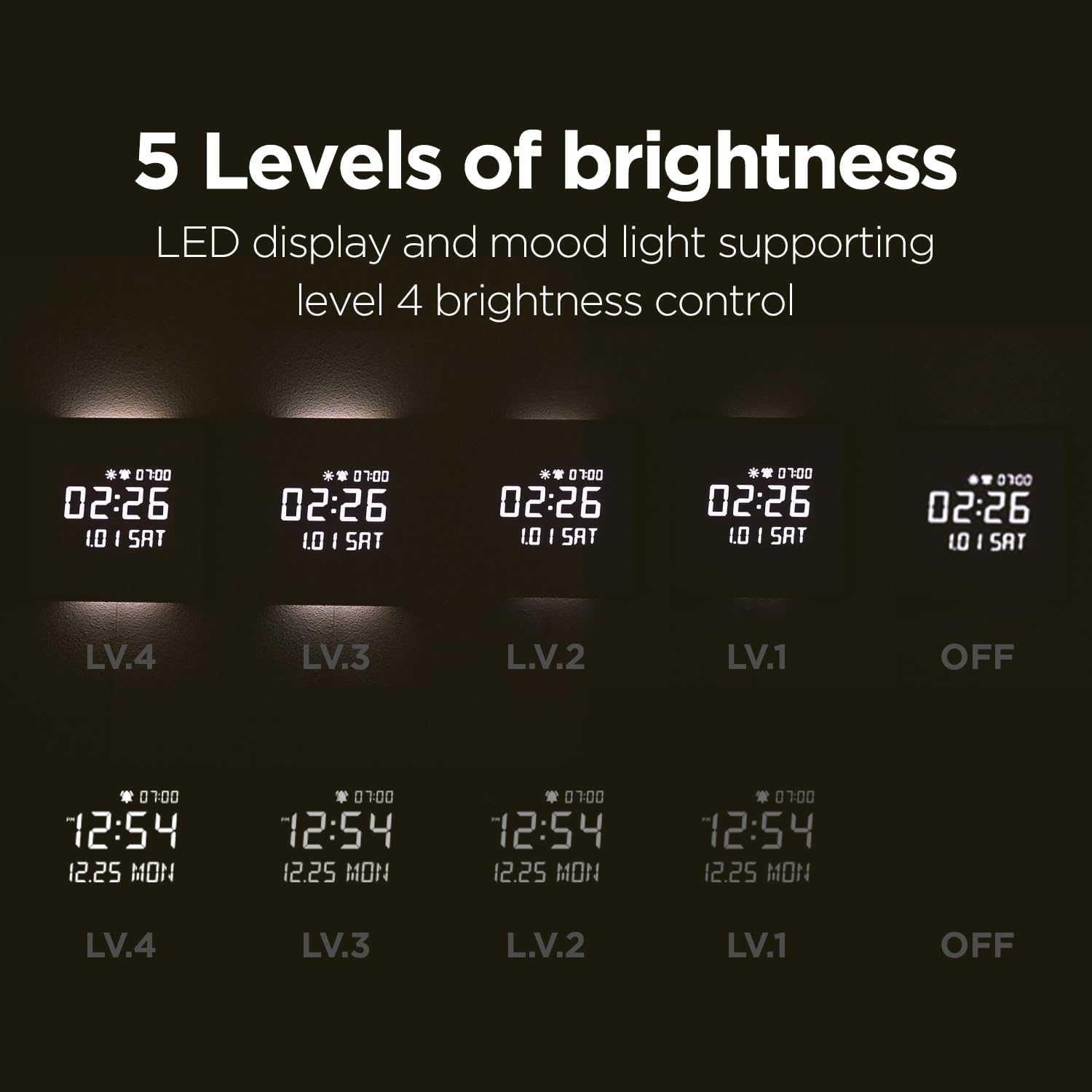
Figure 8: 5 Levels of Brightness

Figure 9: Auto Brightness Control
5. Alarm Features
- Sunrise Alarm: Set a 10, 20, or 30-minute sunrise mode where the backlight gradually brightens before the alarm time, providing a gentle wake-up experience.
- Weekday Alarm: Configure alarms to activate only on weekdays, allowing for uninterrupted rest on weekends.
- Melodi: Choose from 5 available melodies, including bird sounds, rain sounds, and a standard beep.
- Alarm Volume Control: Adjust the alarm volume to High (03), Mid (02), Low (01), or Off. The sequence for adjustment is High (03) → Off → Low (01) → Mid (02).

Figure 10: Melody Alarm Feature

Figure 11: Alarm Volume Control
6. Remote Control Overview
The remote control provides easy access to all clock functions. Refer to the diagram below for button functions:
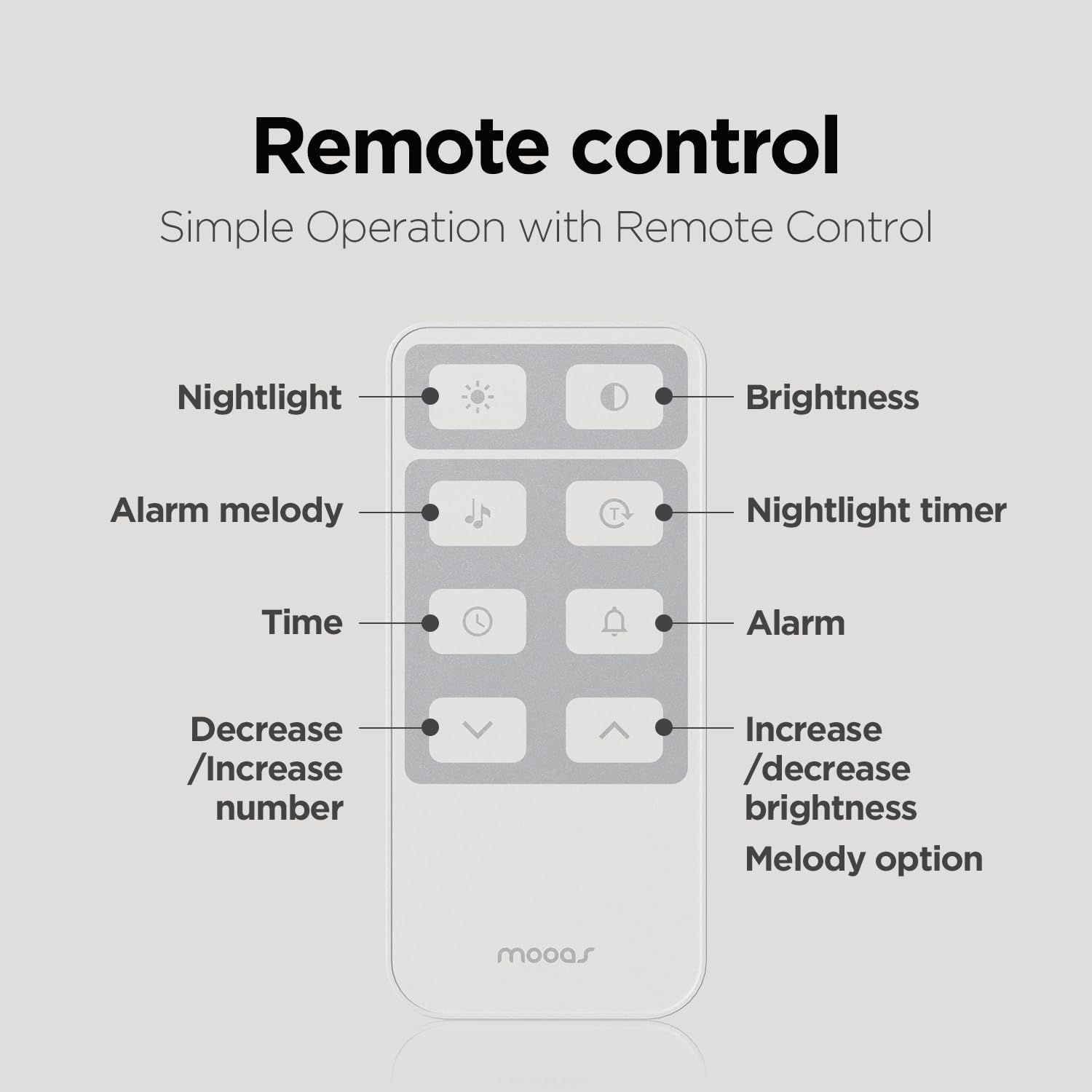
Setšoantšo sa 12: Mesebetsi ea Taolo ea Remote
7. Temperature Display (Celsius/Fahrenheit)
To switch between Celsius (C) and Fahrenheit (F) temperature display, short press the UP konopo ea remote control.
Tlhokomelo
To maintain your mooas clock, gently wipe the surface with a soft, dry cloth. Avoid using abrasive cleaners or solvents, as these may damage the wooden frame or LED display. Ensure the clock is unplugged before cleaning.
Ho batle phoso
- Oache e sa bulelang: Ensure the power adapter is securely connected to both the clock and a working power outlet.
- Remoutu control ha e arabe: Remove the protective film from the remote. If issues persist, disconnect and reconnect the battery and cable from both the clock and remote to reset.
- Display too bright: Adjust the brightness manually using the remote control or activate the auto-brightness function.
- Nako/letsatsi le fosahetseng: Reset the time and date using the remote control. The internal CR2032 battery helps retain settings during brief power outages.
Litlhaloso
| Sebopeho | Tlhaloso |
|---|---|
| Brand | mooas |
| Nomoro ea Mohlala | MC-L8 |
| Litekanyo tsa Sehlahisoa | 11.4"W x 11.4"H |
| Mofuta oa Boitsebiso | Lehong |
| Mofuta oa Pontšo | Digital LED |
| Mohloli oa Matla | Corded Electric (5V 2A adapter) |
| Likarolo Tse Khethehileng | Alarm, Backlit Nightlight, Remote Control, Auto Brightness Adjustment, Sunrise Alarm, Nightlight Timer |
| Mofuta oa ho Beha | Wall Mount, Desk Stand |
Sehlahisoa se Felletseview Video
Shebella video ena ea semmuso bakeng sa pono e felletsengview of the mooas Wooden Frame LED Silent Wall Clock's features and design.
Video 1: mooas Wooden Frame LED Clock Overview
Warranty le Tšehetso
For warranty information or technical support, please refer to the product packaging or contact mooas customer service directly. Keep your purchase receipt for warranty claims.