
1. Selelekela
This manual provides detailed instructions for the installation, operation, maintenance, and troubleshooting of the Fydun ZL-7901A Incubator Controller. This device is designed for precise and automatic control of temperature and humidity in various incubation environments, ensuring optimal conditions for successful hatching.
2. Sehlahisoa Overview
The Fydun ZL-7901A is a high-precision digital incubator controller capable of managing both temperature and humidity. It features a clear display and intuitive controls for easy programming and monitoring.
Likarolo tsa Bohlokoa:
- Taolo e Nepahetseng: High-accuracy temperature and humidity regulation for stable incubator environments.
- Strong Anti-interference: Designed for reliable operation in various conditions.
- High Stability and Accuracy: Ensures consistent performance for critical incubation processes.
- Tšebeliso e pharaletseng: Suitable for a variety of eggs including chicken, duck, goose, pigeon, quail, parrot, and peacock.
- Ts'ebetso ea Automatic: Fully automatic control reduces manual intervention.
Likaroloana:

Setšoantšo sa 2.1: Pele view of the Fydun ZL-7901A Incubator Controller, showing the display and control buttons.

Setšoantšo sa 2.2: The ZL-7901A controller packaged with its temperature and humidity sensors and connecting cables.

Setšoantšo sa 2.3: The ZL-7901A controller shown in an incubator environment, demonstrating its application for egg incubation.
3. Boitsebiso ba Tšireletseho
- Bala litaelo tsohle ka hloko pele u kenya le ho sebetsa.
- Etsa bonnete ba hore motlakase o na le voltage matches the controller's requirements (100V-240V).
- Lithapo tsohle li lokela ho etsoa ke setsebi se tšoanelehang ho thibela likotsi tsa motlakase.
- Do not expose the controller to water or excessive moisture.
- Boloka sesebelisoa hole le lisebelisoa tse tukang.
- Disconnect power before performing any maintenance or wiring changes.
- Sesebelisoa sena ha se papali. Boloka moo bana ba sa fihlelleheng.
4. Ho seta le ho kenya
4.1 Ho beha Selaoli
The ZL-7901A controller is designed for panel mounting. Ensure a secure and stable location within your incubator setup.

Setšoantšo sa 4.1: Lehlakore view illustrating the mounting bracket for panel installation.
4.2 Mahokelo a Wiring
Carefully connect the power supply, sensors, and output devices (heater, humidifier, fan, egg turner) to the appropriate terminals on the back of the controller. Refer to the wiring diagram provided with your product for specific connections. Ensure all connections are tight and secure.

Setšoantšo sa 4.2: Ka morao view of the controller, showing the terminal blocks for electrical connections.
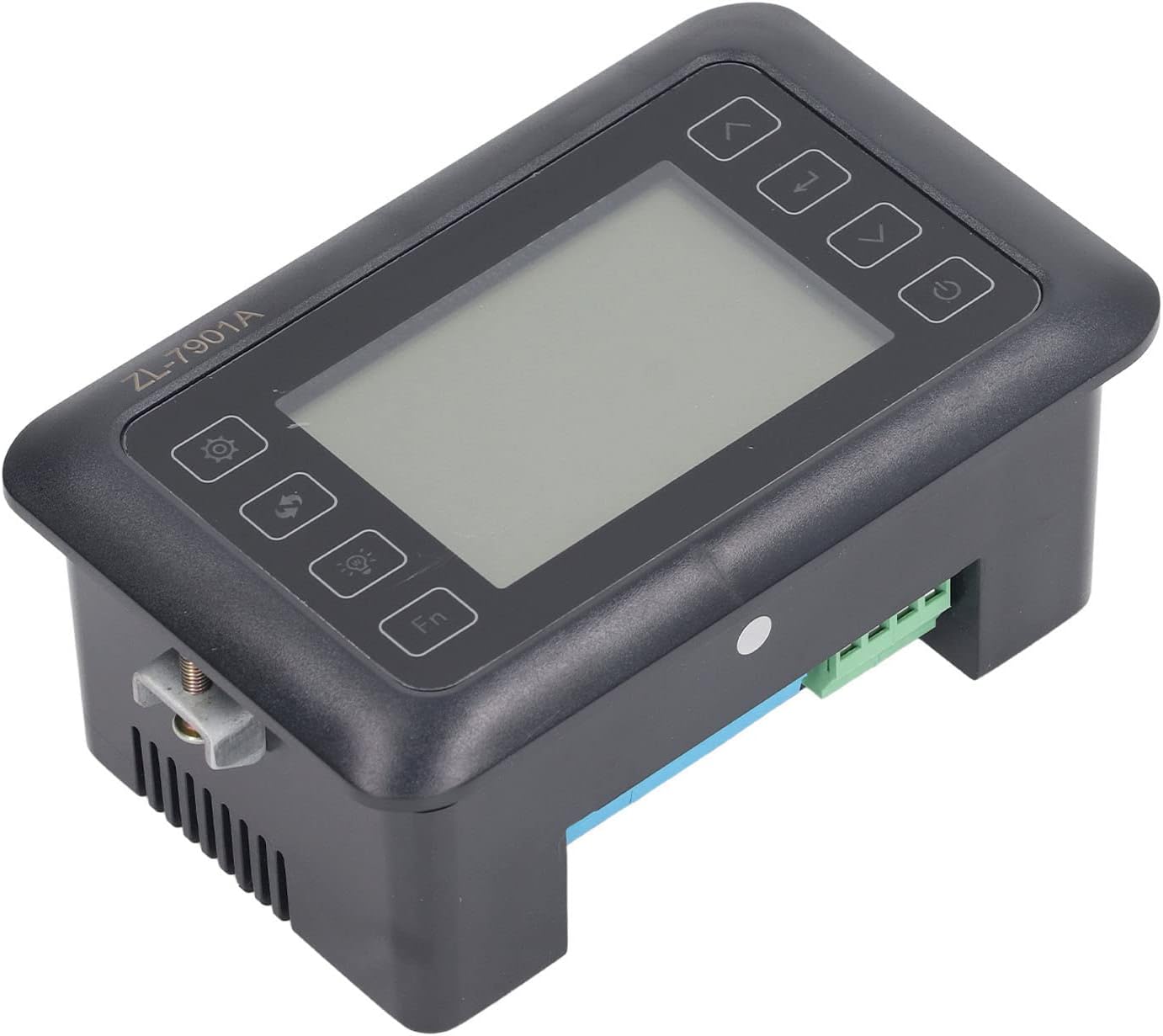
Setšoantšo sa 4.3: Angled view highlighting the various connection points on the controller's side.
After all connections are made, double-check them for correctness before applying power.
5. Litaelo tsa Ts'ebetso
5.1 Ho Bulela/Ho tima
Tobetsa ea Konopo ea matla to turn the controller on or off. The display will illuminate upon power-on. The power button is located on the right side of the controller's front panel.
5.2 Bontšaview
The main display shows the current temperature and humidity readings. Additional indicators may show the status of heating, humidifying, and turning functions.
5.3 Ho beha Mekhahlelo
- Tobetsa ea Konopo ea litlhophiso (gear icon) to enter the parameter setting mode. This button is on the left side of the controller's front panel.
- Sebelisa le Up (motsu o nyolohang) le Tlase (down arrow) buttons to navigate through different parameters (e.g., target temperature, target humidity, egg turning interval). These buttons are on the right side of the controller's front panel.
- Tobetsa ea Kenya konopo (return arrow icon) to select a parameter for editing. This button is on the right side of the controller's front panel.
- Sebelisa le Up le Tlase likonopo ho lokisa boleng.
- Tobetsa ea Kenya konopo hape ho netefatsa boleng bo bocha.
- Repeat for all desired parameters.
- Exit the setting mode by pressing the Konopo ea litlhophiso again or waiting for a timeout.
Hlokomela: Consult the full product manual (if provided separately) for a complete list of parameters and their functions.
5.4 Likonopo tsa Mosebetsi
- Konopo ea Leseli (light bulb icon): Controls the internal light of the incubator (if connected). This button is on the left side of the controller's front panel.
- Konopo ea Fn: Activates special functions or enters advanced settings. Refer to the detailed manual for specific Fn button operations. This button is on the left side of the controller's front panel.
6. Tlhokomelo
6.1 Ho hloekisa
- Ensure the controller is powered off and disconnected from the power source before cleaning.
- Wipe the exterior of the controller with a soft, dry cloth.
- Do not use abrasive cleaners, solvents, or immerse the unit in water.
- Keep the sensor probes clean and free from debris to ensure accurate readings.
6.2 Sensor Care
Handle the temperature and humidity sensors with care. Avoid bending or damaging the cables. If readings appear inaccurate, gently clean the sensor tips. Do not attempt to disassemble the sensors.
7. Ho rarolla mathata
| Bothata | Lebaka le ka khonehang | Tharollo |
|---|---|---|
| Selaoli ha se sebetse. | No power supply; loose connection; faulty power cable. | Check power outlet; ensure all connections are secure; test power cable. |
| Litekanyo tse sa nepahalang tsa mocheso/mongobo. | Sensor dirty or damaged; sensor not properly placed; calibration needed. | Clean sensor; reposition sensor away from direct airflow/heat; refer to advanced settings for calibration (if available). |
| Heater/Humidifier not activating. | Output device not connected; setpoint not reached; faulty output device. | Verify wiring connections; check setpoint values; test heater/humidifier independently. |
| Pontšo e bontša khoutu ea phoso. | Sensor fault; internal error. | Note the error code and consult the full product manual or contact support. |
8. Litlhaloso
| Sebopeho | Lintlha |
|---|---|
| Mohlala | EA-7901A |
| Brand | Fydun |
| Keletso Voltage | 100V-240V AC |
| Mofuta oa Taolo | Fully Automatic Digital Temperature and Humidity Control |
| Ho nepahala | High precision for both temperature and humidity |
| Kopo | Incubators for various poultry and bird eggs |
| Ho phahamisa | Thaba ea Panel |
9. Tiisetso le Tšehetso
Fydun is committed to providing quality products and excellent customer service. If you encounter any issues or have questions regarding your ZL-7901A Incubator Controller, please contact our customer service team.
For support, please refer to the contact information provided with your purchase or visit the official Fydun store on Amazon: Fydun Amazon Store.
Our professional customer service team is ready to assist you promptly.