
1. Selelekela
This manual provides detailed instructions for the proper use and maintenance of your Arlec Remote SS3136. This remote control is specifically designed to operate the Arlec Wall Fan AWDC001HA, offering convenient and effortless control over your fan's functions. Please read this manual thoroughly before first use to ensure optimal performance and longevity of your device.
2. Likarolo tsa lihlahisoa
- Taolo e Bonolo: Utilizes Infrared technology for seamless communication with your Arlec Wall Fan AWDC001HA from up to 10 meters away.
- Matla a Nako e telele: Requires 3 alkaline batteries for extended use.
- Moqapi o Boreleli: Finished in a sophisticated black color.
- Tšebelisano e fapaneng: Designed to control Arlec Wall Fans, specifically model AWDC001HA.
- Ts'ebetso e bonolo: Features 3 intuitive buttons for easy fan control.
3. Likahare tsa Sephutheloana
Netefatsa hore lintho tsohle li teng ka har'a sephutheloana:
- 1 x Arlec Remote SS3136
- 1 x Wall Mount Holder
- 2 x Mounting Screws
- 2 x Lipolaka tsa Wall
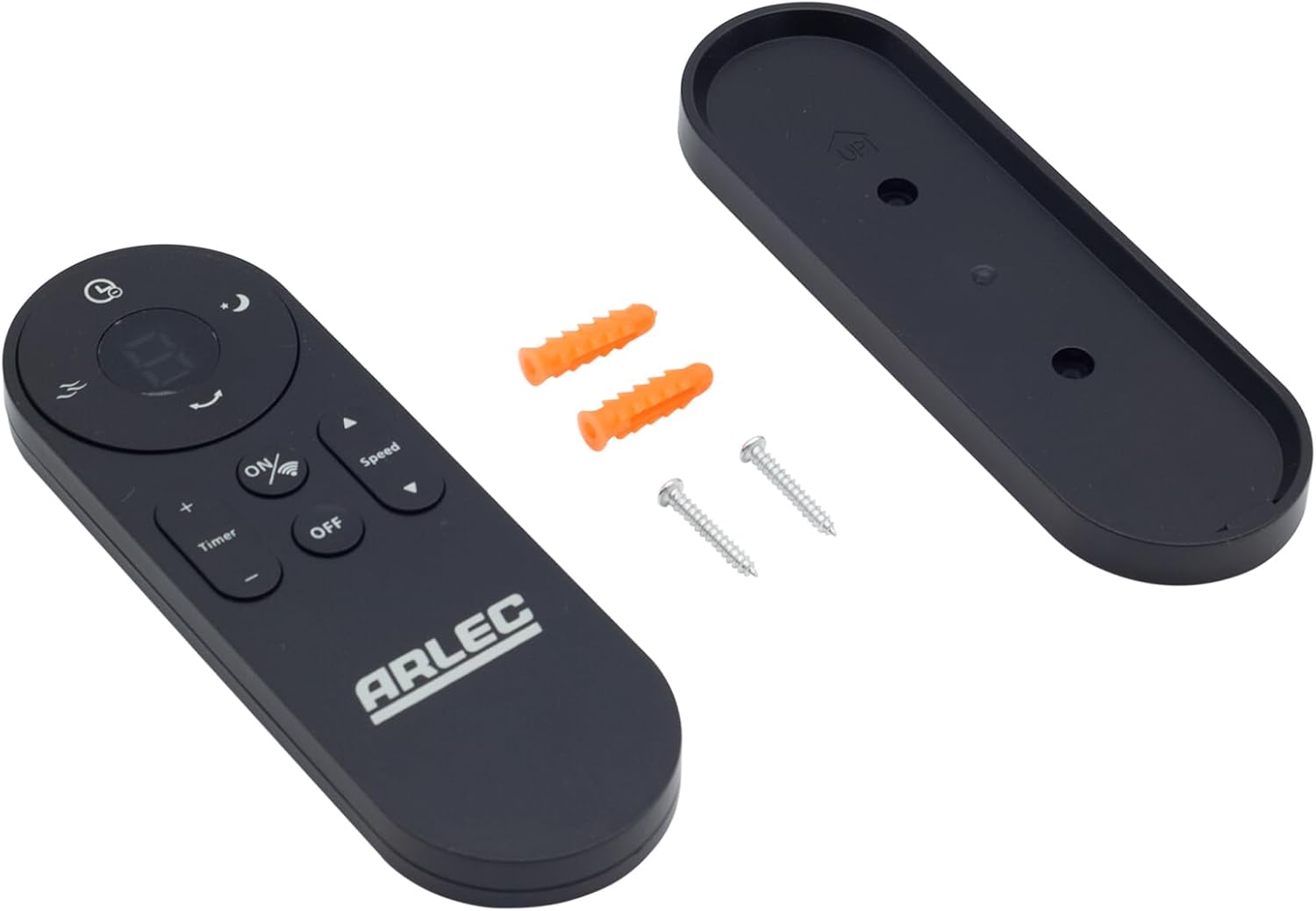
Image: Arlec Remote SS3136 shown with its included wall mount holder, two mounting screws, and two wall plugs, indicating the complete package contents.
4. Seta
4.1 Ho kenya Betri
- Sheba sebaka sa betri ka morao ho remote control.
- Bula sekwahelo sa karolo ya betri.
- Insert 3 Alkaline batteries (not included) into the compartment, ensuring the correct polarity (+ and -) as indicated inside the compartment. The remote requires 3 Volts (DC).
- Koala sekoaelo sa karolo ea betri ka mokhoa o sireletsehileng.
4.2 Wall Mount Installation (Optional)
- Choose a suitable location on a wall for the remote holder.
- Mark the positions for the two mounting screws using the holder as a template.
- Drill pilot holes at the marked positions. Insert the wall plugs if drilling into drywall or masonry.
- Secure the wall mount holder to the wall using the provided screws.
- Place the remote control into the installed holder for convenient storage.
5. Litaelo tsa Ts'ebetso
The Arlec Remote SS3136 features a simple 3-button layout for controlling your Arlec Wall Fan AWDC001HA. Ensure there is a clear line of sight between the remote and the fan's infrared receiver for optimal performance.

Setšoantšo: Haufi view of the Arlec Remote SS3136, highlighting its three main control buttons: ON/OFF, Speed, and Timer.
- Konopo ya HO TULA/TLOA: Tobetsa konopo ena ho bulela kapa ho tima fene.
- Konopo ea Lebelo: Use this button to cycle through the available fan speed settings (e.g., Low, Medium, High).
- Konopo ea Nako: Press this button to set or adjust the fan's timer function. Refer to your Arlec Wall Fan AWDC001HA manual for specific timer intervals.
The remote operates using Infrared (IR) technology. Point the remote directly towards the fan's IR receiver. The effective operating range is up to 10 meters (approximately 33 feet).
6. Tlhokomelo
- Ho hloekisa: Hlakola remote control ka lesela le bonolo, le omileng. U se ke ua sebelisa lihlatsoi tse khorofo kapa li-solvent.
- Phetoho ea Betri: Replace batteries when the remote's performance degrades or it stops responding. Always replace all 3 batteries at the same time with new alkaline batteries.
- Polokelo: If the remote will not be used for an extended period, remove the batteries to prevent leakage. Store in a cool, dry place.
7. Ho rarolla mathata
| Bothata | Lebaka le ka khonehang | Tharollo |
|---|---|---|
| Remote ha e arabe fene. |
|
|
| Likonopo lia khomarela kapa ha li arabele. | Litšila kapa lithōle tlas'a likonopo. | Clean the remote surface with a soft, dry cloth. Avoid liquids. |
8. Litlhaloso
| Tšobotsi | Lintlha |
|---|---|
| Mohlala | SS3136 |
| Moetsi | Arlec |
| Lisebelisoa tse lumellanang | Arlec Wall Fan AWDC001HA |
| Theknoloji ea Khokahano | Infrared (IR) |
| Nomoro ea Likonopo | 3 |
| Mofuta oa Molaoli | Taolo ea Likonopo |
| Mofuta oa Leshala | Alkaline (3 required) |
| Moqtage | 3 Volts (DC) |
| Sebaka sa Ts'ebetso | Ho fihlela ho 10 metres |
9. Tiisetso le Tšehetso
For warranty information and technical support, please refer to the documentation provided with your Arlec Wall Fan AWDC001HA or contact Arlec customer service directly. Keep your purchase receipt as proof of purchase.
For further assistance, please visit the manufacturer's official websebaka kapa ikopanye le mohala oa bona oa tšehetso ea bareki.