
1. Selelekela
Kea leboha ha u rekileasing the Dpofirs LMD-750 Portable DVD Player. This device is designed to provide versatile entertainment on the go, at home, or in the office. Featuring a 270° rotating HD LCD screen, multi-format disc support, USB/SD card playback, analog TV function, FM radio, and game capabilities, it offers a comprehensive multimedia experience. Please read this manual carefully to ensure proper use and to maximize the performance and longevity of your device.
2. Boitsebiso ba Tšireletseho
- Se ke oa beha sesebelisoa pula, mongobo, kapa mocheso o feteletseng.
- Qoba ho beha sesebelisoa haufi le mehloli ea mocheso kapa khanyeng ea letsatsi.
- Use only the provided power adapter and car adapter.
- Se ke oa leka ho qhaqholla kapa ho lokisa sesebelisoa ka bouena. Ikopanye le basebeletsi ba ts'ebeletso ba tšoanelehang.
- Boloka sesebelisoa hole le libaka tse matla tsa makenete.
- Netefatsa moea o nepahetseng ha o sebelisa sesebelisoa.
- Remove discs when transporting the player to prevent damage.
3. Likahare tsa Sephutheloana
Ka kopo, sheba sephutheloana sa lintho tse latelang:
- 1 x Dpofirs LMD-750 Portable DVD Player
- 1 x Taolo ea Remoutu
- 1 x Power Adapter (EU Plug)
- 1 x Adapter ea Koloi
- 1 x AV Cable
- 1 x Antena
- 1 x Gamepad
- 1 x Game Disc
- 1 x Buka ea Mosebelisi
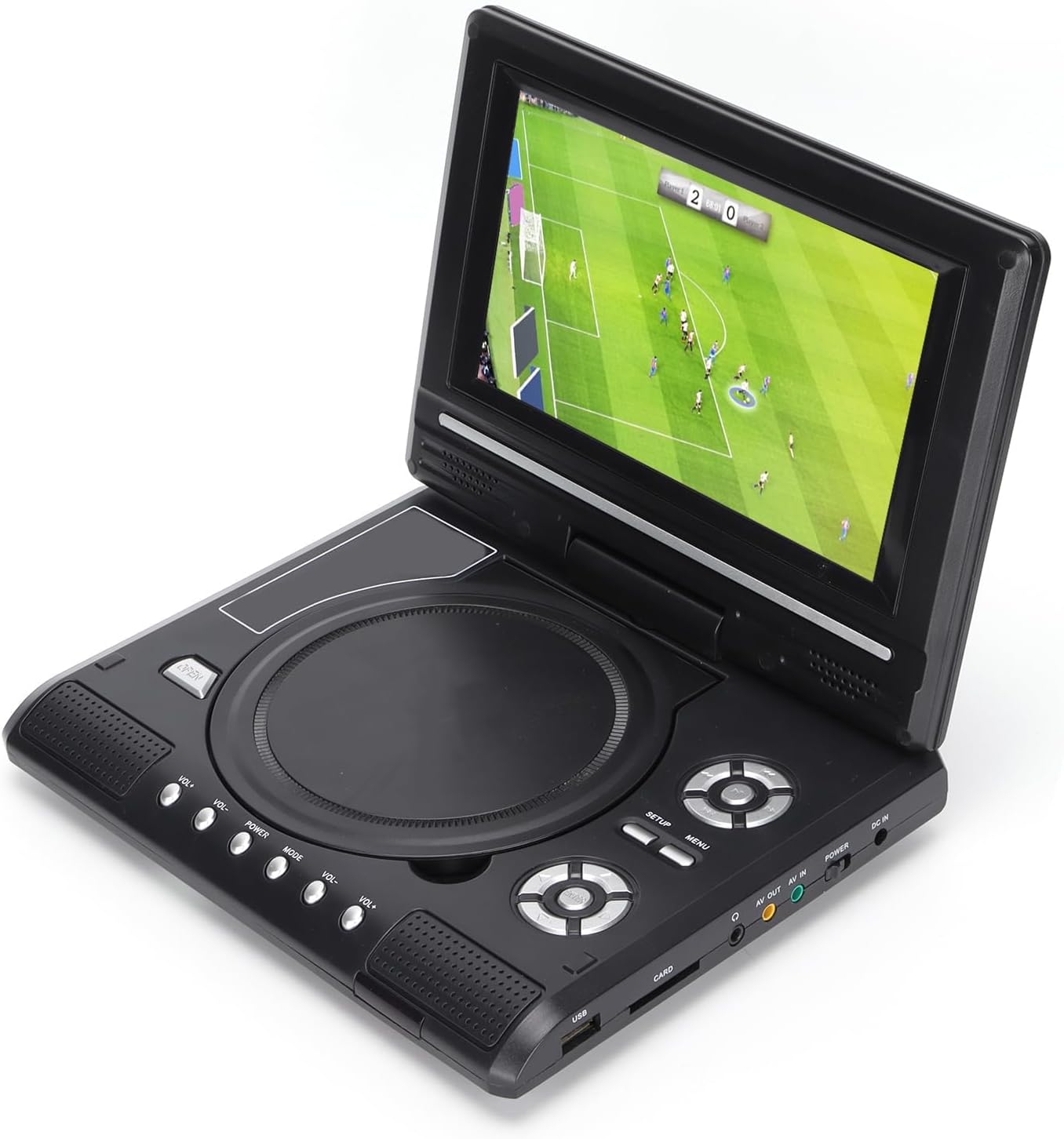
Image: All accessories included with the Dpofirs LMD-750 Portable DVD Player.
4. Sehlahisoa Overview
The Dpofirs LMD-750 features a compact design with intuitive controls and multiple connectivity options.

Setšoantšo: Pele view of the Dpofirs LMD-750 Portable DVD Player with the screen open.

Setšoantšo: Lehlakore view detailing the input/output ports.

Setšoantšo: Holimo view of the player when closed.
Taolo le Boema-kepe:
- Skrine: 6.8"/8.5" HD LCD, 270° rotatable.
- Tray ea disc: For DVD/CD media.
- Likonopo tsa ho Laola: Play/Pause, Stop, Fast Forward/Rewind, Next/Previous, Setup, Menu, Volume +/-.
- Boema-kepe ba USB: Ho hokela li-flash drive tsa USB.
- CARD Slot: For inserting memory cards (e.g., SD card).
- Li-headphone Jack: Bakeng sa ho mamela boinotšing.
- HO TSWA: Audio/Video output to external display.
- AV IN: Audio/Video input from external source.
- Phetoho ea MATLA: To turn the device On/Off.
- DC IN: Power input for adapter.
5. Seta
5.1 Ho tjhaja Betri
Before first use, fully charge the built-in 1500mAh lithium battery. Connect the power adapter to the DC IN port on the player and plug it into a wall outlet (110-240V 50/60Hz). The charging indicator will illuminate. Once fully charged, the indicator may change color or turn off. A full charge provides approximately 30-60 minutes of continuous playback, depending on usage.
5.2 Matla a ho Hokela
- Tšebeliso ea Lehae: Connect the AC power adapter to the DC IN port and a wall socket.
- Tšebeliso ea Koloi: Connect the car adapter to the DC IN port and your vehicle's cigarette lighter socket.
5.3 Connecting to an External Display (AV OUT)
Ho view content on a larger screen:
- Connect one end of the AV cable to the AV OUT port on the DVD player.
- Connect the other end of the AV cable to the corresponding AV IN ports (Yellow for Video, White/Red for Audio) on your TV or monitor.
- Select the correct AV input source on your external display.
5.4 Connecting External Devices (AV IN)
To display content from an external source on the DVD player's screen:
- Connect one end of the AV cable to the AV IN port on the DVD player.
- Connect the other end of the AV cable to the AV OUT ports of your external device (e.g., another DVD player, game console).
- Switch the DVD player to AV IN mode (refer to Operating Instructions).
6. Litaelo tsa Ts'ebetso
6.1 Ho Bulela/Ho tima
Tsamaisa the MATLA switch to the "ON" position to turn on the player. Slide it to "OFF" to power down.
6.2 Ho potoloha ha skrine
The LCD screen can rotate up to 270 degrees. Gently adjust the screen to your desired viewing angle. This allows for flexible viewho sebetsa libakeng tse fapaneng.
6.3 Taolo ea Molumo
Sebelisa le VOL+ le VOL- buttons on the player or remote control to adjust the audio volume.
6.4 Menu Navigation
Tobetsa ea MENU button to access the main menu. Use the directional buttons (up, down, left, right) to navigate and the OK button to confirm selections. Press TLHOPHISO ho fihlella litlhophiso tsa sistimi.
7. Mecha ea ho bapala
7.1 Disc Playback (DVD/CD)
- Bula sekoahelo sa disc.
- Carefully place a compatible disc (DVD, DVD±R, DVD±RW, VCD, CD, CD±R, CD±RW) onto the spindle with the label side facing up.
- Close the disc cover securely.
- The player will automatically detect and begin playback. If not, press the BAPALA konopo.

Image: Player displaying video content.

Image: Player displaying a sports event.
7.2 USB/SD Card Playback
- Kenya flash drive ea USB kahare USB port or a memory card into the KARETE sekotjana.
- The player will automatically switch to USB/Card mode or prompt you to select the source.
- Tsamaea ka har'a hau files o sebedisa dikonopo tse shebang tsela ebe o tobetsa OK ho bapala.
Lifomete tse Tšehetsoeng: DIVX, AV/VOB, MPG, MP3, MP4, WMA, JPEG, TXT, RMVB.
The player features an intelligent power-off memory function, resuming playback from where it stopped after a power interruption.
8. TV Function
The Dpofirs LMD-750 includes an analog TV tuner.
- Connect the included antenna to the antenna port on the player.
- Switch the player to TV mode (usually via the MOKHOA button or menu selection).
- Perform an automatic channel scan in the TV settings menu to find available analog channels.
- Channel reception quality depends on local signal strength.
Supported TV Standards: PAL, NTSC, SECAM (optional).
9. Game Function
Enjoy gaming with the included gamepad and game disc.
- Connect the gamepad to the designated game port on the player.
- Insert the game disc into the disc tray.
- Select the game function from the main menu.
- Choose from the available games on the disc (up to 300 games).
10. Tlhokomelo
10.1 Ho hloekisa Sesebelisoa
- Hlakola bokantle ba sebapali ka lesela le bonolo, le omeletseng.
- U se ke ua sebelisa lintho tse hloekisang metsi kapa lintho tse senyang.
- For the screen, use a soft, lint-free cloth specifically designed for LCD screens.
10.2 Tlhokomelo ea Disc
- Tšoara li-disc ka mathōko ho qoba ho hatisoa ha menoana.
- Hloekisa li-disc ka lesela le bonolo, le se nang lesela, u li hlakola ho tloha bohareng ho ea ka ntle.
- Store discs in their cases to prevent scratches.

Image: Internal disc mechanism.
11. Ho rarolla mathata
| Bothata | Lebaka le ka khonehang | Tharollo |
|---|---|---|
| Ha ho matla | Battery drained; Power adapter not connected; Power switch OFF. | Charge the battery; Connect power adapter; Slide POWER switch to ON. |
| No disc playback | Disc inserted incorrectly; Disc dirty or scratched; Incompatible disc format. | Insert disc correctly (label up); Clean or replace disc; Use supported disc format. |
| Ha ho molumo | Volume too low; Mute function active; Headphone connected. | Increase volume; Deactivate mute; Disconnect headphones if using speakers. |
| Kamohelo e mpe ea TV | Weak signal; Antenna not positioned correctly. | Adjust antenna position; Rescan channels; Check local signal strength. |
| Remote control ha e sebetse | Batteries drained or inserted incorrectly; Obstruction between remote and player. | Replace batteries (2x AAA); Ensure correct polarity; Remove obstructions. |
12. Litlhaloso
| Nomoro ea Mohlala | LMD-750 (Dpofirsrgi5bmonx0-13) |
| Lintho tse bonahalang | ABS |
| Mmala | Ntsho |
| Boholo ba skrine | 6.8" / 8.5" (diagonal, depending on variant) |
| Mofuta oa Pontšo | LCD |
| Qeto ea Pontšo | 234 x 480 x RGB (native), supports up to 1280 x 720, 1366 x 768 |
| Keletso Voltage | 110-240V 50/60Hz |
| Khumo Voltage | 12V |
| Bokhoni ba Battery | 1500mAh Lithium Battery (built-in) |
| Battery ea Remote Control | 2 x AAA libetri (ha li kenyelelitsoe) |
| Liforomo tsa Disc tse tšehelitsoeng | DVD, DVD±R, DVD±RW, VCD, MP3, MP4, CD±R, CD±RW |
| Supported Media Formats (USB/Card) | DIVX, AV/VOB, MPG, MP3, MP4, WMA, JPEG, TXT, RMVB |
| Sistimi ea TV | PAL, NTSC, SECAM (full system) |
| Mecha ea ho Fumana | LHF1-5, VHF6-12, UHF13-69, ATV |
| Audio Encoding Technology | 96kHz / 24bit |
| Dynamic Range | ≥ 80dB |
| Tekanyo ea Signal-to-Noise | ≥ 70dB |
| Ho aroloa ha Channel | ≥ 70dB |
| Theknoloji ea Khokahano | USB, Composite Video |
| Moetsi | Dpofirs |
| Naha ea tlhaho | China |
13. Tiisetso le Tšehetso
Bakeng sa tlhahisoleseding ea tiisetso le tšehetso ea bareki, ka kopo sheba litokomane tse fanoeng ka theko ea hau kapa ikopanye le morekisi oa hau. Boloka bopaki ba hau ba theko bakeng sa liqoso life kapa life tsa tiisetso.