
Lytmi LDD21
Lytmi Fantasy 3 TV Backlight Kit User Manual
Model: LDD21
Sehlahisoa se Felletseview
The Lytmi Fantasy 3 TV Backlight Kit with HDMI 2.1 Sync Box is designed to enhance your viewing experience by synchronizing ambient lighting with your screen content. It supports high resolutions up to 8K 60Hz and 4K 120Hz, making it ideal for gaming and high-definition media. The kit features a high-density LED strip and multiple HDMI 2.1 inputs for versatile connectivity.

Figure 1: Lytmi Fantasy 3 TV Backlight Kit enhancing a gaming experience.
Litaba tsa Sephutheloana
Netefatsa hore likarolo tsohle li teng ka har'a sephutheloana:
- Lytmi Fantasy 3 Sync Box
- LED Light Strip (for 65-70 inch TVs)
- Lithapo tsa HDMI
- Adapter ea Matla
- Mounting Clips/Adhesives
- Bukana ea mosebelisi (tokomane ena)

Figure 2: Included components: Sync Box, LED strip, HDMI cables, power adapter, and mounting accessories.
Litaelo tsa ho seta
- Prepare Your TV: Ensure your TV is clean and dry on the back surface where the LED strip will be applied.
- Attach LED Strip: Carefully peel the adhesive backing from the LED strip and attach it to the back of your TV, following the perimeter. Ensure the strip is positioned correctly for full corner mapping.

Figure 3: Proper placement of the LED strip for full corner mapping.
- Connect LED Strip to Sync Box: Plug the LED strip's connector into the designated port on the Lytmi Sync Box.
- Connect HDMI Devices: Connect your HDMI source devices (e.g., gaming console, TV box, PC) to the HDMI IN ports (HDMI 1-4) on the Sync Box.

Figure 4: Connecting various HDMI devices to the Sync Box.
- Connect Sync Box to TV: Connect an HDMI cable from the Sync Box's HDMI OUT (TV) port to an HDMI IN port on your television.
- Matlafatsa: Connect the power adapter to the Sync Box and plug it into a power outlet. The Sync Box will power on.
- Download Lytmi App: Download the Lytmi Home App from your smartphone's app store. Follow the in-app instructions to pair your Sync Box via Wi-Fi.
Litaelo tsa Ts'ebetso
Screen Synchronization
The Lytmi Fantasy 3 uses an advanced algorithm to accurately synchronize the backlight colors with the content displayed on your TV screen. This provides an immersive viewing experience, especially for high-performance gaming and fast-paced movies.

Figure 5: The system provides smart and accurate real-time color synchronization.
Taolo ea App
Use the Lytmi Home App to control various aspects of your backlight kit, including:
- Ho bonesa/ho tima mabone
- Ho lokisa kganya
- Changing colors and light effects
- Switching between screen sync mode, music mode, and ambient lighting scenes.
Taolo ea Lentsoe
The Lytmi Fantasy 3 is compatible with popular voice assistants such as Alexa and Google Assistant. Once integrated, you can use voice commands for basic functions like turning the lights on/off or changing colors.
Tlhokomelo
To ensure optimal performance and longevity of your Lytmi Fantasy 3 TV Backlight Kit, follow these simple maintenance guidelines:
- Ho hloekisa: Gently wipe the Sync Box and LED strip with a soft, dry cloth. Do not use liquid cleaners or abrasive materials.
- Tsamaiso ea Cable: Ensure all cables are neatly organized and not under strain to prevent damage.
- Moea oa moea: Ensure the Sync Box has adequate ventilation and is not covered, to prevent overheating.
Ho batle phoso
If you encounter issues with your Lytmi Fantasy 3 TV Backlight Kit, refer to the following common problems and solutions:
| Bothata | Lebaka le ka khonehang | Tharollo |
|---|---|---|
| Lights not turning on or syncing. | Loose connections, power issue, app not connected. | Check all cable connections (HDMI, power, LED strip). Ensure the Sync Box is powered. Verify app connection and settings. |
| Inaccurate color synchronization. | Incorrect LED strip placement, calibration needed. | Ensure the LED strip is correctly installed for full corner mapping. Use the Lytmi app to recalibrate the color detection if available. |
| Lights dim drastically in certain modes. | Software setting, potential hardware issue. | Check brightness settings in the Lytmi app. If the issue persists, contact customer support. |
| HDMI input switching issues. | HDMI cable quality, device compatibility. | Ensure you are using high-quality HDMI 2.1 cables. Try manually switching inputs via the Sync Box button or app. Some TV models may have compatibility nuances (e.g., Dolby Vision with LG TVs). |
Litlhaloso
| Sebopeho | Lintlha |
|---|---|
| Mohlala | LDD21 |
| Mmala | RGB (Bokhubelu, Botala, Botala) |
| Tšebeliso ea Ka hare/Kantle | Ka hare |
| Tšobotsi e Khethehileng | Sync Screen/Music |
| Mofuta oa Mohloli oa Leseli | LED |
| Mohloli oa Matla | DC |
| Mmala o Lesedi | Multicolor |
| Sehlooho | Tv |
| Ketsahalo | indoor ambiance |
| Setaele | Ea kajeno |
| Lintho tse bonahalang | Polyvinyl Chloride |
| Mofuta oa Molaoli | Taolo ea App, Taolo ea Lentsoe |
| Khokahano Protocol | Bluetooth, WiFi |
| Theknoloji ea Khokahano | WiFi |
| Palo ea Mehloli ea Leseli | 72 |
| Moqtage | 12 Volts (DC) |
| Wattage | 36 watts |
| Kenyellelitsoe Likaroloana | Hub |
| Boima ba Ntho | 2.1 Liponto |
| Palo ea Lintho | 1 |
| Mokhoa oa ho Laola | App |
| Boemo ba ho hanyetsa Metsi | Ha e Mamelle Metsi |
| Theknoloji ea puisano e se nang mohala | WiFi |
| Boholo | For 65-70 Inch TV(Uncroppable) |
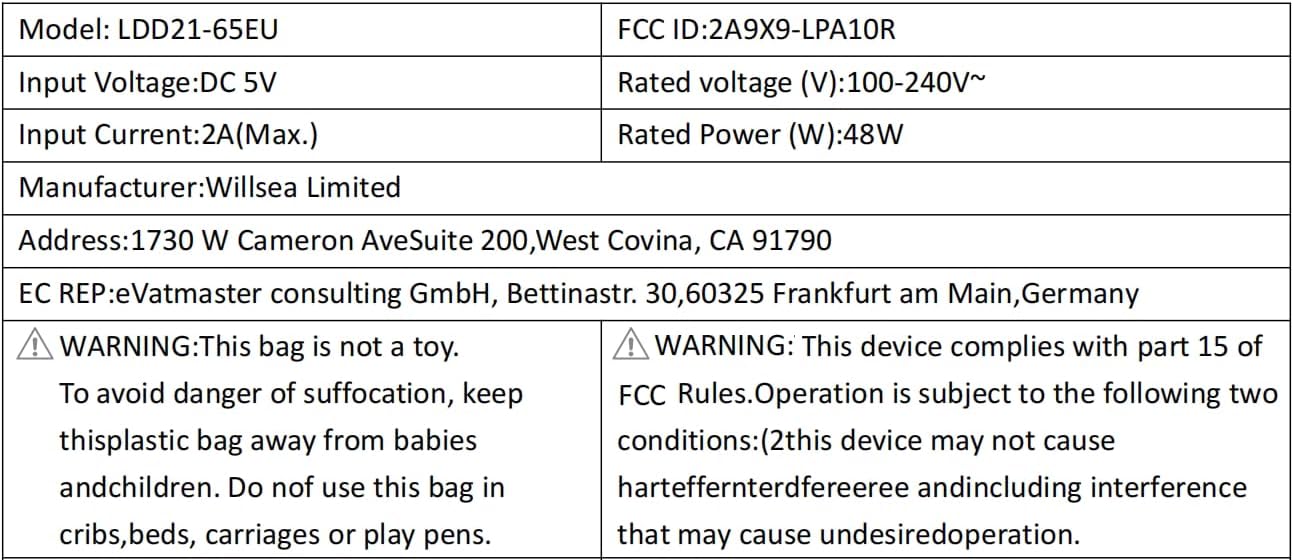
Figure 6: Electrical specifications and compliance details for the LDD21-65EU model.
Warranty le Tšehetso
Boitsebiso ba Warranty
The product's warranty description states: Che. Please refer to your purchase documentation or retailer for any specific return or exchange policies.
Tšehetso ea Bareki
For any questions or assistance regarding your Lytmi product, please contact customer support:
Lengolo-tsoibila: support@lytmi.co
Lytmi provides 24/7 customer service to assist you.
Ask a question about this manual
Ask about setup, troubleshooting, compatibility, parts, safety, or missing instructions. Manuals+ will review the question and use this page’s manual context to help answer it.