
1. Selelekela
This user manual provides essential information for the safe and efficient operation of your HYCHIKA 3.6V Cordless Electric Rechargeable Screwdriver Drill Set. Please read this manual thoroughly before first use and keep it for future reference.
The HYCHIKA 3.6V Cordless Electric Screwdriver is designed for various screwing and light drilling tasks around the home. It features a maximum torque of 6 N-m, a 6.35 mm quick-change chuck, and a versatile design that allows for both pistol and straight grip configurations.
2. Litaelo tsa Tšireletso
Kamehla ela hloko litemoso tsa ts'ireletso ha u sebelisa lisebelisoa tsa motlakase ho fokotsa kotsi ea mollo, ts'oaetso ea motlakase le likotsi tsa motho.
- Tšireletseho ea Sebaka sa Mosebetsi: Boloka sebaka seo u sebeletsang ho sona se hloekile ebile se khantšitse hantle. Libaka tse mahlahahlaha kapa tse lefifi li mema likotsi. Se ke oa sebelisa lisebelisoa tsa motlakase libakeng tse phatlohang, joalo ka moo ho nang le maro a tukang, likhase kapa lerōle.
- Tšireletseho ea Motlakase: Qoba ho ama 'mele ka libaka tse entsoeng ka mobu kapa tse theohileng joalo ka liphaephe, li-radiator, lirase, le lihatsetsi. Se ke oa pepesa lisebelisoa tsa motlakase pula kapa maemo a mongobo.
- Tšireletseho ea Botho: Always wear eye protection. Use safety glasses, goggles, or a face shield. Wear hearing protection when operating noisy tools. Dress properly; avoid loose clothing or jewelry.
- Tšebeliso le Tlhokomelo ea Lisebelisoa: U se ke ua qobella sesebelisoa sa matla. Sebelisa sesebelisoa sa motlakase se nepahetseng bakeng sa ts'ebeliso ea hau. Tlosa polaka mohloling oa matla le/kapa u tlose pakete ea betri pele u etsa litokiso, u fetola lisebelisoa kapa u boloka lisebelisoa tsa motlakase.
- Tšebeliso le Tlhokomelo ea Battery Pack: Tlatsa hape ka tjhaja e boletsoeng ke moetsi. Se ke oa sebelisa lipakete tsa betri ka lisebelisoa tse ling tsa matla. Ha betri pakete e sa sebelisoe, e behe hole le lintho tse ling tsa tšepe.
3. Likahare tsa Sephutheloana
Netefatsa hore lintho tsohle tse thathamisitsoeng ka tlase li kenyelelitsoe ka har'a sephutheloana sa hau. Haeba ho na le lintho tse sieo kapa li senyehile, ka kopo ikopanye le ts'ehetso ea bareki.
- 1 x HYCHIKA 3.6V Cordless Screwdriver
- 19 x Bits ea Screwdriver
- 1 x Sebaka sa Katoloso
- 1 x Adapter ea ho tjhaja
- 1 x Buka ea Mosebelisi

Figure 3.1: Contents of the HYCHIKA 3.6V Cordless Screwdriver package, including the screwdriver, various bits, and charging adapter.
4. Likarolo tsa Sehlahisoa le Likarolo
Familiarize yourself with the different parts of your cordless screwdriver.

Figure 4.1: Key components of the screwdriver, including the magnetic chuck, PUSH button, front LED light, On/Off switch, LED charger indicator, 3.5mm charger port, and forward & reverse button.
- Magnetic Chuck: 1/4 inch (6.35mm) quick-change chuck for easy bit installation and removal.
- Leseli la LED le ka Pele: Illuminates the work area for improved visibility in dark environments.
- On/Off Swichi: Activates and deactivates the screwdriver.
- Forward & Reverse Button: Controls the rotation direction for screwing and unscrewing.
- LED Charger Indicator: Provides status of battery charging.
- 3.5mm Charger Port: Connection point for the charging adapter.
- PUSH Konopo: Used to adjust the grip configuration from pistol to straight.
5. Seta
5.1 Ho tjhaja Betri
The screwdriver is powered by a 3.6V 2000 mAh Lithium-Ion battery. Before first use, fully charge the battery.
- Connect the charging adapter to the 3.5mm charger port on the screwdriver.
- Plug the charging adapter into a standard electrical outlet.
- The LED charger indicator will illuminate during charging. Once fully charged, the indicator may change color or turn off depending on the model.
- Tlosa tjhaja hang ha e qeta ho tjhaja.

Figure 5.1: The screwdriver connected to its charging adapter, indicating a full charge.
The screwdriver is designed to maintain full power output even when the battery is low, ensuring consistent performance until the battery is depleted.
5.2 Ho kenya Bits ea Screwdriver
The screwdriver features a 1/4 inch (6.35mm) magnetic quick-change chuck for easy bit installation.
- Khetha sekoti se loketseng sa screwdriver bakeng sa mosebetsi oa hau.
- Insert the bit into the magnetic chuck until it is securely seated. The magnetic chuck will hold the bit firmly in place.
- To remove a bit, simply pull it out of the chuck. Bits with grooves are designed for easier removal.

Figure 5.2: Visual guide for inserting a bit into the magnetic chuck and removing it.
6. Litaelo tsa Ts'ebetso
6.1 Adjusting Grip Configuration
The screwdriver can be used in two grip configurations: pistol grip or straight grip, for enhanced versatility and comfort.
- To change the grip, press and hold the "PUSH" button located at the top of the screwdriver.
- While holding the button, rotate the handle ninety degrees to switch between pistol and straight configurations.
- Release the "PUSH" button once the desired configuration is achieved. The handle will lock into place.
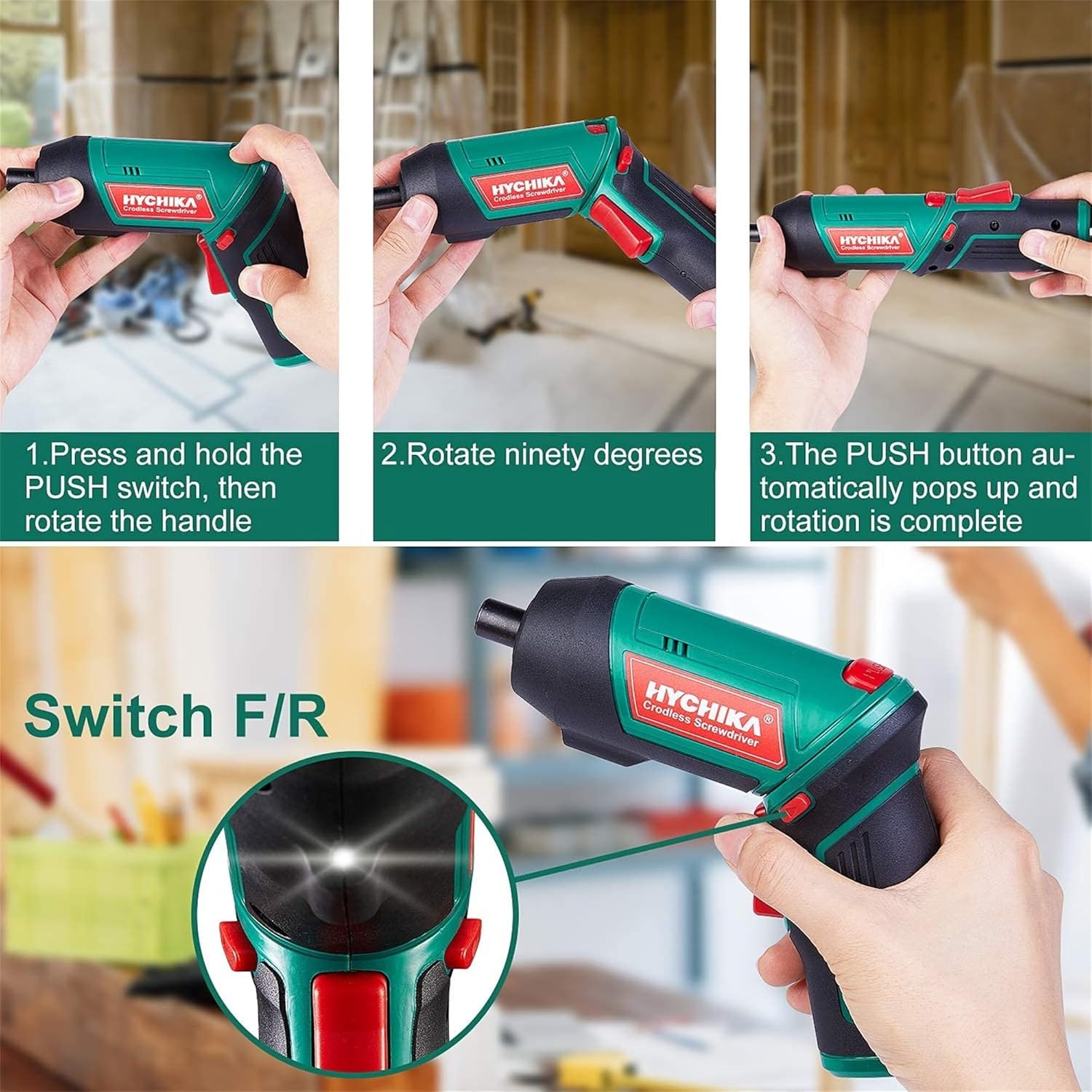
Figure 6.1: Demonstrates the process of transforming the screwdriver's grip by pressing the PUSH button and rotating the handle.
6.2 Ts'ebetso ea ho ea pele le ea morao
The forward/reverse button controls the direction of rotation for screwing and unscrewing.
- To drive screws (forward rotation), push the forward/reverse button to the left (when viewed ho tloha ka morao ho sebetsa).
- To remove screws (reverse rotation), push the forward/reverse button to the right.
- When the button is in the center position, the tool is locked, preventing accidental activation.
6.3 Ho Sebelisa Leseli la Mosebetsi la LED
The built-in LED light automatically illuminates when the screwdriver is in operation, providing visibility in dimly lit areas.

Figure 6.2: The integrated LED light provides clear illumination for working in dark environments.
7. Tlhokomelo
Regular maintenance ensures the longevity and optimal performance of your screwdriver.
- Ho hloekisa: Keep the ventilation openings clean and free from dust. Use a soft, damp lesela ho hloekisa sesebelisoa casing. U se ke ua sebelisa lik'hemik'hale tse bohale kapa li-abrasive cleaners.
- Tlhokomelo ea Bit: Clean screwdriver bits after use. Store them in the provided case to prevent loss and damage.
- Polokelo ea Betri: If storing the tool for an extended period, ensure the battery is partially charged (around 50%) and store it in a cool, dry place. Recharge the battery every 3-6 months to maintain its health.
- Tlhahlobo e Akaretsang: Periodically check for any loose screws, damaged cords, or worn parts. Do not use the tool if any damage is observed.
8. Ho rarolla mathata
This section addresses common issues you might encounter with your screwdriver.
| Bothata | Lebaka le ka khonehang | Tharollo |
|---|---|---|
| Sekurufu ha se bule. | Betri e felile. Forward/Reverse switch is in the center (locked) position. | Tjhaja betri ka botlalo. Sututsa switjha e eang pele/morao ka ho le letšehali kapa ka ho le letona. |
| Screwdriver loses power quickly. | Betri ha e ea tjhaja ka botlalo. Battery life degraded. | Netefatsa hore betri e tjhajilwe ka botlalo pele o e sebedisa. If battery life is significantly reduced, contact customer support for replacement options. |
| Bits are not held securely in the chuck. | Bit is not fully inserted. Chuck is dirty or damaged. | Push the bit firmly into the chuck until it clicks into place. Clean the chuck area. If damage is visible, contact customer support. |
Haeba bothata bo ntse bo tsoela pele ka mor'a ho leka litharollo tsena, ka kopo ikopanye le ts'ehetso ea bareki.
9. Litlhaloso
| Sebopeho | Tlhaloso |
|---|---|
| Brand | Overstock (HYCHIKA) |
| Nomoro ea Mohlala | c131a012-0da9-4306-aeab-b1d9ff5cd4b7 |
| Moqtage | Li-volts tse 3.6 |
| Mohloli oa Matla | Matla a Battery |
| Lebelo | 180 RPM |
| Ntho ea Torque | 6 Newton Meters (6 N-m) |
| Mofuta oa Leshala | Lithium Ion |
| Bokhoni ba Battery | 2000 mAh |
| Boholo ba Chuck | 1/4 lisenthimithara (6.35mm) |
| Lintho tse bonahalang | Plastiki, Rabara |
| Mmala | Botala |
| UPC | 616859793583 |
10. Tiisetso le Tšehetso
Overstock offers lifetime after-sales service for this product. For any questions, concerns, or technical assistance, please contact our customer support team.
Please have your model number (c131a012-0da9-4306-aeab-b1d9ff5cd4b7) and purchase information ready when contacting support.