
1. Selelekela
The Dynatron A42 1U Active Air Cooler is designed for high-performance AMD Ryzen Socket AM4 and AM5 processors. This compact, side-blower PWM fan provides efficient heat dissipation for CPUs up to 95 Watts in 1U server environments. The Dynatron A42 ensures optimal system performance by maintaining appropriate operating temperatures.
Likarolo tsa Bohlokoa:
- Recommended for AMD Ryzen Processors, Socket AM4 and AM5.
- Supports CPU power up to 95 Watts heat dissipation.
- Features an 80x80x13mm PWM Fan and Copper Fin construction.
- Active Air Cooler suitable for 1U Server and Up.
- Overall dimensions: 110.0mm (L) x 85.0mm (W) x 27.3mm (H).
2. Likahare tsa Sephutheloana
Netefatsa hore likarolo tsohle li teng ka har'a sephutheloana pele u tsoela pele ka ho kenya:
- Kopano ea Heatsink
- PWM Fan (integrated)
- Motlakase oa Motlakase
- Mounting Connectors/Screws
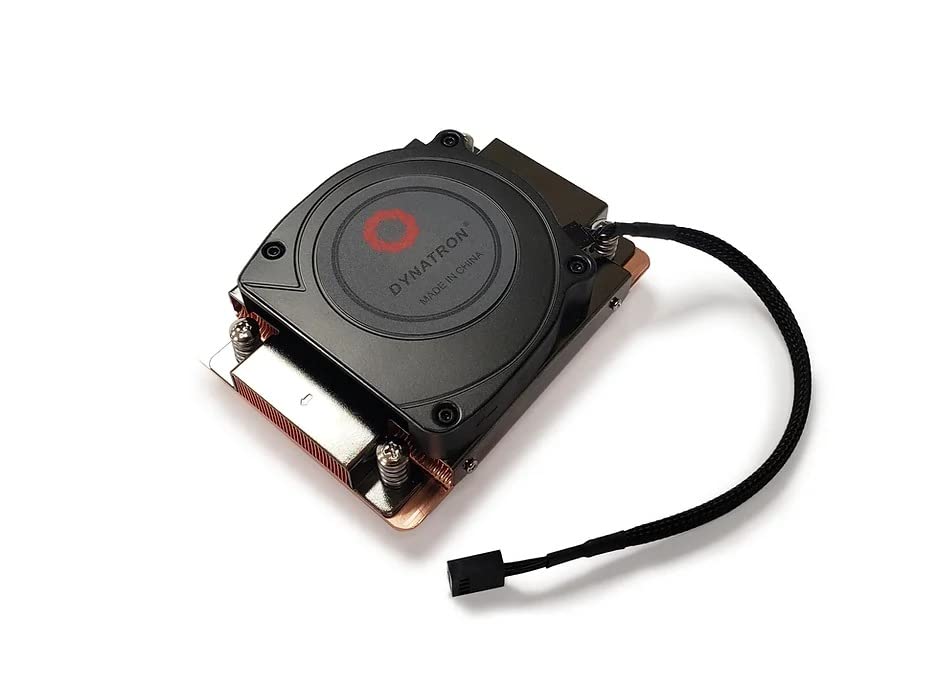
Setšoantšo sa 2.1: Holimo view of the Dynatron A42 CPU Cooler, showing the integrated fan and Dynatron branding.
3. Ho seta le ho kenya
Follow these steps carefully to install the Dynatron A42 CPU Cooler on your AMD AM4 or AM5 motherboard.
- Lokisetsa Motherboard: Ensure your motherboard is compatible with AMD AM4 or AM5 sockets. Remove any existing CPU cooler and clean the CPU surface thoroughly with isopropyl alcohol to remove old thermal paste.
- Kenya Thermal Paste: Apply a small, pea-sized amount of high-quality thermal paste to the center of the CPU's integrated heat spreader (IHS). Avoid applying excessive amounts, as this can lead to reduced cooling performance or unintended residue.
- Beha Sebaka sa ho Pholisa: Carefully align the Dynatron A42 cooler with the mounting holes on the motherboard around the CPU socket. The cooler's base should make even contact with the CPU's IHS.
- Sireletsa Sehatsetsi: Use the provided mounting screws to secure the cooler to the motherboard. Tighten the screws in a diagonal pattern (e.g., top-left, bottom-right, top-right, bottom-left) gradually until the cooler is firmly seated. Do not overtighten.
- Connect the Fan Cable: Locate the 4-pin PWM fan header on your motherboard (typically labeled "CPU_FAN"). Connect the cooler's 4-pin fan cable to this header. Ensure the connector is fully seated.
- Tlhahlobo ea ho Qetela: Double-check all connections and ensure the cooler is securely mounted and does not wobble.

Setšoantšo sa 3.1: Tlase view of the Dynatron A42 CPU Cooler, showing the copper base and pre-applied thermal paste (if applicable) or area for application.

Image 3.2: Dynatron A42 CPU Cooler with indicated dimensions for reference during installation.
4. Tataiso ea Ts'ebetso
Once installed, the Dynatron A42 operates automatically, controlled by your motherboard's PWM fan settings. For optimal performance and longevity:
- Litlhophiso tsa BIOS/UEFI: Access your system's BIOS/UEFI to ensure the CPU fan control is set to PWM mode for dynamic fan speed adjustment based on CPU temperature.
- Tlhokomelo ea Mocheso: Regularly monitor your CPU temperatures using system monitoring software to ensure they remain within safe operating limits, especially under heavy load.
- Ho foka ha moea: Ensure adequate airflow within your server chassis. Proper case ventilation is crucial for the cooler's effectiveness.
5. Tlhokomelo
Tlhokomelo ea kamehla e thusa ho netefatsa hore CPU ea hau e phela nako e telele le ho sebetsa hantle.
- Ho Tlosa Lerōle: Periodically (every 3-6 months, depending on environment) use compressed air to clean dust from the fan blades and heatsink fins. Ensure the fan is not spinning during cleaning to prevent damage.
- Thermal Paste: If CPU temperatures rise significantly over time, consider reapplying thermal paste. This typically involves removing the cooler, cleaning both the CPU and cooler base, and applying fresh thermal paste.
- Tlhahlobo ea Balateli: Check the fan for any signs of wear, unusual noise, or obstructions. Replace the fan if it becomes excessively noisy or stops functioning correctly.
6. Ho rarolla mathata
If you encounter issues with your Dynatron A42 CPU Cooler, refer to the following common problems and solutions:
- Lithempereichara tse phahameng tsa CPU:
- Ensure the cooler is securely mounted and making full contact with the CPU.
- Verify that thermal paste was applied correctly and not excessively.
- Check for dust buildup on the heatsink and fan.
- Confirm proper case airflow and ventilation.
- Ensure the fan is spinning and connected to the correct motherboard header.
- Fan Not Spinning or Making Noise:
- Check the 4-pin fan cable connection to the motherboard.
- Inspect for any obstructions preventing the fan blades from rotating.
- Verify fan settings in BIOS/UEFI.
- If the fan is making grinding or clicking noises, it may be faulty and require replacement.
- Installation Difficulties:
- Refer to the installation steps in Section 3.
- Ensure you are using the correct mounting hardware for your socket type (AM4/AM5).
7. Litlhaloso
| Sebopeho | Tlhaloso |
|---|---|
| Litekanyo tsa Sehlahisoa | 3.35"L x 1.07"W x 4.33"H (110.0 x 85.0 x 27.3mm) |
| Brand | Dynatron |
| Mofuta oa Sehokedi sa Matla | PWM e 4-Pin |
| Moqtage | Li-volts tse 12 |
| Wattage (TDP Support) | 95 Watts |
| Mokhoa oa ho Pholisa | Moea |
| Lisebelisoa tse lumellanang | Desktop (AMD AM4, AM5 Sockets) |
| Boemo ba Lerata | 62 Decibel (Boholo) |
| Lintho tse bonahalang | Leqephe la Koporo |
| Lebelo le Leholo la Potoloho | 2500 RPM |
| Matla a Phallo ea Moea | 26.25 Cubic Feet Ka Motsotso |
| Boima ba Ntho | 1 ponto |
| Nomoro ea Mohlala | A42 (840556075493) |
8. Boitsebiso ba Tiisetso
Dynatron products are manufactured to high-quality standards. Specific warranty terms and conditions may vary by region and retailer. Please refer to the warranty documentation included with your purchase or visit the official Dynatron websebaka sa marang-rang bakeng sa tlhahisoleseding e qaqileng ea tiisetso le mekhoa ea ngoliso. Boloka bopaki ba theko ea hau bakeng sa likopo tsa tiisetso.
9. Tšehetso
For technical assistance, product inquiries, or further support, please visit the official Dynatron website or contact their customer service department. Online resources, FAQs, and driver downloads may also be available on the manufacturer's websebaka.
Semolao Websebaka: www.dynatron.com (Please check for the most current contact information and support resources.)