
Selelekela
Thank you for choosing the HTC Wireless Over-Ear Bluetooth Headphones, model BDT01. This manual provides essential information for setting up, operating, maintaining, and troubleshooting your new headphones. Please read it carefully to ensure optimal performance and longevity of your device.
Se ka Lebokoseng
Ha o qeta ho pakela, ka kopo netefatsa hore lintho tse latelang li kenyelelitsoe:
- 1 x HTC Wireless Over-Ear Bluetooth Headphones
- 1 x Cable ea ho tjhaja USB-C
- 1 x 3.5mm Cable ea molumo
- 1 x Tataiso ea ho Qala ka Potlako (ha e kenyelelitsoe bukeng ena ea dijithale)
- 1 x Warranty Card (details provided in the Warranty section)

Setšoantšo: Lintho tsohle li kenyelelitsoe ka har'a sephutheloana sa sehlahisoa.
Tlhophiso
1. Ho tjhaja Li-headphone
Before first use, fully charge your headphones. Connect the provided USB-C charging cable to the charging port on the headphones and the other end to a USB power source (e.g., computer, wall adapter). A full charge provides up to 40-50 hours of playtime. For quick use, a 10-minute charge can provide approximately 10 hours of listening time.
2. Ho tima/Ho tima
To power on the headphones, press and hold the Power button (usually indicated by a universal power symbol or a multi-function button) for a few seconds until an indicator light illuminates or an audio prompt is heard. To power off, repeat the process until the indicator light turns off or an audio prompt confirms shutdown.
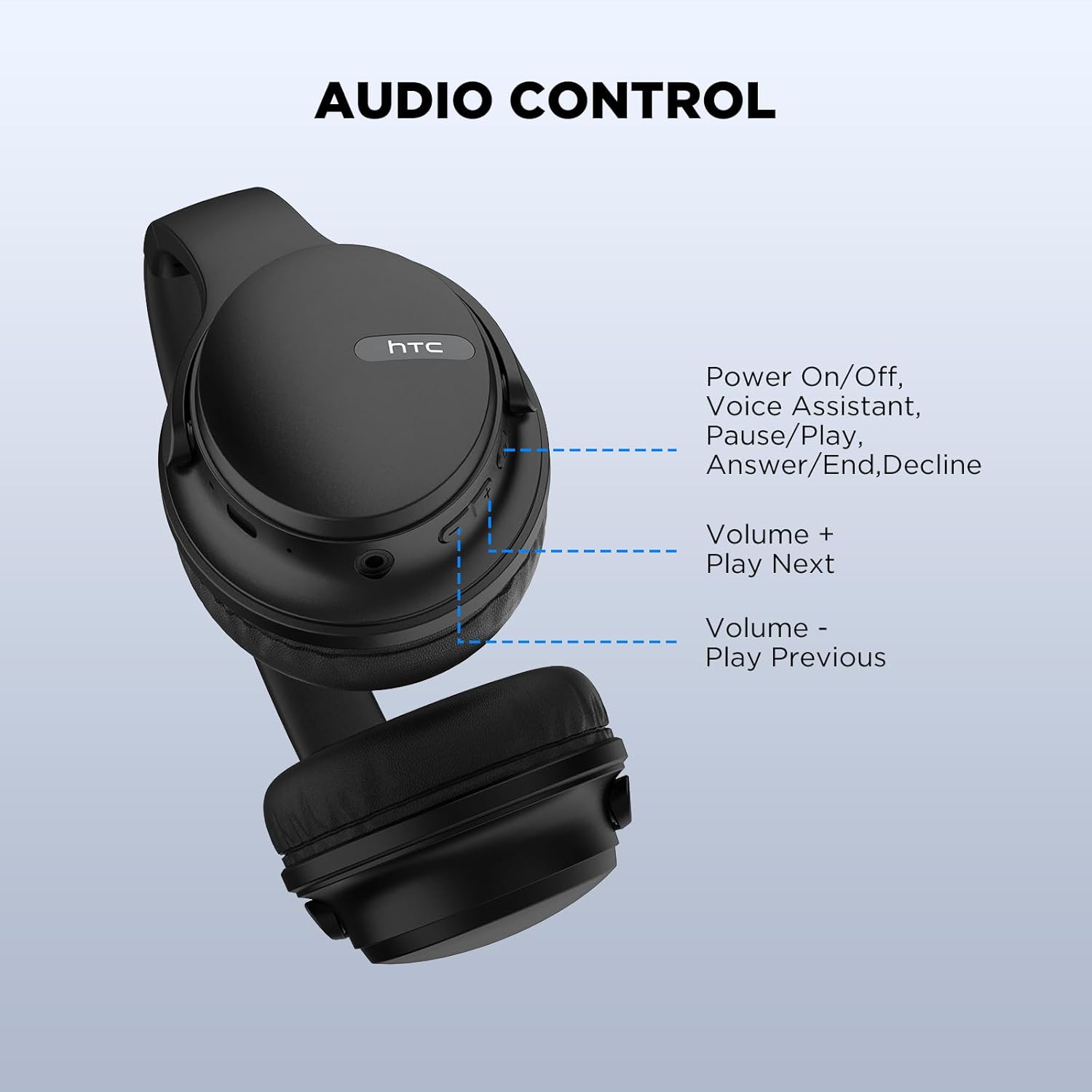
Image: Location of the Power button and other controls.
3. Bluetooth pairing
- Netefatsa hore li-headphone li tima.
- Press and hold the Power button for approximately 5-7 seconds until the indicator light flashes rapidly, indicating pairing mode.
- Sesebedisweng sa hao (smartphone, tablet, laptop), bula Bluetooth mme o batle disebediswa tse teng.
- Select "HTC BDT01" (or similar name) from the list of found devices.
- Once connected, the indicator light will typically stop flashing and remain solid, or an audio prompt will confirm the connection.
The headphones utilize Bluetooth 5.3 technology for a stable and fast connection. After the initial pairing, the headphones will automatically connect to the last paired device when powered on and within range.

Image: Bluetooth 5.3 compatibility with various devices.

Image: Wireless and wired connection options.
Litaelo tsa Ts'ebetso
Litaolo tsa Li-headphone
The headphones feature intuitive controls located on the earcup for easy management of audio and calls.
- Power On/Off / Multi-function Button: Press and hold to power on/off. Short press to Play/Pause music, Answer/End calls, or Decline calls. Double-press to activate Voice Assistant.
- Bolumo + / Pina e latelang: Short press to increase volume. Long press to skip to the next track.
- Volume - / Previous Track: Short press to decrease volume. Long press to go to the previous track.
Setšoantšo: Ka botlalo view of headphone controls.
Wired Connection (Aux-in Mode)
You can use the headphones in wired mode when the battery is low or when connecting to devices without Bluetooth. Simply plug the provided 3.5mm audio cable into the aux-in port on the headphones and the other end into your audio source. The headphones will automatically switch to wired mode.
Call Noise Cancellation (ENC)
The integrated Environmental Noise Cancellation (ENC) technology enhances call clarity by reducing ambient noise, allowing for clear conversations even in noisy environments.
Tlhokomelo
Ho hloekisa
Ho boloka boemo ba li-headphones tsa hau:
- Hlakola li-earcups le lesela la hlooho ka lesela le bonolo, le omeletseng, le se nang lesela.
- Se ke oa sebelisa lik'hemik'hale tse bohale, lihlapolli tse hloekisang, kapa lihlapa tse matla.
- Qoba ho fumana mongobo ka har'a masoba leha e le afe.
Polokelo
The headphones feature a foldable design for convenient storage and portability. Fold them carefully to save space when not in use. Store them in a cool, dry place away from extreme temperatures and direct sunlight.

Image: Foldable design for compact storage.
Ho hanyetsa Metsi
The headphones are designed with IPX5 sweatproof rating, making them suitable for daily life and light exercise. They are resistant to splashes of water and sweat but are not waterproof. Do not submerge them in water or expose them to heavy rain.
Ho batle phoso
| Bothata | Lebaka le ka khonehang | Tharollo |
|---|---|---|
| Li-headphone ha li sebetse. | Betri e tlase. | Chaja li-headphones u sebelisa thapo e fanoeng ea USB-C. |
| Ha e khone ho tsamaisana le sesebelisoa. | Li-headphone li se maemong a ho kopanya; Bluetooth e tima sesebelisoa; sesebelisoa se hole haholo. | Ensure headphones are in pairing mode (flashing indicator). Turn on Bluetooth on your device. Move device closer to headphones (within 10 meters). |
| Ha ho na molumo kapa boleng bo tlase ba molumo. | Volume too low; incorrect audio source; loose wired connection; interference. | Increase volume on headphones and device. Check if the correct audio output is selected on your device. Ensure 3.5mm cable is fully inserted if in wired mode. Move away from sources of interference. |
| Microphone ha e sebetse nakong ea mehala. | Incorrect microphone selected on device; microphone muted. | Check your device's audio settings to ensure the headphone microphone is selected. Ensure the microphone is not muted on your device or application. |
Litlhaloso
| Lebitso la Mohlala | BDT01 |
| Theknoloji ea Khokahano | bluetooth |
| Theknoloji ea puisano e se nang mohala | Bluetooth 5.3 |
| Sebopeho sa Earpiece | Over Ear |
| Mofuta oa Mokhanni oa Audio | Mokhanni ea Matla (40mm) |
| Bophelo ba Battery | Ho fihlela lihora tse 40-50 |
| Nako ea ho tjhaja | Approx. 10 minutes for 10 hours playtime (fast charge) |
| Lintho tse bonahalang | Letlalo, Plastiki |
| Tšobotsi e Khethehileng | Foldable, ENC Call Noise Cancellation, IPX5 Sweatproof |
| Litekanyo tsa Sehlahisoa | 6.69 x 2.36 x 7.48 lisenthimithara |
| Boima ba Ntho | 10.6 lik'hilograma |
| Lisebelisoa tse lumellanang | Smartphones, Laptops, Tablets, iPod, and other Bluetooth-enabled devices |
Warranty le Tšehetso
Your HTC Wireless Over-Ear Bluetooth Headphones come with a 360-day warranty extension. This warranty covers manufacturing defects and ensures your satisfaction with the product.
If you encounter any issues, have questions, or require support, please do not hesitate to contact HTC customer service. Refer to the warranty card included in your packaging for specific contact details or visit the official HTC support websebaka.
Note: Please retain your proof of purchase for warranty claims.
Boitsebiso ba Tšireletseho
- Do not expose headphones to extreme temperatures or humidity.
- Qoba ho lihela kapa ho beha li-headphone tlas'a tšusumetso e matla.
- U se ke ua qhaqholla kapa ua leka ho lokisa li-headphone ka bouena. Sena se tla etsa hore tiisetso e se ke ea sebetsa.
- Mamela ka molumo o itekanetseng ho thibela tšenyo ea kutlo.
- Boloka moo bana ba ka fihlang teng.