
Deeyaple F-8816
Deeyaple LED Digital Alarm Clock User Manual
Mohlala: F-8816
1. Selelekela
Kea leboha ha u rekileasing the Deeyaple LED Digital Alarm Clock. This manual provides detailed instructions for setting up, operating, and maintaining your new alarm clock. Please read this manual thoroughly before use to ensure proper functionality and to maximize your user experience. This clock features adjustable brightness, dual alarms, a snooze function, and a clear LED display showing both time and day.
2. Boitsebiso ba Tšireletseho
- Se ke oa beha sesebelisoa mochesong o feteletseng, mahlaseling a letsatsi, kapa mongobo o phahameng.
- Beha sesebelisoa hole le metsi le maro a mang.
- Use only the provided USB cable for power. An AC adapter is not included.
- U se ke ua leka ho qhaqha kapa ho lokisa sesebelisoa ka bouena. Ikopanye le tšehetso ea bareki haeba ho hlaha mathata.
- Boloka moo bana ba ka fihlang teng.
3. Likahare tsa Sephutheloana
- Deeyaple LED Digital Alarm Clock (Model: F-8816)
- USB Power Cable (Note: Power adapter not included)
- Bukana ea mosebelisi (Tokomane ena)

Figure 3.1: Back panel and side view of the alarm clock, showing control buttons and USB port.
4. Sehlahisoa Overview
4.1 Pontšo e ka pele
The front of the clock features a large LED display that shows the time, day of the week, and indicators for Alarm 1 and Alarm 2. The display uses vibrant, multi-colored digits for enhanced readability.

Setšoantšo sa 4.1: Pele view of the alarm clock with time and day displayed.
4.2 Top Buttons
- SNOOZE/LIGHT Button: Located on the top. Press to activate snooze during an alarm or to adjust display brightness.
4.3 Back Controls
- TIME SET Button: E sebelisoa ho kenya mokhoa oa ho beha nako.
- ALARM SET Konopo: E sebelisoa ho kenya mokhoa oa ho beha alamo.
- UP (+) Button: Increases values during setting or toggles functions.
- DOWN (-) Button: Decreases values during setting or toggles functions.
- Boema-kepe ba DC 5V: USB power input.
- RESETA Konopo: Small button to reset the clock to factory settings.

Setšoantšo sa 4.2: Ka morao view of the alarm clock, highlighting the USB power input and control buttons.
5. Seta
5.1 Ho matlafatsa Sesebelisoa
- Connect the provided USB power cable to the DC 5V port on the back of the alarm clock.
- Plug the other end of the USB cable into a standard USB power adapter (not included) or a powered USB port (e.g., computer, power bank).
- The display will light up, indicating the clock is powered on.

Figure 5.1: The alarm clock is powered via a USB cable, ensuring continuous display.
6. Litaelo tsa Ts'ebetso
6.1 Ho Ipehela Nako
- Tobetsa ea NAKO SEBETSO button on the back of the clock. The hour digits will start flashing.
- Sebelisa le PHAHAMA (+) or TLAS'A (-) likonopo ho fetola hora.
- Tobetsa NAKO SEBETSO hape ho netefatsa hora le ho fetela ho tlhophiso ea motsotso. Linomoro tsa motsotso li tla benya.
- Sebelisa le PHAHAMA (+) or TLAS'A (-) likonopo ho lokisa metsotso.
- Tobetsa NAKO SEBETSO a third time to confirm the minutes and move to 12/24H format selection.
- Sebelisa le PHAHAMA (+) or TLAS'A (-) buttons to select between 12-hour (with AM/PM indicator) or 24-hour format.
- Tobetsa NAKO SEBETSO one last time to save the settings and exit time setting mode.
6.2 Setting Alarms (Dual Alarms)
Oache e tšehetsa lialamo tse peli tse ikemetseng (Alamo ea 1 le Alamo ea 2).
- Tobetsa ea LIEKETSO ALARM button. The Alarm 1 hour digits will start flashing, and the Alarm 1 icon will appear.
- Sebelisa le PHAHAMA (+) or TLAS'A (-) buttons to adjust the Alarm 1 hour.
- Tobetsa LIEKETSO ALARM again to confirm the hour and move to Alarm 1 minute setting. The minute digits will flash.
- Sebelisa le PHAHAMA (+) or TLAS'A (-) buttons to adjust the Alarm 1 minutes.
- Tobetsa LIEKETSO ALARM a third time to confirm minutes and move to Alarm 1 day setting.
- Sebelisa le PHAHAMA (+) or TLAS'A (-) buttons to select the alarm days:
- 1-1: Alamo ea letsatsi le le leng
- 1-5: Mantaha ho isa Labohlano
- 1-6: Mantaha ho isa Moqebelo
- 1-7: Monday to Sunday (Every day)
- 6-7: Saturday to Sunday (Weekend)
- Tobetsa LIEKETSO ALARM again to confirm Alarm 1 settings and proceed to Alarm 2 setting. Repeat steps 2-6 for Alarm 2.
- After setting Alarm 2, press LIEKETSO ALARM one last time to save all alarm settings and exit.

Figure 6.1: Alarm days setting options for customized wake-up schedules.
Mosebetsi oa 6.3 Snooze
Ha alamo e lla, tobetsa konopo e kgolo TSOTSANG / LESELI button on the top of the clock. The alarm will pause for 5 minutes and then sound again. You can repeat the snooze cycle multiple times.

Figure 6.2: Activating the snooze function by touching the top button for an additional 5 minutes of rest.
6.4 Ho Fetola Khanya ea Pontšo
The clock has 3 levels of brightness (Bright, Medium, Low) and an option to turn off the display.
- Tobetsa ea TSOTSANG / LESELI button on the top of the clock (when no alarm is sounding) to cycle through the brightness levels: Bright > Medium > Low > Off > Bright.
- Khetha boemo ba khanya bo loketseng tikoloho le khetho ea hau hantle.
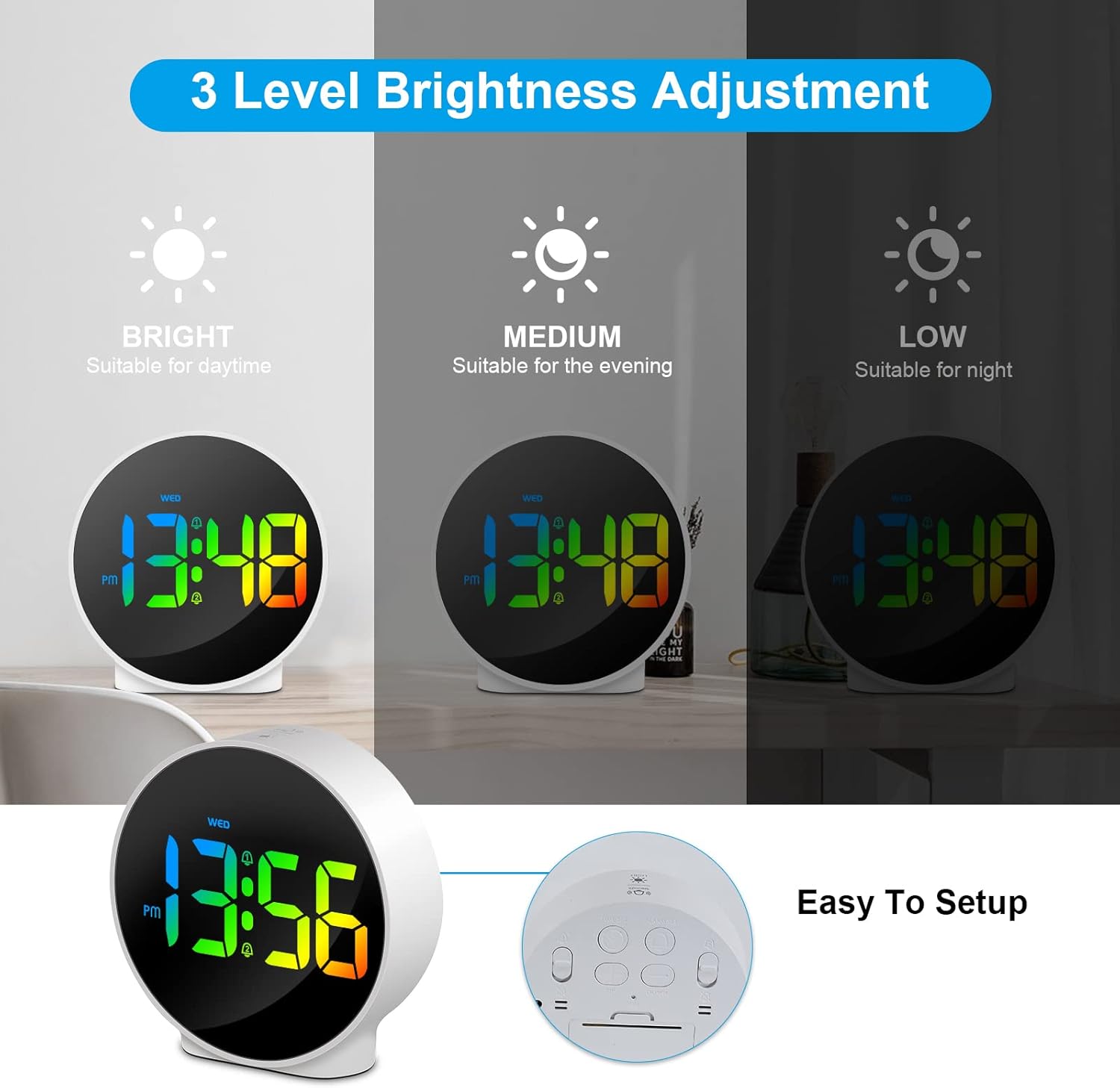
Figure 6.3: Three adjustable brightness levels for optimal viewho kganya maemong a fapaneng a kganya.
6.5 Week and Time Display
The clock simultaneously displays the current time and the day of the week on the same screen, eliminating the need to switch displays.

Figure 6.4: The clock displays both the time and the day of the week on a single screen for convenience.
7. Tlhokomelo
- Ho hloekisa: Use a soft, dry cloth to clean the surface of the clock. Do not use abrasive cleaners or solvents.
- Polokelo: Haeba o boloka oache nako e telele, e tlose motlakaseng 'me u e boloke sebakeng se pholileng, se omileng.
8. Ho rarolla mathata
| Bothata | Lebaka le ka khonehang | Tharollo |
|---|---|---|
| Display is off or dim. | Not powered, brightness set to off/low. | Ensure USB cable is securely connected to a power source. Press SNOOZE/LIGHT button to adjust brightness. |
| Alamo ha e lle. | Alarm not set, alarm volume too low (not applicable for this model), incorrect alarm days. | Verify alarm time and ensure the alarm icon is displayed. Check alarm day settings. |
| Nako e fosahetse. | Nako ha e a beoa hantle, ho sitisoa ha motlakase. | Re-set the time following Section 6.1. Ensure continuous power supply. |
| Likonopo ha li arabele. | Phoso ea nakoana ea software. | Unplug the USB cable, wait 10 seconds, then plug it back in. If issue persists, use the RESET button on the back (requires a thin object like a paperclip). |
9. Litlhaloso
- Lebitso: Deeyaple
- Nomoro ea Mohlala: F-8816
- Mmala: White shell with multi-color display
- Litekanyo (L x W x H): 10 x 3.81 x 10 cm (3.94 x 1.5 x 3.94 lisenthimithara)
- Boima ba 'mele: 180 grams (0.4 lbs)
- Likaroloana: Dual Alarm, Snooze, Adjustable Brightness (3 levels + off), 12/24H Display, Week Display, Corded Electric
- Mohloli oa Matla: USB Cable (DC 5V)
- Mofuta oa Pontšo: Digital LED
- Boitsebiso: Acrylonitrile Butadiene Styrene (ABS)

Figure 9.1: Dimensions of the Deeyaple LED Digital Alarm Clock.
10. Tiisetso le Tšehetso
Deeyaple products are designed for quality and reliability. For any questions, technical support, or warranty claims, please contact the seller or manufacturer directly through your purchase platform. Please retain your proof of purchase for warranty purposes.
Ask a question about this manual
Ask about setup, troubleshooting, compatibility, parts, safety, or missing instructions. Manuals+ will review the question and use this page’s manual context to help answer it.