
1. Selelekela
This manual provides detailed instructions for the setup, operation, and maintenance of your Graflsoa PG-9078 Bluetooth Wireless Gamepad. Please read this manual thoroughly before using the product to ensure proper functionality and to maximize your gaming experience. This gamepad is compatible with iOS, Android, Tablet, Phone, PC, Smart TV, and Set Top Box devices.
2. Boitsebiso ba Tšireletseho
- Do not expose the gamepad to extreme temperatures, humidity, or direct sunlight.
- Avoid dropping or subjecting the gamepad to strong impacts.
- Do not attempt to disassemble or modify the gamepad. This will void the warranty.
- Keep the gamepad away from water and other liquids.
- Sebelisa feela thapo e fanoeng ea ho tjhaja kapa e lekanang le eona e netefalitsoeng.
- Store the gamepad in a clean, dry place when not in use.
3. Likahare tsa Sephutheloana
Ka kopo, sheba litaba tsa sephutheloana ka mor'a unboxing:
- Graflsoa PG-9078 Wireless Gamepad
- USB Charging Cable
- Bukana ea mosebelisi (tokomane ena)
4. Sehlahisoa Overview
Familiarize yourself with the components and features of your PG-9078 gamepad.
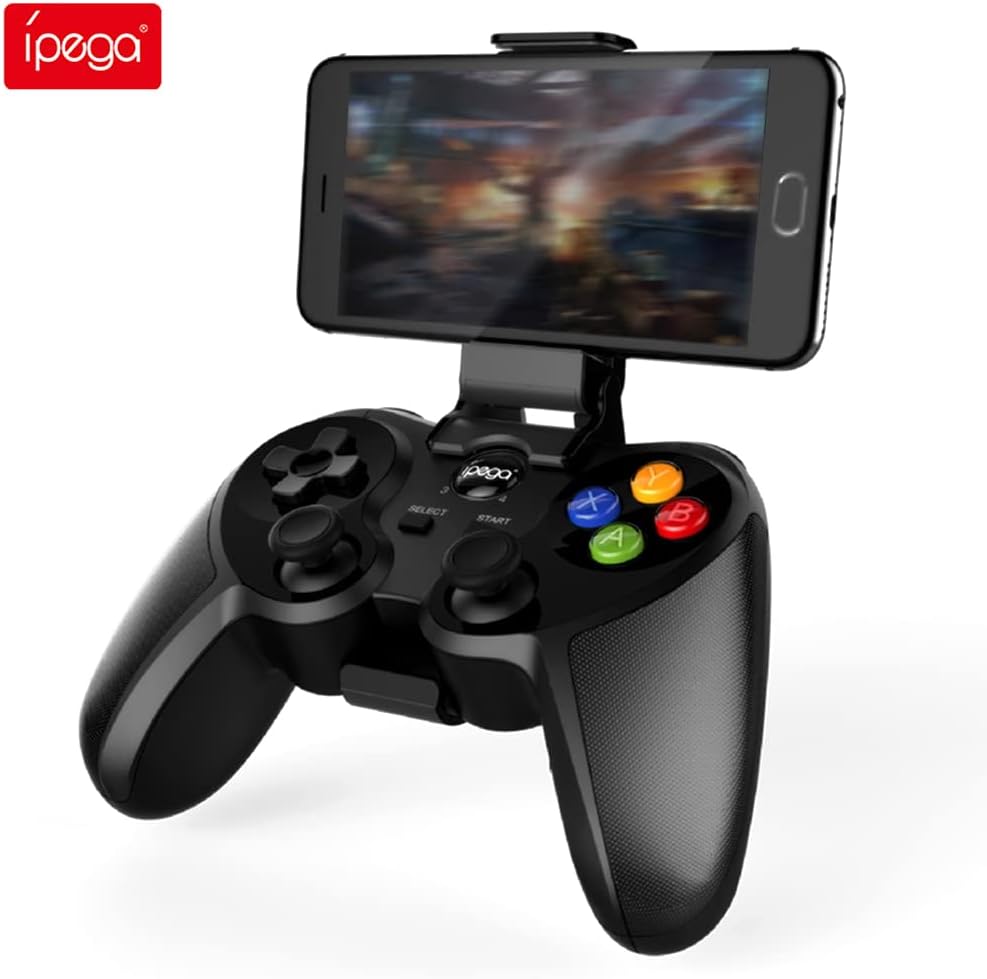
Figure 4.1: Graflsoa PG-9078 Wireless Gamepad with a smartphone mounted in the integrated holder.
The Graflsoa PG-9078 is a versatile Bluetooth gamepad designed for various gaming platforms. It features a comfortable ergonomic design, precise controls, and an integrated phone holder.
4.1 Likarolo tsa Bohlokoa
- Sets'oants'o sa Mehala se Kopantsoeng: Supports smartphones from 4 to 5.5 inches, with an adjustable angle for optimal viewng.
- Hall Effect Sensor Switches: Provides durable and responsive trigger input.
- High Accuracy Joysticks: 360-degree precision joysticks with anti-slip texture to prevent operational errors.
- Likonopo tsa Karabo: Fast response time for all face buttons and shoulder buttons.
- Analog L2/R2 Triggers: Offers precise control for racing and other games requiring nuanced input.
- Khokahano ea Bluetooth: Stable wireless connection with a transmission distance of up to 8 meters.

Figure 4.2: The adjustable phone holder, designed to securely hold smartphones between 4 and 5.5 inches. The angle can be freely adjusted for user comfort.

Figure 4.3: The high-accuracy joystick, featuring 360-degree movement and an anti-slip texture for enhanced control.

Figure 4.4: The highly sensitive and responsive face buttons and shoulder buttons, designed for quick input.
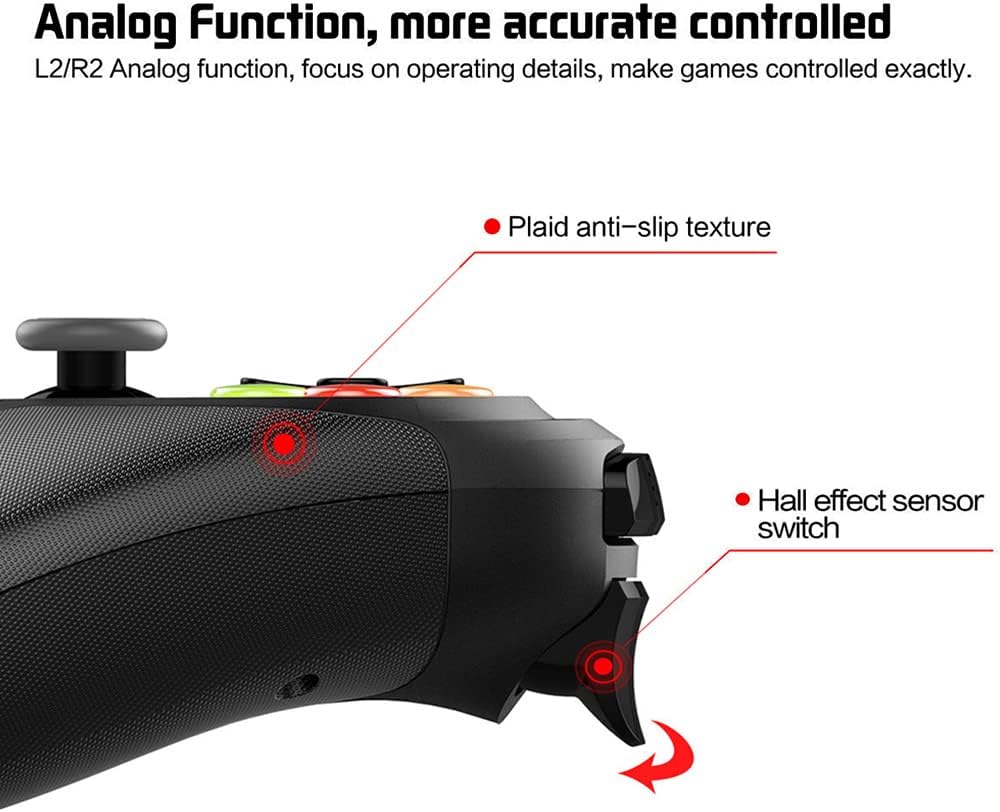
Figure 4.5: The L2/R2 analog triggers, providing accurate and detailed control for various in-game actions.

Figure 4.6: The gamepad utilizes Bluetooth technology for wireless connectivity, offering a stable connection up to 8 meters.
5. Litaelo tsa ho seta
5.1 Ho tjhaja Gamepad
- Connect the small end of the USB charging cable to the charging port on the gamepad.
- Hokela ntlha e kholoanyane ea thapo ea ho tjhaja ea USB mohloling oa motlakase oa USB (mohlala, koung ea USB ea khomphutha, adaptara ea lebota la USB).
- The charging indicator light on the gamepad will illuminate during charging and turn off or change color when fully charged.
- Tefiso e felletseng e nka lihora tse ka bang 2-3.
5.2 Attaching the Phone Holder
- Locate the phone holder attachment point on the top of the gamepad.
- Carefully slide the phone holder into the designated slot until it clicks securely into place.
- Adjust the angle of the holder to your preferred viewing boemo.
- Gently place your smartphone (4-5.5 inches) into the holder, ensuring it is securely gripped.
5.3 Ho hokahanya ha Bluetooth
The PG-9078 supports multiple connection modes. Select the appropriate mode for your device.
5.3.1 Android Standard Mode
- Ensure the gamepad is powered off.
- Tobetsa o hatelle "X" button + HOME button simultaneously until the indicator light flashes rapidly.
- On your Android device, enable Bluetooth and search for available devices.
- Select "PG-9078" from the list to pair. The indicator light will become solid once connected.
5.3.2 iOS Standard Mode
- Ensure the gamepad is powered off.
- Tobetsa o hatelle "Y" button + HOME button simultaneously until the indicator light flashes rapidly.
- On your iOS device, enable Bluetooth and search for available devices.
- Select "PG-9078" from the list to pair. The indicator light will become solid once connected.
5.3.3 PC/Smart TV Mode (Direct Play)
- Ensure the gamepad is powered off.
- Tobetsa o hatelle "A" button + HOME button simultaneously until the indicator light flashes rapidly.
- On your PC or Smart TV, enable Bluetooth and search for available devices.
- Select "PG-9078" from the list to pair. The indicator light will become solid once connected.
Note: After successful pairing, the gamepad will automatically connect to the last paired device when powered on in the same mode.
6. Litaelo tsa Ts'ebetso
6.1 Ho Bulela/Ho tima
- Matlafatsa: Tobetsa ea konopo ea HOME for 1 second. The indicator light will flash, then connect to the last paired device.
- Tlosa motlakase: Tobetsa o hatelle konopo ea HOME for 5 seconds until the indicator light turns off. The gamepad will also automatically power off after 5 minutes of inactivity.
6.2 Gamepad Modes
The PG-9078 supports different modes for optimal compatibility:
- Android Standard Mode (X + HOME): For most Android games and emulators.
- iOS Standard Mode (Y + HOME): For iOS games that support MFi controllers or specific gamepad protocols.
- PC/Smart TV Mode (A + HOME): For direct play on Windows PCs (requires Bluetooth adapter) and compatible Smart TVs.
Note: Game compatibility varies by platform and game title. Some games may require specific mapping or may not support external controllers.
6.3 Ho sebelisa Litaolo
The gamepad features standard controls:
- Directional Pad (D-Pad): Bakeng sa ho kenya ka tsela e nepahetseng.
- Lithupa tsa Analoge ka ho le letšehali/ka ho le letona: For 360-degree movement and camera control.
- Likonopo tsa Sefahleho (A, B, X, Y): For in-game actions.
- Shoulder Buttons (L1, R1): For quick actions.
- Analog Triggers (L2, R2): For pressure-sensitive input, ideal for acceleration/braking in racing games.
- SELECT/START Buttons: Bakeng sa ho tsamaya lenaneng la di-menu le mesebetsi ya papadi.
- Konopo ea HOME: For power on/off and mode switching.

Figure 6.1: Proper grip and button access on the Graflsoa PG-9078 gamepad, highlighting its ergonomic design and Hall effect sensor switches.
7. Tlhokomelo
- Ho hloekisa: Use a soft, dry cloth to wipe the surface of the gamepad. Do not use harsh chemicals or abrasive cleaners.
- Polokelo: Boloka gamepad sebakeng se pholileng, se omileng hole le khanya ea letsatsi le mocheso o feteletseng.
- Tlhokomelo ea Betri: To prolong battery life, avoid fully discharging the gamepad frequently. Charge it regularly, even if not in constant use. If storing for an extended period, charge it to about 50% every few months.
8. Ho rarolla mathata
8.1 Gamepad Does Not Power On
- Ensure the gamepad is charged. Connect it to a power source using the USB cable and allow it to charge for at least 30 minutes before attempting to power on again.
- Tobetsa 'me u tšoare konopo ea HOME motsotsoana o le 1 ho bula.
8.2 Unable to Pair via Bluetooth
- Ensure the gamepad is in the correct pairing mode for your device (Android: X+HOME, iOS: Y+HOME, PC/Smart TV: A+HOME).
- Make sure Bluetooth is enabled on your device and it is discoverable.
- Move the gamepad closer to your device (within 8 meters).
- Forget/remove "PG-9078" from your device's Bluetooth list and attempt to pair again.
- Restart both your device and the gamepad.
8.3 Buttons/Joysticks Not Responding
- Verify that the gamepad is successfully connected to your device.
- Check game settings to ensure controller support is enabled and controls are mapped correctly.
- Some games may not fully support external gamepads.
- Try restarting the gamepad and your device.
9. Litlhaloso
| Mohlala | PG-9078 |
| Khokahano | Bluetooth Wireless |
| Bluetooth Range | Ho fihlela ho 8 metres |
| Ho lumellana | iOS, Android, Tablet, Phone, PC, Smart TV, Set Top Box |
| Phone Holder Support | 4 - 5.5 inch smartphones |
| Likarolo Tse Khethehileng | Hall Effect Sensor Switches, 360-degree High Accuracy Joysticks, Analog L2/R2 Triggers |
| Mohloli oa Matla | Rechargeable Battery (Internal) |
10. Tiisetso le Tšehetso
Bakeng sa tlhahisoleseding ea tiisetso le tšehetso ea tekheniki, ka kopo sheba litokomane tse fanoeng ka theko ea hau kapa ikopanye le morekisi oa hau. Boloka bopaki ba hau ba theko bakeng sa liqoso life kapa life tsa tiisetso.