
LiebeWH TOWSM1-100
LiebeWH WiFi Smart Circuit Breaker TOWSM1-100 16A User Manual
Model: TOWSM1-100 | Current Rating: 16A
1. Selelekela
This manual provides essential information for the safe and effective use of your LiebeWH WiFi Smart Circuit Breaker, model TOWSM1-100 16A. This device is designed to offer advanced electrical protection and smart control capabilities for various applications.
The smart circuit breaker integrates overload, short-circuit, over-voltage, le under-voltage protection. It supports remote control via a dedicated mobile application and voice control through compatible smart terminals, enhancing convenience and safety in your electrical system.
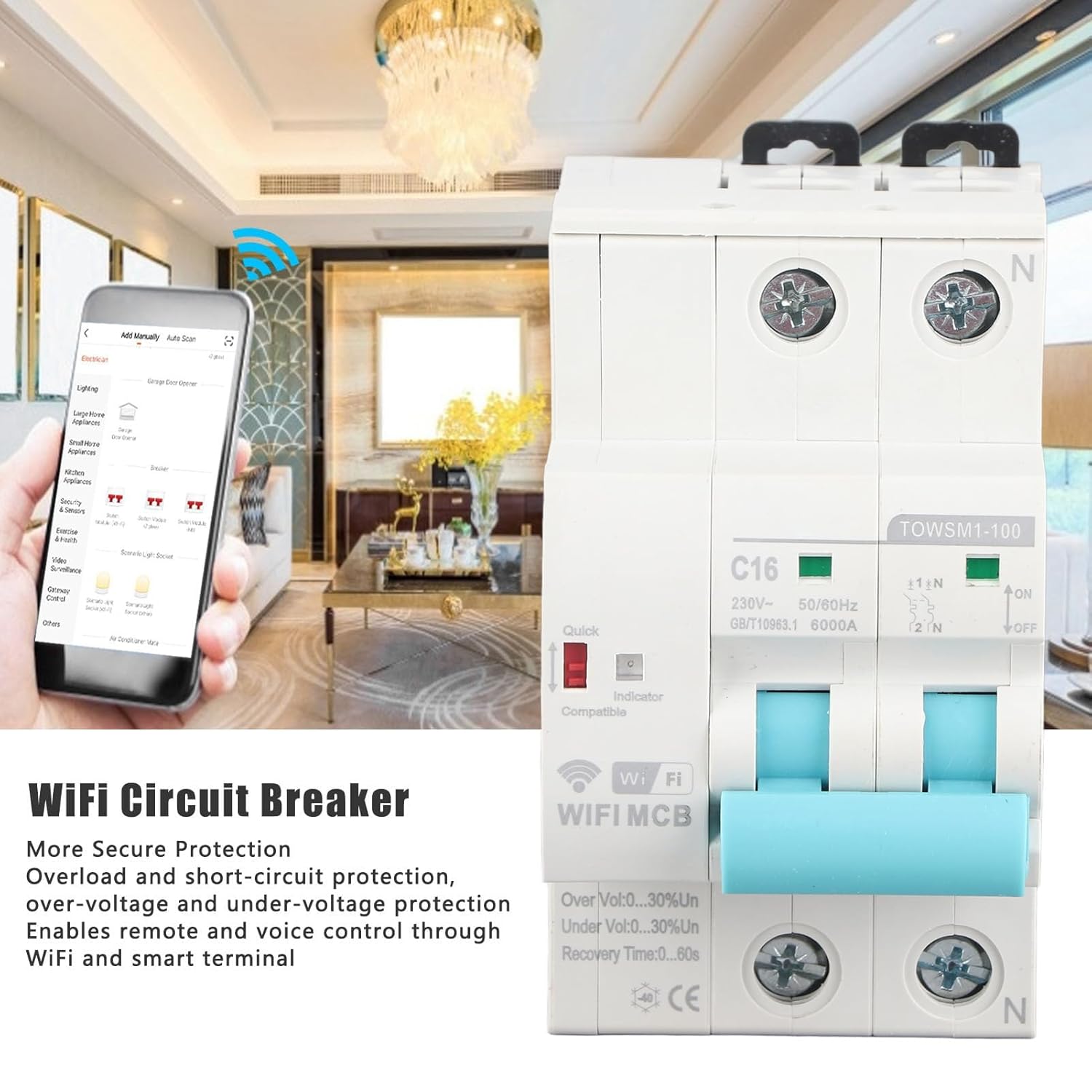
Image 1.1: LiebeWH WiFi Smart Circuit Breaker with remote control via smartphone app.
2. Boitsebiso ba Tšireletseho
TLHOKOMELISO: Electrical installation and maintenance should only be performed by qualified personnel in accordance with all local and national electrical codes and regulations. Failure to comply with these instructions can result in electric shock, fire, serious injury, or death.
- Always disconnect power at the main service panel before installing or servicing the circuit breaker.
- Netefatsa hore ho na le likhokahano tse nepahetseng tsa ho thella le ho hokahanya lithapo.
- Se ke oa sebelisa sesebelisoa haeba se bonahala se senyehile.
- Se ke oa feta palo e lekantsoengtage and current specifications of the device.
- Boloka sesebediswa hole le metsi le mongobo o feteletseng.
3. Sehlahisoa Overview
The LiebeWH TOWSM1-100 16A is a 2-pole smart circuit breaker designed for DIN rail mounting. It features clear indicators for its status and protection mechanisms.

Setšoantšo sa 3.1: Pele view of the circuit breaker.
Likarolo tsa Bohlokoa:
- Phetoho e kholo: Lever for manual ON/OFF operation.
- Lesupa la Matla: Shows the power status.
- Sesupo sa WiFi: Displays the WiFi connection status.
- Quick Indicator: Red indicator for quick trip status.
- Boemelo: Input and output terminals for wiring connections.
- DIN Rail Clip: For secure mounting on a standard DIN rail.

Image 3.2: Close-up of indicators and switch, showing 'ON' and 'OFF' positions, 'C16' rating, and 'TOWSM1-100' model.
4. Ho seta le ho kenya
Proper installation is crucial for the safe and reliable operation of the smart circuit breaker. Always ensure power is disconnected before beginning installation.
4.1 Mechanical Installation (DIN Rail Mounting)
- Netefatsa hore phepelo ea motlakase e kholo e TIMILOE.
- Locate a suitable position on a standard DIN rail within your electrical panel.
- Engage the top clip of the circuit breaker onto the DIN rail.
- Press the bottom part of the circuit breaker firmly until the bottom clip snaps onto the DIN rail, securing the device in place.

Image 4.1: DIN rail mounting diagram, illustrating 'Tilt Out' and 'Pull Down' actions.
4.2 Lithapo tsa Motlakase
- With power still OFF, connect the incoming live (L) and neutral (N) wires to the upper terminals of the circuit breaker.
- Connect the outgoing load live (L) and neutral (N) wires to the lower terminals of the circuit breaker.
- Ensure all wire connections are tight and secure to prevent loose contacts and overheating.
- Verify that the wiring matches the circuit diagram and local electrical standards.

Image 4.2: Close-up of wiring terminals for secure connections.
4.3 App Pairing and Network Connection
- Download the compatible smart home application (e.g., Tuya Smart, Smart Life) from your smartphone's app store.
- Ngodisa kapa o kene ka akhaonteng ea hau.
- Power on the circuit breaker. The WiFi indicator should start blinking, indicating it's in pairing mode. If not, refer to the app's instructions for manual pairing mode activation.
- In the app, select "Add Device" or the '+' icon, then choose "Electrical" or "Circuit Breaker".
- Follow the on-screen instructions to connect the device to your 2.4GHz WiFi network.
- Once successfully paired, the WiFi indicator will become solid, and the device will appear in your app.
5. Litaelo tsa Ts'ebetso
5.1 Ts'ebetso ea matsoho
- To turn the circuit breaker ON, push the lever upwards to the 'ON' position.
- To turn the circuit breaker OFF, push the lever downwards to the 'OFF' position.
5.2 Taolo ea Remote ka Sesebelisoa
- Open the smart home application on your smartphone.
- Select the LiebeWH WiFi Smart Circuit Breaker from your device list.
- Use the virtual switch or controls within the app to turn the circuit breaker ON or OFF remotely.
- The app also provides real-time monitoring of power status and protection events.
5.3 Taolo ea lentsoe
If integrated with a compatible voice assistant (e.g., Amazon Alexa, Google Assistant), you can control the circuit breaker using voice commands. Refer to your voice assistant's setup guide for connecting smart home devices.
- Example commands: "Alexa, turn on the living room circuit breaker." or "Hey Google, turn off the water heater."
5.4 Automatic Reclosing and Protection Features
The circuit breaker is equipped with automatic reclosing functionality and various protection features:
- Tšireletso e feteletseng: Automatically trips when the current exceeds the rated capacity (16A).
- Tšireletso ea Potoloho e Khutšoane: Trips instantly in case of a short circuit.
- Bo-Voltage Tshireletso: Protects connected devices from excessive voltage.
- Tlas'a Voltage Tshireletso: Protects connected devices from insufficient voltage.
- Ho Iketsa Sephiri: After a trip event (e.g., temporary overload), the device can automatically attempt to reclose after a configurable recovery time (0-60 seconds), if the fault condition is no longer present. This feature helps maintain continuous power supply where appropriate.
6. Tlhokomelo
The LiebeWH WiFi Smart Circuit Breaker is designed for minimal maintenance. However, periodic checks are recommended to ensure optimal performance and safety.
- Tlhahlobo ea Pono: Hlahloba nako le nako sesebelisoa sa ho roba potoloho bakeng sa matšoao afe kapa afe a tšenyo ea 'mele, ho fetoha ha' mala, kapa likhokahano tse hlephileng.
- Ho hloekisa: If necessary, gently clean the exterior of the device with a dry, soft cloth. Do not use liquid cleaners or solvents.
- Tlhahlobo ea Ts'ebetso: Test the manual ON/OFF switch periodically to ensure it operates smoothly.
- Lisebelisoa tsa Firmware: Check the smart home application for any available firmware updates for the device to ensure you have the latest features and security enhancements.
For any internal maintenance or repairs, contact a qualified electrician or the manufacturer's support.
7. Ho rarolla mathata
| Bothata | Lebaka le ka khonehang | Tharollo |
|---|---|---|
| Sesebelisoa ha se sebetse. | No power supply; incorrect wiring; device fault. | Check main power supply. Verify wiring connections. If problem persists, contact support. |
| WiFi indicator is off or blinking slowly. | No WiFi connection; incorrect network settings; device not in pairing mode. | Ensure 2.4GHz WiFi is active. Re-enter pairing mode (refer to app instructions). Check router distance. |
| Sesebediswa sa potoloho se tsamaya kgafetsa. | Overload; short circuit; over/under voltage; faulty appliance. | Reduce load on the circuit. Disconnect appliances to identify faulty ones. Consult an electrician to check for wiring issues. |
| Remote control ha e sebetse. | No internet connection; app issue; device offline. | Check your smartphone's internet connection. Ensure the circuit breaker's WiFi indicator is solid. Restart the app. |
8. Litlhaloso
| Sebopeho | Tlhaloso |
|---|---|
| Mohlala | TOWSM1-100 |
| E lekantsoe Hona Joale | 16A |
| E lekantsoe Voltage | AC 230V |
| Khafetsa | 50/60Hz |
| Ultimate Breaking Capacity (ICU) | 6000A |
| Mokhoa oa ho kenya | Terene ea DIN |
| Nako ea ho hlaphoheloa | 0-60s |
| Lintho tse bonahalang | ABS |
| Litekanyo (Pakete) | 10.1 x 8.7 x 5.9 cm, |
| Boima (Pakete) | 350 dikgerama |
| Moetsi | LiebeWH |
| Nomoro ea Karolo ea Moetsi | LiebeWHqg8v3fzo4p-11 |

Image 8.1: Wide application of the LiebeWH WiFi Smart Circuit Breaker.
9. Boitsebiso ba Tiisetso
Specific warranty details for the LiebeWH TOWSM1-100 16A WiFi Smart Circuit Breaker are not provided in the product information. Please refer to the retailer's return policy or contact the manufacturer directly for warranty terms and conditions.
10. Tšehetso
For technical assistance, troubleshooting beyond this manual, or inquiries regarding your LiebeWH WiFi Smart Circuit Breaker, please contact your point of purchase or the manufacturer's customer support channels.
- Moetsi: LiebeWH
- Lisebelisoa tsa Marang-rang: Check the LiebeWH official website or the smart home app's help section for FAQs and additional support.
Ask a question about this manual
Ask about setup, troubleshooting, compatibility, parts, safety, or missing instructions. Manuals+ will review the question and use this page’s manual context to help answer it.