
1. Selelekela
Welcome to the user manual for your new Avtex W195TS Smart TV. This television is specifically designed for mobile living, offering versatile power options (12V, 24V, and 240V) and a range of smart features, including Wi-Fi, Bluetooth, and an integrated Freesat satellite decoder. This manual provides essential information for setting up, operating, maintaining, and troubleshooting your device to ensure optimal performance and enjoyment.
2. Boitsebiso ba Tšireletseho
Ka kopo bala litaelo tsohle tsa polokeho ka hloko pele o sebelisa thelevishene. Boloka bukana ena bakeng sa litšupiso tsa nako e tlang.
- Phepelo ea motlakase: Etsa bonnete ba hore molumo o nepahetsetage is used (12V, 24V DC or 240V AC). Do not overload power outlets.
- Moea oa moea: Se ke oa thibela menyetla ea moea. Lumella sebaka se lekaneng ho potoloha TV bakeng sa moea o nepahetseng.
- Metsi le Mongobo: Se ke oa pepesetsa TV pula kapa mongobo. Se ke oa beha lintho tse tlatsitsoeng ka maro ho TV.
- Ho hloekisa: Tlosa TV pele u hloekisa. Sebelisa lesela le bonolo, le omeletseng. Se ke oa sebelisa lisebelisoa tse hloekisang metsi kapa li-aerosol cleaners.
- Sebaka: Place the TV on a stable, flat surface or mount securely to a wall/bracket. Avoid direct sunlight or heat sources.
- Litšebeletso: Se ke oa leka ho fana ka sehlahisoa sena u le mong. Fetisetsa litšebeletso tsohle ho basebetsi ba tšoanelehang ba litšebeletso.
3. Likahare tsa Sephutheloana
Before setup, please check that all items are present in the box:
- Avtex W195TS Smart TV
- Taolo ea Remoutu e nang le Battery
- 12V/24V DC Cable ea Matla
- Adaptara ea Matla ea 240V AC
- Sebaka sa Tafole (haeba se hlokahala)
- Bukana ea mosebelisi (tokomane ena)
4. Sehlahisoa Overview
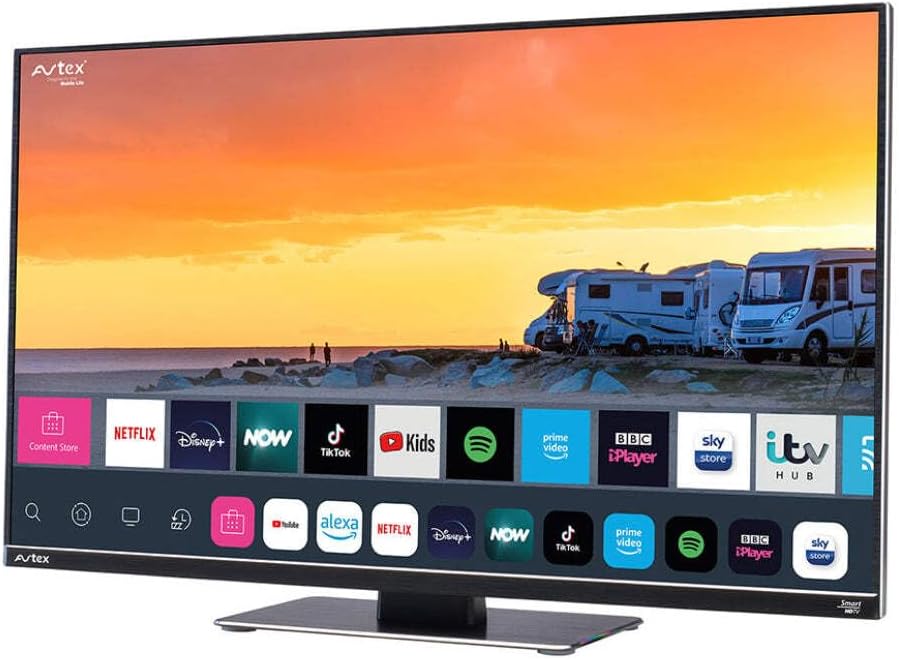
Figure 4.1: Avtex W195TS Smart TV Front View
This image shows the Avtex W195TS Smart TV from a slight angle, highlighting its slim design and the vibrant display. The screen shows a user interface with icons for popular streaming services like Netflix, Disney+, Now, TikTok, Kids, Spotify, Prime Video, BBC iPlayer, Sky Store, and ITV Hub. The background on the screen depicts a scenic view of motorhomes parked near a beach at sunset. The Avtex logo is visible on the top left and bottom left of the TV frame.
4.1. Ports and Connections
- Boema-kepe ba HDMI: For connecting external devices like Blu-ray players, game consoles, or set-top boxes.
- Boema-kepe ba USB (2): For media playback from USB drives or connecting USB accessories.
- Kenyo ea Antenna: For connecting a terrestrial TV antenna.
- Kenyo ea Satellite: For connecting a satellite dish for Freesat or other satellite services.
- Motlakase oa DC: For 12V/24V DC power connection.
- AC Power Keletso: For 240V AC power connection via adapter.
- Port ea Ethernet: Bakeng sa khokahanyo ea marang-rang ea marang-rang.
- Audio Output: Bakeng sa ho hokela ditsamaiso tsa modumo tsa kantle kapa di-headphone.
5. Seta
5.1. Installing the Stand (Optional)
- Ka hloko beha sefahleho sa TV fatše sebakeng se bonolo, se hloekileng ho thibela tšenyo ea skrine.
- Lokisa setofo le masoba a ho fanyeha tlase ho TV.
- Sireletsa sethala u sebelisa li-screw tse fanoeng.
5.2. Khokelo ea Matla
The Avtex W195TS supports multiple power inputs:
- 12V/24V DC: Connect the supplied 12V/24V DC power cable to the DC input on the TV and to your vehicle's 12V or 24V power outlet.
- 240V AC: Connect the supplied 240V AC power adapter to the AC input on the TV, then plug the adapter into a standard 240V AC wall socket.
Hlokomela: Do not connect both DC and AC power simultaneously.
5.3. Antenna/Satellite Connection
- Terrestrial TV: Connect your aerial cable to the 'ANTENNA IN' port.
- Satellite TV (Freesat): Connect your satellite dish cable to the 'SATELLITE IN' port.
5.4. Initial Power On and First-Time Setup
- Connect the TV to power and press the power button on the remote control or TV.
- The First-Time Setup Wizard will appear. Follow the on-screen prompts to select your language, country, and time zone.
- Perform an automatic channel scan for both terrestrial and satellite channels.
- Connect to your Wi-Fi network by selecting your network name and entering the password.
6. Ho sebetsa
6.1. Mesebetsi ea Remote Control
Itlwaelanye le dikonopo tsa taolo ya remoutu bakeng sa ho tsamaya habonolo le ho laola dikarolo tsa TV ya hao.
- Konopo ea Matla: E bulela/ tima TV.
- Konopo ea Mohloli: Selects input sources (HDMI, USB, TV, Satellite).
- Buka ea +/-: E fetola boemo ba molumo.
- Channel +/-: E fetola likanale tsa TV.
- Likonopo tsa ho Tsamaea (Holimo/Tlase/Ka ho le Letshehadi/Ka ho le Letona/Ho Lokile): Bakeng sa ho tsamaea le khetho ea menu.
- Smart Hub/Home Button: E fihlella sebopeho sa Smart TV.
- Likonopo tsa App: Dedicated buttons for popular streaming apps (if available).
6.2. Lisebelisoa tsa Smart TV
Your Avtex W195TS is equipped with smart TV capabilities:
- App Store: Download and install various applications for streaming, news, and entertainment.
- Litšebeletso tsa ho phallela: Access pre-installed or downloaded apps like Netflix, Disney+, Prime Video, BBC iPlayer, etc. (subscription may be required).
- Web Sebatli: Browse the internet directly on your TV.
- Screen Mirroring: Connect your smartphone or tablet to display content on the TV screen (compatibility may vary).
6.3. Khokahano ea Bluetooth
Pair Bluetooth devices such as headphones or external speakers for enhanced audio experience.
- Eya ho menu ea litlhophiso tsa TV.
- Select 'Bluetooth' or 'Connected Devices'.
- Enable Bluetooth and put your device into pairing mode.
- Khetha sesebediswa hao ho tswa lenaneng ho para.
6.4. Media Playback via USB
Insert a USB drive into one of the USB ports to view photos, play videos, or listen to music.
- The TV will usually prompt you to open the media player.
- Tsamaea ka har'a hau files using the remote control.
7. Tlhokomelo
7.1. Ho hloekisa TV
- Skrine: Hlakola skrine ka bonolo ka lesela le bonolo le se nang letlapa. Bakeng sa matšoao a manganga, hanyenyane dampst lesela le nang le metsi kapa tharollo e ikhethileng skrineng (o se ke oa fafatsa skrineng ka kotloloho).
- Casing: Sebelisa lesela le bonolo, le omeletseng ho hlakola TV casing. Qoba li-abrasive cleaners kapa solvents.
7.2. Lintlafatso tsa Software
Periodically check for software updates to ensure your TV has the latest features and bug fixes. Updates can usually be found in the TV's settings menu under 'System' or 'Software Update'.
8. Ho rarolla mathata
If you encounter issues with your Avtex W195TS, refer to the following common problems and solutions:
| Bothata | Lebaka le ka khonehang | Tharollo |
|---|---|---|
| Ha ho Matla | Power cable not connected; no power from outlet. | Check power cable connection; test outlet with another device; ensure correct voltag(12V / 24V / 240V). |
| Ha ho Senepe, empa Molumo o teng | Incorrect input source selected; faulty cable. | Press the 'Source' button on the remote to select the correct input; check HDMI/antenna cables. |
| Ha ho Molumo, empa Setšoantšo se teng | Molumo o khutsitsoe kapa o tlase haholo; taba ea tsamaiso ea molumo ea kantle. | Unmute volume or increase level; check connections to external audio devices. |
| Ha e khone ho hokela ho Wi-Fi | Phasewete e fosahetseng; bothata ba router; TV e hole haholo le router. | Re-enter Wi-Fi password; restart router; move TV closer to router or use an extender. |
| Remote Control Ha e sebetse | Dead batteries; obstruction; pairing issue. | Replace batteries; remove obstructions; re-pair remote if it's a Bluetooth remote. |
9. Litlhaloso
| Sebopeho | Tlhaloso |
|---|---|
| Brand | Avtex |
| Nomoro ea Mohlala | AVTEX W195TS |
| Boholo ba skrine | 19.5 lisenthimithara |
| Qeto | 1080p (HD e felletseng) |
| Aspect ratio | 16:9 |
| Theknoloji ea Khokahano | Bluetooth, HDMI, Wi-Fi |
| Kakaretso ea likou tsa USB | 2 |
| Moqtage | 12 Volts, 24 Volts, 240 Volts |
| Boima ba Ntho | 2.5 lik'hilograma |
| Selemo sa Mohlala | 2018 |
10. Tiisetso le Tšehetso
Your Avtex W195TS Smart TV comes with a manufacturer's warranty. Please refer to the warranty card included in your product packaging for specific terms and conditions, including warranty period and coverage details. Keep your proof of purchase for warranty claims.
For technical support, troubleshooting assistance beyond this manual, or warranty inquiries, please contact Avtex customer service through their official website or the contact information provided with your product. When contacting support, please have your model number (AVTEX W195TS) and serial number ready.