
1. Selelekela
This manual provides essential information for the Lumenier QAV-PRO Micro Whoop 2.5" Cinequads Edition Motor Plate. This component is designed as a replacement or spare part for the Lumenier QAV-PRO Micro Whoop 2.5" Cinequads Edition FPV quadcopter. It is crucial for the structural integrity and motor mounting of your drone.
Please read this manual thoroughly before installation to ensure proper assembly and safe operation of your quadcopter.
2. Sehlahisoa Overview
The Lumenier QAV-PRO Micro Whoop 2.5" Cinequads Edition Motor Plate is a precisely cut carbon fiber component that forms the base structure for mounting motors and integrating with the rest of the quadcopter frame. It is specifically designed for the 2.5-inch Cinequads Edition, offering durability and a lightweight profile.
2.1 Se kenyellelitsoeng
- 1x Lumenier QAV-PRO Micro Whoop 2.5" Cinequads Edition Motor Plate
2.2 What's Not Included
Please note that this product includes only the motor plate. Bumpers, standoffs, screws, motors, propellers, camera, flight controller, and other quadcopter parts are eseng e kenyelelitsoe mme e tlameha ho rekoa ka thoko.
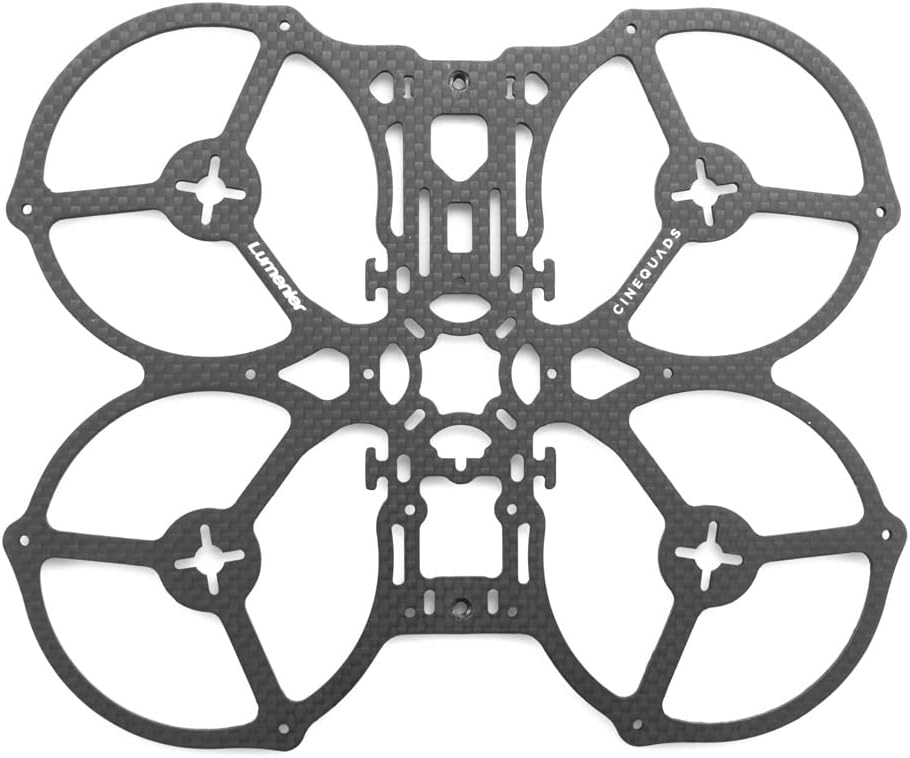
Figure 1: Lumenier QAV-PRO Micro Whoop 2.5" Cinequads Edition Motor Plate. This image displays the Lumenier QAV-PRO Micro Whoop 2.5 Cinequads Edition Motor Plate in a top-down perspective. The plate is made from 2mm quasi-isotropic Japanese carbon fiber, featuring cutouts for motor mounting, central frame attachment, and propeller protection rings. The Lumenier and Cinequads branding are visible on the carbon fiber surface.
3. Litlhaloso
| Sebopeho | Lintlha |
|---|---|
| Lintho tse bonahalang | 2mm Quasi-Isotropic Japanese Carbon Fiber (Matte Finish) |
| Carbon Fiber Thickness | 2 limilimithara |
| Litekanyo | 178mm x 145 limilimithara |
| Boima ba 'mele | 21g (0.74 ounces) |
| Brand | Lumenier |
| Lebitso la Mohlala | QAV PRO |
| UPC | 764613349801 |
| Moetsi | Lumenier |
4. Ho seta le ho kenya
The motor plate serves as the foundation for assembling your Lumenier QAV-PRO Micro Whoop 2.5" Cinequads Edition quadcopter. Follow these general steps for installation. Specific details may vary based on your chosen components (motors, flight controller, etc.).
4.1 Required Tools and Additional Components
- Small Phillips hlooho screwdriver
- Hex wrenches (appropriate sizes for your frame hardware)
- Thread-locking compound (e.g., Loctite 242, optional but recommended for motor screws)
- Motors (4x)
- Molaoli oa Sefofane
- ESCs (Electronic Speed Controllers) or 4-in-1 ESC
- Frame hardware (standoffs, screws, nuts)
- Li-propeller
4.2 Mehato ea ho kenya
- Inspect the Plate: Carefully examine the motor plate for any manufacturing defects or damage.
- Attach Standoffs: Secure the frame standoffs to the designated mounting points on the motor plate using the appropriate screws. Ensure they are tightened securely but do not overtighten.
- Mount Motors: Attach your chosen motors to the motor mounting holes on each arm of the plate. Use the provided motor screws and, if desired, a small amount of thread-locking compound to prevent screws from loosening due to vibration. Ensure motor wires are routed cleanly.
- Integrate with Frame: Continue assembling the rest of your QAV-PRO Micro Whoop 2.5" Cinequads Edition frame, attaching the top plate, camera mounts, and other components as per your frame's specific instructions.
- Install Electronics: Mount your flight controller, ESCs, receiver, and other electronics onto the assembled frame, ensuring proper wire management and connections.
- Tlhahlobo ea ho Qetela: Before powering on, double-check all screw connections, wire routing, and component placement to ensure everything is secure and correctly installed.
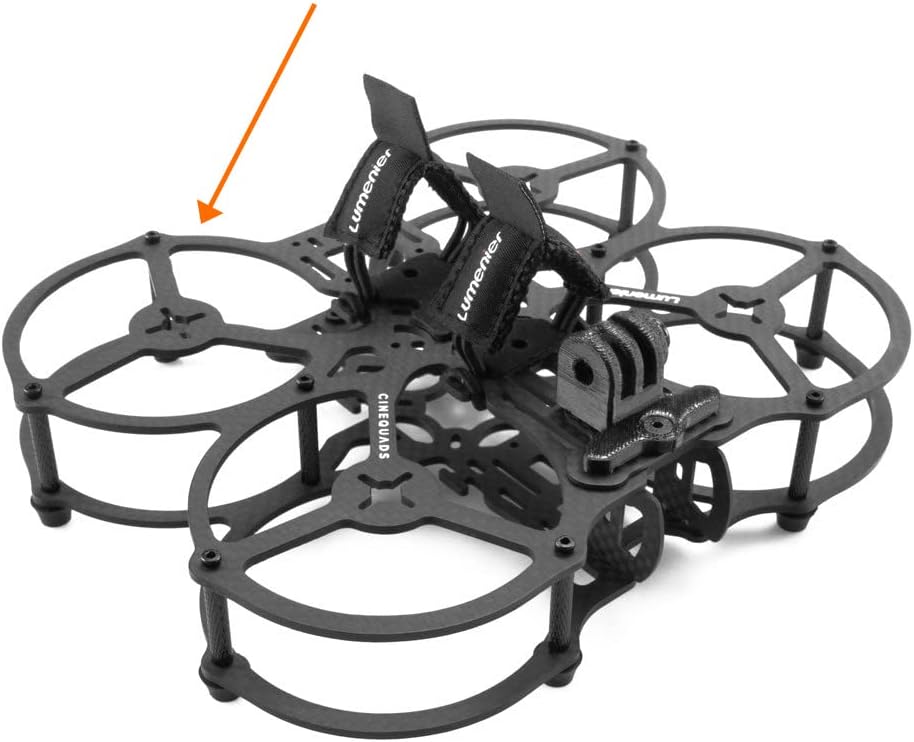
Figure 2: Partially assembled Lumenier QAV-PRO Micro Whoop 2.5" Cinequads Edition frame. This image shows the Lumenier QAV-PRO Micro Whoop 2.5 Cinequads Edition FPV quadcopter frame partially assembled. The motor plate is visible as the base structure, with standoffs, top plates, and battery straps attached. An arrow points to the motor plate, indicating its position within the overall drone assembly. This illustrates how the motor plate integrates with other components to form the complete quadcopter frame.
5. Lintlha tsa Ts'ebetso
As the motor plate is a structural component, its operation is passive. However, its proper installation is critical for the safe and effective operation of the entire quadcopter. Ensure all motors are securely fastened and that the plate itself is free from cracks or damage that could compromise flight safety.
6. Tlhokomelo
Regular inspection and maintenance of your motor plate are essential for the longevity and safety of your FPV quadcopter.
- Tlhahlobo ea Pono: After any crash or hard landing, carefully inspect the carbon fiber motor plate for cracks, delamination, or stress marks. Even small cracks can compromise structural integrity.
- Screw Tightness: Periodically check the tightness of all screws attaching the motors to the plate and the standoffs to the plate. Vibrations can cause screws to loosen over time.
- Ho hloekisa: Keep the motor plate clean from dirt, dust, and debris. Use a soft, dry cloth or compressed air. Avoid harsh chemicals that could damage the carbon fiber.
- Phetoho: If any significant damage is found, replace the motor plate immediately to prevent catastrophic failure during flight.
7. Ho rarolla mathata
Issues related directly to the motor plate are typically structural. If you experience any of the following, inspect your motor plate:
- Tšisinyeho e Feteletseng: If your quadcopter exhibits unusual vibrations, check if any motor screws are loose or if the motor plate itself has developed a crack.
- Motor Wobble: A wobbly motor could indicate loose mounting screws or damage to the motor mounting area on the plate.
- Sefofane se sa tsitsang: While many factors contribute to unstable flight, a compromised motor plate can lead to uneven motor thrust distribution and instability.
If you suspect the motor plate is damaged, replace it with a new one to ensure flight safety.
8. Boitsebiso ba Tšireletseho
- Always handle carbon fiber components with care to avoid splinters.
- Ensure all screws are tightened appropriately. Overtightening can strip threads or crack carbon fiber; undertightening can lead to component separation during flight.
- Never fly a quadcopter with damaged structural components.
- Boloka likarolo tse nyane hole le bana.
9. Tiisetso le Tšehetso
For specific warranty information regarding your Lumenier QAV-PRO Micro Whoop 2.5" Cinequads Edition Motor Plate, please refer to the official Lumenier website or contact your retailer. General product support and technical assistance can often be found through the manufacturer's online resources or community forums dedicated to FPV drones.
Bakeng sa thuso e eketsehileng, ka kopo etela ho Lumenier Store on Amazon.


