
Xtorm XP300U
Xtorm XP300U Portable Power Station 300W - User Manual
Model: XP300U
Selelekela
Thank you for choosing the Xtorm XP300U Portable Power Station. This device is designed to provide reliable and portable power for various applications, from home use to outdoor camping. With a 300W output and multiple charging options, it ensures your devices stay powered wherever you are. This manual provides essential information on the safe operation, setup, maintenance, and troubleshooting of your power station.
Boitsebiso ba Tšireletseho
Please read all safety warnings and instructions before using this product to ensure safe operation and prevent damage. Keep this manual for future reference.
- O se ke wa qhaqha, wa lokisa, kapa wa fetola yuniti. Ho kopanya hape ka tsela e fosahetseng ho ka baka mollo kapa kotsi.
- Do not expose the unit to fire or high temperatures (above 60°C/140°F).
- Do not use or store the unit in direct sunlight or in hot environments.
- U se ke ua sebelisa kapa ua boloka yuniti ka kamoreng ea ho hlapela kapa libakeng tse pepesehetseng metsi kapa mongobo.
- Do not drop, hit, or subject the unit to strong impacts.
- Boloka moo bana ba ka fihlang teng.
- Use only the original or certified charging cables and adapters.
- Ensure proper ventilation during use and charging. Do not cover the unit.
- In case of leakage from the battery, do not allow the liquid to come into contact with skin or eyes. If contact occurs, wash with plenty of water and seek medical advice.

Image: Safety features of the Xtorm XP300U, highlighting Pure Sine Wave, Short Circuit Protection, Temperature Control, Overcharge Protection, APM Chip, A-Class Batteries, and High Efficiency.
Litaba tsa Sephutheloana
Ka kopo, sheba litaba tsa sephutheloana ha u bula. Haeba ho na le lintho tse sieo kapa li senyehile, ikopanye le morekisi oa hau.
- Xtorm XP300U Portable Power Station
- Mochini oa Wall Wall
- Mohala oa ho tjhaja koloi
- MC4 to DC Cable (for solar panel connection, solar panel not included)
- Bukana ea Mosebelisi

Image: The Xtorm XP300U Portable Power Station displayed with its included accessories: AC wall charger, car charger cable, and MC4 to DC cable.
Sehlahisoa se Felletseview
Familiarize yourself with the different parts of your Xtorm XP300U Power Station.
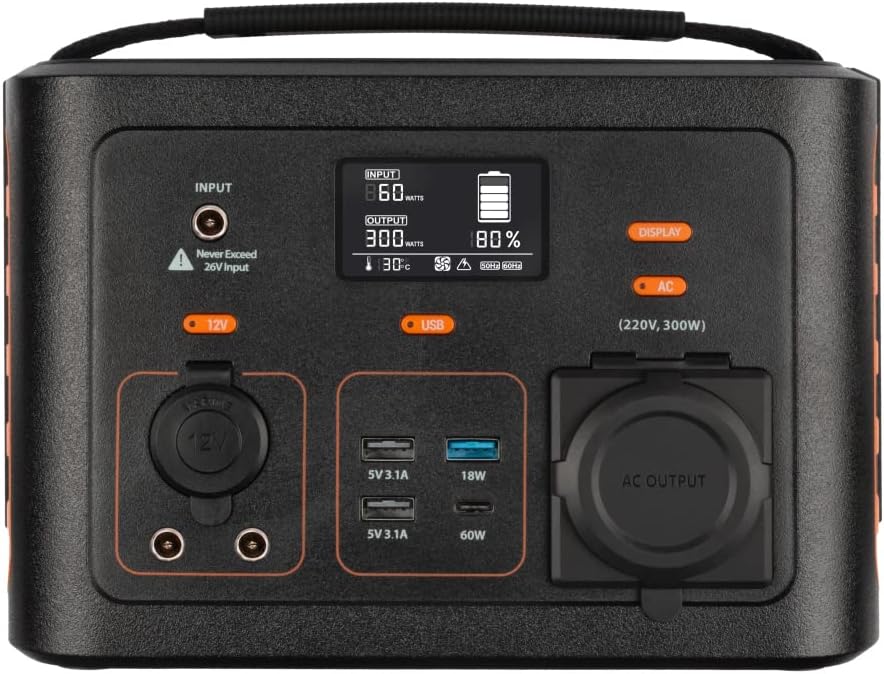
Setšoantšo: Haufi view of the Xtorm XP300U's front panel, showing the digital display, input port, 12V DC output, USB-A and USB-C ports, and AC output socket.
Likarolo tsa Front Panel:
- Pontšo ea LCD: Shows battery level, input/output power, and status indicators.
- Boema-kepe ba Kena: For charging the power station via AC adapter, car charger, or solar panel.
- 12V DC Sephetho: For powering 12V devices.
- USB-A Ports: Multiple USB-A outputs for charging various devices (e.g., 5V 3.1A, 18W Quick Charge).
- Boema-kepe ba USB-C PD: High-speed USB-C Power Delivery output (up to 60W).
- AC Output Socket: Standard AC outlet for powering household appliances (220V, 300W).
- Likonopo tsa ho Laola: Buttons for turning on/off specific outputs (e.g., AC, DC, USB).

Setšoantšo: Holimo view of the Xtorm XP300U, highlighting its integrated carrying handle for portability.

Setšoantšo: Ka morao view of the Xtorm XP300U, featuring the Xtorm brand logo and "Portable Power Station 300" text.
Tlhophiso
Before first use, it is recommended to fully charge your Xtorm XP300U Power Station.
- Hlakola: Tlosa seteishene sa motlakase le lisebelisoa tsohle ka hloko ho tsoa sephutheloana.
- Initial Charge (AC Wall Charger):
- Connect the AC wall charger to the input port on the power station.
- Plug the AC wall charger into a standard wall outlet.
- The LCD display will show the charging status. Charge until the battery indicator shows 100%.
- Sebaka: Place the power station on a stable, flat surface in a well-ventilated area, away from direct sunlight or heat sources.
Litaelo tsa Ts'ebetso
The Xtorm XP300U offers multiple ways to charge and power your devices.
Ho tjhaja Setsi sa Motlakase:
The XP300U can be recharged using four different methods:
Image: Visual representation of the four charging methods for the Xtorm XP300U: via wall socket, USB-C PD, solar panel (not included), and 12V car charger.
- Via Wall Socket (AC Charger): Connect the included AC wall charger to the input port and a wall outlet.
- Via USB-C PD: Use a compatible USB-C Power Delivery charger (not included) to charge the unit via its USB-C port.
- Ka Solar Panel: Connect a compatible solar panel (not included) to the input port using the provided MC4 to DC cable. Ensure the solar panel is placed in direct sunlight for optimal charging.
- Via 12V Car Charger: Connect the included car charger cable to the input port and your vehicle's 12V cigarette lighter socket.
The LCD display will show the input wattage and battery charge status during charging. You can use the outputs even while the power station is charging (pass-through charging).
Using the Outputs:
The XP300U provides various output ports to power different types of devices.

Image: The Xtorm XP300U demonstrating its universal compatibility with icons representing various devices and output types: 1x AC 300W/220V, 1x USB-C PD 60W, 2x DC 5.5mm 60W, 2x USB QC3.0 18W, 1x USB 18W, and 1x 12V Car 120W.
- AC Output (220V, 300W):
- Press the "AC" button to activate the AC output. The AC indicator on the display will light up.
- Plug your device's power cord into the AC outlet.
- Ensure your device's power consumption does not exceed 300W.
- Press the "AC" button again to turn off the AC output when not in use.
- Sephetho sa DC (12V):
- Press the "12V" button to activate the DC output. The DC indicator will light up.
- Connect your 12V device to the DC port.
- Press the "12V" button again to turn off the DC output.
- USB Outputs (USB-A, USB-C PD):
- The USB outputs are typically always active when the unit is on.
- Connect your USB-powered devices to the appropriate USB-A or USB-C PD ports.
- The display will show the output wattage for connected devices.
The power station can provide power for extended periods, depending on the connected devices' power consumption.

Setšoantšo: Examples of device runtimes with the Xtorm XP300U: 17.5 hours for a 10W LED light, 5.5 hours for a 30W small TV, 4 hours for a 40W small coolbox, and 6 hours for a 40W small coolbox (via 12V carplug output).
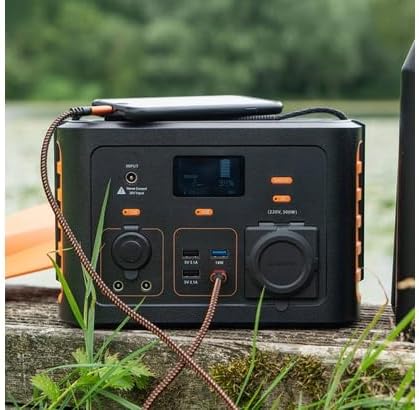
Image: The Xtorm XP300U Portable Power Station being used outdoors on a wooden surface, charging a smartphone, demonstrating its portability and utility in various environments.
Tlhokomelo
Proper maintenance ensures the longevity and optimal performance of your power station.
- Ho hloekisa: Sebelisa lesela le bonolo, le omeletseng ho hloekisa bokantle ba yuniti. Se ke oa sebelisa li-abrasive cleaners kapa solvents.
- Polokelo:
- Boloka seteishene sa motlakase sebakeng se pholileng, se omileng, hole le khanya ea letsatsi le mocheso o feteletseng.
- Bakeng sa polokelo ea nako e telele, lefisa yuniti ho hoo e ka bang 50-80% likhoeling tse ling le tse ling tse 3-6 ho boloka bophelo bo botle ba betri.
- Avoid storing in environments with high humidity.
- Tlhokomelo ea Betri: Do not fully discharge the battery frequently, as this can reduce its lifespan. Recharge promptly when the battery level is low.
Ho batle phoso
If you encounter issues with your Xtorm XP300U, refer to the following common problems and solutions.
| Bothata | Lebaka le ka khonehang | Tharollo |
|---|---|---|
| Yuniti ha e bulele. | Betri e ntšitsoe ka botlalo. | Connect the power station to an AC wall outlet and charge it for at least 30 minutes. |
| AC output not working. | AC output not activated; device exceeds 300W; overheating. | Press the "AC" button to activate. Check device wattage. Allow unit to cool down if overheated. |
| USB ports not charging. | Device not compatible; cable faulty. | Ensure device is compatible. Try a different USB cable. |
| Ho tjhaja butle. | Using a low-power charger; environmental factors (e.g., cloudy for solar). | Use the original AC charger or a higher wattage USB-C PD charger. Optimize solar panel placement. |
If the problem persists, please contact Xtorm customer support.
Litlhaloso
Detailed technical specifications for the Xtorm XP300U Portable Power Station.
| Sebopeho | Lintlha |
|---|---|
| Lebitso la Mohlala | XP300U |
| Brand | Xtorm |
| Matla a Output | 300 Watts (AC) |
| Keletso Voltage | 12 Volts (DC) |
| Mohloli oa Matla | AC Wall, USB-C PD, Solar, Car Charger |
| Litšebeliso tse khothalelitsoeng | Home, Campng |
| Boima ba 'mele | Ligrama tse 3300 (3.3 kg) |
| Mmala | namunu |
| Kenyellelitsoe Likaroloana | 1 package (Power Station, AC Charger, Car Charger, MC4 to DC Cable) |

Image: Dimensions of the Xtorm XP300U Portable Power Station (240mm x 154mm x 142mm) and its weight (3.3 kg), highlighting its convenient travel size.
Warranty le Tšehetso
Xtorm products come with a standard warranty. Please refer to the warranty card included in your package or visit the official Xtorm websebaka bakeng sa lintlha le lipehelo tse qaqileng tsa tiisetso.
For technical support, troubleshooting assistance, or warranty claims, please contact Xtorm customer service:
- Websebaka: www.motsala.eu (Check for support contact information)
- Lengolo-tsoibila: Refer to the Xtorm websebaka sa marang-rang bakeng sa liaterese tse itseng tsa imeile tsa tšehetso.
- Mohala: Refer to the Xtorm websebaka sa marang-rang bakeng sa linomoro tsa mohala tsa tšehetso ea libaka.
When contacting support, please have your product model (XP300U) and purchase details ready.
Ask a question about this manual
Ask about setup, troubleshooting, compatibility, parts, safety, or missing instructions. Manuals+ will review the question and use this page’s manual context to help answer it.