
1. Litaelo tsa Tšireletso
Please read these safety instructions carefully before using the product. Keep this manual for future reference.
- Sehlahisoa sena se etselitsoe ho sebelisoa ka tlung feela. Se ke oa se pepesetsa mongobo kapa mocheso o feteletseng.
- Do not attempt to open or modify the device. This may void the warranty and pose a safety risk.
- Boloka sesebelisoa hole le bana.
- Use only the provided micro-USB cable for charging.
- U se ke ua sheba ka ho toba mohloling oa lebone la LED.
2. Likahare tsa Sephutheloana
Netefatsa hore lintho tsohle li teng ka har'a sephutheloana:
- ANSMANN Under-Cabinet Light M
- Mohala oa ho tjhaja oa Micro-USB
- Buka ea Tataiso
3. Sehlahisoa Overview
The ANSMANN Under-Cabinet Light M is a versatile, rechargeable LED lamp designed for various indoor applications. It features a motion sensor, adjustable color temperatures, and a slim design for discreet placement.

Image 1: The ANSMANN Under-Cabinet Light M, showcasing its sleek, white design and integrated motion sensor.
Likarolo tsa Bohlokoa:
- PIR Motion Sensor: Automatically activates the light when motion is detected in low-light conditions.
- Twilight Sensor: Ensures the light only activates in dark environments, conserving battery life.
- Mocheso oa Mobala o Fetohang: Choose between 3 color temperatures (cool white, neutral white, warm white) or activate all LEDs for maximum brightness.
- Stepless Dimming: Adjust brightness by holding down the control button.
- Betri e ka nchafatsoang hape: Integrated battery for cordless operation, charged via micro-USB.
- Ho Tlama ha Magnetic: Easy installation and removal with a magnetic strip.

Image 2: Diagram illustrating the Micro-USB Port, On/Off button, and PIR motion sensor on the device.
4. Ho seta le ho kenya
The Under-Cabinet Light M offers flexible installation options using its integrated magnetic strip.
Ho Tlama ha Magnetic:
- Identify a suitable, clean, and dry surface for installation (e.g., inside a cabinet, under a shelf).
- The light comes with a fixed magnetic strip on its back. For non-metallic surfaces, use the included adhesive strip.
- Peel off the protective film from the adhesive strip and firmly press it onto the desired surface.
- Attach the Under-Cabinet Light M to the adhesive strip. The magnetic connection will hold it in place.
Setšoantšo sa 3: Haufi-ufi view of the magnetic strip and the removable adhesive strip, demonstrating the mounting mechanism.

Setšoantšo sa 4: Example of the under-cabinet light installed in a modern kitchen setting, providing illumination over a countertop.
5. Ts'ebetso
The Under-Cabinet Light M offers intuitive control for its lighting functions.
Tlosa/Tima:
- Locate the On/Off button (refer to Image 2).
- Press the button once to turn the light on or off.
Fetola Mocheso oa 'Mala:
- With the light on, short press the control button repeatedly to cycle through the 3 available color temperatures: cool white, neutral white, and warm white.
- A fourth press will activate all LEDs for maximum brightness.
Mosebetsi oa Dimming:
- To adjust the brightness, press and hold the control button. The light will gradually dim or brighten. Release the button when the desired brightness level is reached.
Motion and Twilight Sensor:
- When the light is in motion sensor mode, it will automatically turn on when movement is detected within its range.
- The integrated twilight sensor ensures that the motion sensor only activates the light in dark environments, preventing unnecessary illumination during daylight hours.
6. Ho tjhaja
The Under-Cabinet Light M is equipped with a rechargeable battery for convenient cordless use.
- When the battery is low, the light output may decrease or the light may not turn on.
- Gently detach the light from its magnetic mounting surface.
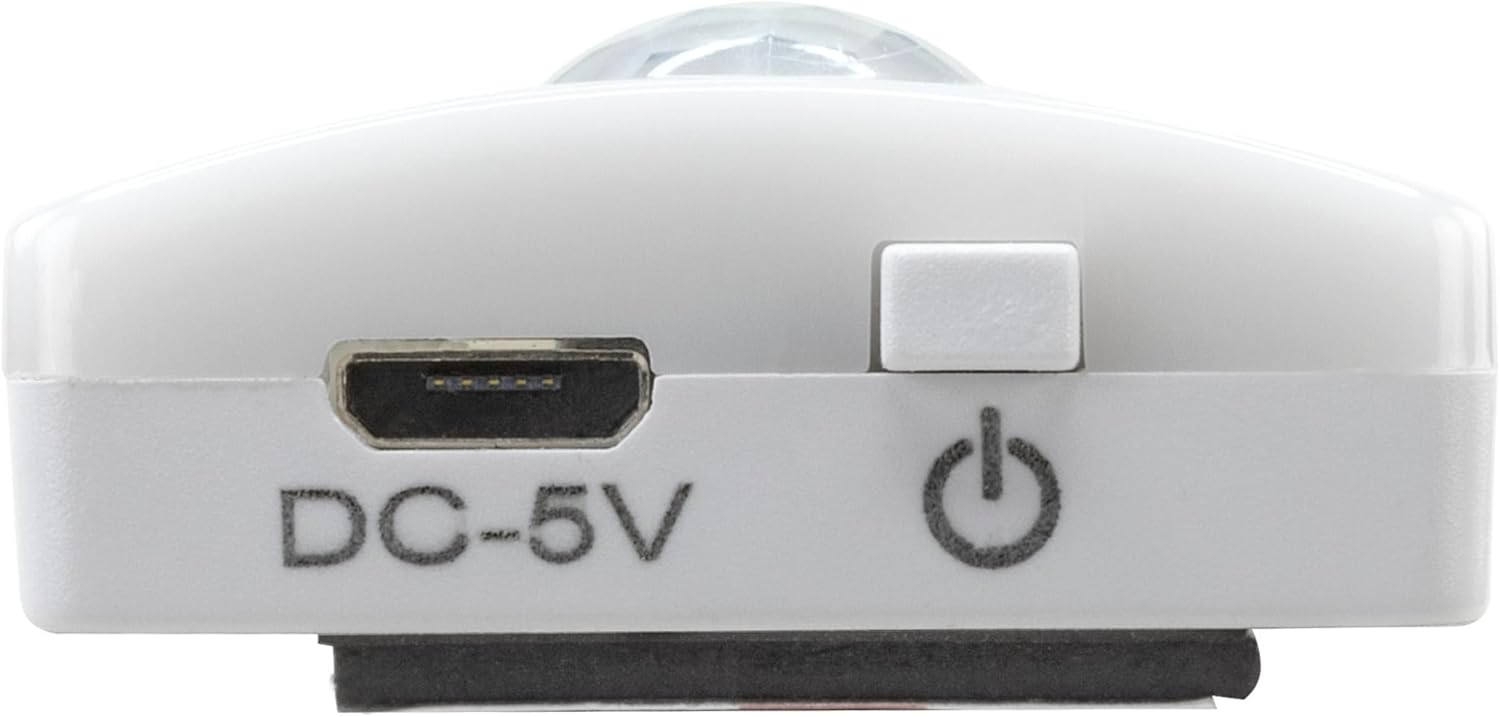
- Connect the provided micro-USB cable to the micro-USB port on the light (refer to Image 2).
- Connect the other end of the micro-USB cable to a suitable USB power source (e.g., USB wall adapter, computer USB port).
- An indicator light will show the charging status (e.g., red for charging, green for fully charged).
- Once fully charged, disconnect the cable and reattach the light to its mounting surface.

Setšoantšo sa 5: Ka botlalo view of the Micro-USB charging port and the On/Off button, essential for charging and operation.
7. Tlhokomelo
To ensure the longevity and optimal performance of your Under-Cabinet Light M, follow these simple maintenance guidelines:
- Clean the light regularly with a soft, dry cloth. Do not use abrasive cleaners or solvents.
- Ensure the motion sensor lens is kept clean and free from obstructions for proper function.
- Store the light in a cool, dry place if not in use for extended periods.
8. Ho rarolla mathata
If you encounter issues with your Under-Cabinet Light M, refer to the following common problems and solutions:
| Bothata | Lebaka le ka khonehang | Tharollo |
|---|---|---|
| Leseli ha le khanye. | Betri e felile. | Charge the light using the micro-USB cable. |
| Motion sensor ha e bone motsamao. | Ensure the sensor is clean and unobstructed. Check if the environment is dark enough for the twilight sensor to activate. | |
| Leseli ha le lefise. | Cable e fosahetseng kapa mohloli oa matla. | Try a different micro-USB cable or USB power adapter. |
| Kou ea ho tjhaja e litšila. | Gently clean the micro-USB port with a dry, soft brush. | |
| Leseli lea panya kapa le fifala. | Betri e tlase. | Hlahisa sesebelisoa hape. |
Haeba bothata bo ntse bo tsoela pele ka mor'a ho leka litharollo tsena, ka kopo ikopanye le ts'ehetso ea bareki.
9. Litlhaloso
| Sebopeho | Lintlha |
|---|---|
| Nomoro ea Mohlala | 1600-0438 |
| Litekanyo tsa Sehlahisoa | 25L x 3.5W x 1.3H cm (9.84L x 1.38W x 0.51H inches) |
| Boima ba Ntho | Ligrama tse 112 (0.25 lbs) |
| Mohloli oa Matla | Matla a Battery |
| Boema-kepe ba ho tjhaja | Micro-USB (DC-5V) |
| Lintho tse bonahalang | Plastiki |
| Mmala | Bosoeu |
| Mofuta oa Tlhophiso | Ho Thabisa Leboteng (Makenete) |
| Mofuta oa kamore | Dining Room, Kitchen, Wardrobe, Hallway, etc. |
10. Tiisetso le Tšehetso
ANSMANN products are manufactured with high-quality standards. For information regarding warranty terms and conditions, please refer to the documentation provided with your purchase or visit the official ANSMANN websebaka.
For technical support or inquiries, please contact ANSMANN customer service through their official channels.