
1. Sehlahisoa Overview
The Anderic OEM NSRCFNA21 Smart Remote is an original equipment manufacturer (OEM) replacement remote control specifically designed for various Insignia TV models. This remote provides seamless functionality and user-friendly operation, ensuring reliable control over your television.
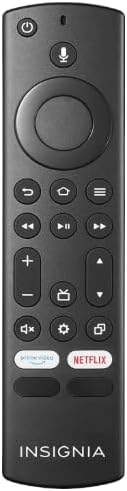
Setšoantšo sa 1.1: The Anderic OEM NSRCFNA21 Smart Remote. This image displays the front view of the black remote control, featuring various buttons for power, voice control, navigation, volume, channel, and dedicated streaming service buttons.
Lintlha tsa bohlokoa li kenyelletsa:
- Original Quality: An authentic OEM product, ensuring performance and reliability comparable to the remote originally supplied with your TV.
- Moralo o Sebeletsang: Intuitive buttons and controls for easy navigation, volume adjustment, channel changes, and access to various TV functions.
- Ts'ebetso e Tšepahalang: Provides a stable and responsive connection for accurate command execution.
2. Litaelo tsa ho Seta le ho Kopanya
To ensure proper functionality, the remote control must be paired with your Insignia TV. Follow these steps carefully:
- Seta TV bocha: Unplug your Insignia TV from its power source. Wait for approximately 30 seconds.
- Ho Bulela TV ka Matla: Plug the TV back into the power source and turn it on. Allow the TV to fully boot up.
- Qala ho Kopanya: Once the TV has completely booted up and is displaying content, press and hold the Lehae button on the Anderic NSRCFNA21 remote control for up to 30 seconds.
- Remote Update (if prompted): Your TV may display a message indicating that the remote needs an update. If prompted, allow the TV to proceed with the update. This process may take 1 to 3 minutes to complete.
- Netefatso: After the update (if any) and pairing process, test the remote's functions (e.g., volume, channel, navigation) to confirm successful pairing.
If the remote does not pair after following these steps, repeat the process or refer to the troubleshooting section.
3. Ho sebetsa Remote Control
The Anderic NSRCFNA21 remote control features an intuitive layout for easy operation of your Insignia TV. Below are the general functions of the primary buttons:
- Konopo ea Matla: E bulela kapa e tima TV.
- Konopo ea Taolo ea Lentsoe: Activates voice commands for searching content or controlling the TV.
- Navigation Pad (Directional Buttons and Select): E sebedisetswa ho kena hara dimenu le ho kgetha dintho.
- Konopo ea Lehae: Returns to the TV's main home screen.
- Konopo ea ho Khutlela: E khutlela skrineng kapa lethathamong le fetileng.
- Menu/Options Button: Accesses additional menu options or settings.
- Phahamiso ea Phahamiso / Tlase: E lokisa bophahamo ba modumo ba TV.
- Channel Holimo/tlase: E fetola likanale tsa TV.
- Konopo ea Limumu: Mutes or unmutes the TV's audio.
- Konopo ea Litlhophiso: E bula lenane la litlhophiso tsa TV.
- Konopo ea ho kenya/mohloli: Changes the TV's input source (e.g., HDMI 1, HDMI 2).
- Dedicated Streaming Service Buttons: Provides quick access to popular streaming applications (e.g., Amazon Prime Video, Netflix).
4. Ho lumellana
The Anderic OEM NSRCFNA21 Smart Remote is compatible with the following Insignia TV models:
- NS24DF310NA21
- NS39DF310NA21
- NS50DF710NA21
- NS55DF710NA21
This remote also replaces the following models:
- NSRCFNA19 Rev B Fire
- NSRCFNA19revB
- NSRCFNA21 Fire
- NSRCFNA21 Rev E
- NSRCFNA21-Rev-E
Ensure your TV model is listed above for optimal performance.
5. Tlhokomelo
Proper maintenance can extend the life and functionality of your remote control.
- Phetoho ea Betri: The remote requires two AAA batteries. Replace batteries when the remote's responsiveness decreases or it stops functioning. Ensure correct polarity when inserting new batteries.
- Ho hloekisa: Use a soft, dry cloth to clean the remote's surface. Avoid using liquid cleaners or abrasive materials, as these can damage the remote.
- Polokelo: Boloka remote sebakeng se omileng, hole le mocheso o feteletseng le khanya ea letsatsi e tobileng.
6. Ho rarolla mathata
If you encounter issues with your Anderic NSRCFNA21 Smart Remote, try the following troubleshooting steps:
- Remoutu ha e arabe:
- Check the batteries. Replace them with fresh AAA batteries, ensuring correct polarity.
- Netefatsa hore ha ho na litšitiso lipakeng tsa remote le sensor ea TV.
- Re-attempt the pairing process as described in Section 2.
- Ts'ebetso ea nakoana:
- Sena se ka bontša matla a betri a tlase. Nkela libeteri sebaka.
- Ensure you are within the effective range of the TV's sensor.
- Pairing Fails:
- Confirm your TV model is listed in the compatibility section (Section 4).
- Ensure the TV is fully booted up before attempting to hold the Home button.
- Try unplugging the TV for a longer period (e.g., 1-2 minutes) before plugging it back in and re-attempting pairing.
If problems persist after attempting these steps, contact customer support for further assistance.
7. Litlhaloso
| Brand | Anderik |
| Nomoro ea Mohlala | NSRCFNA21 Rev B |
| Lisebelisoa tse lumellanang | Insignia Televisions |
| Mohloli oa Matla | 2 AAA libetri (tse hlokahalang) |
| Boima ba Ntho | 1.76 lik'hilograma |
| Litekanyo tsa sephutheloana | 6.3 x 2.95 x 0.67 lisenthimithara |
| Mmala | Ntsho |
| Moetsi | Dan's Electronics Etc., Inc. |
8. Tiisetso le Tšehetso
For warranty information or technical support, please contact the manufacturer, Anderic (Dan's Electronics Etc., Inc.). Refer to the product packaging or the official Anderic website for specific contact details and warranty terms.
U ka etela Anderic Store on Amazon bakeng sa lintlha tse ling.