
1. Selelekela
The TecMate OptiMate 7 (Model TM267) is an advanced 12V/24V battery charger and maintainer designed for lead-acid batteries, including AGM, Wet, EFB, Spiral Cell, and Gel types. It features a 10A output for 12V batteries and a 5A output for 24V batteries, making it suitable for a wide range of applications from motorcycles and cars to trucks, boats, RVs, and industrial equipment. This manual provides essential information for safe and effective use of your OptiMate 7 charger.

Figure 1: OptiMate 7 in use, demonstrating simple connection for various vehicles. Learn more about OptiMate 7
2. Boitsebiso ba Tšireletseho
Always read and understand all safety warnings and instructions before using the OptiMate 7 charger. Failure to do so may result in electric shock, fire, or serious injury.
- Use the charger only for 12V or 24V lead-acid batteries (AGM, Wet, EFB, Spiral Cell, Gel). Do not use for other battery types.
- Ensure proper ventilation during charging. Do not charge in a sealed area.
- Avoid sparks or flames near the battery. Batteries can produce explosive gases.
- Apara tšireletso ea mahlo le liaparo tse sireletsang ha u sebetsa ka libeteri.
- Boloka moo bana ba ka fihlang teng.
- Se ke oa pepesetsa tjhaja pula kapa mongobo o mongata.
- Tlosa motlakase oa AC pele o etsa kapa o roba likhokahano le betri.
- If the battery is completely dead or internally shorted, the OptiMate charger cannot revive it. Such batteries require replacement.
- If the green LED indicates full charge but the engine does not start, a minor internal short in the battery may be present. The OptiMate charger may not detect such minor shorts, and the battery will require replacement.
3. Likahare tsa Sephutheloana
Verify that all items are present in your OptiMate 7 package:
- OptiMate 7 12V/24V Battery Charger Unit (Model TM267)
- M8/M10 Ring Terminal Cable (for permanent connection to vehicle battery terminals)
- Alligator Clip Cable (for temporary connection)
- User Manual (Japanese, refer to this translated version for English instructions)

Figure 2: Included accessories with the OptiMate 7 charger.
4. Likarolo tsa lihlahisoa
The OptiMate 7 incorporates several advanced technologies to ensure optimal battery performance and longevity:
- Ampmatic Technology: This patented technology automatically adjusts the charge current based on the battery's size and condition, ensuring efficient and safe charging without overcharging.
- Battery Recovery Function: Features a powerful 3-stage desulfation mode to recover deeply discharged batteries, starting charging even from 0.5V.
- Battery Diagnosis Function: Provides clear battery health status indication (red, yellow, green LEDs) to help identify potential issues.
- 24/7 Maintenance: Safe for long-term connection, the charger automatically switches to a maintenance mode, preventing self-discharge and keeping the battery optimally charged.
- Tšireletso e Khutšoanyane ea Potoloho: Built-in safety features prevent damage from accidental short circuits.
- Matšeliso a Mocheso: E fetola ka bohona bophahamo ba ho tjhajatage based on ambient temperature for optimal performance in various climates.


Figure 3: Key features and trusted quality of OptiMate chargers.
5. Seta
Follow these steps to set up your OptiMate 7 charger:
- Lokisa Betri: Ensure the battery terminals are clean and free of corrosion. If charging a wet cell battery, check electrolyte levels and top up with distilled water if necessary.
- Hokela ho Betri: Choose either the ring terminal cable for permanent installation or the alligator clip cable for temporary connection. Connect the red (+) clamp/terminal to the positive (+) battery terminal and the black (-) clamp/terminal to the negative (-) battery terminal. Ensure a secure connection.
- Hokela ho Matla: Plug the AC power cord of the OptiMate 7 into a standard wall outlet.
The charger will automatically begin its diagnostic and charging process. The battery can remain in the vehicle during charging.
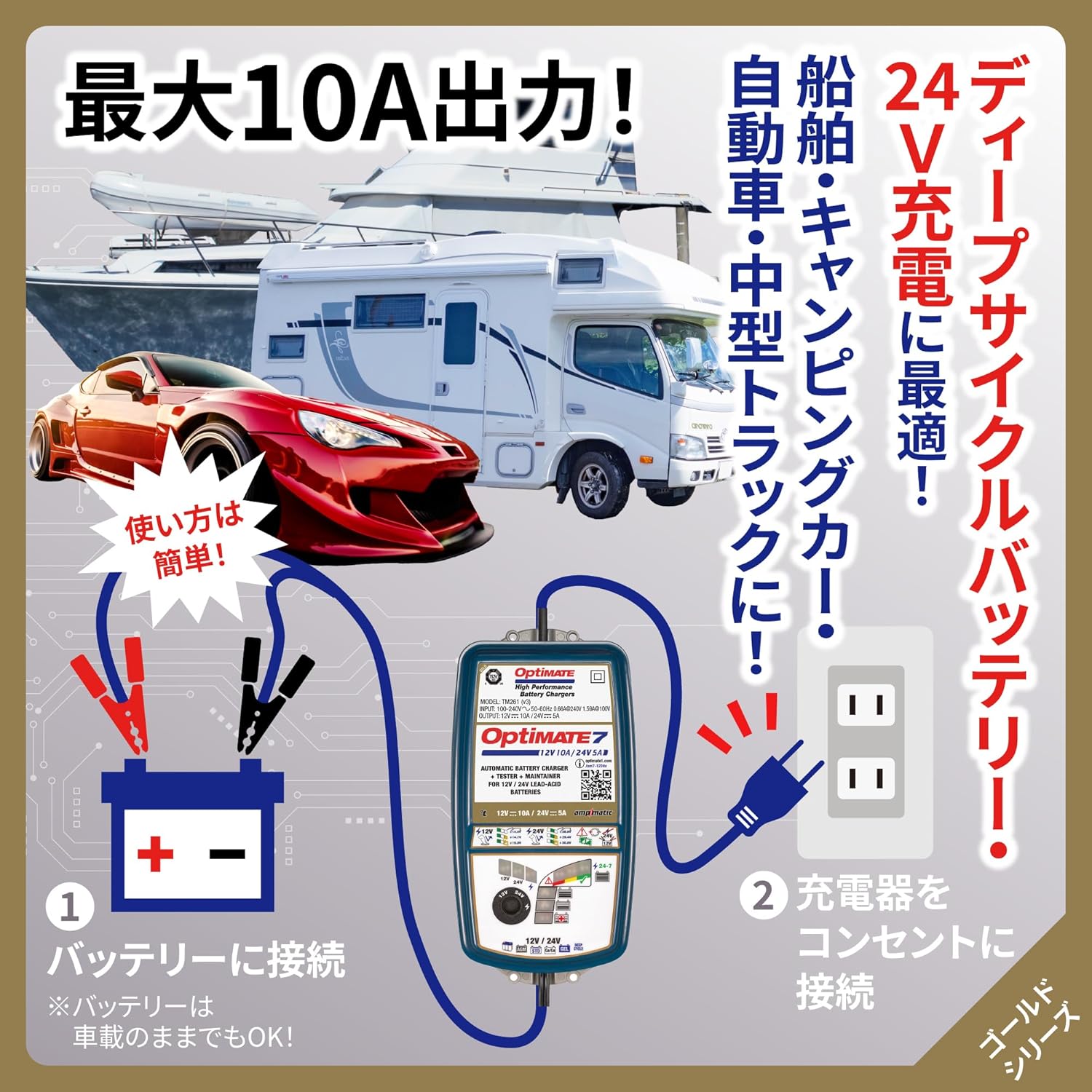
Figure 4: Simple two-step connection process for the OptiMate 7.
6. Litaelo tsa Ts'ebetso
The OptiMate 7 features an intelligent multi-step charging program. Once connected, it automatically diagnoses the battery and proceeds through the charging stages.
6.1 Charging Process Overview
- Tlhahlobo: The charger first checks the battery's voltage le bophelo bo botle ka kakaretso.
- Desulfation (if needed): If a deeply discharged or sulfated battery is detected, the pulse recovery mode activates to break down lead sulfate crystals.
- Tefiso ea Bongata: Delivers maximum current to bring the battery to approximately 80% charge.
- Tefiso ea ho monya: Gradually reduces current while increasing matlatage to fully charge the battery.
- Netefatso: Checks if the battery can retain charge.
- Tlhokomelo: Once fully charged, the charger enters a long-term maintenance mode, delivering small charges as needed to counteract self-discharge.
6.2 Mode Selection (12V / 24V and Voltage Likhetho)
The OptiMate 7 allows selection between 12V and 24V charging, and offers specific voltage settings for different battery types:
- Use the 'SELECT' dial on the charger to choose the appropriate voltage (12V or 24V) and charging mode for your battery.
- Bakeng sa Batri tsa 12V:
- 14.4V: For standard lead-acid batteries.
- 14.7V: For general deep cycle batteries.
- 15.0V: For Optima, Voyager, and other spiral cell type batteries.
- Bakeng sa Batri tsa 24V:
- 28.8V: For standard 24V lead-acid batteries.
- 29.4V: For general 24V deep cycle batteries.
- 30.0V: For 24V Optima, Voyager, and other spiral cell type batteries.

Figure 5: Selectable charging voltages for 12V and 24V batteries.
7. Tlhokomelo
The OptiMate 7 is designed for long-term battery maintenance, ensuring your battery remains in optimal condition, especially during periods of non-use.
- Connect and Forget: The 24/7 maintenance function allows you to leave the charger connected to the battery indefinitely. It will automatically monitor the battery's state and deliver small, precise charges to prevent self-discharge.
- Pulse Recovery: The powerful pulse recovery feature helps to reverse sulfation, a common cause of battery failure, by dissolving lead sulfate crystals that build up on battery plates. This can extend battery life.
- Tlhokomelo ea Bophelo ba Battery: The charger continuously monitors the battery's health and provides feedback through its LED indicators. A green LED indicates a healthy, fully charged battery.

Figure 6: Pulse recovery charging for sulfation removal.

Figure 7: Long-term maintenance and battery diagnosis features.
8. Ho rarolla mathata
If you encounter issues with your OptiMate 7 charger, refer to the following common problems and solutions:
- Charger does not start: Ensure the AC power cord is securely plugged into a live outlet and the battery connections are correct (red to positive, black to negative).
- Battery does not charge / Charger indicates error:
- Hlahloba matla a betritage. If the battery is completely dead (e.g., 0V), the charger may not be able to initiate charging.
- Ntlha ea Bohlokoa 1: The OptiMate charger cannot revive batteries that have reached the end of their service life or have an internal short circuit. If an internal short occurs, no charger can revive it, and the battery must be replaced.
- Green LED is on, but engine won't start:
- Ntlha ea Bohlokoa 2: If the green LED indicates a full charge but the engine still won't start, a minor internal short may be present within the battery. While the surface voltage may appear normal, it drops sharply during engine cranking, preventing startup. The OptiMate charger's battery health diagnosis is a guideline and may not detect such minor internal shorts. In such cases, the battery requires replacement as internal shorts cannot be repaired by a charger.
- Unusual heat or smell: Immediately disconnect the charger from both the AC outlet and the battery. Contact customer support.
9. Litlhaloso
| Sebopeho | Tlhaloso |
|---|---|
| Mohlala | TM267 |
| Keletso Voltage | 100-240V (Global Input) |
| Output Current | 10A (12V), 5A (24V) |
| Battery Voltage | 12V & 24V Lead-Acid Batteries |
| Mefuta ea Battery e lumellanang | AGM, Wet, EFB, Spiral Cell, Gel |
| Bokhoni ba Battery bo khothalelitsoeng | 10-240Ah (12V), 5-120Ah (24V) |
| Charging Modes (12V) | 14.4V (Standard), 14.7V (Deep Cycle), 15.0V (Optima/Spiral Cell) |
| Charging Modes (24V) | 28.8V (Standard), 29.4V (Deep Cycle), 30.0V (Optima/Spiral Cell) |
| Likaroloana | Ampmatic, Pulse Recovery, Battery Diagnosis, 24/7 Maintenance, Short Protection, Temperature Compensation |
| Ingress Protection (IP) Rating | IP54 (Rated down to -40°C/-40°F) |
| Litekanyo tsa Sehlahisoa | 27 x 18 x 13 cm, |
| Boima ba Sehlahisoa | 1.44 lik'hilograma |

Figure 8: Detailed technical specifications and charging program overview.
10. Warranty & Ts'ehetso
For warranty information, technical support, or service inquiries regarding your TecMate OptiMate 7 charger, please refer to the official TecMate websaete kapa ikopanye le morekisi oa lehae oa hau. Boloka rasiti ea hau ea theko e le bopaki ba hore u rekile litseko tsa waranti.
- Lisebelisoa tsa Marang-rang: Visit the official TecMate websebaka sa li-FAQ, ngoliso ea lihlahisoa, le lisebelisoa tse ling tsa tšehetso.
- Tšebeletso ea bareki: Contact details for customer support can typically be found on the TecMate websetsheng kapa sephuthelong sa sehlahiswa sa mantlha.