
1. Selelekela
This manual provides detailed instructions for the installation, operation, and maintenance of your MAIMEIMI 85mm GPS Speedometer. Designed for a wide range of applications including cars, tractors, trucks, boats, and marine vessels, this speedometer features a clear TFT screen, IP67 waterproof rating, and a wide 9-32VDC working voltage range. Please read this manual thoroughly before installation and use to ensure proper function and safety.
2. Likahare tsa Sephutheloana
Upon opening your package, please verify that all the following items are included:
- 1 x GPS Speedometer (85mm / 3-3/8")
- 1 x GPS Antenna (3-meter cable length)
- 1 x Buka ea litaelo

Image: Contents of the MAIMEIMI GPS Speedometer package.
3. Likarolo tsa lihlahisoa
- TFT Screen Display: Provides clear visibility of speed, odometer, trip meter, battery voltage, and course over ground (COG).
- Vol. Voltage Range: Operates on 9-32VDC, suitable for various vehicle types.
- Waterproof & Anti-fogging: IP67 rated for water and fog resistance, ensuring reliable performance in challenging environments.
- Multiple Unit Switching: Easily switch between kilometers per hour (km/h), miles per hour (mph), and knots (rounded to one decimal).
- GPS Signal Acquisition: Initial signal acquisition takes approximately 30 seconds, with faster connections under clear skies.
- Odometer & Trip Meter: Odometer (0-999999km) is adjustable via the back button. Trip meter (0-999.9km) resets when power is off.
- Orientation Pointer: Displays Course Over Ground (COG) for directional awareness.
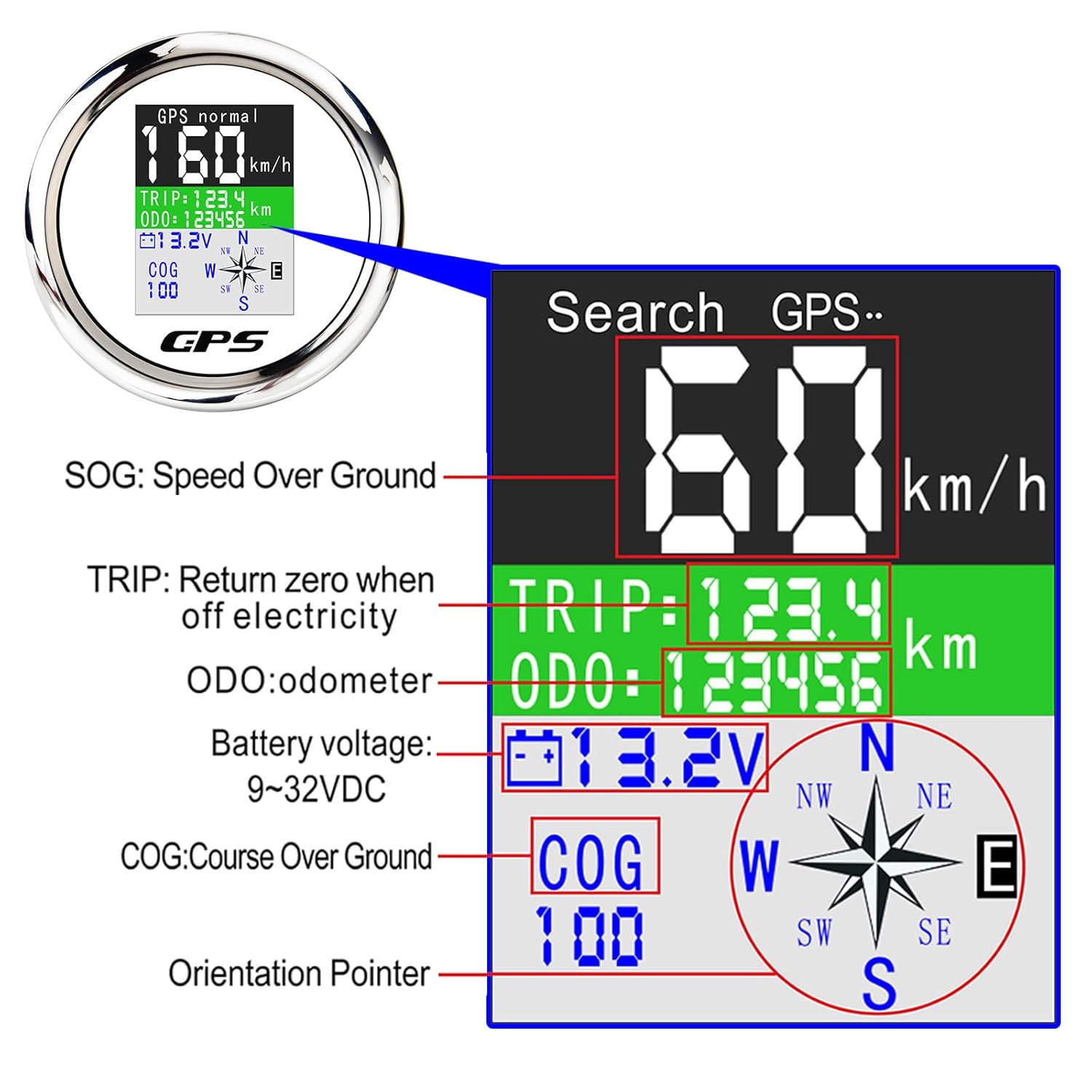
Image: Detailed display information of the GPS Speedometer.

Image: The speedometer undergoing a waterproof test.
4. Ho seta le ho kenya
Follow these steps for proper installation of your GPS Speedometer:
- Lokisa Lesoba la ho Thabisa: Open an 85mm (3 3/8") diameter hole in your panel. Ensure there is a 55mm (2 3/16") depth clearance behind the panel for the gauge body.
- Insert the Gauge: Carefully place the speedometer into the prepared hole.
- Sireletsa Tekanyo: Use the provided mounting ring to screw down and secure the gauge firmly in place.
- Hokela Wiring:
- Connect the Black wire to Ground (-).
- Connect the Red wire to 9-30VDC power supply.
- Antenna ea ho hokela ea GPS: Plug the GPS antenna into the designated port on the back of the speedometer. The GPS antenna can be optionally mounted using 3M double-sided tape.

Image: Front and back dimensions of the GPS Speedometer.

Image: Basic wiring diagram for the speedometer.

Image: Step-by-step installation guide for the gauge.
5. Litaelo tsa Ts'ebetso
Once installed and powered, the speedometer will begin searching for a GPS signal. After acquiring a signal, it will display speed and other data.
- Phetoho ea Yuniti: To change the speed unit (km/h, mph, or knots), press the button located on the back of the speedometer. The unit will cycle through the options and save automatically.
- Odometer Adjustment: The odometer value can be adjusted using the button on the back.
- Trip Meter: The trip meter automatically resets to zero when the power is turned off.

Image: Display showing selectable speed units.
Video: Demonstration of the 85mm GPS Speedometer, including unit switching and waterproof features.
6. Tlhokomelo
To ensure the longevity and optimal performance of your GPS Speedometer, follow these general maintenance guidelines:
- Regularly clean the screen and bezel with a soft, damp lesela. Qoba li-abrasive cleaners.
- Netefatsa hore likhokahano tsohle tsa terata li lula li sireletsehile ebile li se na mafome.
- Periodically check the GPS antenna for any damage or obstruction to maintain signal integrity.
- While the unit is IP67 waterproof, avoid prolonged submersion or high-pressure water jets.
7. Ho rarolla mathata
If you encounter any issues with your GPS Speedometer, consider the following common solutions:
- Ha ho na Letšoao la GPS: Netefatsa hore antenna ea GPS e na le leseli le hlakileng view of the sky. Obstructions can block the signal. Allow up to 30 seconds for initial signal acquisition.
- Incorrect Speed Reading: Verify that the correct unit (km/h, mph, knots) is selected. If the issue persists, ensure the GPS antenna is securely connected.
- Pontšo ha e sebetse: Check all power connections to ensure they are secure and receiving the correct voltag(9-32VDC).
- Likonopo ha li arabele: Ensure the unit is clean and free from debris around the buttons.
Haeba mathata a ntse a tsoela pele ka mor'a ho leka mehato ena, ka kopo ikopanye le tšehetso ea bareki bakeng sa thuso e eketsehileng.
8. Litlhaloso
| Tlhaloso | Lintlha |
|---|---|
| Litekanyo tsa Sehlahisoa | 3.82 x 3.78 x 2.2 lisenthimithara; 10.88 lik'hilograma |
| Sebetsa Voltage | 9-32VDC |
| Lintlha tse sa keneleng metsi | IP67 |
| Lintho tse bonahalang | Stainless Steel, Plastic, Anti-Fogging Glass |
| Lebelo la Lebelo | 0-600 km/h |
| Odometer Range | 0-999999 km (adjustable) |
| Trip Meter Range | 0-999.9 km (resets on power off) |
| Moetsi | MAIMEIMI |
9. Tiisetso le Tšehetso
For warranty information or technical support, please refer to the contact details provided with your purchase documentation or visit the official MAIMEIMI websebaka. Boloka bopaki ba hau ba theko bakeng sa likopo life kapa life tsa waranti.