
Ortis B09697ZDYF
Ortis Electronic Adjustable Sump Pump Switch Controller User Manual
Model: B09697ZDYF
Selelekela
This manual provides detailed instructions for the installation, operation, and maintenance of your Ortis Electronic Adjustable Sump Pump Switch Controller. Designed with dual sensors, this controller is suitable for various applications such as sewage pits, fish tanks, and water tanks, operating on both 220V and 110V AC power supplies. Please read this manual thoroughly before use to ensure proper function and safety.
Sehlahisoa se Felletseview
The Ortis Sump Pump Switch Controller features an intelligent design for precise water level management. It includes LED indicators for operational status, offers multiple operating modes (Water Mode for replenishment, Drain Mode for drainage), and incorporates overload protection for enhanced safety and durability. The adjustable sensors allow for flexible water level settings.

Setšoantšo sa 1: Pele view of the Ortis Water Level Controller, highlighting LED indicators, Water Mode, Drain Mode, Compatibility, and Overload Protection features.

Figure 2: Operational diagram illustrating how the Hi-Lo pump switch functions in sewage pits, showing pump activation when water reaches the 'Hi' sensor and deactivation when it drops below the 'Lo' sensor.

Figure 3: Operational diagram demonstrating the Hi-Lo pump switch's function in fish tanks, where the pump activates when water is below the 'Lo' sensor and turns off when it reaches the 'Hi' sensor, suitable for water replenishment.
Tlhophiso
Proper setup is crucial for the optimal performance of your Ortis Water Level Controller. Follow these steps carefully:
- Mount the Controller: The main control unit can be mounted on a wall using screws or a strong adhesive hook. Ensure it is in a dry, accessible location, away from direct water exposure.
- Connect the Sensors: The dual sensors are adjustable and can be positioned between 0.5 inches and 20 inches apart. Attach them to a stable surface within the water container (e.g., sump pit, tank wall) using zip ties or the provided suction cups for fish tanks. Ensure the 'Hi' sensor is positioned at the desired maximum water level and the 'Lo' sensor at the desired minimum water level.
- Hokela pompo: Plug your sump pump or other water pump into the designated outlet on the controller unit.
- Khokelo ea Matla: Plug the controller's power cord into a suitable 220V or 110V AC power outlet.
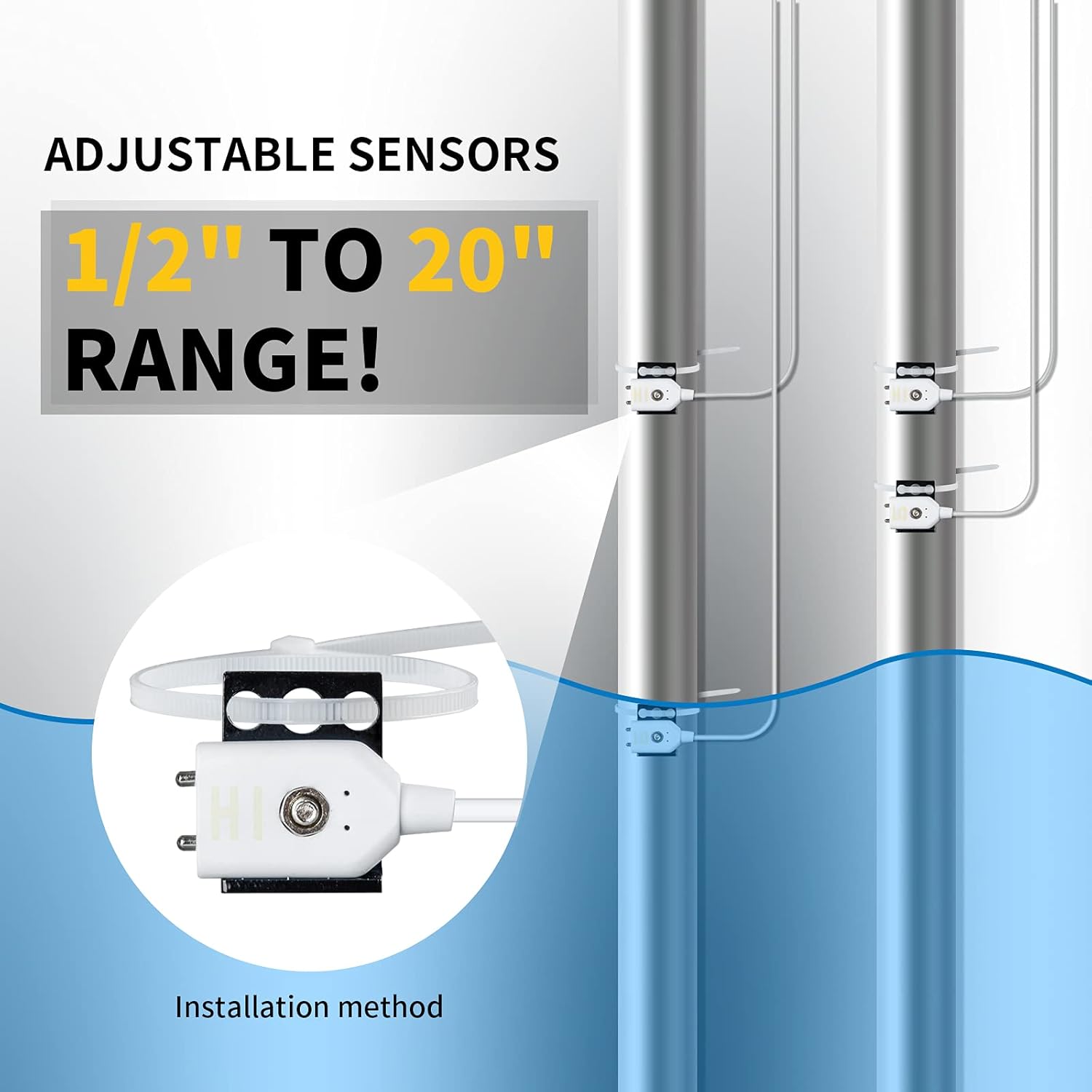
Figure 4: Close-up of the adjustable sensors, demonstrating their flexible range and a typical installation method using zip ties.

Figure 5: Illustration of two primary installation methods for the control unit: direct wall mounting with screws and attachment using an adhesive hook.

Setšoantšo sa 6: Example diagram showing the complete installation of the Ortis controller and sensors within a typical basement sump pit setup.
Litaelo tsa Ts'ebetso
The Ortis Water Level Controller offers intuitive operation with distinct modes for different applications:
- Drain Mode: Ideal for drainage applications like sump pits or sewage pits. In this mode, the pump activates when the water level reaches the 'Hi' sensor and continues to pump until the water level drops below the 'Lo' sensor.
- Mokhoa oa Metsi: Suitable for water replenishment in applications such as fish tanks or water towers. In this mode, the pump activates when the water level drops below the 'Lo' sensor and fills until it reaches the 'Hi' sensor.
- Phetolelo ka letsoho: The controller typically features an AUTO/OFF/ON switch. Use 'AUTO' for automatic operation based on sensor readings. 'ON' will continuously run the pump, and 'OFF' will keep it off, regardless of water levels.
- Mosebetsi oa Alamo: The unit is equipped with an alarm to alert users to potential issues, such as a pump failure or prolonged high water levels. A 'Mute' button is usually available to silence the alarm temporarily.
Refer to the LED indicators on the control unit for current operational status and alerts.
Tlhokomelo
Regular maintenance ensures the longevity and reliable operation of your Ortis Sump Pump Switch Controller:
- Ho Hloekisa Sensor: Periodically inspect and clean the sensors to prevent buildup of debris, sludge, or mineral deposits, which can interfere with accurate water level detection. Use a soft cloth and clean water.
- Tlhahlobo ea Lithapo: Check all cables and connections for any signs of wear, damage, or corrosion. Ensure they are securely plugged in.
- Ho Bea Karolo: Confirm the main control unit remains in a dry environment. If exposed to moisture, dry it thoroughly and relocate if necessary.
- Ts'ebetso ea liteko: Regularly test the system by manually raising or lowering water levels to trigger the pump and ensure the sensors and pump respond correctly.
Ho batle phoso
If you encounter issues with your controller, refer to the following common troubleshooting steps:
| Bothata | Lebaka le ka khonehang | Tharollo |
|---|---|---|
| Pump not activating/deactivating | Dirty or improperly placed sensors, power outage, pump malfunction, incorrect mode selection. | Clean sensors, verify sensor placement, check power supply, inspect pump, ensure correct operating mode (Drain/Water). |
| Alarm sounding continuously | Water level not receding (Drain Mode) or not filling (Water Mode) within expected time, sensor issue, pump failure. | Check pump operation, inspect sensors for blockages, verify power to pump, press 'Mute' to silence temporarily while investigating. |
| Controller unit not powering on | No power to outlet, damaged power cord. | Check power outlet with another device, inspect power cord for damage. |
Litlhaloso
- Lebitso: Ortis
- Mohlala: B09697ZDYF
- Mmala: Ntsho
- Moqtage: 220/110 Volts (AC)
- Boitsebiso: Stainless Steel (sensors)
- Boima ba Ntho: 1.1 Liponto
- Palo ea likarolo: 1.0 Palo
- Mofuta oa Pontšo: LED
- Adjustable Sensor Range: 0.5" to 20" (approximate, based on images)
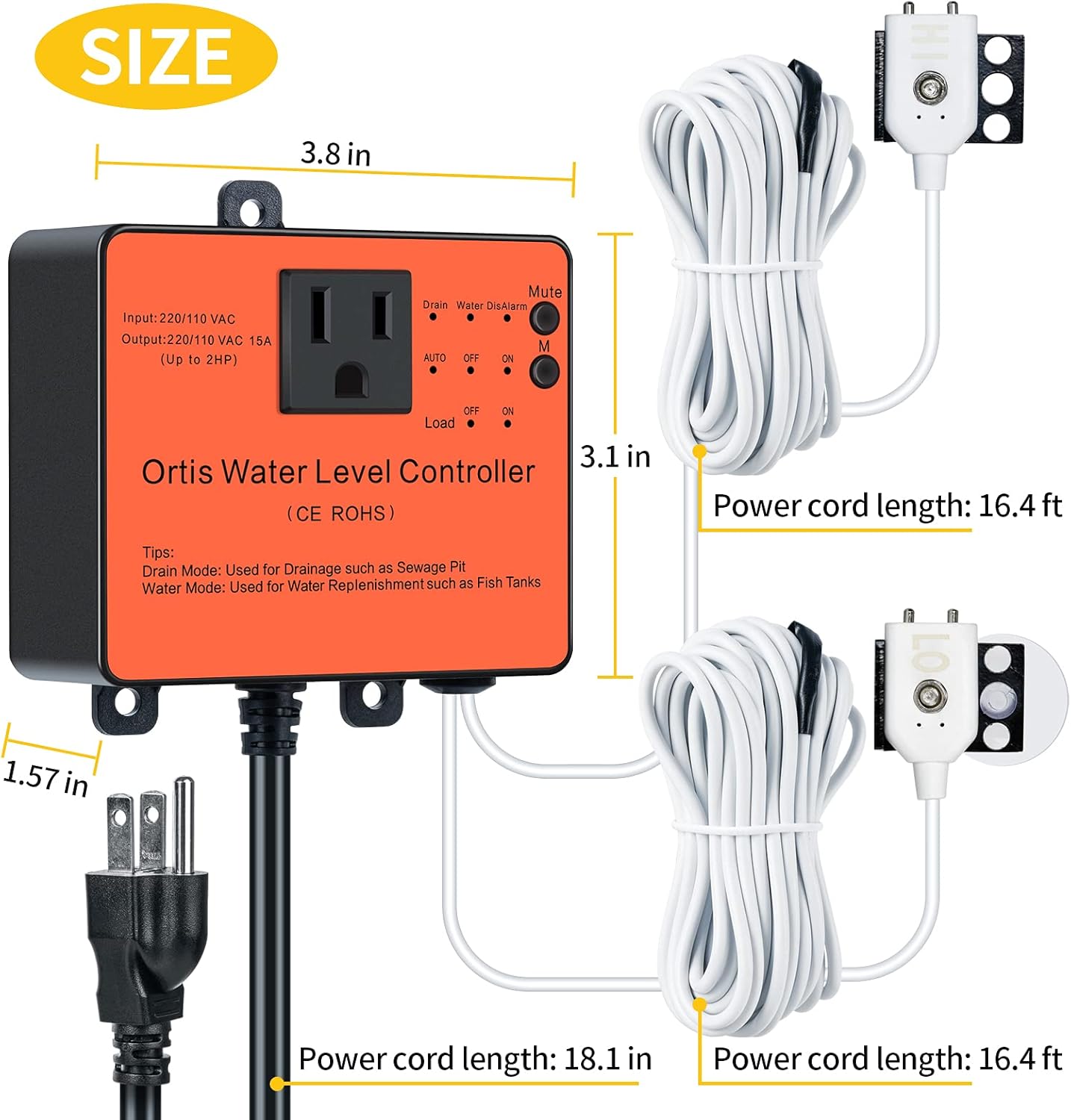
Figure 7: Product dimensions for the controller unit and sensor cables.
Livideo tsa Sehlahisoa sa Molao
Ha ho livideo tsa semmuso tse tsoang ho morekisi tse fumanehang hore li ka kengoa ka nako ena.
Warranty le Tšehetso
For warranty information or technical support, please refer to the product packaging or contact Ortis customer service directly. Keep your purchase receipt as proof of purchase.
Ask a question about this manual
Ask about setup, troubleshooting, compatibility, parts, safety, or missing instructions. Manuals+ will review the question and use this page’s manual context to help answer it.