
1. Selelekela
The HAPPYMODEL ES24TX Pro Micro ExpressLRS TX module is an advanced 2.4GHz radio frequency (RF) module designed for remote control (RC) applications, particularly for DIY RC drones. This module is an upgraded version of the ES24TX, featuring enhanced output power, an integrated cooling fan, and an RGB LED module. It is based on the open-source ExpressLRS project, known for its low latency and high refresh rate capabilities, making it a popular choice for RC enthusiasts.
2. Boitsebiso ba Tšireletseho
- Always ensure proper ventilation around the module, especially during high-power operation, to prevent overheating.
- Handle the module with care to avoid electrostatic discharge, which can damage electronic components.
- Ensure correct polarity when connecting power to the module. Incorrect connections can cause permanent damage.
- Operate the module within its specified voltagmefuta-futa (5V ~ 10V).
- Keep the module away from water, moisture, and extreme temperatures.
- Always perform range checks and functional tests in a safe environment before operating your RC model.
3. Likahare tsa Sephutheloana
- ES24TX Pro Micro TX Module x 1
- Moxon Antenna x 1
4. Sehlahisoa Overview
The ES24TX Pro module is designed for seamless integration with most OpenTX radio transmitters equipped with a Micro JR bay. It features a robust design with a focus on performance and reliability.

Setšoantšo sa 4.1: Pele view of the ES24TX Pro module with the Moxon antenna attached.

Figure 4.2: The ES24TX Pro module and its included Moxon antenna.

Setšoantšo sa 4.3: Ka tlase view of the module, highlighting the integrated cooling fan for thermal management.

Setšoantšo sa 4.4: Ka hare view of the module, revealing the heat sink and electronic components.
5. Seta
5.1 Ho kenngwa ha Mojule
The ES24TX Pro module is designed for plug-and-play installation into radio transmitters equipped with a Micro JR bay. Ensure your radio transmitter supports external modules via a JR bay.
- Power off your radio transmitter.
- Carefully insert the ES24TX Pro module into the Micro JR bay on the back of your radio transmitter. Ensure it is seated firmly.
- Connect the provided Moxon antenna to the SMA connector on the module. Hand-tighten the connector; do not overtighten.

Setšoantšo sa 5.1: Lehlakore view of the ES24TX Pro module correctly installed in a radio transmitter's JR bay.
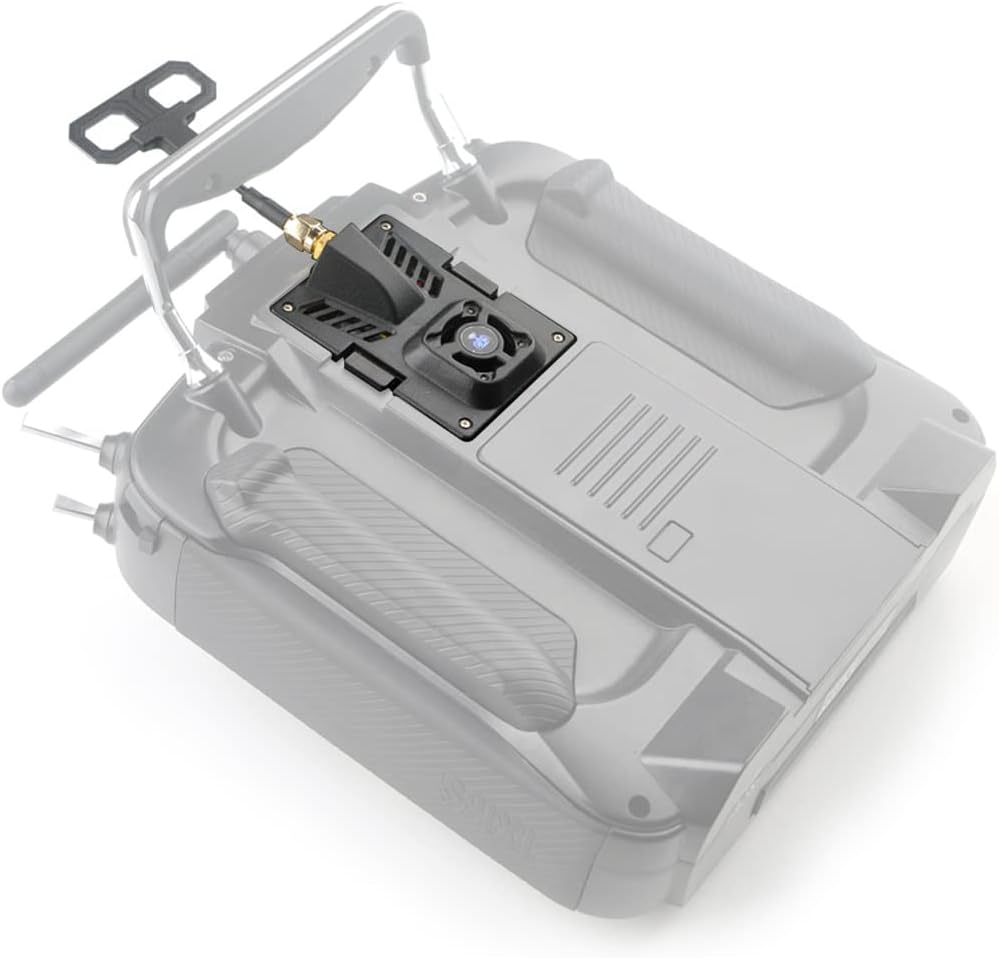
Setšoantšo sa 5.2: Ka morao view of the ES24TX Pro module installed on a radio transmitter, showing the antenna connection.

Figure 5.3: Close-up of the module's fan and RGB LED when installed on a radio transmitter.
5.2 Firmware le Tlhophiso
The ES24TX Pro module comes pre-assembled and ready for use. For optimal performance and access to the latest features, it is recommended to keep the module's firmware updated. Refer to the official ExpressLRS documentation for detailed instructions on firmware flashing and configuration via the ExpressLRS Configurator.
This module supports most OpenTX radio transmitters. Ensure your radio's internal RF module is disabled and the external module is set to CRSF protocol in your radio's model settings for proper communication.
6. Ho sebetsa
6.1 Ho Bulela/Ho tima
The module powers on and off with your radio transmitter. Once powered on, the RGB LED will indicate its status (e.g., binding mode, connected, error).
6.2 Binding with Receiver
To establish a connection between the ES24TX Pro module and an ExpressLRS receiver, follow the standard ExpressLRS binding procedure. This typically involves putting both the TX module and the receiver into binding mode (often by powering the receiver on/off three times or using a bind button) and then initiating the bind process from your radio's ExpressLRS LUA script or menu.
6.3 RF Output Power Settings
The ES24TX Pro module supports a maximum RF output power of up to 1000mW (>30dBm). The output power can be adjusted via the ExpressLRS LUA script on your OpenTX radio. Always select an appropriate power level for your flying environment and local regulations. Higher power levels generate more heat, which the integrated cooling fan is designed to manage.
7. Tlhokomelo
7.1 Cooling Fan
The ES24TX Pro includes a cooling fan to dissipate heat generated during operation, especially at higher RF output power settings. Periodically check the fan for any obstructions (dust, debris) and ensure it spins freely. Clean gently with compressed air if necessary.
7.2 RGB LED
The RGB LED provides visual feedback on the module's status. No specific maintenance is required for the LED, but familiarize yourself with its color codes as defined by the ExpressLRS firmware for troubleshooting and operational awareness.
8. Ho rarolla mathata
- Module Not Recognized by Radio: Ensure the module is fully seated in the JR bay. Verify that the radio's internal RF module is disabled and the external module is set to CRSF protocol in the radio's model settings.
- Litaba tse Tlamang: Confirm both the TX module and receiver are running compatible ExpressLRS firmware versions. Double-check the binding procedure as per ExpressLRS documentation.
- Intermittent Connection/Low Range: Check the antenna connection on both the TX module and receiver. Ensure the antenna is not damaged or obstructed. Verify RF output power settings are appropriate.
- Ho chesa haholo: Ensure the cooling fan is operational and free from obstructions. Reduce RF output power if operating in a confined space or high ambient temperature.
- Mathata a ho Sebetsa 'Meleng: Some radio transmitter JR bays may have slight variations. If the module does not fit perfectly, do not force it. Consult your radio's manual or community forums for known compatibility issues or minor modifications.
9. Litlhaloso
| Sebopeho | Tlhaloso |
|---|---|
| Sebaka sa Taolo | ISM2400 |
| MCU | ESP32 (main), ESP8285 (aux, as espbackpack) |
| RF Chip | Tlhaloso: SX1281IMLTRT |
| JR Standard Socket | 5-phini |
| Maqhubu a Range | 2400 MHz ho 2500 MHz |
| Maximum Receive Refresh Rate | 500 Hz |
| Minimum Receiver Refresh Rate | 25 Hz |
| RF Output Power | >30dBm (up to 1000mW) |
| Phepelo ea motlakase Voltage | 5V ~ 10V |
| Boima ba 'mele | 51 grams (without antenna) |
| Boemo | 70mm x 49mm x 32.5mm |
| Monyetla oa Antenna | 4.18dBi (Moxon antenna) |
| Firmware Target | HappyModel_ES24TX_Pro_Series_2400_TX |
| Mofuta oa Boitsebiso | Plastiki |
10. Tiisetso le Tšehetso
For warranty information and technical support, please refer to the official HAPPYMODEL website or contact your retailer. Keep your proof of purchase for any warranty claims. For community support and the latest ExpressLRS information, visit the official ExpressLRS project website and forums.


