
Selelekela
The HTC Vive Pro 2 Headset is engineered to enhance your virtual reality experiences with exceptional visual fidelity, ergonomic comfort, and precise sub-millimeter tracking. Featuring new dual LCD screens, 5K resolution, a 120-degree field of view, and a 120Hz refresh rate, it delivers a leading immersive experience suitable for high-end PC-VR gaming and demanding graphical applications. This manual provides essential information for setting up, operating, maintaining, and troubleshooting your Vive Pro 2 Headset.
Se ka Lebokoseng
The HTC Vive Pro 2 Headset Only package includes the following components:
- VIVE Pro 2 Headset
- All-in-one cable
- Link Box
- 18W x1 AC adapter
- Mini DP ho adaptara ea DP
- DisplayPort™ cable
- thapo ea USB 3.0
Additional documentation and accessories are also included. Please note that base stations and controllers are required for full functionality and are sold separately.

Image: Components included with the HTC Vive Pro 2 Headset Only.
Tlhophiso
Follow these steps to set up your HTC Vive Pro 2 Headset:
- Prepare Your PC: Ensure your computer meets the minimum system requirements (refer to the Specifications section). Verify that your graphics card has a DisplayPort 1.2 or higher output.
- Connect the Link Box: Connect the Link Box to your PC using the provided DisplayPort cable and USB 3.0 cable. Power the Link Box with the AC adapter.
- Hokela Headset: Plug the all-in-one cable from the Vive Pro 2 Headset into the Link Box.
- Kenya Software: Download and install the necessary Vive software and SteamVR from the official HTC Vive website or Steam. Follow the on-screen instructions for driver installation and initial setup.
- Set Up Tracking: If you have SteamVR 1.0 or 2.0 base stations (sold separately), position them according to their respective manuals to define your play area.
- Pair Controllers: Pair your Vive controllers or Valve Index controllers (sold separately) with the system as instructed by the software.
- Lokisa ho Lokela ha Li-headphone: Place the headset on your head and adjust the head strap for a secure yet comfortable fit. Use the IPD adjustment dial to align the lenses with your eyes for optimal clarity.

Setšoantšo: Pele view of the HTC Vive Pro 2 Headset.
Ho sebetsa
The Vive Pro 2 Headset offers advanced features for an enhanced VR experience:
- High Visual Fidelity: Experience virtual worlds in 5K clarity with a combined resolution of 4896 x 2448 pixels. This high resolution brings out fine details in games and applications.
- Tšimo e Pharalletseng ea View (FOV): A 120-degree FOV expands your peripheral vision, making the virtual environment feel more natural and immersive.
- Sekhahla se Phahameng sa ho Nchafatsa: Enjoy smooth and seamless visuals with a 120Hz refresh rate, reducing motion sickness and improving overall comfort during graphics-intensive use.
- Moralo oa Ergonomic: The headset features a balanced construction and adjustable components, including eye relief and IPD (Interpupillary Distance) adjustment, to ensure a comfortable fit for various head sizes and vision types, including users wearing glasses.
- Hi-Res Certified Audio: Integrated headphones provide 3D spatial sound, delivering immersive audio experiences.

Image: Visual representation of the 5K clarity through the Vive Pro 2 lenses.
Video: Ho fetaview of the HTC VIVE Pro 2 Virtual Reality System, showcasing its features and components.
Tlhokomelo
Proper maintenance ensures the longevity and optimal performance of your Vive Pro 2 Headset:
- Lilense tsa ho hloekisa: Use a microfiber cloth specifically designed for optical lenses to gently wipe the headset lenses. Avoid abrasive materials or chemical cleaners, which can damage the lens coating.
- Ho Hloekisa Kantle: Wipe the exterior of the headset with a soft, damp cloth. Do not use excessive moisture or allow liquids to enter the device.
- Polokelo: Store the headset in a cool, dry place away from direct sunlight. Protect the lenses from scratches by using the provided lens cover or storing it in a protective case.
- Tsamaiso ea Cable: Qoba ho kobeha kapa ho thibana ha dithapo ho thibela tshenyo.
- Bohloeki: Regularly clean the foam face cushions and head straps, especially if multiple users share the headset. Replace worn-out cushions for comfort and hygiene.
Ho batle phoso
If you encounter issues with your Vive Pro 2 Headset, consider the following troubleshooting steps:
- Ha ho Pontšo/Skrine se Ntšo:
- Ensure all cables (DisplayPort, USB, power) are securely connected to the headset, Link Box, and PC.
- Verify your PC meets the minimum graphics card requirements and that the DisplayPort cable is connected to a compatible port (not HDMI).
- Restart SteamVR and your computer.
- Tracking Issues:
- Check that your base stations are properly powered, positioned, and free from obstructions.
- Ensure there are no reflective surfaces in your play area that could interfere with tracking.
- Recalibrate your play area in SteamVR settings.
- Poor Visual Clarity/Blurriness:
- Adjust the IPD dial on the headset to match your interpupillary distance.
- Ensure the headset is positioned correctly on your head and the lenses are clean.
- Check your PC's graphics settings and ensure the resolution and refresh rate are configured correctly in SteamVR.
- Headset Overheating:
- Ensure adequate ventilation around the headset and your PC.
- Reduce graphics settings in demanding applications if overheating persists.
- Software Crashes (SteamVR):
- Update your graphics drivers and SteamVR software to the latest versions.
- Ensure no conflicting background applications are running.
- If issues persist, consider reinstalling SteamVR.
For further assistance, please refer to the official HTC Vive support websebaka.
Video: A detailed look at the HTC VIVE Pro 2, highlighting its sharp visuals and immersive VR experience.
Litlhaloso
Detailed technical specifications for the HTC Vive Pro 2 Headset:
| Sebopeho | Lintlha |
|---|---|
| Skrine | Dual RGB low persistence LCD |
| Qeto | 2448 x 2448 pixels per eye (4896 x 2448 combined) |
| Refresh Rate | 90 / 120 Hz (Supports up to 90Hz via VIVE Wireless Adapter) |
| Tšimo ea View | Ho fihlela ho likhato tse 120 |
| Audio | Hi-Res certified headphones (removable), High-impedance headphones support (via USB-C analog signal) |
| Kenyeletso | Dual Integrated microphones |
| Lihokelo | Bluetooth, USB-C port for peripherals |
| Li-sensor | G-sensor, gyroscope, proximity, IPD sensor, SteamVR Tracking V2.0 (compatible with SteamVR 1.0 and 2.0 base stations) |
| Ergonomics | Eye relief with lens distance adjustment, adjustable IPD, adjustable headphones, adjustable headstrap |
| Litekanyo tsa Sehlahisoa | 13.2 x 13.1 x 7.3 lisenthimithara |
| Boima ba Ntho | 6.62 Liponto |
| Ntho Nomoro ea Mohlala | 99HASW001-00 |
Litlhoko tse nyane tsa Khomphutha
| Karolo | Tlhokahalo |
|---|---|
| processor | Intel® Core™ i5-4590 or AMD Ryzen 1500 equivalent or greater |
| Litšoantšo | NVIDIA® GeForce® GTX 1060 or AMD Radeon™ RX 480 equivalent or greater (GeForce® RTX 20 Series (Turing) or AMD Radeon™ 5000 (Navi) generations or newer required for Full Resolution mode) |
| Mohopolo | 8 GB ea RAM kapa ho feta |
| Li-port tsa USB | 1x USB 3.0 kapa e ncha |
| Mokhoa oa tšebetso | Windows® 10 |
| Video Out | DisplayPort 1.2 or higher (DisplayPort 1.4 or higher with DSC required for Full Resolution mode) |
Refer to AMD or NVIDIA's VR Ready website for an extended list of VR Ready graphics cards.
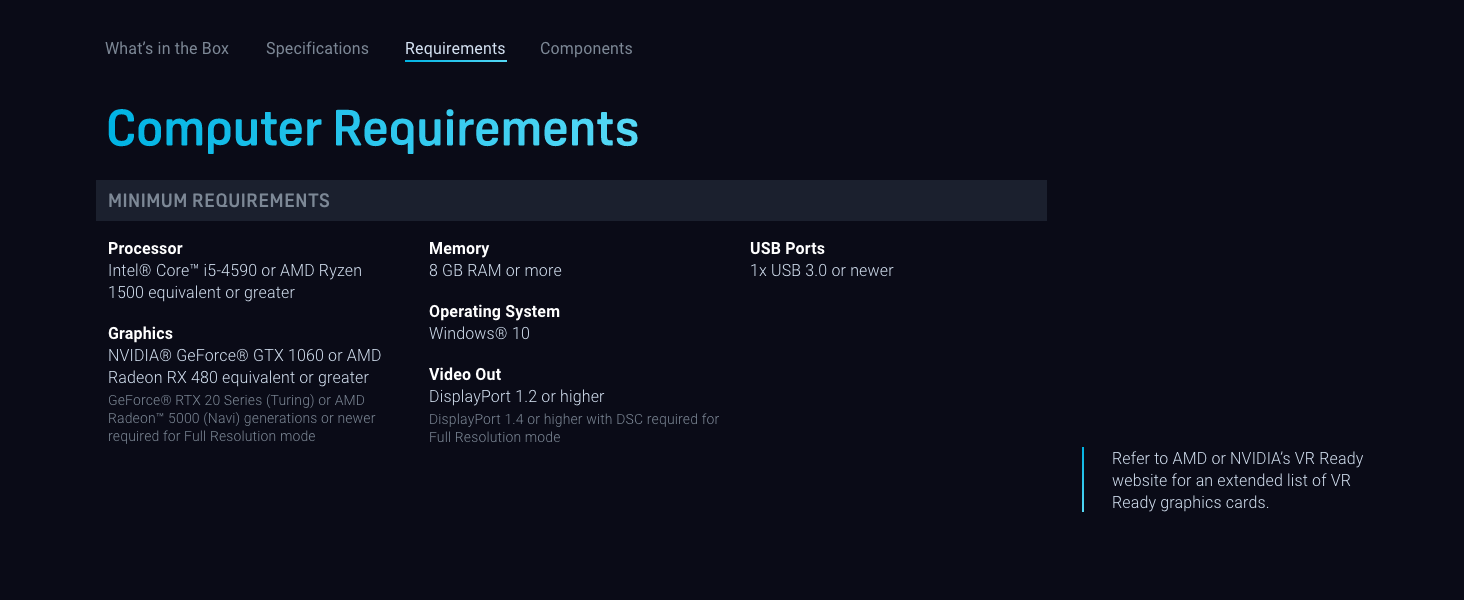
Image: Minimum computer requirements for the Vive Pro 2.
Warranty le Tšehetso
The HTC Vive Pro 2 Headset is covered by a manufacturer's warranty. Please refer to the warranty card included with your product or visit the official HTC Vive websebaka sa marang-rang bakeng sa lintlha le lipehelo tse qaqileng tsa tiisetso sebakeng sa heno.
For technical support, product registration, FAQs, and driver downloads, please visit the official HTC Vive support portal. You can find comprehensive resources and contact information for customer service there.
Official HTC Vive Support: www.vive.com/support/