
1. Selelekela
Thank you for choosing the KALINCO P96 Smartwatch. This device is designed to help you monitor your health, track your fitness activities, and stay connected. This manual provides essential information for setting up, operating, and maintaining your smartwatch to ensure optimal performance and longevity.
2. Sehlahisoa Overview
The KALINCO P96 Smartwatch features a 1.69-inch TFT display and offers a wide range of functionalities:
- Tlhokomelo ea Bophelo bo Botle: Continuous monitoring of heart rate, blood oxygen (SpO2), blood pressure, and sleep patterns. Includes a menstrual cycle tracking function for women.
- Boikemisetso: Split-screen mode for quick access to frequently used functions and over 100 stylish watch faces available via the GloryFit app. You can also upload personal photos as watch faces.
- Mekhoa ea Lipapali: Over 100 sports modes (running, cycling, rope skipping, dancing, yoga, etc.) with activity tracking for steps, calories burned, distance, heart rate, and blood oxygen during exercise.
- Litsebiso tse bohlale: Receive text messages and notifications from apps like WhatsApp, Messenger, Facebook, and Instagram directly on your watch. Notifications can be individually deleted from the watch.
- Durability & Battery Life: IP67 water resistance for daily use (hand washing, rain). Equipped with a 260 mAh battery, providing 5-7 days of active use and 15-20 days of standby time with a 2-hour charge.
- Mesebetsi e Eketsehileng: Features include phone/watch finder, screen brightness adjustment, breathing training, remote photography, music control, sedentary reminder, alarm clock, timer, stopwatch, and weather forecasts.

Image: The KALINCO P96 Smartwatch displaying its 1.69-inch screen with multiple customizable watch faces and user interface elements.
3. Seta
3.1. Ho tjhaja Smartwatch
Before initial use, fully charge your smartwatch. Connect the magnetic charging cable to the charging contacts on the back of the watch and plug the USB end into a standard USB power adapter (not included). A full charge typically takes approximately 2 hours.
3.2. Ho jarolla le ho kenya App
The KALINCO P96 Smartwatch requires the LumBella application for full functionality and data synchronization. You can download the app from:
- The Apple App Store (for iOS devices)
- Google Play Store (for Android devices)
- Scan the QR code provided in the quick start guide (if available).
The GloryFit app is compatible with smartphones running Android 5.0 or iOS 9.0 and above.
3.3. Ho kopanya le Smartphone ea Hao
- Netefatsa hore Bluetooth ea smartphone ea hau e lumelletsoe.
- Open the GloryFit app on your smartphone.
- Follow the in-app instructions to search for and connect to your KALINCO P96 Smartwatch. The watch will typically appear as 'P96' or a similar device name.
- Netefatsa kopo ea ho kopanya fonong ea hau ea smartphone le oache e bohlale haeba u khothalletsoa.
Hang ha oache e kopantsoe, e tla hokahanya nako le data le fono ea hau.
4. Litaelo tsa Ts'ebetso
4.1. Basic Navigation
- Swaepela Hodimo/Fase: Tsamaea ka har'a li-menu le litsebiso.
- Swaepela ka ho le Letshehadi/Ka ho le letona: Fumana mesebetsi e potlakileng kapa li-skrini tse fapaneng tsa data.
- Tlanya: Khetha ntho kapa netefatsa ketso.
- Konopo ea Lehlakoreng: Tobetsa ho tsosa skrine, ho kgutlela skrineng sa lapeng, kapa ho fihlella menu e kgolo.
4.2. Tlhokomelo ea Bophelo bo Botle
The smartwatch continuously monitors several health metrics:
- Sekhahla sa Pelo: Provides 24-hour heart rate monitoring. View real-time data on the watch or detailed trends in the GloryFit app.
- Mali a Oksijene (SpO2): Monitors blood oxygen levels using infrared technology. Access readings on the watch or app.
- Khatello ea Mali: Measures blood pressure. For accurate readings, ensure the watch is worn correctly and remain still during measurement. Consult a medical professional for precise medical data.
- Ho Latela Boroko: Automatically tracks your sleep patterns, including deep sleep, light sleep, and awake times. Review your sleep quality analysis in the GloryFit app.
- Menstrual Cycle Tracking: A dedicated feature for women to record and track menstrual cycles within the GloryFit app.

Image: The smartwatch interface showing health monitoring features such as blood oxygen, blood pressure, heart rate, and a visual representation of sleep tracking data.
4.3. Mekhoa ea Lipapali le ho Latela Mesebetsi
The P96 Smartwatch supports over 100 sports modes. To use:
- Navigate to the 'Sports' section on your watch.
- Select your desired activity (e.g., running, cycling, yoga).
- Start the activity. The watch will track metrics like steps, calories, distance, and heart rate.
- End the activity to save your data. Detailed reports are available in the GloryFit app.

Image: A visual representation of the smartwatch's 100+ sports modes icons and a smartphone screen displaying detailed daily activity tracking data including steps, distance, and calories.
4.4. Litsebiso tse Bohlale
Once paired with your phone, the watch can display notifications:
- Ensure app notifications are enabled in the GloryFit app settings.
- Incoming calls, text messages, and app alerts will vibrate the watch and display content on the screen.
- You can dismiss or delete notifications directly from the watch.

Image: The smartwatch showing icons for various smart notifications (calls, Facebook, Line, Instagram, etc.) and illustrations of vibration reminders for calls, sedentary alerts, and alarms.
4.5. Boikemisetso
- Lifahleho tsa Tebello: In the GloryFit app, browse and select from over 100 watch faces. You can also upload your own photos to personalize the watch face.
- Split-Screen Mode: Swipe right on the main screen to access the split-screen area, allowing quick selection of frequently used functions.
4.6. Mesebetsi e Eketsehileng
Explore other useful features:
- Stopwatch: Use the built-in stopwatch for timing activities.
- Meteo Weather: View current weather conditions and forecasts (requires app synchronization).
- Taolo ya Mmino: Laola ho bapala mmino ho smartphone ea hau (bapala, emisa, tlola lipina).
- Phetoho ea Khanya: Adjust screen brightness for optimal visibility in different lighting conditions.
- Find Phone/Watch: Fumana mohala oa hau o parang kapa oache haeba e fositse.
- Koetliso ea ho Phefumoloha: Boikoetliso ba ho hema bo tataisoang bakeng sa ho phomola.
- Linepe tse hole: Sebelisa oache ea hau joalo ka shutter e hole bakeng sa khamera ea mohala oa hau.
- Khopotso ea ho Lula: Fumana litemoso tsa ho falla haeba u se u sa sebetse nako e telele haholo.
- Alarm Clock & Timer: Set alarms and timers directly from your watch.
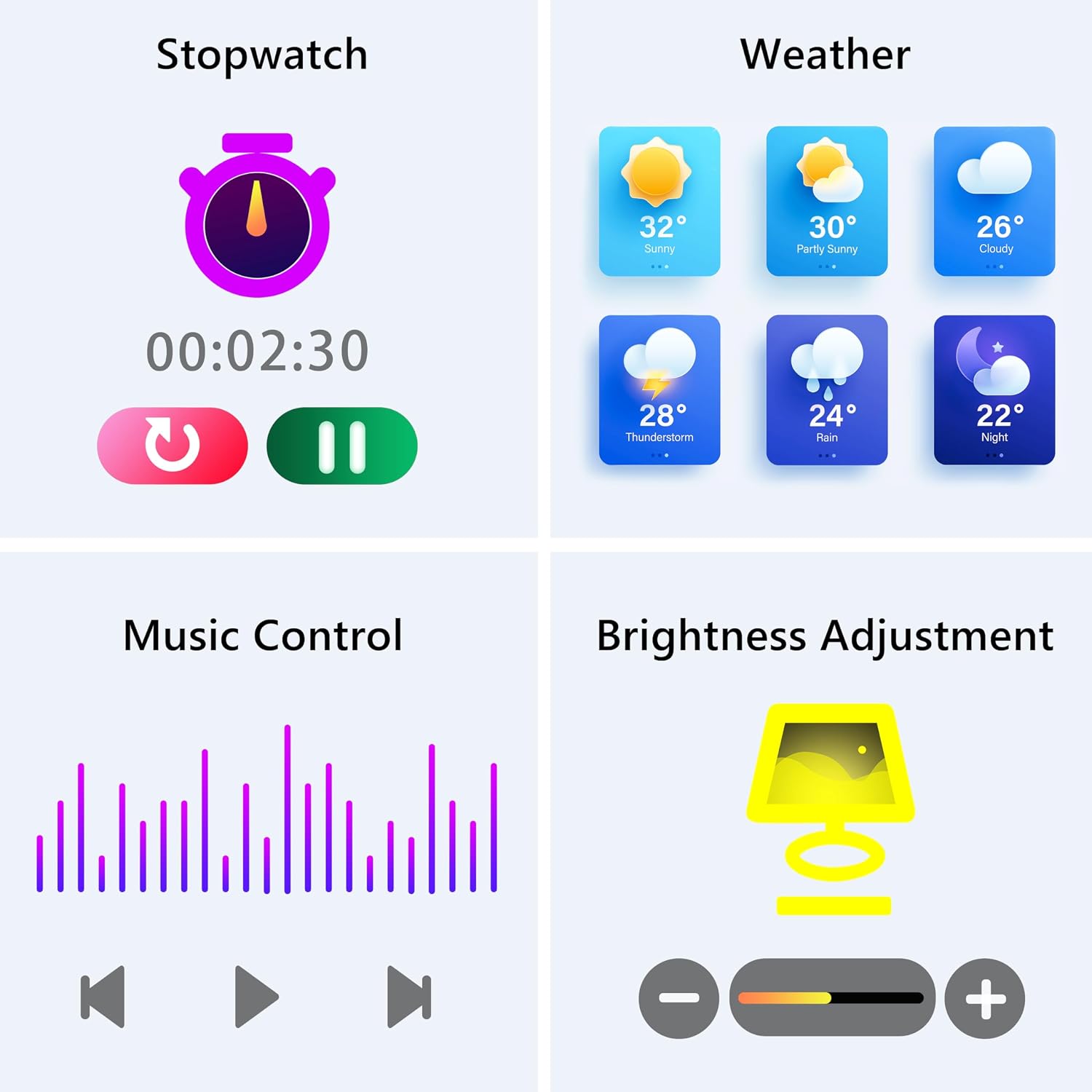
Image: The smartwatch screen showing various utility functions including a stopwatch, weather forecast, music control interface, and brightness adjustment slider.
5. Tlhokomelo
- Ho hloekisa: Regularly clean your smartwatch and strap with a soft, dry cloth. Avoid using harsh chemicals or abrasive materials.
- Mathata a Metsi (IP67): The watch is IP67 water-resistant, meaning it can withstand splashes, hand washing, and rain. It is eseng suitable for swimming, showering with hot water, or diving. Avoid prolonged exposure to water.
- Tlhokomelo ea Betri: Charge the battery fully when indicated. Avoid completely draining the battery frequently to prolong its lifespan. Store the watch in a cool, dry place when not in use for extended periods.
- Lintlafatso tsa Software: Keep the GloryFit app updated to ensure your smartwatch has the latest features and performance improvements.
6. Ho rarolla mathata
If you encounter issues with your KALINCO P96 Smartwatch, try the following solutions:
- Sheba ha e laetsoe: Ensure the watch is fully charged. Connect it to the charger for at least 10-15 minutes.
- Ha e khone ho hokahanya le mohala:
- Netefatsa hore Bluetooth e butswe fonong ya hao.
- Etsa bonnete ba hore oache e sebakeng sa Bluetooth (hangata ke limithara tse 10).
- Qala hape fono ea hau le smartwatch.
- Check if the GloryFit app is updated to the latest version.
- If previously paired, try unpairing and re-pairing the device through the GloryFit app.
- Litsebiso ha lia amoheloa:
- Verify that notifications are enabled for specific apps in the GloryFit app settings.
- Ensure your phone's notification settings allow the GloryFit app to display alerts.
- Check if the watch is properly connected via Bluetooth.
- Lintlha tse fosahetseng tsa bophelo bo botle:
- Netefatsa hore oache e aparoa hantle letsohong la hao, eseng e thata haholo kapa e hlephileng haholo.
- For blood pressure readings, remain still and follow instructions. Note that smartwatch blood pressure measurements are for reference only and should not replace professional medical equipment.
- Hloekisa sensor ka morao ho oache.
- Bophelo bo bokhuts'oane ba betri:
- Fokotsa khanya ea skrine.
- Thibela ho lekola sekhahla sa pelo ka ho tswela pele haeba ho sa hlokahale 24/7.
- Fokotsa palo ea lits'ebetso tse romellang litsebiso oacheng.
If problems persist, please refer to the support section for contact information.
7. Litlhaloso
| Sebopeho | Lintlha |
|---|---|
| Brand | KALINCO |
| Nomoro ea Mohlala | P96 |
| Boholo ba skrine | 1.69 lisenthimithara |
| Mokhoa oa tšebetso | Multiple Versions of Both iOS and Android |
| Theknoloji ea Khokahano | Bluetooth 4.0 |
| Bokhoni ba Battery | 260 mAh (Lithium-polymer) |
| Ho hanyetsa Metsi | IP67 |
| Lisebelisoa tse lumellanang | Smartphone (Android 5.0+ / iOS 9.0+) |
| Likarolo Tse Khethehileng | Text Messaging, Notification, Health Monitoring |
| GPS | GPS ka smartphone |
8. Tiisetso le Tšehetso
KALINCO is committed to providing exceptional products. Your KALINCO P96 Smartwatch comes with a Waranti ea likhoeli tse 12 ho tloha ka letsatsi la theko.
If you encounter any problems, have suggestions, or require assistance, please do not hesitate to contact KALINCO customer support. We are dedicated to providing you with satisfactory solutions at all times.
For support, please refer to the contact information provided with your product packaging or visit the official KALINCO websebaka.