
Selelekela
This manual provides essential instructions for the proper use and maintenance of your Vikefon Type C Charging and Data Cable. This 1-meter cable is designed for efficient charging and high-speed data transfer between your Type C enabled devices and compatible power sources or computers.

Image: The Vikefon Type C Charging and Data Cable, featuring a standard USB-A connector on one end and a reversible USB-C connector on the other.
Likarolo tsa Sehlahisoa
- USB Connector Quality: Ensures reliable charging and high-speed data transmission.
- Motlakase: Supports up to 5V, 3 Amp bakeng sa ho tjhaja kapele.
- Tšebelisano ea bokahohle: Fully compatible with all Type C mobile devices for fast charging and syncing.
- Reversible USB Type-C Connector: Allows for quick and easy connections in any orientation.
- Moralo o tšoarellang: Features intricate nylon braiding for enhanced durability and longevity, outlasting standard cables.
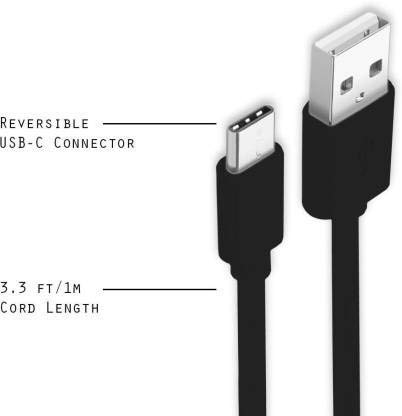
Image: A diagram illustrating the reversible nature of the USB-C connector and the cable's 1-meter (3.3 ft) cord length.
Tlhophiso
- Lemoha Lihokelo: The cable has a standard USB-A connector on one end and a smaller, oval-shaped USB Type-C connector on the other.
- Hokela ho Mohloli oa Matla/Khomphutha: Insert the USB-A end of the cable into a compatible USB port on a wall adapter, power bank, car charger, or computer.
- Hokela ho Sesebediswa: Insert the USB Type-C end into the charging/data port of your smartphone, tablet, or other Type C enabled device. The USB Type-C connector is reversible, so it can be inserted in either orientation.
- Netefatsa Khokahano: Ensure both ends are securely connected. Your device should indicate that it is charging or connected for data transfer.
Litaelo tsa Ts'ebetso
Ho tjhaja Sesebediswa sa Hao
- Connect the USB-A end of the cable to a compatible USB power adapter (e.g., wall charger, car charger, power bank).
- Connect the USB Type-C end to your device's charging port.
- Ensure the power adapter is plugged into a live power outlet. Your device should begin charging.
Ho fetisetsa Data
- Connect the USB-A end of the cable to a USB port on your computer.
- Connect the USB Type-C end to your device.
- On your device, you may receive a prompt asking to allow data access or to select a USB connection mode (e.g., "File Transfer," "MTP"). Select the appropriate option to enable data transfer.
- Your device should appear as a removable drive or media device on your computer, allowing you to transfer files.
Tlhokomelo
- Tšoaro e nepahetseng: Kamehla tšoara hlooho ea sehokelo ha u hokela kapa u ntša thapo. Qoba ho hula thapo ka ho toba ho thibela tšenyo ea lithapo tsa kahare.
- Qoba ho Kobeha: Do not excessively bend or crimp the cable, especially near the connectors, as this can cause internal wire breakage.
- Polokelo: Store the cable in a clean, dry place away from extreme temperatures and direct sunlight. Avoid tangling the cable.
- Ho hloekisa: If necessary, gently wipe the cable and connectors with a dry, soft cloth. Do not use liquids or abrasive cleaners.

Setšoantšo: Haufi view highlighting the durable metal heads of the Vikefon Type C cable connectors, designed for anti-oxidation and corrosion resistance.
Ho batle phoso
- Sesebediswa ha se Tefise:
- Netefatsa hore mahlakore ka bobeli a thapo a hoketsoe ka mokhoa o sireletsehileng.
- Netefatsa hore adaptara ea motlakase e sebetsa hantle 'me e hoketsoe ka har'a sokete e phelang.
- Leka ho sebelisa adaptara ea motlakase e fapaneng kapa boema-kepe ba USB.
- Hlahloba kou ea ho tjhaja ea sesebelisoa sa hau bakeng sa lithōle kapa tšenyo efe kapa efe.
- Ho tjhaja butle:
- Ensure you are using a power adapter that supports fast charging (e.g., 3A output).
- Close any unnecessary background applications on your device.
- Ha ho Phetiso ea Lintlha:
- Confirm the cable is properly connected to both your device and computer.
- On your device, check the notification panel for USB options and select "File Transfer" or "MTP."
- Leka ho hokela koung e fapaneng ea USB komporong ea hau.
- Qala bocha ka bobeli sesebelisoa sa hau le komporo.
Litlhaloso
| Sebopeho | Lintlha |
|---|---|
| Brand | Vikefon |
| Lebitso la Mohlala | Mofuta oa C |
| Nomoro ea Mohlala | Mofuta oa C 0129 |
| Mofuta oa Sehokelo | USB Type C (Male-to-Male) |
| Mofuta oa Cable | USB |
| Lisebelisoa tse lumellanang | Laptop, PC, Smartphone (e.g., Xiaomi Redmi 8A, Poco M2, Poco M2 Pro, Samsung, Motorola, Lenovo, Lava, Sony, HTC, LG, Karbonn, Maxx) |
| Likarolo Tse Khethehileng | Charging Wire, Durable, High Data Transfer Rate, High Quality, Long Length |
| Sekhahla sa Phetiso ea Lintlha | Up to 0.48 Gigabits Per Second (480 Mbps) |
| Theknoloji ea Khokahano | USB |
| Ga tlhaloso Met | ISO |
| Mmala | Ntsho |
| Sebopeho sa Ntho | Ratoa |
| Outer Material Type | Rubber (with Nylon Braiding) |
| Bolelele ba Cable | 1 Limithara |
Warranty le Tšehetso
Specific warranty details for the Vikefon Type C Charging and Data Cable are not provided in this manual. For information regarding warranty coverage, returns, or technical support, please refer to the product packaging or contact the manufacturer directly through their official channels.