
Sehlahisoa se Felletseview
The Joyroom JR-T09 Wireless Bluetooth Earbuds provide a convenient and high-quality audio experience. These earbuds feature Bluetooth 5.0 connectivity, a built-in microphone for calls, and a comfortable in-ear design. The included charging case ensures extended usage with no noticeable delay in true wireless audio transmission, thanks to its Airoha chip.

Image: Joyroom JR-T09 Wireless Bluetooth Earbuds with their charging case, highlighting true wireless and Bluetooth 5.0.
Litaba tsa Sephutheloana
Netefatsa hore lintho tsohle li teng ka har'a sephutheloana:
- A pair of Joyroom JR-T09 Wireless Bluetooth Earbuds
- Nyeoe ea ho tjhaja e se nang mohala
- Micro Charging Cable
- Buka ea litaelo (tokomane ena)
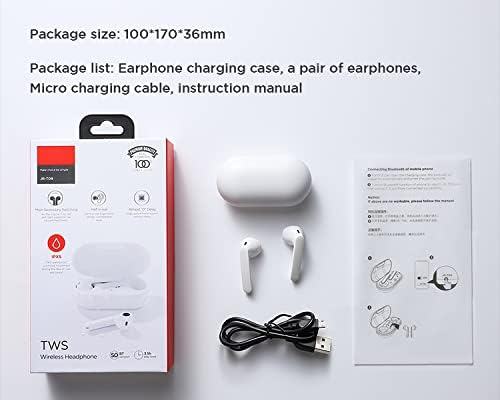
Image: Contents of the Joyroom JR-T09 package, including earbuds, charging case, and cable.
Litaelo tsa ho seta
1. Ho tjhaja li-Earbuds le Case
Pele o sebelisoa ka lekhetlo la pele, tjhaja li-earbud le mokotla oa ho tjhaja ka botlalo.
- Kenya li-earbud ka har'a lebokose la ho tjhaja. Netefatsa hore li lutse hantle.
- Connect the Micro Charging Cable to the charging port on the case and to a USB power source.
- The indicator light on the charging case will show the charging status. Once fully charged, the indicator light may change or turn off.

Image: Close-up of the charging port on the Joyroom JR-T09 charging case.
2. Ho kopanya le Sesebediswa sa Bluetooth
- Netefatsa hore li-earbud li tjhajiloe.
- Open the charging case. The earbuds will automatically enter pairing mode, indicated by a flashing light (refer to product for specific light indicators).
- Sesebedisweng sa hao (smartphone, tablet, jj), kenya tshebetsong Bluetooth.
- Batla available Bluetooth devices and select "JR-T09" from the list.
- Once connected, the earbuds will indicate successful pairing (e.g., a voice prompt or solid light).
- For subsequent use, the earbuds will automatically connect to the last paired device when removed from the case and Bluetooth is enabled on the device.
Litaelo tsa Ts'ebetso
The Joyroom JR-T09 earbuds feature touch controls for easy management of audio and calls. They are designed for smooth, constant, and clear HD calls, utilizing an imported silicon microphone to eliminate environmental noise and ensure stable voice transmission.
Litaolo tsa ho Tšoara
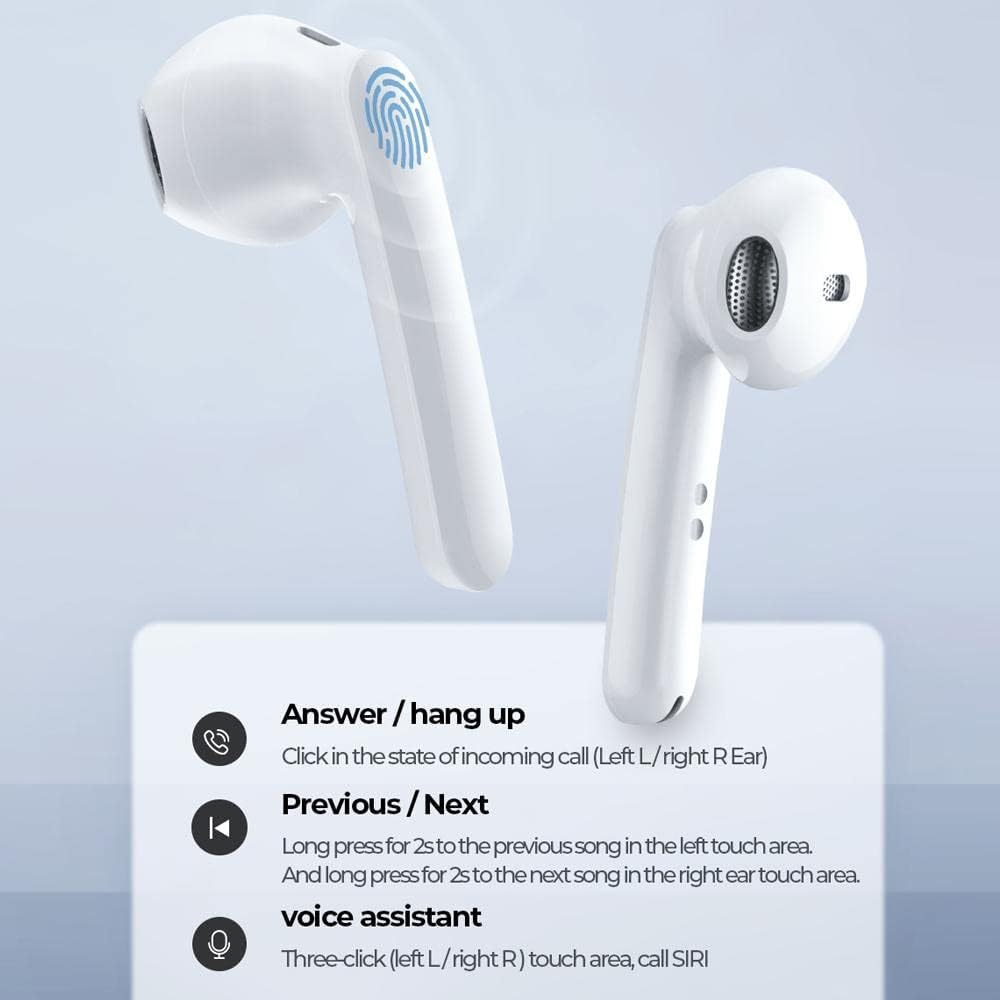
Image: Diagram illustrating the touch control functions on the Joyroom JR-T09 earbuds.
- Araba / Thibela mohala: Click the touch area on either the left (L) or right (R) earbud during an incoming call.
- Pina e Fetileng: Long press the touch area on the left (L) earbud for 2 seconds.
- Pina e Latelang: Long press the touch area on the right (R) earbud for 2 seconds.
- Voice Assistant (SIRI): Triple-click the touch area on either the left (L) or right (R) earbud.
- Bapala/Emisa: Single click the touch area on either earbud.
Motlakase/O tima
- Matlafatsa: The earbuds power on automatically when removed from the charging case.
- Tlosa motlakase: Place the earbuds back into the charging case to power them off and begin charging.
Tlhokomelo
Tlhokomelo e nepahetseng e netefatsa nako e telele le ts'ebetso e ntle ea li-earbud tsa hau.
- Ho hloekisa: Hloekisa li-earbud le mokotla oa ho tjhaja khafetsa ka lesela le bonolo, le omeletseng, le se nang lint. U se ke ua sebelisa lik'hemik'hale tse thata kapa lisebelisoa tse senyang.
- Mabitso a ho lefisa: Netefatsa hore likhokahano tsa ho tjhaja tse ho li-earbud le khese li hloekile ebile ha li na lithōle ho boloka tjhaja e nepahetse.
- Polokelo: Ha li sa sebelisoe, boloka li-earbud ka mokotlaneng oa tsona oa ho tjhaja ho li sireletsa le ho li boloka li tjhajiloe. Boloka sebakeng se phodileng, se omileng hole le mocheso o feteletseng.
- Mathata a Metsi: The earbuds have an IPX5 water resistance rating, meaning they are protected against low-pressure water jets from any direction. They are not designed for submersion in water. Avoid exposing them to heavy rain or swimming.

Image: Joyroom JR-T09 earbuds and case, illustrating their water-resistant design.
Ho batle phoso
If you encounter issues with your Joyroom JR-T09 earbuds, try the following solutions:
- Li-earbud ha li kopane:
- Netefatsa hore li-earbud ka bobeli li tjhajiloe.
- Beha li-earbuds morao ka mokotlaneng, koala sekoahelo, ebe u se bula hape ho kenya mokhoa oa ho para.
- Koala 'me u bulele Bluetooth sesebelisoa sa hau.
- Forget "JR-T09" from your device's Bluetooth settings and attempt to pair again.
- Ha ho molumo o tsoang ho e 'ngoe ea li-earbud:
- Netefatsa hore li-earbud ka bobeli li tjhajiloe.
- Beha li-earbud ka bobeli ka har'a lebokose la ho tjhaja, koala sekoahelo, ebe u li ntša hape.
- Try resetting the earbuds (re-pairing often resolves this).
- Li-earbud ha li tjhaje:
- Etsa bonnete ba hore thapo ea ho tjhaja e hoketsoe ka mokhoa o sireletsehileng ka khase le mohloling oa matla.
- Check if the charging contacts on the earbuds and inside the case are clean.
- Leka thapo e fapaneng ea ho tjhaja kapa adaptara ea motlakase.
- Boleng bo fokolang ba mohala:
- Netefatsa hore li-earbud li tjhajiloe ka botlalo.
- Move closer to your connected device to avoid signal interference.
- Avoid using the earbuds in noisy environments.
Litlhaloso tsa Sehlahisoa
| Lebitso la Brand | Joyroom |
| Lebitso la Mohlala | JR-T09 |
| Mmala | Bosoeu |
| Li-headphones Foromo Factor | Tsebeng |
| Theknoloji ea Khokahano | Wireless (Bluetooth 5.0) |
| Kenyellelitsoe Likaroloana | Nyeoe ea ho tjhaja e se nang mohala |
| Tlhaloso ea Lilemo | Motho e moholo |
| Lintho tse bonahalang | ABS Plastiki |
| Lisebelisoa tse lumellanang | Lisebelisoa tse ngata |
| Palo ea Lintho | 1 |
| Global Trade Identification Number (UPC) | 06941237113658 |
| Moetsi | Joyroom |
| Likarolo Tse Khethehileng | Microphone e hahiloeng |
| Tšobotsi ea Cable | Cable-free |
| Mokhoa oa ho Laola | Thetsa |
| Boima ba Ntho | 45 dikgerama |
| Palo ea likarolo | 1 Palo |
| Bokhoni ba Battery ea Earbud e le 'Ngoe | 35 mAh |
| Bokhoni ba Battery ea ho tjhaja | 500 mAh |
| Nako ea ho Bapala | Ho fihla ho lihora tse 3.5 (ka molumo oa 70%) |
| Nako ea ho Bua | Ho fihlela lihora tse 3.5 |
| Nako ea ho ema | Ho fihlela lihora tse 120 |
| Sebaka sa kamohelo | 10 limithara |
| Tekanyetso ea ho hanyetsa Metsi | IPX5 |
Boitsebiso ba Warranty
The Joyroom JR-T09 Wireless Bluetooth Earbuds come with a waranti ya selemo se le seng from the date of purchase. This warranty covers manufacturing defects and workmanship under normal use. It does not cover damage caused by misuse, accidents, unauthorized modifications, or normal wear and tear. Please retain your proof of purchase for warranty claims.
Tšehetso ea Bareki
For further assistance, technical support, or warranty inquiries, please contact Joyroom customer service. You can typically find contact information on the official Joyroom websebaka kapa ka morekisi oa hau.
Visit the official Joyroom store: Joyroom Store