
1. Sehlahisoa Overview
The Integra DRX-3.3 is a 9.2-channel network A/V receiver designed to deliver immersive audio and video performance for your home entertainment system. It features advanced signal processing and high-current power for dynamic speaker control, ensuring pure, rich, and authentic sound. The receiver supports multi-zone audio distribution and network multi-room audio capabilities.
Likarolo tsa Bohlokoa:
- Integra Power: Delivers 100 watts per channel (8 ohms, 20 Hz–20 kHz, 0.08% THD, 2 channels driven) with 30 Amps of high instantaneous current capability.
- Smooth Analog Signal: Incorporates Vector Linear Shaping Circuitry (VLSC) to remove pulse noise generated during D/A conversion, reproducing sound waves with high fidelity. This feature is applied to the front left and right channels, which are also bi-ampkhonahala.
- Flexible Zone 2 Audio: Offers powered Zone 2 for audio distribution to speakers in a second room, Zone 2 line out for external amplifiers, and a Zone 2 DAC for SPDIF (PCM), network, and USB audio sources. Includes 7.2 Channel pre-outs (with 2 subwoofer pre-outs) and adjustable maximum power/power on volume settings for both main and Zone 2.
- Object-Based Sound: Supports Dolby Atmos and DTS:X for an immersive three-dimensional sound experience, with an up-mixer for non-Dolby Atmos content.
Se ka Lebokoseng:
- Integra DRX-3.3 A/V Receiver
2. Seta le likhokahano
This section guides you through the initial setup and connection of your Integra DRX-3.3 receiver.
Panel e ka pele ho fetaview:

Setšoantšo sa 2.1: Pele view of the Integra DRX-3.3 receiver, showing the display, input selection buttons, volume knob, and front panel connections like headphones and auxiliary HDMI input.
Lihokelo tsa Panel tse ka morao:
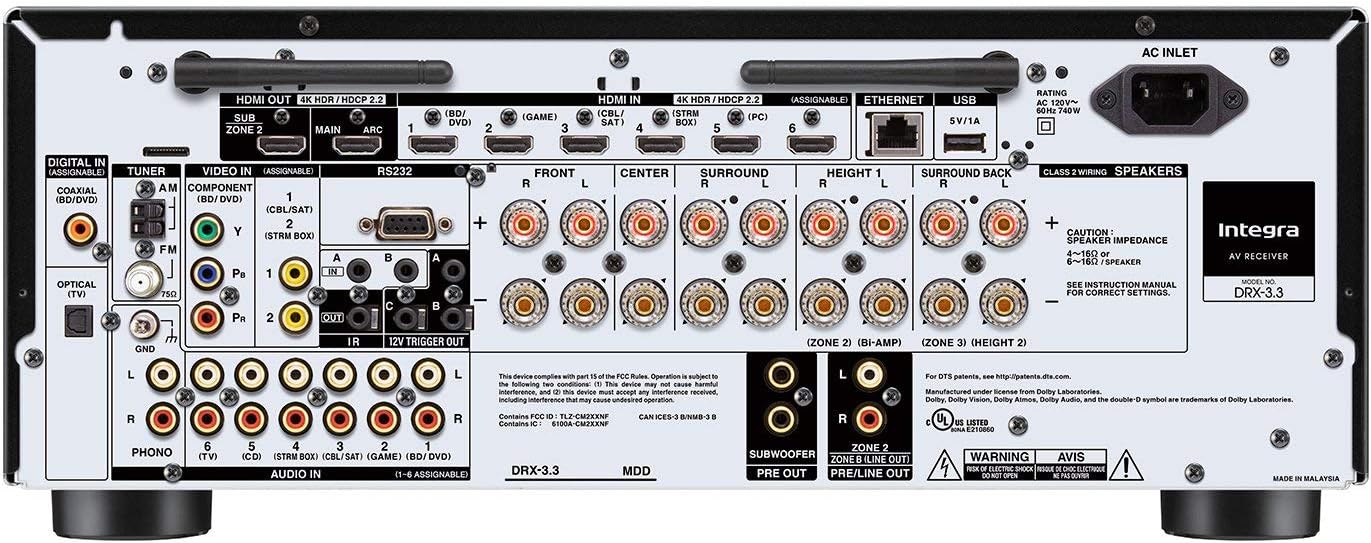
Setšoantšo sa 2.2: Ka morao view of the Integra DRX-3.3 receiver, illustrating various input and output ports including HDMI, digital audio, analog audio, and speaker terminals.
Lihokelo tsa Sebui:
Connect your speakers to the appropriate terminals on the rear panel. Ensure correct polarity (positive to positive, negative to negative) for optimal sound quality. The DRX-3.3 supports a 9.2 channel configuration, allowing for various surround sound setups including Dolby Atmos and DTS:X.
Lihokelo tsa HDMI:
Connect your video sources (e.g., Blu-ray player, gaming console, streaming device) to the HDMI input ports. Connect your TV or projector to the HDMI OUT (MAIN) port. The receiver features 7 HDMI input ports.
Network and Wireless Setup:
The receiver supports 802.11AC (MIMO) Wi-Fi for network multi-room audio. Connect the receiver to your home network via Ethernet or Wi-Fi for access to streaming services and firmware updates. Bluetooth connectivity is also available for wireless audio streaming from compatible devices.
3. Litaelo tsa Ts'ebetso
This section details the basic operation of your Integra DRX-3.3 receiver.
Tlosa/Tima:
Tobetsa ea E emetse / E emetse button on the front panel or the remote control to power the unit on or off. The Hybrid Standby indicator will illuminate when the unit is in standby mode.
Khetho ea Lintho:
Use the input selector buttons on the front panel (e.g., BD/DVD, Game, CBL/SAT, PC, CD, TV, Tuner, NET, Bluetooth) or the remote control to switch between connected audio/video sources.
Taolo ea Bolumo:
Adjust the Master Volume knob on the front panel or use the VOL +/- buttons on the remote control to increase or decrease the volume.
Mekhoa ea ho Mamela:
The receiver offers various listening modes to optimize your audio experience. Use the Mokhoa oa ho Mamela buttons on the front panel or remote to cycle through options like Movie/TV, Music, and Game modes. The Dolby Surround up-mixer processes content not mixed for Dolby Atmos to fill flexible speaker layouts.
Molumo oa Libaka tse Ngata:
The DRX-3.3 supports up to three-zone audio distribution. Use the Sebaka sa 2 le Sebaka sa 3 buttons on the front panel or remote to control audio in different rooms. Refer to the on-screen display for detailed zone setup and control.
Remote Control:

Figure 3.1: The remote control for the Integra DRX-3.3 receiver, featuring dedicated buttons for power, input selection, volume, listening modes, and multi-zone control.
4. Tlhokomelo
Proper maintenance ensures the longevity and optimal performance of your Integra DRX-3.3 receiver.
Ho hloekisa:
- Hlakola libaka tse ka ntle ka lesela le bonolo, le omeletseng.
- Se ke oa sebelisa li-abrasive cleaners, boka, kapa li-solvents kaha li ka senya qetello.
Moea oa moea:
Ensure adequate ventilation around the receiver. Do not block the ventilation slots on the top, sides, or rear of the unit. Overheating can lead to performance issues or damage. Maintain at least 6 inches (15 cm) of clear space above the unit.
Lisebelisoa tsa Firmware:
Periodically check for firmware updates to ensure your receiver has the latest features and bug fixes. Updates can typically be performed via the network connection.
5. Ho rarolla mathata
This section addresses common issues you might encounter with your DRX-3.3 receiver.
Ha ho na Molumo:
- Check all speaker connections for proper seating and polarity.
- Netefatsa hore mohloli o nepahetseng oa ho kenya o khethiloe.
- Netefatsa hore molumo ha oa khutsisoa kapa ha oa beoa tlase haholo.
- Confirm that the speaker impedance matches the receiver's specifications.
Video Display Issues (e.g., No Picture, Flickering):
- Netefatsa hore dikheibole tsohle tsa HDMI di hokahantswe ka mokhoa o sireletsehileng.
- Try using different HDMI cables, especially high-speed certified ones for 4K content.
- Verify that your display device (TV/projector) is set to the correct HDMI input.
- If experiencing issues with 4K@120Hz, ensure all components in the signal chain (source, cables, receiver, display) fully support this specification. Some older chipsets may have limitations.
Static or Unwanted Noise:
- Check for loose or damaged speaker wires.
- Ensure proper grounding of all audio components.
- If using analog inputs, ensure cables are shielded and away from power cords.
- For VLSC-enabled channels (front L/R), ensure the feature is active if desired for noise reduction.
Mathata a Khokahano ea Marang-rang:
- Verify your Wi-Fi network is active and the password is correct.
- If using Ethernet, ensure the cable is connected and your router is functioning.
- Qala botjha router ea hau le moamoheli.
6. Litlhaloso
| Sebopeho | Tlhaloso |
|---|---|
| Nomoro ea Mohlala | DRX-3.3 |
| Litekanyo tsa Sehlahisoa | 14.82 x 17.13 x 6.85 lisenthimithara |
| Boima ba Ntho | 28.5 liponto |
| Mokhoa oa Phatlalatso ea Audio | Potoloha |
| Potoloho ea Mohala oa Molumo o Potileng | 9.2 Channel |
| Kakaretso ea likou tsa HDMI | 7 |
| Theknoloji ea Khokahano | Bluetooth, USB, Wireless (802.11AC MIMO Wi-Fi) |
| Mofuta oa Molaoli | Voice, Bluetooth |
| Likarolo Tse Khethehileng | Equalizer, Pandora, Spotify, VLSC, Dolby Atmos, DTS:X |
| Lisebelisoa tse lumellanang | Sebui |
| Khouto ea Video | H.264, H.265/HEVC, VP9 |
7. Official Sehlahisoa Video
Watch this official video for an overview of the Integra DRX-3.3 9.2-Channel Receiver.
Video 7.1: A detailed look at the Integra DRX-3.3 9.2-Channel Receiver, highlighting its features and design. This video provides a visual guide to the product's capabilities and aesthetics.
8. Tiisetso le Tšehetso
For warranty information, technical support, or service inquiries, please refer to the official Integra websebaka kapa ikopanye le lefapha la litšebeletso tsa bareki. Boloka rasiti ea hau ea theko e le bopaki ba hore u rekile litseko tsa waranti.