
1. Selelekela
This manual provides essential information for the safe operation, maintenance, and troubleshooting of your Kobalt Hybrid 24-Volt Max Jobsite Fan. Please read this manual thoroughly before operating the fan and retain it for future reference. This fan is designed for air circulation in various indoor and outdoor environments, offering both battery-powered portability and corded operation.
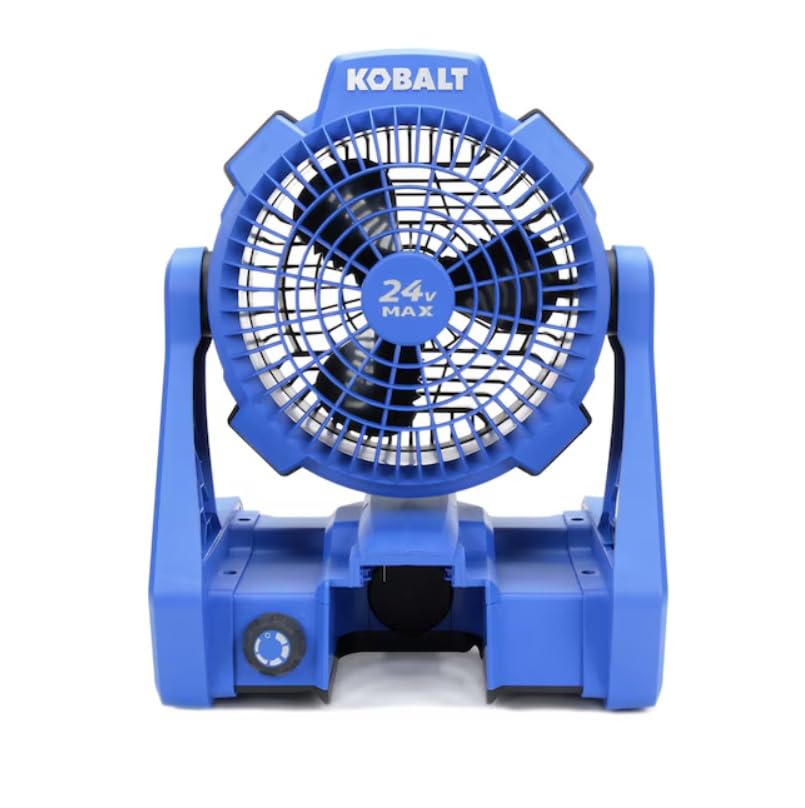
Figure 1: Kobalt Hybrid 24-Volt Max Jobsite Fan. This image displays the fan in its upright position, highlighting its robust blue and black casing and the 24V MAX branding on the fan grille.
2. Boitsebiso ba Tšireletseho
Kamehla ela hloko mehato ea ts'ireletso ea mantlha ho fokotsa kotsi ea mollo, ho ts'oaroa ke motlakase le likotsi tsa motho.
- Se ke oa sebelisa fene ka thapo e senyehileng kapa polaka.
- Avoid placing hands or objects near the fan blades during operation.
- Netefatsa hore fene e behiloe holim'a sebaka se tsitsitseng, se bataletseng ho thibela ho thella.
- Keep the fan away from water or wet environments when using AC power.
- Use only Kobalt 24-Volt Max batteries and chargers with this product.
- Tlosa motlakase pele o hloekisa kapa o lokisa leha e le efe.
3. Likahare tsa Sephutheloana
Netefatsa hore lintho tsohle li teng ha ho buloa:
- Kobalt Hybrid 24-Volt Max Jobsite Fan (Model KJF 124B-03)
- Khoele ea Matla ea AC
Tlhokomeliso: Betri le tjhaja li rekisoa ka thoko.
4. Likarolo
The Kobalt Hybrid 24-Volt Max Jobsite Fan offers versatile performance with the following key features:
- Hybrid Power Source: Operates on a Kobalt 24-Volt Max battery or standard AC power.
- Variable Speed Control: A rotary knob allows for precise adjustment of airflow from low to high.
- Hlooho ea Fans e Fetohang: The fan head pivots to direct airflow where needed.
- Integrated Hanging Hooks: Convenient hooks on the frame allow for easy suspension in various locations.
- Kaho e Ts'oarellang: Built to withstand demanding jobsite conditions.
- Moralo o bobebe: Facilitates easy transport and repositioning.
5. Setupo le Kopano
5.1 Battery Installation/Removal
- To install the battery (not included), align the battery pack with the battery port on the fan base.
- Tsamaisa betri boema-kepe ho fihlela e tobetsa sebakeng se sireletsehileng.
- To remove the battery, press the battery release button (usually located on the battery pack) and slide the battery out.
5.2 Khokelo ea Motlakase oa AC
- Locate the AC power inlet on the fan base.
- Insert the provided AC power cord firmly into the inlet.
- Plug the other end of the power cord into a standard 120V AC electrical outlet.
6. Litaelo tsa Ts'ebetso
6.1 Ho Matlafatsa/Ho tima
The fan features a rotary knob that controls both power and speed.
- To turn on the fan, rotate the knob clockwise from the 'OFF' position.
- To turn off the fan, rotate the knob counter-clockwise until it reaches the 'OFF' position.
6.2 Ho Fetola Lebelo la Feni
The rotary knob provides variable speed control:
- Rotate the knob clockwise to increase the fan speed.
- Rotate the knob counter-clockwise to decrease the fan speed.
6.3 Adjusting Fan Angle
The fan head can be manually tilted to direct airflow:
- Grasp the fan housing firmly and gently tilt it to the desired angle. The fan head will hold its position.
6.4 Using Hanging Hooks
For elevated airflow, utilize the integrated hanging hooks:
- Extend the metal hooks located on the sides of the fan frame.
- Hang the fan from a secure overhead structure, such as a tent frame or scaffolding. Ensure the structure can support the fan's weight.
7. Tlhokomelo
7.1 Ho hloekisa
- Always disconnect the fan from its power source (remove battery or unplug AC cord) before cleaning.
- Hlakola bokantle ba ka ntle ba fene ka bonolo, damp lesela. Se ke oa sebelisa li-abrasive cleaners kapa solvents.
- Use a vacuum cleaner with a brush attachment to remove dust and debris from the fan grille and blades.
Tlhokomelo ea Battery
- Boloka libeteri sebakeng se phodileng, se omeletseng hole le khanya ea letsatsi le mocheso o feteletseng.
- Charge batteries fully before storage and periodically during long storage periods to maintain battery health.
8. Ho rarolla mathata
Haeba u tobana le mathata le fan ea hau, sheba mathata le tharollo tse latelang:
| Bothata | Lebaka le ka khonehang | Tharollo |
|---|---|---|
| Fane ha e bulele. | No power supply; Battery depleted; AC cord not plugged in. | Ensure battery is charged and properly installed, or AC cord is securely plugged into a live outlet. |
| Phallo e tlase ea moea. | Fan speed set too low; Obstruction in front/rear grille; Dirty blades. | Increase fan speed; Remove any obstructions; Clean fan blades and grilles. |
| Fene e etsa lerata le sa tloaelehang. | Loose components; Debris in fan housing. | Inspect for loose parts; Disconnect power and carefully remove any debris. |
9. Litlhaloso
| Sebopeho | Tlhaloso |
|---|---|
| Brand | Kobalt |
| Lebitso la Mohlala | KJF 124B-03 |
| Mohloli oa Matla | Battery Powered (24V Max) / AC Cord |
| Moqtage | Li-volts tse 24 |
| Wattage | 288 watts |
| Lebelo | Ho fihlela ho 1000 RPM |
| Palo ea Li-Blades | 3 |
| Palo ea Maemo a Matla | Variable (via rotary knob) |
| Mokhoa oa ho Laola | Button Control (Rotary Knob) |
| Mofuta oa ho Beha | Tabletop Mount, Hanging |
| Boima ba Ntho | 5.5 Liponto |
| Tšebeliso ea Ka hare/Kantle | Ka hare, Ka ntle |
| Lintho tse bonahalang | Plastiki |
10. Tiisetso le Tšehetso
This Kobalt product is covered by the manufacturer's warranty. For specific warranty details, please refer to the warranty card included with your purchase or visit the official Kobalt website. For technical support, replacement parts, or service inquiries, please contact Kobalt customer service through their official channels.