
Nestling HK-688
Nestling HK-688 Walkie Talkies User Manual
Model: HK-688
1. Selelekela
This manual provides comprehensive instructions for the safe and effective operation of your Nestling HK-688 Walkie Talkies. These mini 2-way radios are designed for clear communication over long distances, making them ideal for children's outdoor adventures, camping, hiking, and general play.
The Nestling HK-688 Walkie Talkies feature 22 UHF channels, a generous range, and user-friendly controls. Please read this manual thoroughly before using the device to ensure proper functionality and to maximize your experience.

Image: Three Nestling HK-688 walkie talkies in camo blue, camo pink, and camo green, displayed with their product packaging.
2. Sehlahisoa Overview
2.1 Likahare tsa Sephutheloana
Sephutheloana se tloaelehileng se kenyelletsa lintho tse latelang:
- 3x Nestling HK-688 Camo Kids Walkie Talkies (Camo Blue, Camo Pink, Camo Green)
- 1x Buka ea Mosebelisi (tokomane ena)
- Tlhokomeliso: Libetri tsa AAA ha li kenyelelitsoe 'me li tlameha ho rekoa ka thoko.
2.2 Likarolo tsa Bohlokoa
- 22 FRS/GMRS Channels: Provides multiple communication options.
- Nako e telele: Up to 3km (1.9 miles) in typical conditions, and up to 5km (3.1 miles) in open fields.
- Hlakola Boleng ba Molumo: Ensures effective communication.
- Pontšo ea Backlit ea LCD: Bakeng sa bonolo viewing of channel, battery status, and other indicators.
- Built-in Mini LED Torch: Useful for low-light conditions.
- Automatic Channel Scan: Quickly finds active channels.
- Automatic Squelch: Reduces background noise for clearer reception.
- CTCSS 99 Sub-codes: Enhances privacy by filtering unwanted signals.
- Tlhokomeliso: Notifies you of incoming calls.
- Senotlolo sa Channel: Prevents accidental channel changes.
- PTT/VOX Function: Push-to-Talk for manual transmission or Voice Operated Exchange for hands-free communication.
- Battery Save Function: E eketsa bophelo ba betri.
- Tlhokomeliso ea Matla a Tlase: Indicates when batteries are running low.
- Bolumo bo Fetohang: Control the listening level.
- E bobebe ebile ea nkeha: Designed for easy carrying with a built-in belt clip.
- Drop Resistant Design: Enhanced durability for active use.

Image: Visual representation of the walkie talkie's dimensions and key features like drop resistance, low battery alert, flashlight, and communication range.

Image: Features of the walkie talkie, including 22 channels with privacy codes, extended range, noise reduction, drop resistance, and a built-in flashlight.
2.3 Lisebelisoa tsa lisebelisoa

Image: Detailed diagram illustrating the various parts of the walkie talkie, including buttons, display, and audio components.
- Antenna: Bakeng sa ho fetisa le ho amohela matšoao.
- Lamp (Flashlight): Leseli la LED le kentsweng kahare.
- Maekerofounu: For speaking into the device.
- PTT Button (Push-to-Talk): Tobetsa 'me u tšoare ho fetisa lentsoe la hao.
- Pontšo ea LCD: Shows channel, battery level, and other indicators.
- Call Lock Button: Locks the current channel.
- Konopo ea ho Hlahloba: Allows listening to weak signals on the current channel.
- Lamp Konopo ea ho Skena: Activates the flashlight and initiates channel scan.
- Konopo e tlase Navigates menus or decreases values.
- Power/Menu Button: Turns the device on/off and accesses the menu.
- Sebui: For listening to incoming transmissions.
3. Seta
3.1 Ho kenya Betri
Each Nestling HK-688 Walkie Talkie requires 4x AAA batteries (not included).
- Release the Belt Clip: Press the lock on the top of the belt clip and lift the clip up to detach it from the radio.
- Bula Kamore ea Battery: Locate the battery cover on the back of the walkie talkie. Gently push down on the tab and slide the cover off.
- Kenya Libetri: Insert 4x AAA batteries into the compartment, ensuring correct polarity (+/-) as indicated inside the compartment.
- Koala Kamore ea Battery: Replace the battery cover and slide it until it clicks securely into place. Reattach the belt clip if desired.
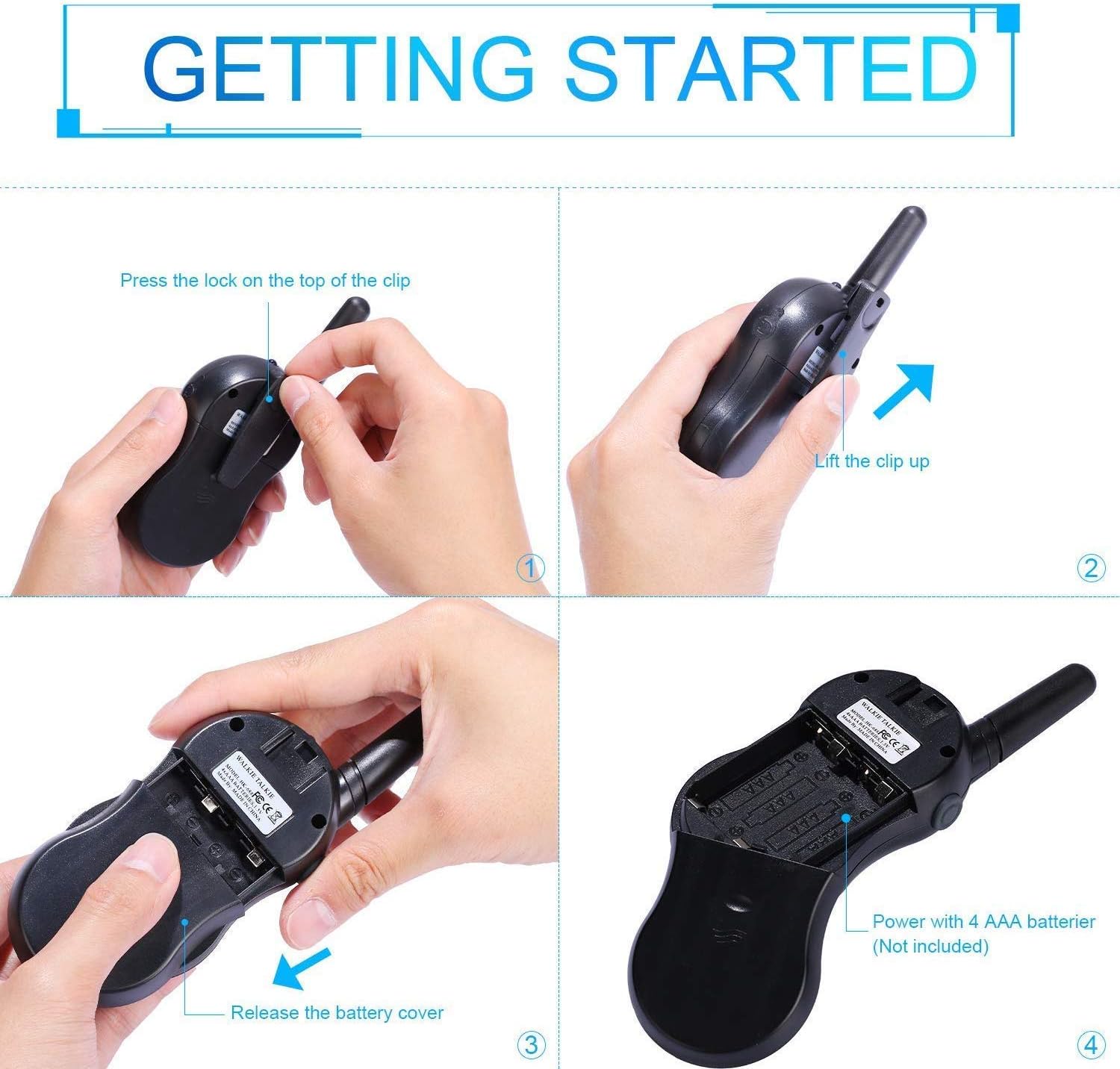
Image: Step-by-step instructions for opening the battery compartment and inserting AAA batteries into the walkie talkie.

Image: An open battery compartment of the walkie talkie, ready for battery insertion.
3.2 Ho Matlafatsa/Ho tima
To turn the walkie talkie on or off, press and hold the Matla/Menu button until the LCD screen illuminates or turns off.
4. Litaelo tsa Ts'ebetso
4.1 Basic Communication (Push-to-Talk)
- Khetha Channel: Ensure all walkie talkies you wish to communicate with are set to the same channel and sub-code. Use the Up le Tlase likonopo ho fetola likanale.
- Fetisetsa: Tobetsa o hatelle PTT button (located on the side of the radio). Speak clearly into the microphone, holding the radio approximately 2-3 inches from your mouth.
- Amohela: Lokolla PTT button to listen for incoming transmissions.
Tip: For optimal range and clarity, avoid obstructions like buildings, dense foliage, or large metal objects. Adverse weather conditions can also affect range.
4.2 Channel Selection and Sub-codes (CTCSS/DCS)
Your walkie talkie supports 22 FRS/GMRS channels and 99 CTCSS/DCS sub-codes. Sub-codes help filter out unwanted conversations on the same channel, enhancing privacy.
- Tobetsa ea Lenane button once to enter channel selection mode. The channel number will flash.
- Sebelisa le Up or Tlase dikonopo ho kgetha kanale eo o e batlang (1-22).
- Tobetsa ea Lenane button again to enter sub-code selection mode. The sub-code number will flash.
- Sebelisa le Up or Tlase buttons to select your desired sub-code (0-99). Setting to 0 disables the sub-code.
- Tobetsa ea PTT button or wait a few seconds for the setting to be saved and exit the menu.
4.3 Mosebetsi oa VOX (Phapanyetsano e Sebetsang ka Lentsoe)
The VOX function allows for hands-free communication. When activated, the radio will automatically transmit when it detects your voice.
- Tobetsa ea Lenane button multiple times until the VOX icon (VOX) appears on the LCD and flashes.
- Sebelisa le Up or Tlase buttons to select the VOX sensitivity level (e.g., 1-3, with 1 being most sensitive). Select "OFF" to disable VOX.
- Tobetsa ea PTT button or wait a few seconds to save the setting and exit.
4.4 Tshebetso ya Toche
To turn the built-in LED flashlight on or off, briefly press the Lamp button (often combined with the Scan button).
4.5 Call Alert Tone
To send a call alert tone to other radios on the same channel, briefly press the Letsa button (often represented by a musical note icon).
4.6 Senotlolo sa Channel
To prevent accidental channel changes, you can lock the current channel.
- Tobetsa o hatelle Call Lock button (often represented by a key icon) until a key icon appears on the LCD.
- Ho notlolla, tobetsa o hatelle Call Lock button again until the key icon disappears.

Setšoantšo: Examples of suitable scenarios for using the walkie talkies, such as outdoor play, family activities, and leisure.

Image: Illustrations of walkie talkies being used for communication in both play and household settings.
5. Tlhokomelo
Tlhokomelo ea Battery
- Always use fresh, high-quality AAA batteries.
- Remove batteries from the walkie talkie if it will not be used for an extended period to prevent leakage and damage.
- Lahla libeteri tse sebelisitsoeng ka boikarabelo ho latela melao ea sebaka.
5.2 Ho Hloekisa le ho Boloka
- Clean the walkie talkie with a soft, damp lesela. U se ke ua sebelisa lik'hemik'hale tse bohale kapa li-abrasive cleaners.
- Do not immerse the walkie talkie in water, as it is not water-resistant.
- Boloka walkie talkie sebakeng se pholileng, se omileng hole le khanya ea letsatsi le mocheso o feteletseng.
6. Ho rarolla mathata
| Bothata | Lebaka le ka khonehang | Tharollo |
|---|---|---|
| Ha ho matla | Libetri li shoele kapa li kentsoe hampe. | Fetola libeteri ka tse ncha, ho netefatsa polarity e nepahetseng. |
| Ha e khone ho fetisetsa kapa ho amohela | Not on the same channel/sub-code; out of range; PTT button not pressed/released. | Ensure all radios are on the same channel and sub-code. Move closer to the other radio. Press and hold PTT to transmit, release to receive. |
| Boleng ba modumo bo fokolang / Bo sa fetoheng | Out of range; obstructions; low battery; squelch setting. | Move closer. Avoid obstructions. Replace batteries. Check squelch settings. |
| Channel changes accidentally | Channel lock is not activated. | Activate the channel lock function. |
| VOX not working | VOX sensitivity too low or VOX is off. | Adjust VOX sensitivity to a higher level or ensure VOX is enabled. |
7. Litlhaloso
| Sebopeho | Lintlha |
|---|---|
| Brand | Nestling |
| Mohlala | EA-688 |
| Maqhubu a Range | 400-470MHz |
| Likanale | 22 FRS/GMRS Channels |
| Likhoutu tse nyane | EA-99-CTCSS |
| Matla a Phetiso | <=0.5W |
| Mofuta oa Modulation | EA-F3E |
| Range | Up to 3km (1.9 miles) typical, MAX 5km (3.1 miles) in open field |
| Sehlopha | Auto squelch |
| Mofuta oa Pontšo | LCD Backlit |
| Earphone Jack | 2.5mm / 0.1inch |
| Phepelo ea motlakase | 4x AAA batteries per radio (Not Included) |
| Litekanyo tsa Sehlahisoa (H x L x D) | 14cm x 5.5cm x 3.5cm (5.5 x 2.2 x 1.4 inches) |
| Pakete Boima | 370g |
| Mmala | Camo Blue, Camo Pink, Camo Green |
| Boemo ba ho hanyetsa Metsi | Ha e Mamelle Metsi |
8. Tiisetso le Tšehetso
Nestling HK-688 Walkie Talkies come with a Warranty ea Likhoeli tse 12 ho tloha ka letsatsi la theko.
For any support inquiries, troubleshooting assistance beyond this manual, or warranty claims, please refer to the contact information provided on the product packaging or the retailer's websebaka seo sehlahiswa se rekiloeng ho sona.
Ask a question about this manual
Ask about setup, troubleshooting, compatibility, parts, safety, or missing instructions. Manuals+ will review the question and use this page’s manual context to help answer it.