
1. Selelekela
This manual provides comprehensive instructions for the installation, operation, and maintenance of the Chacon DI-O 54515 Universal Dimmer White. This device allows you to wirelessly control your lighting, integrating seamlessly with existing light switches and the DiO 1.0 ecosystem.
The DI-O 54515 micro-module is designed to be installed behind your existing light switch, enabling wireless ON-OFF control of your lights. It supports control via the physical switch, a remote control, or automatically through compatible motion or opening sensors. When connected to a LiteBox or DiO Home+ hub, it offers smartphone app control, timers, and scenario programming, including voice control via Amazon Echo or Google Home.
2. Boitsebiso ba Tšireletseho
Ka kopo bala litaelo tsohle tsa polokeho ka hloko pele o kenya le ho sebelisa. Ho hloleha ho latela litaelo tsena ho ka baka ho tšoha ha motlakase, mollo, kapa likotsi tse ling.
- Ho kenya ho lokela ho etsoa ke setsebi sa motlakase se tšoanelehang kapa ho latela melao ea motlakase ea lehae.
- Always disconnect power at the circuit breaker before installing or servicing the device.
- Do not exceed the maximum load ratings specified in the technical specifications.
- Sesebelisoa sena se etselitsoe ho sebelisoa ka tlung feela.
- Boloka sesebelisoa hole le metsi, mongobo le mocheso o feteletseng.
- Netefatsa hore likhokahano tsohle li bolokehile ebile li sirelelitsoe hantle.
3. Likahare tsa Sephutheloana
Pakete e lokela ho ba le lintho tse latelang:
- Chacon DI-O 54515 Universal Dimmer White Module
- Buka ea litaelo (tokomane ena)

Image 1: The Chacon DI-O 54515 Universal Dimmer White module, showing its compact design and wiring terminals.
4. Likarolo tsa lihlahisoa
- Taolo ea Wireless: Enables wireless ON-OFF control of lights when installed behind an existing switch.
- Dikgetho tsa Taolo e Mengata: Compatible with existing physical switches, DiO 1.0 remote controls, wireless switches, motion sensors, and opening sensors.
- Smart Home Integration: Connects to LiteBox or DiO Home+ for smartphone app control, timers, and scenario programming.
- Taolo ea Lentsoe: Supports voice commands via Amazon Echo or Google Home when integrated with DiO Home+.
- Kenyelletso e Bonolo: Designed for simple connection behind an existing light switch, requiring no neutral wire.
- Moralo oa Compact: Dimensions (L x W x H): 41 x 42 x 13 mm, allowing it to fit into standard electrical boxes.
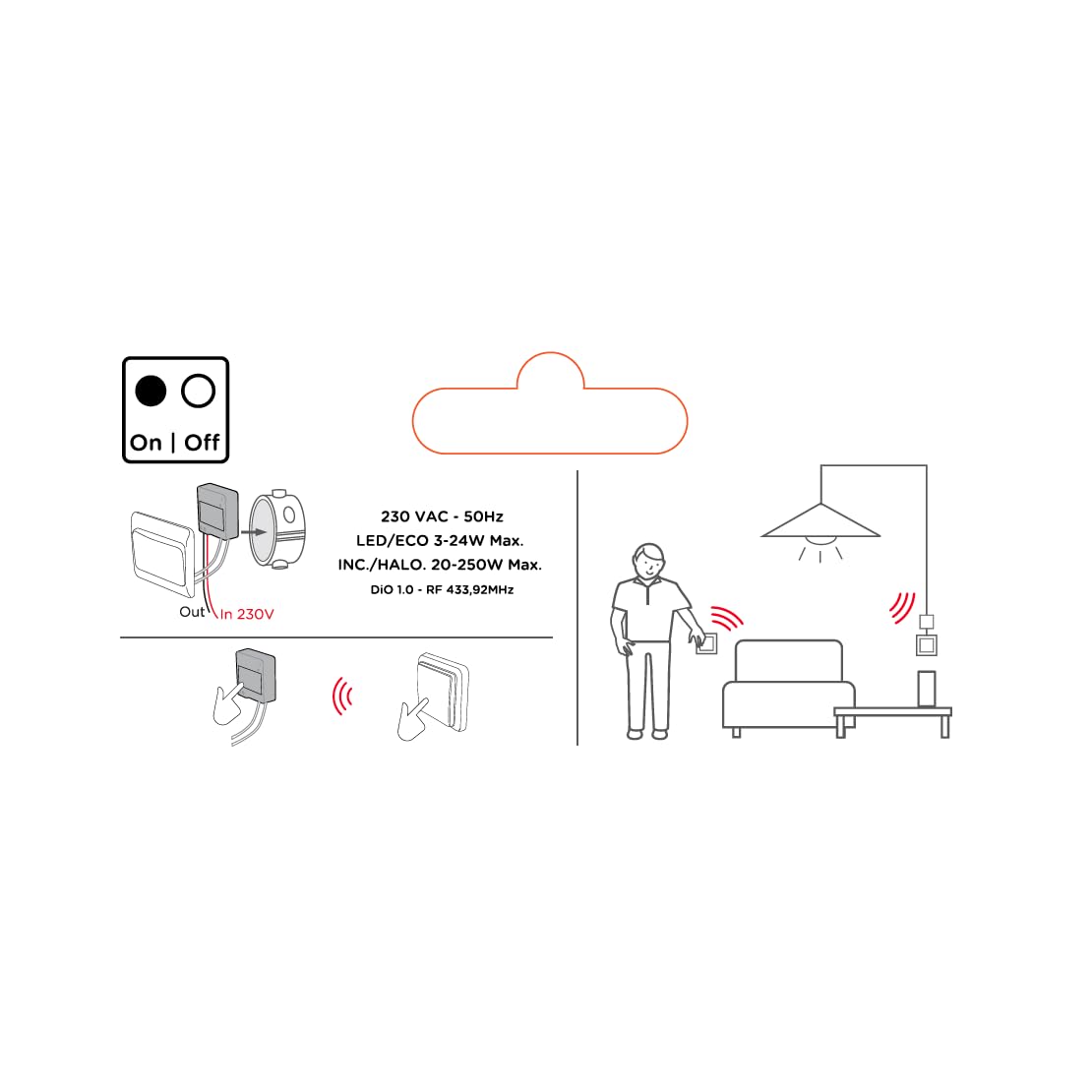
Image 2: An illustrative diagram detailing the wireless control capabilities and key electrical specifications of the module.
5. Ho seta le ho kenya
The installation of the Chacon DI-O 54515 module is designed to be straightforward. However, if you are unsure, consult a qualified electrician.
5.1 Litaelo tsa Wiring
- Hakolla Matla: Before starting any electrical work, ensure the power supply to the circuit is turned off at the main circuit breaker.
- Access Switch Box: Carefully remove your existing light switch from the wall box.
- Hokela Mojule:
- Connect the Live (L) wire from your electrical supply to the 'L' terminal on the DiO module.
- Connect the wire going to your light fixture to the output terminal (often marked with a wave symbol or 'OUT') on the DiO module.
- Connect the two wires from your existing light switch to the designated switch input terminals on the DiO module. This module does not require a neutral wire for operation.
- Position Module: Carefully place the DiO module into the wall box behind your existing light switch. Ensure wires are not pinched.
- Reinstall Switch: Reattach your existing light switch to the wall box.
- Khutlisa Matla: Bulela motlakase ho sekhechana sa potoloho.

Image 3: A visual representation of the DiO module being installed within a standard electrical wall box, positioned behind an existing light switch.

Setšoantšo sa 4: E qaqileng view of the Chacon DI-O 54515 module, highlighting its wiring terminals for proper connection.
5.2 Pairing with DiO 1.0 Controls
To enable wireless control, you need to pair the module with a compatible DiO 1.0 remote control, wireless switch, or sensor.
- Kenya Mokhoa oa Pairing: Refer to the specific instructions for your DiO 1.0 control device to put it into pairing mode. Typically, this involves pressing a pairing button on the module or performing a specific sequence with the existing switch.
- Activate Control: Once the module is in pairing mode, activate your DiO 1.0 control (e.g., press the 'ON' button on a remote or wireless switch).
- Netefatso: The light connected to the module should flash or turn on/off to confirm successful pairing.
- Repeat for Multiple Controls: You can pair multiple DiO 1.0 controls to the same module if desired.
6. Litaelo tsa Ts'ebetso
Once installed and paired, the Chacon DI-O 54515 module offers several ways to control your lighting:
- Existing Light Switch: You can continue to use your traditional wall switch to turn the lights on and off.
- DiO 1.0 Remote Control/Wireless Switch: Use any paired DiO 1.0 remote control or wireless switch to toggle the lights.
- DiO 1.0 Sensors: If paired with a DiO motion or opening sensor, the lights can be triggered automatically based on detected activity.
- Smartphone App (via DiO Home+ / LiteBox):
- Connect your DiO module to a DiO Home+ or LiteBox hub (sold separately).
- Download the free DiO smartphone app.
- Follow the app's instructions to add and configure your module.
- From the app, you can turn lights on/off, set timers, and create custom scenarios.
- Voice Control (via DiO Home+ and Smart Speaker):
- Ensure your DiO Home+ hub is integrated with Amazon Echo or Google Home.
- Use voice commands such as "Alexa, turn on the living room light" or "Hey Google, turn off the kitchen light."
7. Tlhokomelo
The Chacon DI-O 54515 module requires minimal maintenance. Follow these guidelines to ensure optimal performance:
- Ho hloekisa: Haeba ho hlokahala, hlakola module ka bonolo ka lesela le omileng le bonolo. U se ke ua sebelisa li-cleaner tsa metsi kapa li-solvent.
- Tlhahlobo: Periodically check the wiring connections to ensure they remain secure. Always disconnect power before inspection.
- Lisebelisoa tsa Firmware: If using with a DiO Home+ or LiteBox, ensure your hub's firmware and the smartphone app are kept up to date for the best performance and security.
8. Ho rarolla mathata
| Bothata | Lebaka le ka khonehang | Tharollo |
|---|---|---|
| Leseli ha le tite/ho tima. | No power to the module, incorrect wiring, module not paired, faulty bulb. | Check circuit breaker. Verify wiring according to Section 5.1. Re-pair the module with the control device (Section 5.2). Test with a known working bulb. |
| Taolo e se nang mohala ha e sebetse. | Module not paired, control device out of range, battery low in remote/sensor. | Ensure module is correctly paired (Section 5.2). Move control device closer to the module. Replace batteries in remote/sensor. |
| Module indicator light flashing red. | Overload or short circuit detected. | Immediately disconnect power. Check the connected load does not exceed specifications. Inspect wiring for any short circuits. Consult a qualified electrician if the problem persists. |
| Voice control not responding. | DiO Home+ hub not connected, incorrect voice command, smart speaker issue. | Ensure DiO Home+ is online and linked to your smart speaker account. Verify the correct device name is used in commands. Check smart speaker's internet connection. |
9. Litlhaloso
| Sebopeho | Lintlha |
|---|---|
| Nomoro ea Mohlala | 54515 |
| Brand | Dio |
| Mokhoa oa ts'ebetso | SEBETSE |
| Boemo ba Hona Joale | 10 Amps |
| Fetola Mofuta | Phetoho ea Dimmer |
| Mofuta oa ho Beha | Thaba ea Lerako |
| Mofuta oa Actuator | Remote Control |
| Tekanyetso ea Tšireletso ea Machaba | IP44 |
| Mofuta oa Molaoli | Amazon Alexa |
| Mokhoa oa ho Laola | Hole |
| Mmala | Bosoeu |
| Litekanyo (L x W x H) | 41 x 42 x 13 limilimithara |
| Tiisetso | 2 lilemo |
Note on Dimming Functionality: While the product title includes "Dimmer" and "Switch Type" is listed as "Dimmer Switch", the official specifications list "Operation mode: ON-OFF". Some user reviews also indicate that newer versions of this module function as a simple ON/OFF switch rather than a dimmer. Please verify the specific functionality of your module upon receipt.
10. Tiisetso le Tšehetso
This Chacon DI-O 54515 Universal Dimmer White module comes with a Waranti ea lilemo tse 2 ho tloha ka letsatsi la theko, ho koahela liphoso tsa tlhahiso.
For technical support, troubleshooting assistance, or warranty claims, please contact your retailer or visit the official Dio website for contact information. Please have your proof of purchase and model number (54515) ready when contacting support.