
1. Selelekela
Kea leboha ha u rekileasing the Infocus 24-inch 720p LED TV, model IM24ED800. This manual provides essential information for setting up, operating, and maintaining your television. Please read this manual thoroughly before using the product and retain it for future reference.
Boitsebiso ba Tšireletseho
- Se ke oa pepesetsa TV pula kapa mongobo.
- Se ke oa thibela menyetla ea moea o kenang.
- Etsa bonnete ba hore motlakase o na le matla a lekanengtage.
- Sireletsa thapo ea motlakase hore e se ke ea tsamauoa kapa e penngoa.
- Fetisetsa lits'ebeletso tsohle ho basebetsi ba tšoanelehang.
- Boloka TV hole le khanya ea letsatsi, mehloli ea mocheso le matla a makenete a matla.
2. Likahare tsa Sephutheloana
Ka kopo, sheba lebokose bakeng sa lintlha tse latelang:
- Infocus 24-inch 720p LED TV (IM24ED800)
- Taolo ea Remote (e nang le libeteri, haeba li kenyelelitsoe)
- Mohala oa Matla
- Seteishene sa TV (likotoana tse 2)
- Likokoana-hloko tsa Seteishene sa TV
- Bukana ea mosebelisi (tokomane ena)
3. Seta
3.1 Ho hokela Seteishene sa TV
To attach the stand to your Infocus TV:
- Beha skrini sa TV ka hloko sebakeng se bonolo, se hloekile ho thibela mengwapo.
- Lokisetsa karolo e 'ngoe le e 'ngoe ea ho ema le libaka tse tsamaisanang le eona tlase ho TV.
- Secure each stand piece using the provided screws. Ensure they are tightened firmly.
- Phahamisa TV ka hloko 'me u e behe sebakeng se tsitsitseng, se lekaneng.
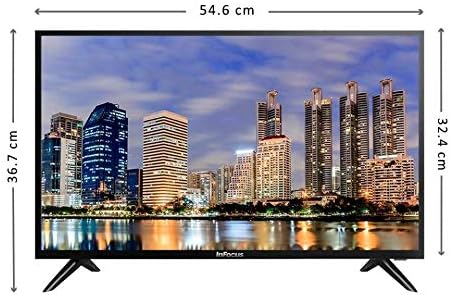
Setšoantšo: Pele view of the Infocus 24-inch LED TV with dimensions indicated. The TV measures approximately 54.6 cm in width and 36.7 cm in height with the stand.
3.2 Lisebelisoa tse hokelang
Your Infocus TV features multiple input ports for connecting external devices.

Setšoantšo: Ka morao view of the Infocus 24-inch LED TV, highlighting the location of various input ports including HDMI and USB.
- Lihokelo tsa HDMI: Connect Blu-ray players, game consoles, or cable/satellite boxes to the HDMI ports. The TV has 2 HDMI inputs.
- Lihokelo tsa USB: Connect USB flash drives for media playback to the USB ports. The TV has 2 USB inputs.
- Antenna/Cable: Connect an antenna or cable TV signal to the RF input (if available, not explicitly listed but standard for TVs).
- Matla: Hokela thapo ea motlakase ho motlakase oa TV, ebe o hokela leboteng.
3.3 Matla a Pele a Buletsoe
After connecting all necessary cables:
- Ensure the power cord is securely plugged into both the TV and a power outlet.
- Tobetsa konopo ea Matla ho remote control kapa ho TV ka boeona.
- Follow the on-screen instructions for initial setup, which may include language selection, time zone, and channel scanning.
4. Ho Sebelisa TV ea Hao
4.1 Taolo ea Remoutu Overview
The remote control allows you to access all TV functions. While specific button layouts may vary, common functions include:
- Matla: E bulela kapa e tima TV.
- Kenyelletso/Mohloli: Selects the input source (HDMI 1, HDMI 2, USB, TV).
- Phahamiso ea Phahamiso / Tlase: E lokisa molumo.
- Channel Holimo/tlase: E fetola likanale tsa TV.
- Khutsa: E khutsisa molumo oa TV.
- Lenane: E bula lenane le ka sehloohong bakeng sa diphetoho tsa di-setting.
- Likonopo tsa ho Tsamaea (Holimo/Tlase/Ka ho le Letshehadi/Ka ho le Letona/Ho Lokile): E sebelisoa ho sheba li-menu le ho netefatsa likhetho.
- Exit/Back: Returns to the previous screen or exits the menu.
4.2 Mesebetsi ea Motheo
- Ho Fetola Mohloli oa Ketso: Tobetsa ea Kenyeletso or Mohloli button on your remote control. Use the navigation buttons to select the desired input (e.g., HDMI 1, USB) and press OK.
- Ho Fetola Bolumo: Sebelisa le Phahamiso ea Phahamiso (+) or Buka e tlase (-) likonopo.
- Litsela Tse Fetolang: Sebelisa le Channel Up (CH+) or Channel Down (CH-) likonopo.
4.3 USB Media Playback
Ho bapala media files from a USB flash drive:
- Insert a USB flash drive into one of the TV's USB ports.
- Tobetsa ea Kenyeletso or Mohloli konopo ea remote control ebe u khetha USB.
- The TV's media browser should appear. Navigate through your files (photos, music, videos) using the remote control.
- Khetha a file ebe o tobetsa OK ho e bapala.
5. Tlhokomelo
5.1 Ho hloekisa skrine
- Turn off the TV and unplug the power cord before cleaning.
- Sebelisa lesela le bonolo, le se nang lesela le thata (mohlala, lesela la microfiber) ho hlakola skrine ka bonolo.
- Bakeng sa matšoao a manganga, ha bobebe damptn lesela le nang le metsi kapa mochini o hloekisang skrineng. Le ka mohla u se ke ua fafatsa sehloekisi ka kotloloho skrineng.
- Avoid using abrasive cleaners, alcohol, benzene, or thinners, as these can damage the screen.
5.2 Tlhokomelo e akaretsang
- Boloka TV sebakeng se nang le moea o kenang hantle.
- Qoba ho beha lintho tse boima ka holim'a TV.
- Tlosa TV nakong ea lifefo tsa lehalima kapa ha e tla be e sa sebelisoe ka nako e telele.
6. Ho rarolla mathata
Haeba u kopana le mathata ka TV ea hau, sheba mathata a latelang a tloaelehileng le tharollo:
| Bothata | Lebaka le ka khonehang | Tharollo |
|---|---|---|
| Ha ho matla | Power cord not connected; power outlet issue | Netefatsa hore thapo ea motlakase e hoketsoe hantle. Leka sehokelo ka sesebelisoa se seng. |
| Ha ho setšoantšo, empa molumo o teng | Incorrect input source selected; loose video cable | Tobetsa ea Kenyeletso/Mohlodi button to select the correct input. Check video cable connections. |
| Ha ho na molumo, empa setšoantšo se teng | Volume muted or too low; audio cable issue | Tobetsa ea Semumu button or increase volume. Check audio cable connections. |
| Remote control ha e sebetse | Batteries depleted; obstruction; remote sensor blocked | Replace batteries. Remove any obstructions between the remote and TV. Ensure the TV's remote sensor is clear. |
| "No Signal" message | Incorrect input source; device not powered on; cable issue | Verify the correct input source is selected. Ensure the connected device is powered on. Check all cable connections. |
7. Litlhaloso
The following are the technical specifications for the Infocus 24-inch 720p LED TV model IM24ED800:
| Sebopeho | Lintlha |
|---|---|
| Nomoro ea Mohlala | IM24ED800 |
| Boholo ba skrine | 24 lisenthimithara (61 cm) |
| Bontša Theknoloji | LED |
| Qeto | 1366 x 768 (720p HD) |
| Refresh Rate | 60 Hz |
| Lisebelisoa tsa HDMI | 2 |
| Lisebelisoa tsa USB | 2 |
| Khokahano | HDMI, USB |
| Mofuta oa ho Beha | Setopo sa Tafole |
| Litekanyo tsa sephutheloana | 60.8 x 37.8 x 12 cm, |
| Pakete Boima | 5 lik'hilograma |
8. Tiisetso le Tšehetso
This Infocus TV is sold as a renewed product, which typically comes with a limited warranty provided by the seller or refurbisher. Please refer to your purchase documentation or contact your retailer for specific warranty terms and conditions.
For technical support or service inquiries, please contact the customer support channel provided by your retailer or the Infocus support websebaka.