
1. Selelekela
This manual provides instructions for the installation, operation, and maintenance of the Cisco CP-68KEM-3PCC Expansion Module. This module is designed to enhance the functionality of your Cisco IP Phone 6851 by providing additional programmable keys.
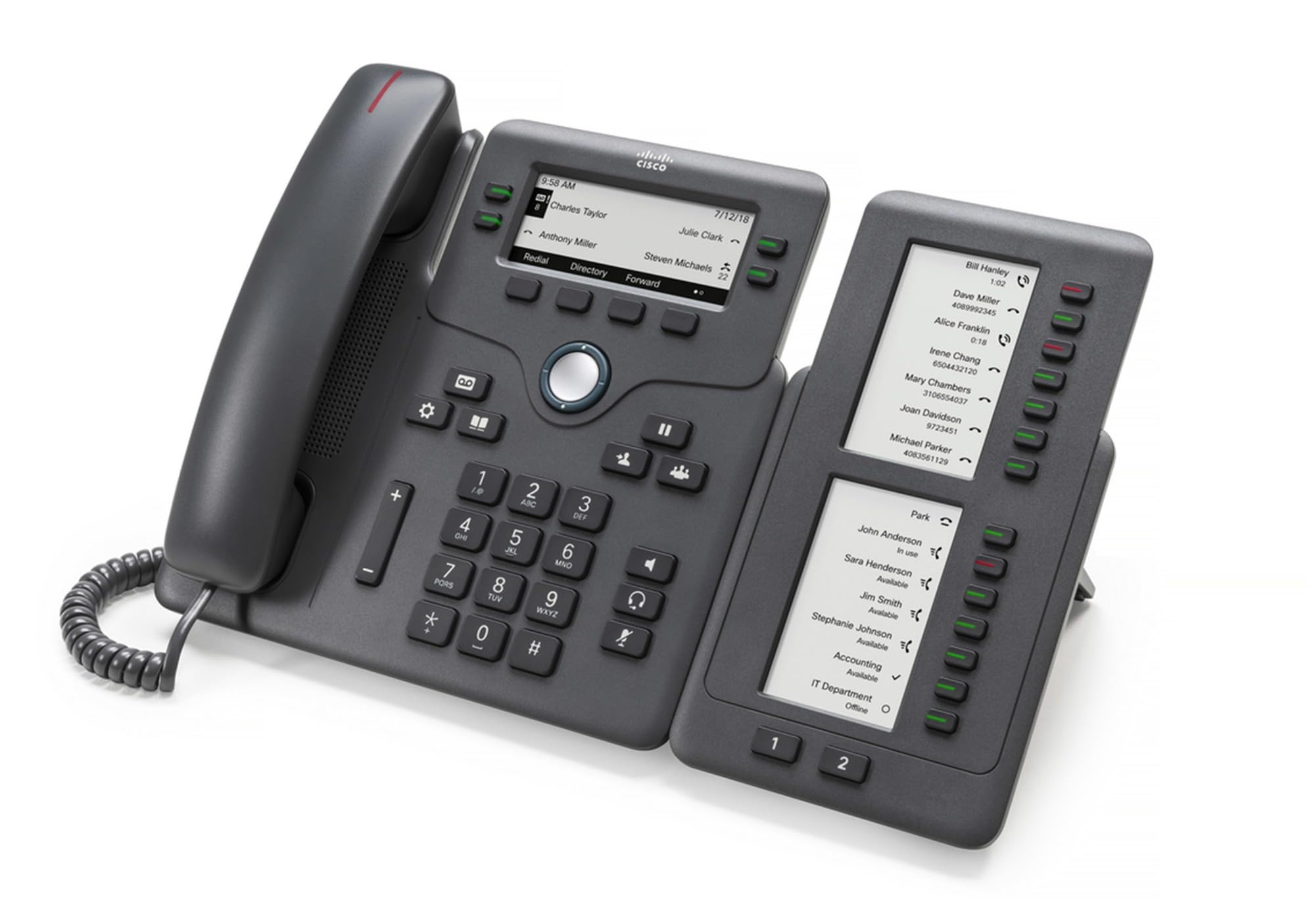
Figure 1: Cisco CP-68KEM-3PCC Expansion Module. This image shows the front view of the expansion module with its grayscale LCD screen and programmable keys.
The Cisco CP-68KEM-3PCC Expansion Module adds 14-line keys and 2-page keys, totaling 28 additional keys, with an easy-to-read grayscale LCD screen. It is ideal for monitoring and managing call status, directory numbers, and speed dial functions.
2. Se ka Lebokoseng
Hlakola lebokose ka hloko 'me u netefatse hore lintho tsohle li teng:
- Cisco CP-68KEM-3PCC Phone Expansion Module
- Connecting Cable (typically included for linking to the phone)
- Documentation (this user manual, safety information)
If any items are missing or damaged, please contact your vendor or Cisco support immediately.
3. Litaelo tsa ho seta
Follow these steps to connect your Cisco CP-68KEM-3PCC Expansion Module to your Cisco IP Phone 6851.
- Prepare the IP Phone: Ensure your Cisco IP Phone 6851 is powered off and disconnected from the network.
- Connect the Expansion Module: Locate the expansion port on the back or side of your Cisco IP Phone 6851. Connect the provided connecting cable from the expansion module to this port.
- Sireletsa Khokahano: Ensure the cable is securely fastened to prevent accidental disconnection.
- Matlafatsa: Reconnect your Cisco IP Phone 6851 to the network and power it on. The expansion module should be detected automatically.
- Netefatsa Tšebetso: Once the phone has booted, check the expansion module's display and keys to ensure they are responsive.
For detailed visual instructions, refer to the official Cisco documentation or support websebaka.
4. Operating the Expansion Module
The expansion module provides additional keys for various functions, enhancing your call management capabilities.
4.1 Linotlolo tse lokiselitsoeng
The 28 programmable keys (14 keys across 2 pages) can be configured for:
- Directory Numbers (DNs): Assign specific phone lines or extensions.
- Ho daela ka lebelo: Program frequently called numbers for quick access.
- Linotlolo tsa Tšobotsi: Assign functions like call transfer, conference, or call park.
- Call Status Monitoring: Monitor the status of other lines (e.g., busy, ringing).
4.2 Page Navigation
Use the dedicated page keys (usually located near the display) to switch between the two pages of programmable keys. The grayscale LCD screen will update to show the labels for the currently active page.
4.3 Tlhophiso
Configuration of the programmable keys is typically managed through your organization's phone system administrator or via the web interface of the Cisco IP Phone 6851. Consult your IT department for specific configuration instructions.
5. Tlhokomelo
To ensure the longevity and optimal performance of your Cisco CP-68KEM-3PCC Expansion Module, follow these maintenance guidelines:
- Ho hloekisa: Use a soft, dry, lint-free cloth to clean the exterior surfaces. For stubborn marks, slightly dampen the cloth with water. Avoid using harsh chemicals, abrasive cleaners, or solvents, as these can damage the finish and electronic components.
- Tikoloho: Keep the module in a clean, dry environment, away from direct sunlight, excessive heat, and moisture.
- Ho tšoara: Handle the module with care. Avoid dropping it or subjecting it to strong impacts.
- Tsamaiso ea Cable: Ensure connecting cables are not kinked, pinched, or under strain.
There are no user-serviceable parts inside the expansion module. Do not attempt to open or repair the device yourself.
6. Ho rarolla mathata
If you encounter issues with your expansion module, try the following troubleshooting steps:
| Bothata | Lebaka le ka khonehang | Tharollo |
|---|---|---|
| Module not recognized by phone | Loose cable connection, phone not restarted, incompatible phone model. |
|
| Linotlolo ha li arabele | Software glitch, configuration issue. |
|
| Display is blank or flickering | Bothata ba motlakase, phoso ea ka hare. |
|
If these steps do not resolve the issue, please contact Cisco technical support or your authorized reseller.
7. Litlhaloso
| Sebopeho | Lintlha |
|---|---|
| Nomoro ea Mohlala | CP-68KEM-3PCC |
| Brand | Cisco |
| Lisebelisoa tse lumellanang | Cisco IP Fono 6851 |
| Mmala | Ntsho |
| Lintho tse bonahalang | Tšepe |
| Litekanyo tsa Ntho (LxWxH) | 5.1 x 10.2 x 20.3 cm, |
| Mohloli oa Matla | Corded (powered via host IP Phone) |
| Nomoro ea Linotlolo | 28 (14 keys across 2 pages) |
| Pontšo | Grayscale LCD |
| GTIN/UPC | 889728068383 |
8. Boitsebiso ba Tiisetso
The Cisco CP-68KEM-3PCC Expansion Module comes with a Tiisetso ea lihlahisoa tsa lilemo tse 2 from the date of purchase. This warranty covers defects in materials and workmanship under normal use. It does not cover damage caused by misuse, accidents, unauthorized modifications, or external causes.
For warranty claims or detailed terms and conditions, please refer to the official Cisco warranty policy available on their websaete kapa ikopanye le moo u rekelang teng.
9. Tšehetso
For technical assistance, product information, or to report issues, please contact Cisco support:
- Ts'ehetso ea Cisco Websebaka: Etela ofisiri Ts'ehetso ea Cisco websebaka for documentation, downloads, and contact options.
- Morekisi ea Lumelloang: Contact the reseller from whom you purchased the product.
When contacting support, please have your product model (CP-68KEM-3PCC) and serial number ready.