
1. Selelekela
Thank you for choosing the Adastra DM40 Digital 100V Mixer Amplifier System. This system provides a comprehensive audio solution for various small to medium-sized installations, combining a powerful amplifier with versatile input options including USB, FM radio, and Bluetooth connectivity. The included Adastra BC3V-B background speakers are designed for clear audio reproduction and flexible installation.
This manual provides essential information for the safe and efficient operation of your Adastra DM40 system. Please read it thoroughly before installation and use, and retain it for future reference.
2. Litaelo tsa Tšireletso
To prevent the risk of fire or electric shock, do not expose this appliance to rain or moisture. Do not open the casing. Fetisetsa litšebeletso tsohle ho basebetsi ba tšoanelehang.
- Phepelo ea motlakase: Netefatsa hore lintlha tse kholo voltage is correct for the amplifier (230Vac, 50Hz). Use the supplied IEC power lead.
- Moea oa moea: Do not obstruct any ventilation openings. Ensure adequate airflow around the unit.
- Metsi le Mongobo: Do not use this appliance near water or in damp environments. Do not place objects filled with liquids on the unit.
- Mehloli ea Mocheso: Boloka yuniti e le hole le mehloli ea mocheso e kang li-radiator, lirejista tsa mocheso, litofo kapa lisebelisoa tse ling tse hlahisang mocheso.
- Ho hloekisa: Clean only with a dry cloth. Do not use liquid cleaners or aerosols.
- Ho laola haholo: Do not overload power outlets or extension cords, as this can result in a risk of fire or electric shock.
- Litšebeletso: Se ke oa leka ho fana ka sehlahisoa sena u le mong. Ho bula kapa ho tlosa likoahelo ho ka u pepesetsa voltage kapa likotsi tse ling.
3. Likahare tsa Sephutheloana
Carefully unpack the system and check the contents to ensure all items are present and in good condition. If any items are missing or damaged, please contact your supplier immediately.

Figure 3.1: Complete Adastra DM40 System Package Contents
This image displays the full Adastra DM40 system package, including the DM40 digital mixer amplifier, four Adastra BC3V-B background speakers, and a roll of 100m speaker cable. This visual representation helps confirm all components are present upon unboxing.
- 1 x Adastra DM40 Digital 100V Mixer Ampmoqhobi
- 4 x Adastra BC3V-B Background Speakers
- 1 x 100m Speaker Cable
- 1 x IEC Mains Power Lead
- 1 x Buka ea Mosebelisi (tokomane ena)
4. Sehlahisoa Overview
4.1. DM40 AmpLifier Front Panel Controls
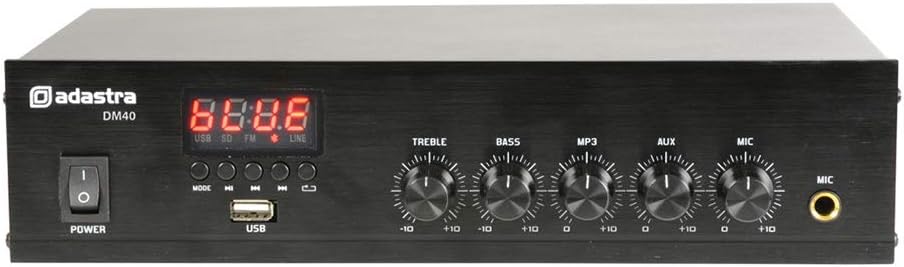
Figure 4.1: Adastra DM40 AmpLifier Front Panel
This image shows the front panel of the Adastra DM40 amplifier. Key features visible include the power switch, digital display, control buttons for media playback (Mode, Play/Pause, Previous, Next, Repeat), a USB port, and rotary controls for Treble, Bass, MP3/USB/FM volume, Aux volume, and Microphone volume, along with a 6.3mm microphone input jack.
- Phetoho ea MATLA: E fetola mokhoa oa ampho bulela/ tima.
- Pontšo ea Dijiti: Shows current mode (USB, SD, FM, LINE) and track/station information.
- Konopo ea MODE: Switches between USB, FM, Bluetooth, and Line input modes.
- PLAY/PUUSE Konopo: Starts or pauses playback for USB/Bluetooth, or auto-scans for FM.
- Konopo E FETILENG: Skips to the previous track/station.
- LATELANG Konopo: Skips to the next track/station.
- Pheta Konopo: Repeats current track or all tracks (USB mode).
- Boema-kepe ba USB: For connecting USB flash drives with audio files.
- Taolo ea TREBLE: Adjusts high-frequency output.
- Taolo ea BASS: Adjusts low-frequency output.
- MP3/USB/FM Volume: Controls the volume level for the integrated media player.
- AUX Volume: Controls the volume level for the auxiliary input.
- Buka ea MIC: Controls the volume level for the microphone input.
- Kenyo ea MIC: 6.3mm jack for connecting an unbalanced microphone.
4.2. DM40 Amplifier Rear Panel Connections

Figure 4.2: Adastra DM40 AmpLifier Rear Panel
This image displays the rear panel of the Adastra DM40 amplifier, highlighting its various input and output connections. These include RCA line inputs (AUX IN), RCA line outputs (OUT), spring terminals for speaker connections (COM, 4-16 Ohms, 100V), an FM antenna terminal, and the IEC mains power inlet.
- AUX IN (RCA): Stereo RCA input for external audio sources (summed to mono).
- KA NTLE (RCA): Stereo RCA line output for connecting to another ampsesebedisoa sa lifier kapa ho rekota.
- Speaker Outputs (Spring Terminals):
- COM: Common negative terminal for all speaker connections.
- 4-16 Ohms: Output for low impedance speakers (e.g., 8 Ohm speakers).
- 100V: Output for 100V line speakers.
- Seteishene sa Antenna ea FM: Spring terminal for connecting the FM antenna wire.
- IEC Mains Inlet: For connecting the supplied power cable.
4.3. Adastra BC3V-B Background Speakers

Figure 4.3: Adastra BC3V-B Speaker Front View
Setšoantšo sena se bontša karolo e ka pele view of a single Adastra BC3V-B background speaker, highlighting its sturdy metal grille and compact ABS housing. This speaker is designed for clear audio output in various indoor settings.

Figure 4.4: Adastra BC3V-B Speaker Rear View
This image displays the rear panel of the Adastra BC3V-B speaker, featuring the rotary selector switch for 100V line taps (6W, 3W, 1.5W) or 8 Ohm operation, and spring terminals for speaker wire connection. The adjustable mounting bracket is also visible.
The BC3V-B speakers are 2-way systems with a 75mm (3'') reinforced paper cone woofer and a 13mm (0.5'') polymer HF driver. They feature a rotary selector switch on the rear for choosing between 100V line taps (6W, 3W, 1.5W) or 8 Ohm operation. They come with an adjustable mounting bracket for wall or freestanding installation.
5. Seta
5.1. Khokahano ea Sebui
The DM40 amplifier supports both 100V line and 4-16 Ohm speaker connections. The BC3V-B speakers can be configured for either mode using their rear selector switch.
- 100V Line Connection: This is recommended for multiple speakers over long distances.
- Set the rotary switch on each BC3V-B speaker to the desired 100V tap (6W, 3W, or 1.5W).
- Connect the positive (+) terminal of each speaker to the '100V' terminal on the DM40 ampmoqhobi.
- Connect the negative (-) terminal of each speaker to the 'COM' terminal on the DM40 ampmoqhobi.
- Netefatsa wat kakaretsotage of all connected 100V speakers does not exceed the amplifier's output power (40W).
- 4-16 Ohm Connection: Use this for direct impedance matching, typically for fewer speakers over shorter distances.
- Set the rotary switch on each BC3V-B speaker to '8 Ohms'.
- Connect the positive (+) terminal of each speaker to the '4-16 Ohms' terminal on the DM40 ampmoqhobi.
- Connect the negative (-) terminal of each speaker to the 'COM' terminal on the DM40 ampmoqhobi.
- Ensure the total impedance of connected speakers is within the 4-16 Ohm range. For multiple 8 Ohm speakers, connect them in series-parallel to achieve a suitable total impedance.
Use the supplied 100m speaker cable for connections. Ensure correct polarity (+ to + and - to -) for optimal sound quality.
5.2. Audio Source Connection
- Kenyelletso ea Thuso: Connect external audio devices (e.g., CD player, mixer) to the 'AUX IN' RCA jacks on the rear panel.
- Kenyo ea Maekerofounu: Connect an unbalanced microphone to the 6.3mm 'MIC' jack on the front panel.
- USB Media: Kenya drive ea flash ea USB e nang le molumo oa MP3 files into the 'USB' port on the front panel.
- FM Lenakana: Connect the supplied FM antenna wire to the 'FM' spring terminal on the rear panel for radio reception.
5.3. Khokelo ea Matla
Connect the supplied IEC mains power lead to the 'IEC Mains Inlet' on the rear panel of the DM40 amplifier and then to a suitable 230Vac, 50Hz power outlet.
6. Litaelo tsa Ts'ebetso
6.1. Ho tima/Ho tima
Press the 'POWER' switch on the front panel to turn the amplifier on or off. The digital display will illuminate when the unit is powered on.
6.2. Khetho ea Mohloli
Press the 'MODE' button on the front panel to cycle through the available input sources: USB, FM, Bluetooth, and Line (AUX).
6.3. USB Player Operation
- Insert a USB flash drive into the USB port. The unit will automatically switch to USB mode and begin playback.
- Use the 'PREVIOUS' and 'NEXT' buttons to skip tracks.
- Press 'PLAY/PAUSE' to pause or resume playback.
- Press 'REPEAT' to cycle through repeat modes (e.g., repeat one, repeat all).
- Adjust the 'MP3' volume control to set the output level.
6.4. FM Tuner Operation
- Switch to FM mode using the 'MODE' button.
- Press and hold the 'PLAY/PAUSE' button to initiate an automatic station scan. The tuner will scan and save available FM stations.
- Use the 'PREVIOUS' and 'NEXT' buttons to navigate through saved stations.
- Adjust the 'MP3' volume control to set the output level.
6.5. Bluetooth pairing
- Switch to Bluetooth mode using the 'MODE' button. The display will show 'BT'.
- Ho smartphone kapa tablet ea hau, lumella Bluetooth 'me u batle lisebelisoa tse teng.
- Select 'Adastra DM40' (or similar name) from the list of devices to pair.
- Once paired, you can play audio from your device wirelessly through the ampmoqhobi.
- Adjust the 'MP3' volume control to set the output level.
6.6. Auxiliary Input Operation
- Switch to Line mode using the 'MODE' button. The display will show 'LINE'.
- Play audio from your connected external device.
- Adjust the 'AUX' volume control to set the output level.
6.7. Microphone Operation
- Connect a microphone to the 'MIC' input jack.
- Adjust the 'MIC' volume control to set the microphone's output level.
- The microphone input is active regardless of the selected audio source, allowing for announcements or voice-overs.
6.8. Taolo ea Molumo
- Use the 'TREBLE' control to adjust the high-frequency response of the overall output.
- Use the 'BASS' control to adjust the low-frequency response of the overall output.
7. Tlhokomelo
The Adastra DM40 system requires minimal maintenance. Follow these guidelines to ensure longevity and optimal performance:
- Ho hloekisa: Hlakola amplifier and speakers with a soft, dry cloth. Do not use abrasive cleaners, waxes, or solvents.
- Moea oa moea: Periodically check that the ventilation openings on the amplifier are clear of dust and debris.
- Lihokelo: Ensure all cable connections remain secure. Loose connections can lead to poor sound quality or intermittent operation.
- Polokelo: Haeba u boloka yuniti nako e telele, e hakolle phepelong ea motlakase 'me u e boloke sebakeng se phodileng, se omileng hole le khanya ea letsatsi le mocheso o feteletseng.
8. Ho rarolla mathata
| Bothata | Lebaka le ka khonehang | Tharollo |
|---|---|---|
| Ha ho matla | Power cable not connected; Power outlet faulty; Power switch off | Check power cable connection; Try a different outlet; Ensure power switch is ON |
| Ha ho tlhahiso ea molumo | Incorrect source selected; Volume too low; Speaker cables disconnected/incorrectly wired; Speaker selector switch incorrect | Select correct source; Increase volume; Check speaker wiring and polarity; Ensure speaker selector switch is set correctly (100V or 8 Ohm) |
| Molumo o sothehileng | Volume too high; Incorrect impedance matching (for 4-16 Ohm); Damaged speaker/cable | Reduce volume; Verify speaker impedance matches amplifier output; Inspect speakers and cables for damage |
| Bluetooth ha e hoketsoe | Amplifier not in Bluetooth mode; Device not in pairing mode; Device too far | Netefatsa amplifier is in BT mode; Put device in pairing mode; Move device closer to ampmoqhobi |
| Mathata a ho bapala ka USB | Ha e tshehetsoe file format; USB drive faulty; USB drive not properly inserted | Netefatsa files are MP3; Try a different USB drive; Re-insert USB drive firmly |
| Kamohelo e mpe ea FM | Antenna not connected; Weak signal | Connect FM antenna; Reposition antenna for better reception |
9. Litlhaloso
9.1. Adastra DM40 Ampmoqhobi
| Sebopeho | Tlhaloso |
|---|---|
| Phepelo ea motlakase | 230Vac, 50Hz (IEC) |
| Matla a Phahameng ka ho Fetisisa | 40W |
| Mehloli ea Mantsoe | USB player, FM tuner, Bluetooth receiver, AUX (RCA), Microphone (6.3mm jack) |
| Bluetooth Version | 2.1 |
| Litholoana tsa Sebui | COM, 100V, 4-16 Ohms (spring terminals) |
| Litaolo | Treble, Bass, MP3/USB/FM Volume, Aux Volume, Microphone Volume |
| Litekanyo (W x D x H) | 280 x 205 x 67 limilimithara |
| Boima ba 'mele | 1.74 lik'hilograma |
9.2. Adastra BC3V-B Background Speakers (per unit)
| Sebopeho | Tlhaloso |
|---|---|
| Mohlala | BC3V-B |
| Mmala | Ntsho |
| Woofer | 75mmØ (3'') reinforced paper cone |
| Tweeter | 13mm (0.5'') polymer HF driver |
| Karabelo ea Khafetsa | 110Hz - 20kHz |
| Power Max. (8 Ohms) | 60W |
| Power RMS (8 Ohms) | 30W |
| SPL @ 1W/1m | 87dB |
| 100V Tappings | 6W, 3W, 1.5W |
| Impedance (100V) | 1.6k, 3.3k, 6.6k Ohms |
| Litekanyo (W x H x D) | 106 x 153 x 98 limilimithara |
| Boima ba 'mele | 0.900 lik'hilograma |
10. Tiisetso le Tšehetso
Specific warranty information for the Adastra DM40 Digital 100V Mixer Amplifier System is not provided within this manual. Please refer to your purchase documentation or contact your retailer or the manufacturer, Adastra, for details regarding warranty coverage and support services.
For technical assistance or inquiries, please visit the official Adastra websaete kapa ikopanye le likanale tsa bona tsa tšehetso ea bareki.