
1. Selelekela
This manual provides instructions for the proper setup, operation, and maintenance of your Acer B247Y 23.8-inch LED LCD Monitor. Please read this manual thoroughly before using your monitor to ensure optimal performance and to prevent damage.
The Acer B247Y is a 23.8-inch Full HD (1920 x 1080) monitor featuring an IPS panel for wide viewing angles, an anti-glare display, and a frameless design on three sides. It includes multiple connectivity options and an ergonomic stand for comfortable viewng.
2. Likahare tsa Sephutheloana
Netefatsa hore lintho tsohle li teng ka har'a sephutheloana sa hau. Haeba ho na le lintho tse sieo kapa li senyehile, ikopanye le morekisi oa hau.
- Acer B247Y 23.8-inch LED LCD Monitor
- Monitor Stand (Motheo le Molala)
- Power Adapter (Internal) and Power Cable
- Cable ea VGA
- Cable ea DisplayPort 1.2
- Cable ea HDMI
- Audio-in Cable (if included)
- Audio-out Cable (if included)
- Bukana ea mosebelisi (tokomane ena)
3. Seta
3.1 Ho Kopanya Setulo sa Tekolo
The monitor comes with a detachable foot stand. Follow these steps to assemble:
- Tlosa sesupo ka hloko le lisebelisoa tsa ho ema sephuthelong.
- Hokela molala oa ho ema ho phanele ea ho shebella. Netefatsa hore e tobetsa sebakeng se sireletsehileng.
- Attach the stand base to the stand neck. Tighten any screws if provided, usually located on the underside of the base.
- Beha leihlo le kopaneng sebakeng se tsitsitseng, se bataletseng.
Hlokomela: The monitor also supports VESA mount (100 x 100 mm) for wall or arm mounting. Refer to your VESA mount kit instructions for installation.
3.2 Ho hokela Mohlahlobi
Hokela sebali khomphuteng ea hau kapa lisebelisoa tse ling u sebelisa likhoele tse loketseng.
- Khokahano ea Video:
- Connect one end of the DisplayPort cable to the DisplayPort output on your computer and the other end to the DisplayPort input on the monitor.
- Alternatively, connect an HDMI cable from your computer's HDMI output to the monitor's HDMI input.
- For older systems, connect a VGA cable from your computer's VGA output to the monitor's VGA input.
- Khokahano ea audio:
- If using VGA or DisplayPort without audio, connect an audio cable from your computer's audio output to the monitor's audio-in port for integrated speakers.
- To connect external speakers or headphones, use the monitor's audio-out port.
- Khokelo ea Matla:
- Hokela thapo ea motlakase ho motlakase oa mochine, ebe o hokela ntlha e 'ngoe sebakeng sa motlakase se theohileng fatše.

Figure 3.2.1: Acer B247Y Monitor with Stand. This image illustrates the overall appearance of the monitor when fully assembled on its stand.
4. Litaelo tsa Ts'ebetso
4.1 Ho Matlafatsa/Ho tima
Press the power button, usually located on the bottom right or rear of the monitor, to turn the monitor on or off. The power indicator light will illuminate when the monitor is on.
4.2 Adjusting Monitor Settings (OSD)
The monitor features an On-Screen Display (OSD) menu for adjusting various settings. Use the control buttons (typically located near the power button) to navigate and select options within the OSD menu.
Litlhophiso tse tloaelehileng tsa OSD li kenyelletsa:
- Setšoantšo: Brightness, Contrast, Color Temperature, Gamma, Acer eColor Management modes (e.g., Dark Room, Eco).
- Molumo: Volume control for integrated speakers or audio-out.
- Kenyo: Select the active video input source (VGA, DisplayPort, HDMI).
- OSD: Nako ea ho emisa ea OSD, puo.
- Tsamaiso: Khutlisetsa ho liphoso tsa feme.
4.3 Liphetoho tsa Ergonomic
The Acer B247Y monitor stand offers several ergonomic adjustments to optimize your viewboiphihlelo:
- Shebisa: Adjust the screen angle from -5 degrees to 25 degrees (forward/backward).
- Swivel: Rotate the monitor horizontally up to +/- 45 degrees.
- Phetoho ea Bophahamo: Fetola bophahamo ba skrine ho fihlela ho 120mm.
- Pivot: Rotate the screen 90 degrees for portrait viewng.
5. Tlhokomelo
Tlhokomelo e nepahetseng e netefatsa bophelo bo bolelele le ts'ebetso e nepahetseng ea sebali sa hau.
- Ho hloekisa skrine: Hlakola skrine ka bonolo ka lesela le bonolo le se nang letlapa. Bakeng sa matšoao a manganga, dampen the cloth with a small amount of water or a non-abrasive screen cleaner. Do not spray liquid directly onto the screen.
- Ho hloekisa Casing: Sebelisa lesela le bonolo, le omeletseng ho hloekisa mochine casing. Qoba ho sebelisa li-detergent tse matla kapa li-abrasive cleaners.
- Moea oa moea: Netefatsa hore masoba a moea a holim'a mochine ha a thibeloa ho thibela mocheso o feteletseng.
- Tlosa motlakase: Always turn off the monitor and unplug it from the power outlet before cleaning or when not in use for extended periods.
6. Ho rarolla mathata
Haeba u na le mathata ka sesebelisoa sa hau, sheba mehato e latelang e tloaelehileng ea ho rarolla mathata:
- No Power / Monitor Does Not Turn On:
- Netefatsa hore thapo ea motlakase e hokahantsoe ka mokhoa o sireletsehileng ho monitor le soketeng ea motlakase e sebetsang.
- Netefatsa hore motlakase oa sebetsa ka ho hokela sesebelisoa se seng.
- Tobetsa konopo ea matla ka tieo.
- No Image / "No Signal" Message:
- Check that the video cable (DisplayPort, HDMI, or VGA) is securely connected to both the monitor and your computer.
- Netefatsa hore khomphutha ea hau e butsoe 'me ha e sebetse ka mokhoa oa boroko.
- Use the OSD menu to manually select the correct input source.
- Try a different video cable or port if available.
- Setšoantšo se sothehile kapa ha sea hlaka:
- Ensure the display resolution on your computer is set to the monitor's native resolution (1920 x 1080).
- Adjust brightness, contrast, and other picture settings via the OSD menu.
- Check for any physical damage to the screen or cables.
- Ha ho Molumo o tsoang ho Libui:
- Increase the volume using the OSD menu or your computer's sound settings.
- Ensure the audio cable (if used) is properly connected.
- Netefatsa hore sesebediswa se nepahetseng sa ho ntsha modumo se kgethilwe diseting tsa modumo tsa komporo ya hao.
7. Litlhaloso
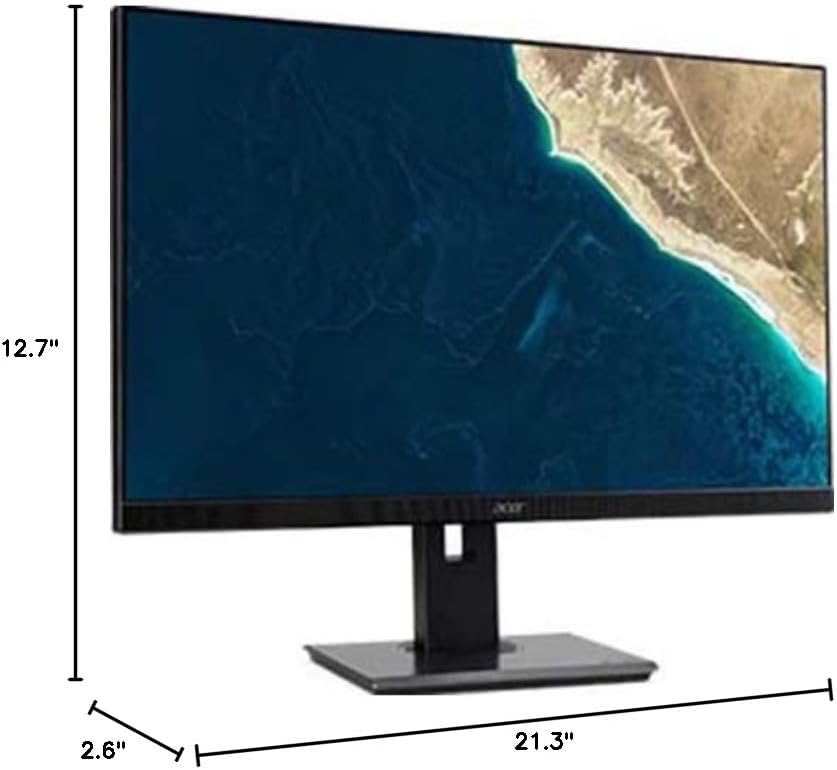
Figure 7.1.1: Acer B247Y Monitor Dimensions. This image shows the approximate height (12.7"), width (21.3"), and depth (2.6") of the monitor without the stand.
| Sebopeho | Tlhaloso |
|---|---|
| Nomoro ea Mohlala | B247Y |
| Boholo ba skrine | 23.8 lisenthimithara (60.5 cm) |
| Mofuta oa Pontšo | LED LCD, IPS Panel, Anti-glare (AG) |
| Boholo ba Qeto | 1920 x 1080 (HD e felletseng) |
| Aspect ratio | 16:9 |
| Refresh Rate | 75 Hz |
| Nako ea Karabelo | 4ms (gray-to-gray) |
| Khanya (e tloaelehileng) | 250 cd/m² |
| Boemo ba Phapang ea Native | 1,000:1 |
| Karolelano ea Phapang e Matla | 100,000,000:1 |
| Viewing Angles (H/V) | 178° / 178° |
| Khokahano | VGA, DisplayPort 1.2, HDMI, Audio-in, Audio-out |
| Libui tse Kopaneng | 2 x 2.0W |
| Liphetoho tsa Ergonomic | Tilt (-5° to 25°), Swivel (+/- 45°), Height Adjustment (120mm), Pivot (90°) |
| VESA Mount Support | 100 x 100 limilimithara |
| Litekanyo tse nang le Boemo (W x H x D) | 21.3" x 14.9"~19.6" x 7.6" (54.0cm x 37.9cm~49.9cm x 19.3cm) |
| Boima ka Stand | 12.3 lb. (5.6 lik'hilograma) |
| Adapter ea Matla | Ka hare |
| Mmala | Ntsho |
8. Tiisetso le Tšehetso
Your Acer B247Y monitor comes with a Limited Three-Year Warranty. Please retain your proof of purchase for warranty claims.
For technical support, service, or warranty inquiries, please refer to the official Acer support website or contact their customer service department. Contact information can typically be found on the Acer websebaka sa marang-rang kapa kareteng ea tiisetso e kenyelelitsoeng le sehlahisoa sa hau.
Kensington Lock: The monitor supports a Kensington lock for security. Attach a compatible Kensington lock (sold separately) to the security slot on the monitor to deter theft.


