
1. Selelekela
This manual provides detailed instructions for the proper use and maintenance of your Edifier W820BT Bluetooth Headphones. Please read this manual thoroughly before using the product to ensure optimal performance and longevity.
2. Likahare tsa Sephutheloana
Verify that all items listed below are included in your package. If any items are missing or damaged, please contact Edifier customer support.
- Edifier W820BT Bluetooth Headphones
- Cable ea ho tjhaja (USB)
- Mohala oa molumo (3.5mm)
- Bukana ea mosebelisi (tokomane ena)
3. Sehlahisoa Overview
The Edifier W820BT headphones are designed for comfort and extended listening, featuring Bluetooth v4.1 connectivity and a long-lasting battery.
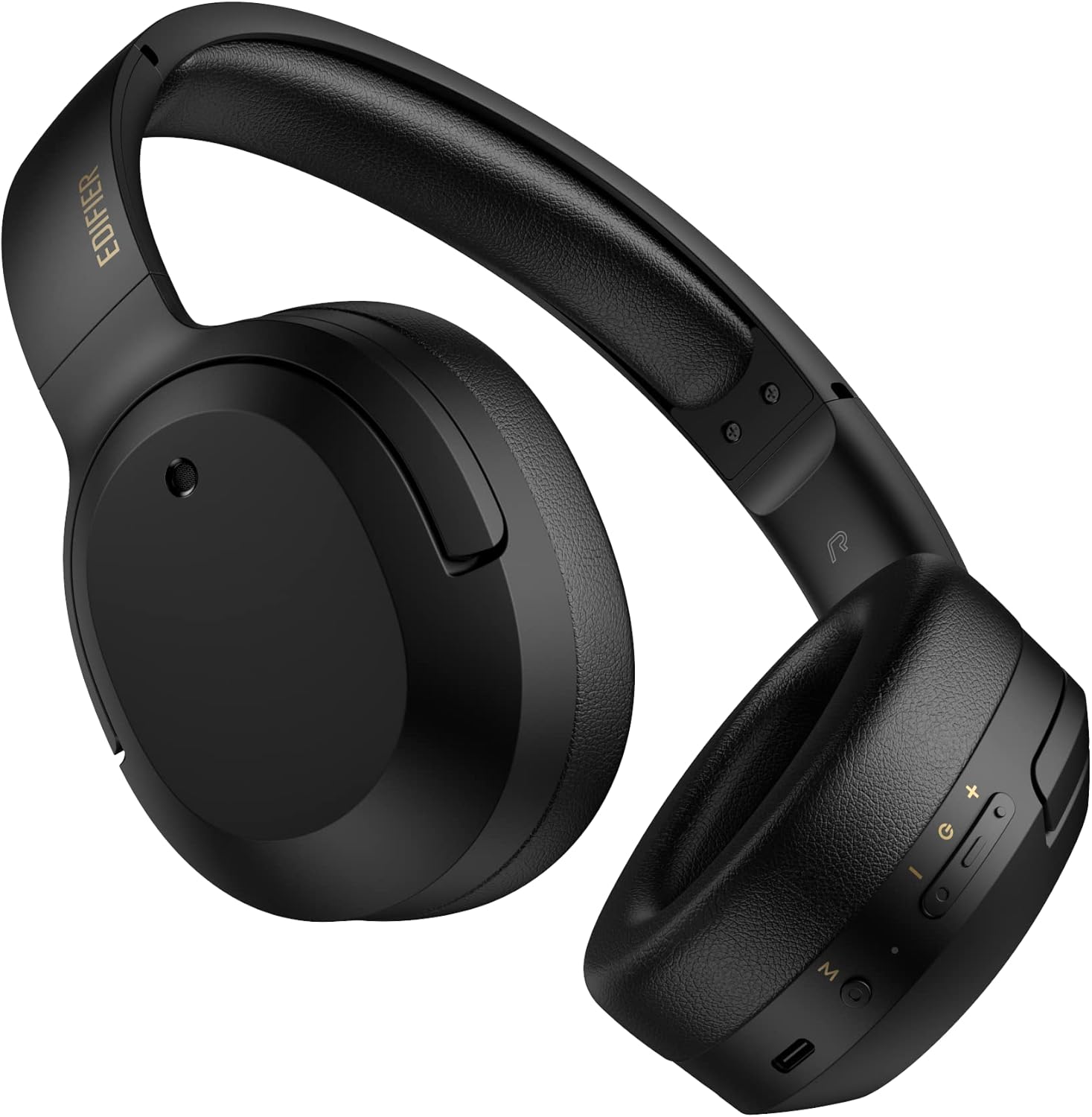
Setšoantšo sa 3.1: Pele view of the Edifier W820BT Bluetooth Headphones.

Setšoantšo sa 3.2: Lehlakore view of the Edifier W820BT Bluetooth Headphones, highlighting the control buttons.
Likarolo tsa Bohlokoa:
- Bluetooth V4.1 with CSR Technology for stable wireless connection.
- Ho fihla ho lihora tse 80 tsa bophelo ba betri.
- Foldable design for portability.
- Soft leather ear pads for comfort.
- Durable and flexible steel headband.
- On-ear controls for media playback and calls.
4. Seta
4.1 Ho tjhaja Li-headphone
Before first use, fully charge the headphones.
- Connect the micro-USB end of the charging cable to the charging port on the headphone (located on the right earcup).
- Hokela pheletso ea thapo ea ho tjhaja ea USB-A ho adaptara ea motlakase ea USB (ha e kenyelelitsoe) kapa koung ea USB ea khomphutha.
- Letšoao la LED le tla bonesa nakong ea ho tjhaja 'me le tla tima hang ha le tjhajiloe ka botlalo.
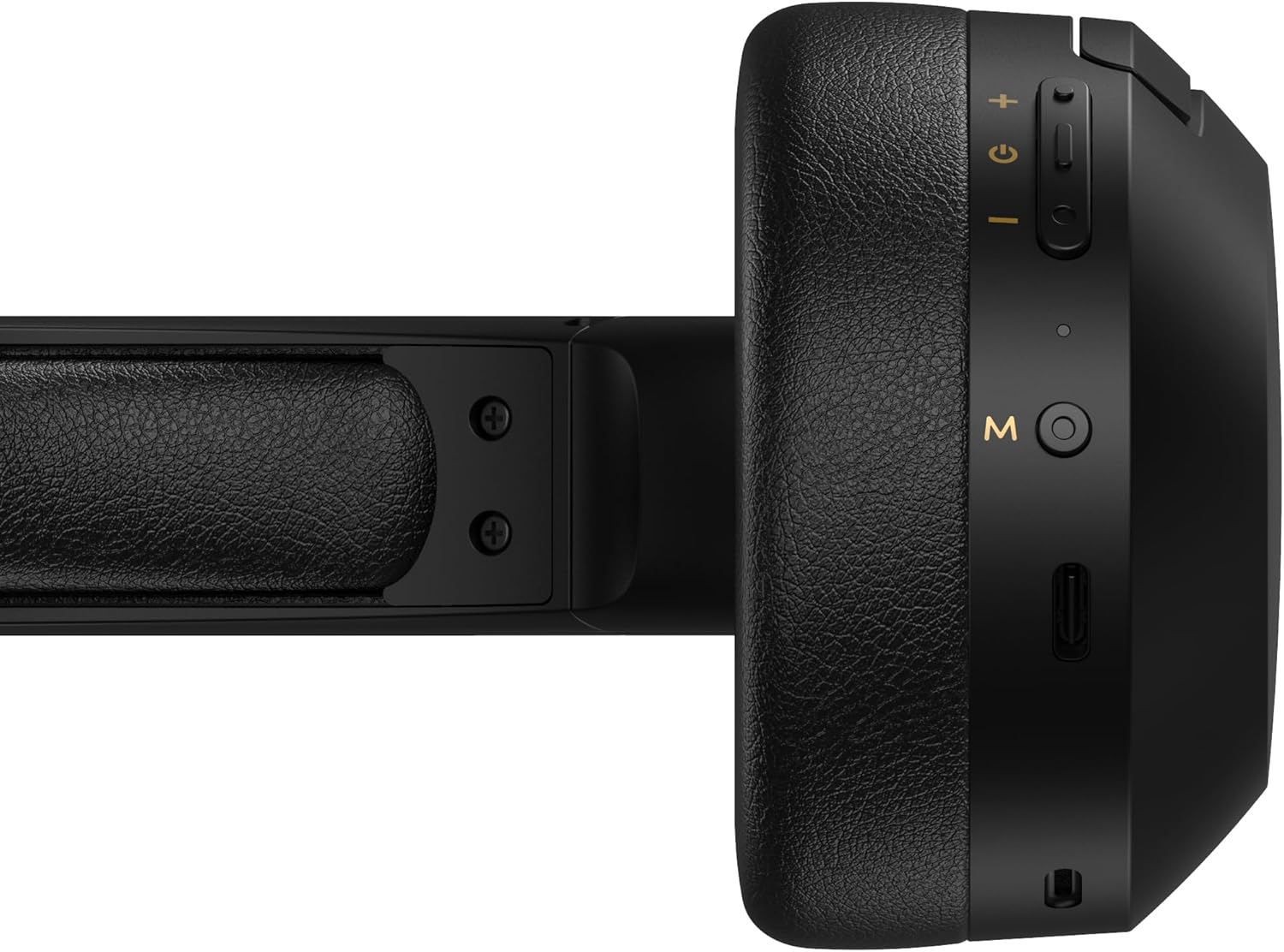
Figure 4.1: Close-up of the charging port and control buttons on the right earcup.
4.2 Ho Matlafatsa/Ho tima
- Ho Matlafatsa: Press and hold the multi-function button (usually marked with a power icon or 'M') for approximately 3 seconds until the LED indicator flashes blue.
- Ho tima: Press and hold the multi-function button for approximately 5 seconds until the LED indicator flashes red and then turns off.
4.3 Ho hokahanya ha Bluetooth
Ho hokela li-headphone tsa hau ho sesebelisoa se sebelisoang ke Bluetooth:
- Netefatsa hore li-headphone li tima.
- Press and hold the multi-function button for approximately 5-7 seconds until the LED indicator flashes red and blue alternately. This indicates pairing mode.
- Sesebedisweng sa hao (smartphone, tablet, komporo), bula Bluetooth mme o batle disebediswa tse teng.
- Select "EDIFIER W820BT" from the list of found devices.
- Hang ha e pentiloe, letšoao la LED le tla benya boputsoa butle.
Hlokomela: Li-headphone li tla leka ka botsona ho hokela sesebelisoa sa ho qetela se palameng ha se buletsoe.
5. Litaelo tsa Ts'ebetso
5.1 On-Ear Controls
The control buttons are located on the right earcup.
| Konopo/ Ketso | Mosebetsi |
|---|---|
| Multi-function Button (M) |
|
| Phahamiso ea Phahamiso (+) |
|
| Buka e tlase (-) |
|
Khokahano e nang le mehala ea 5.2
The W820BT headphones can also be used with a wired connection.
- Connect one end of the 3.5mm audio cable to the audio input jack on the left earcup of the headphones.
- Hokela pheletso e 'ngoe ea thapo ea molumo ea 3.5mm ho jack ea tlhahiso ea molumo ea sesebelisoa sa hau.
- The headphones will automatically switch to wired mode. Bluetooth functionality will be disabled.

Figure 5.1: Connecting the 3.5mm audio cable for wired listening.
6. Tlhokomelo
- Hloekisa li-headphone ka lesela le bonolo, le omileng. U se ke ua sebelisa li-cleaner tse khorofo kapa li-solvent.
- Qoba ho beha li-headphones sebakeng sa mocheso o feteletseng, mongobo, kapa mahlaseling a letsatsi.
- Boloka li-headphones sebakeng se phodileng, se omileng ha se sa sebelisoe. Moralo o ka phuthoang o lumella polokelo e kopaneng.
- Do not disassemble the headphones. This will void the warranty.
7. Ho rarolla mathata
If you encounter issues with your Edifier W820BT headphones, refer to the following common problems and solutions:
| Bothata | Tharollo |
|---|---|
| Ha e khone ho sebetsa | Ensure the headphones are charged. Connect to a power source using the charging cable. |
| Ha e khone ho para ka Bluetooth |
|
| Ha ho molumo |
|
| Boleng bo fokolang ba molumo |
|
8. Litlhaloso
| Sebopeho | Lintlha |
|---|---|
| Lebitso la Mohlala | W820BT |
| Theknoloji ea Khokahano | Wireless (Bluetooth), Wired (3.5mm Jack) |
| Bluetooth Version | 4.1 |
| Bophelo ba Battery | Ho fihlela lihora tse 80 |
| Sebopeho sa Earpiece | Over Ear |
| Lintho tse bonahalang | Steel (headband) |
| Boima ba Ntho | 1.14 liponto (hoo e ka bang 517g) |
| Litekanyo tsa Sehlahisoa | 9.25 x 7.64 x 3.41 lisenthimithara |
| Moetsi | Mohlophisi |
9. Tiisetso le Tšehetso
Edifier provides a waranti ya selemo se le seng in the USA and Canada for the W820BT headphones. For warranty claims or technical support, please contact Edifier customer service.
For more information, visit the official Edifier websaete kapa sheba litokomane tsa theko ea hau.
10. Pontšo ea Video
Watch the official product video for a visual guide on the Edifier W820BT Bluetooth Headphones' features and usage.
Video 10.1: Sehlahisoa sa semmuso se felileview of the Edifier W820BT Bluetooth Headphones, demonstrating features like battery life, comfort, foldable design, and on-ear controls.