
1. Selelekela
Welcome to the user manual for your ALCAD TED-001 Digital Telephone. This document provides essential information for the proper installation, operation, and maintenance of your device. Please read these instructions carefully before using the product to ensure optimal performance and longevity.
Keletso ea Bohlokoa: Before installation, please verify the model number of your device, typically located on the back of the unit, to ensure it matches TED-001.
2. Sehlahisoa Overview
The ALCAD TED-001 is a corded digital telephone designed for single-line operation, featuring a single button for simplified communication. It is compatible with wired telephone networks and supports Caller ID functionality.
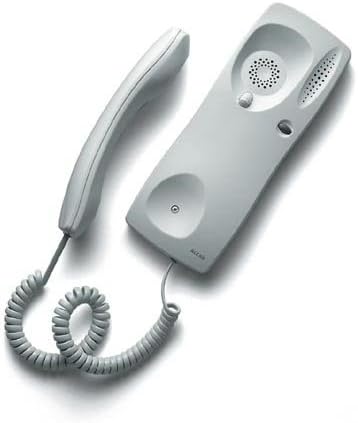
Setšoantšo sa 1: ALCAD TED-001 Digital Telephone. This image displays the complete telephone unit, including the handset and the base unit, connected by a coiled cord. The base unit is light gray with a speaker grille and a single button, indicating its simple, functional design.
3. Seta
- Ho phutha: Carefully remove all components from the packaging. Ensure the telephone unit and its cord are present.
- Connection to Telephone Line: Locate the telephone line input on the base unit. Connect one end of the provided telephone cord to this input and the other end to your wall telephone jack.
- Khokahano ea Sesebediswa sa Mohala: Connect the coiled cord from the handset to the designated port on the base unit.
- Mohloli oa Matla: The device is powered via the wired telephone line. No external power adapter is typically required for basic operation.
- Teko ea Pele: Lift the handset and listen for a dial tone. If no dial tone is present, recheck all connections.
4. Litaelo tsa Ts'ebetso
4.1 Making a Call (Single Button Functionality)
The ALCAD TED-001 features a single button, primarily designed for specific functions within an intercom or door entry system. Its operation is typically as follows:
- To Initiate Communication: Lift the handset. Press the single button located on the base unit. This action will typically connect you to a pre-programmed central unit, concierge, or open a door/gate, depending on the system configuration.
- To End Communication: Replace the handset on the base unit.
4.2 Ho amohela Mohala
- When the telephone rings, lift the handset to answer the incoming call.
- To end the call, replace the handset on the base unit.
4.3 ID ea moletsi
This model supports Caller ID functionality. The display (if present and configured) will show the incoming caller's number or name before you answer, provided this service is activated by your telephone service provider.
5. Tlhokomelo
To ensure the longevity and proper functioning of your ALCAD TED-001 Digital Telephone, follow these simple maintenance guidelines:
- Ho hloekisa: Sebelisa e bonolo, e omeletseng, kapa e nyenyane damp cloth to clean the exterior surfaces of the telephone. Avoid using abrasive cleaners, solvents, or harsh chemicals, as these can damage the metal and plastic components.
- Tikoloho: Keep the telephone in a dry environment, away from direct sunlight, excessive heat, and moisture.
- Tlhokomelo ea Mehala: Avoid tangling or excessive pulling of the coiled handset cord and the main telephone line cord to prevent damage.
6. Ho rarolla mathata
If you encounter issues with your ALCAD TED-001, please refer to the following common problems and solutions:
| Bothata | Lebaka le ka khonehang | Tharollo |
|---|---|---|
| Ha ho molumo oa ho daela | Loose telephone line connection. Faulty telephone line. | Ensure the telephone line cord is securely plugged into both the wall jack and the telephone base. Test with another working telephone if available. |
| Cannot hear or be heard | Handset not properly seated. Faulty handset cord. | Ensure the handset is correctly placed on the base. Check the coiled cord connection to the handset and base. |
| Single button does not activate function | System configuration issue. Internal fault. | Verify the telephone system's central unit is operational. If the issue persists, contact your system administrator or ALCAD support. |
If these steps do not resolve the issue, please contact ALCAD customer support or your system installer for further assistance.
7. Litlhaloso
| Sebopeho | Tlhaloso |
|---|---|
| Brand | ALCAD |
| Mohlala | TED-001 |
| Lisebelisoa tse lumellanang | Wired telephone networks, answering machines, and fax machines |
| Palo ea Lihlahisoa | 1 |
| Mohloli oa Matla | Motlakase oa Wired |
| Mofuta oa Boitsebiso | Tšepe |
| Mmala | Bosoeu |
| Mofuta oa Fono | E koetsoe |
| Dialing Type | Single Keypad (1 Button) |
| Mofuta oa Sistimi ea ho Araba | Dijithale |
| Multi-line Operation | Single-line operation |
| ID ea moletsi | Ee |
8. Tiisetso le Tšehetso
For information regarding warranty coverage, technical support, or service, please refer to the documentation provided at the time of purchase or contact your ALCAD product supplier. You may also visit the official ALCAD website for general support information.