
1. Selelekela
The Flashpoint Zoom Li-Ion Mini R2 TTL Flash is a compact and powerful flash unit designed for use with select Sony mirrorless cameras, including models such as A7RIII, a7rII, a7R, a58, a99, ILCE6000L, a77II, RX10, and the a9. This flash features an integrated R2 radio transceiver, enabling wireless triggering and control. It can function as a master unit to command other Flashpoint and Godox R2-compatible slave units, offering versatile lighting solutions for various photographic scenarios.
2. Mehato ea Tšireletso
- Do not disassemble or modify the flash unit. Repairs should only be performed by authorized service personnel.
- Boloka yuniti ea flash e omme. U se ke ua e pepesetsa pula, mongobo, kapa mongobo o mongata.
- Do not touch the flash tube after firing, as it can be hot.
- Boloka moo bana ba ka fihlang teng.
- Use only the specified battery and charger. Improper use can lead to fire, explosion, or electric shock.
- Qoba ho pepesehela khanya ka ho toba mahlong, haholo-holo ha e le haufi, kaha e ka sitisa pono.
3. Sehlahisoa Overview
3.1 Likahare tsa Sephutheloana
- Flashpoint Zoom Li-Ion Mini Flash Unit
- Mini Ema
- Tshireletso Nyeoe
- Diffuser (assumed from 'Dif' in product data)
3.2 Flash Components
Familiarize yourself with the main components of your Flashpoint Zoom Li-Ion Mini R2 TTL Flash.

Setšoantšo sa 3.2.1: Pele view of the Flashpoint Zoom Li-Ion Mini R2 TTL Flash, showing the flash head and main body.
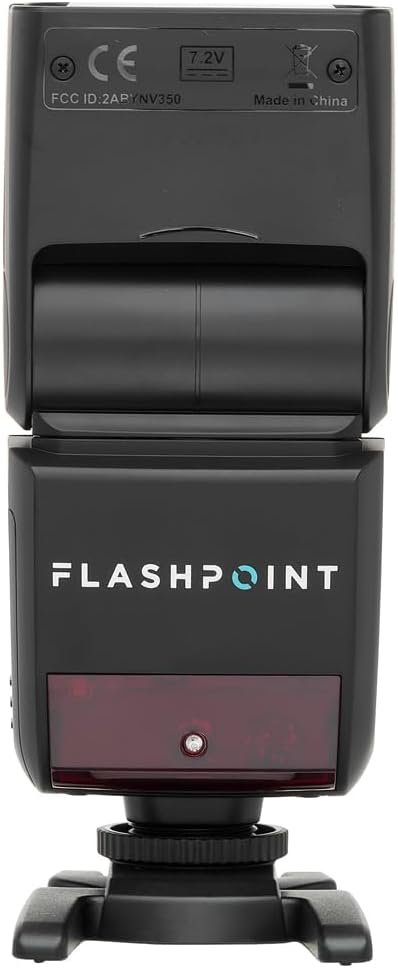
Setšoantšo sa 3.2.2: Ka morao view of the flash, highlighting the LCD display and control buttons for mode, zoom, sync, and power.

Setšoantšo sa 3.2.3: The flash unit with its built-in wide-angle diffuser panel extended from the flash head.
4. Seta
4.1 Ho kenya Betri
- Fumana karolo ea betri ka lehlakoreng la yuniti ea flash.
- Slide the battery cover release latch and open the compartment.
- Insert the Li-Ion battery, ensuring correct polarity as indicated inside the compartment.
- Kwala sekoahelo sa karolo ea betri ho fihlela se tobetsa hantle sebakeng sa sona.

Setšoantšo sa 4.1.1: Lehlakore view of the flash unit, indicating the battery compartment with a 'BATT.PUSH' label.
4.2 Ho kenya Khamera
- Netefatsa hore yuniti ea flash e tima.
- Slide the flash's hot shoe foot into your Sony camera's hot shoe mount.
- Tighten the locking ring on the flash foot to secure it to the camera. Do not overtighten.
4.3 Ho Matlafatsa/Ho tima
Press and hold the power button (usually marked with a ⚡ or power symbol) on the rear control panel to turn the flash on or off.
5. Litaelo tsa Ts'ebetso
5.1 Mekhoa ea Motheo ea Ts'ebetso
The Flashpoint Zoom Li-Ion Mini R2 TTL Flash supports various operating modes:
- TTL Autoflash Mode: Automatically sets the flash output for correct exposure.
- Mokhoa oa ho sebetsa ka letsoho (M): Allows manual adjustment of flash power output.
- Mokhoa oa Multi (Stroboscopic): Fires a series of rapid flashes during a single exposure.
- Mekhoa ea Makhoba a Optical ea S1/S2: Triggers the flash optically when another flash fires.
Sebelisa le MOKHOA button on the control panel to cycle through these modes.

Setšoantšo sa 5.1.1: Ka botlalo view of the flash control panel, showing buttons for MODE, ZOOM, SYNC, SLAVE, GR/CH, and the SET dial.
5.2 R2 Wireless System
The integrated R2 radio transceiver provides wireless control. Set the flash to Master or Slave mode and configure the group (GR) and channel (CH) settings to match your R2-compatible transmitter or other R2 flashes. Refer to your R2 transmitter's manual for detailed wireless setup.
5.3 Phetoho ea Hlooho ea Flash
The flash head can be rotated and tilted to bounce light off ceilings or walls for softer illumination.
- Ho potoloha ho Horizontal: 0 ho isa ho 270 likhato.
- Tilt e Otlolohileng: -7 ho 90 likhato.

Setšoantšo sa 5.3.1: Illustration demonstrating the flexible rotation and tilt capabilities of the flash head.
5.4 Mosebetsi oa Zoom
The flash features an automatically zooming flashhead from 24-105mm. This adjusts the flash coverage to match the focal length of your lens. In manual mode, you can also adjust the zoom manually using the ZOOM konopo.
6. Tlhokomelo
- Ho hloekisa: Use a soft, dry cloth to clean the flash unit. For stubborn dirt, use a slightly damp cloth with mild detergent, then wipe dry. Do not use organic solvents like thinner or benzene.
- Polokelo: When not in use for extended periods, remove the battery and store the flash in a cool, dry place, preferably in its protective case.
- Tlhokomelo ea Betri: Recharge the Li-Ion battery regularly, even if not in use, to maintain its lifespan. Avoid fully discharging the battery.
7. Ho rarolla mathata
If you encounter issues with your Flashpoint Zoom Li-Ion Mini R2 TTL Flash, refer to the following common problems and solutions:
| Bothata | Seo e ka bang Sesosa / Tharollo |
|---|---|
| Flash ha e chese. | Check if the flash is powered on. Ensure the battery is charged and correctly installed. Verify the flash is securely mounted on the camera hot shoe. Check camera flash settings. |
| Flash output is inconsistent or incorrect. | Ensure TTL mode is selected for automatic exposure, or adjust manual power settings. Check for obstructions between the flash and subject. Verify flash head zoom matches lens focal length. |
| Ho qalisa ha waelese hoa hloleha. | Confirm that the flash and transmitter are set to the same R2 group and channel. Ensure both units are within range and have fresh batteries. Check for radio interference. |
| Difficulty mounting flash on camera hot shoe. | Ensure the locking ring is fully loosened. Some camera hot shoes may have tighter tolerances; apply firm, even pressure. If persistent, verify compatibility with your specific camera model. |
| Unable to update firmware via micro-USB port. | The micro-USB port may be recessed. Try using a micro-USB cable with a very slim connector housing. If issues persist, contact Flashpoint customer support for guidance on compatible cables or alternative update methods. |
8. Litlhaloso
| Sebopeho | Tlhaloso |
|---|---|
| Nomoro ea Tataiso | 82ft / 25m (at ISO 100) |
| Nako ea ho Recycle | Metsotsoana e 0.1 ho isa ho e 1.7 |
| Nyenyefatsa Range | 24-105mm (E iketsang/E tsamaisoa ka letsoho) |
| Bounce Head Rotation | Horizontal: 0 to 270 degrees |
| Bounce Head Tilt | Vertical: -7 to 90 degrees |
| Litekanyo (L x W x H) | 8.4 x 7.2 x 2.8 lisenthimithara |
| Boima ba Ntho | 1.87 liponto |
| Li-Mounings tse lumellanang | Sony Alpha |
| Nomoro ea Mohlala | Zoom-Lion Mini |
| ASIN | B07CV42KFV |
9. Tiisetso le Tšehetso
9.1 Boitsebiso ba Tiisetso
Flashpoint products typically come with a limited manufacturer's warranty. For specific details regarding the warranty period and terms for your Zoom Li-Ion Mini R2 TTL Flash, please refer to the warranty card included with your product or visit the official Flashpoint websebaka.
9.2 Tšehetso ea Bareki
For technical assistance, troubleshooting beyond this manual, or service inquiries, please contact Flashpoint customer support. Contact information can usually be found on the Flashpoint websaeteng kapa litokomaneng tsa sehlahisoa sa hau.