
InFocus IN112XV
InFocus IN112XV Presentation Projector User Manual
Model: IN112XV | Brand: InFocus
1. Selelekela
This manual provides essential information for the safe and efficient operation of your InFocus IN112XV Presentation Projector. The IN112XV is designed for business presentations and educational use, offering a long lamp life, high brightness, and clear image quality.
- E eketsehileng Lamp Bophelo: Enjoy over 15,000 hours of viewng.
- Khanya e Phahameng: 3800 lumens for clear images in various lighting conditions.
- Phapang Ratio: 26000:1 for distinct whites and blacks.
- E tenyetsehang Viewing: Projects images from 28 inches to 300 inches diagonally.
- Khokahano: Features HDMI input and SVGA (800 x 600) resolution.
2. Likahare tsa Sephutheloana
Netefatsa hore lintho tsohle tse thathamisitsoeng ka tlase li kenyelelitsoe ka har'a sephutheloana sa hau:
- InFocus IN112XV Projector
- Mohala oa Matla
- Remote Control
- Cable ea VGA
- Litokomane (bukana ena le litataiso tse ling)
3. Sehlahisoa Overview
Familiarize yourself with the components and controls of your InFocus IN112XV projector.
3.1 Ka pele View
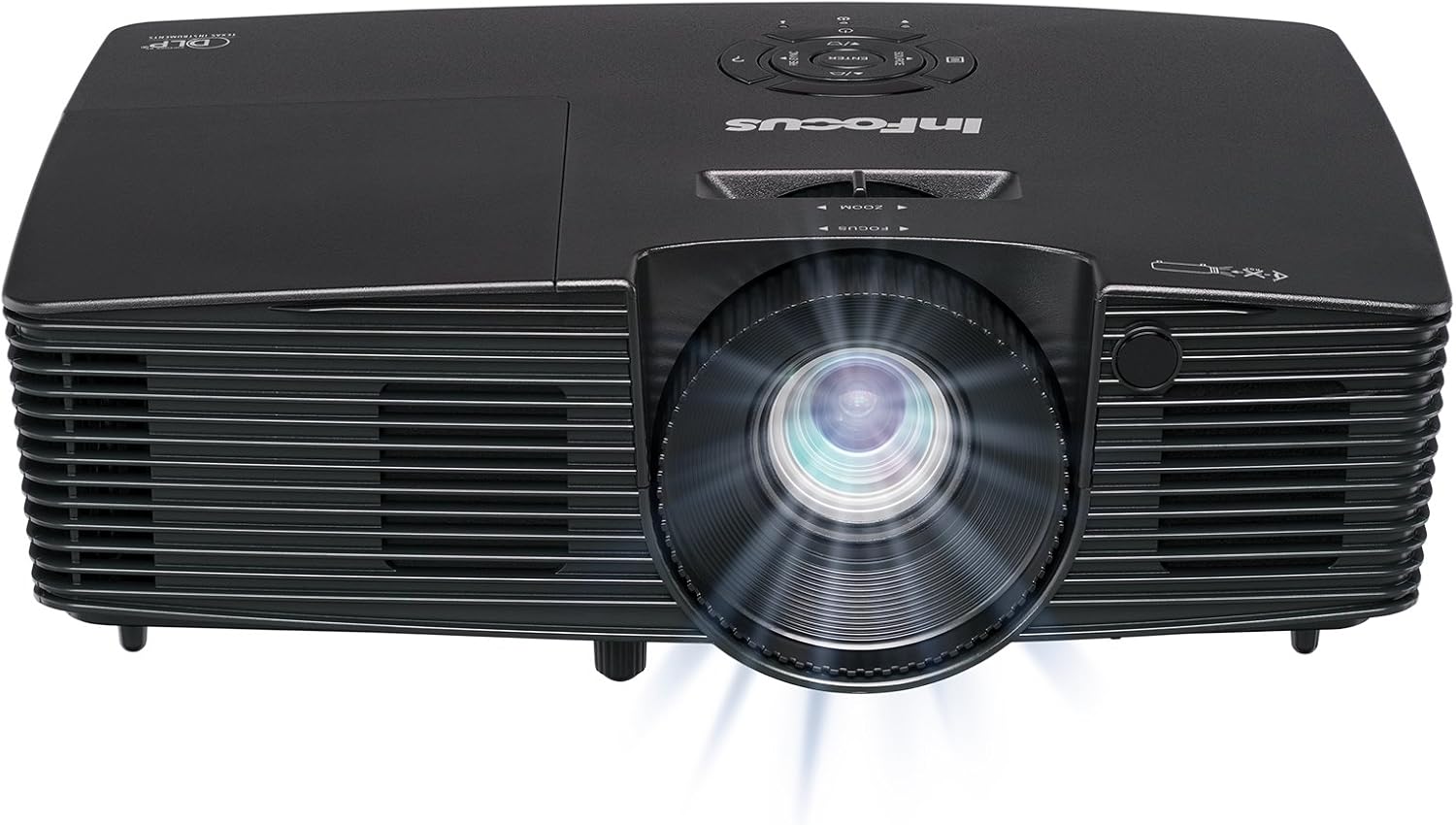
Setšoantšo sa 3.1: Pele view of the InFocus IN112XV projector. This image highlights the main projection lens and the front ventilation grilles.
3.2 Holimo View le Panel ea Taolo

Setšoantšo sa 3.2: Holimo view of the InFocus IN112XV projector. The control panel is visible on the right, featuring buttons for power, source selection, menu navigation, keystone adjustment, and volume. The focus and zoom adjustment rings are located around the lens.
The control panel on the top of the projector allows for basic operation without the remote. Key buttons include:
- Matla: E bulela kapa ho tima projector.
- Mohloli: E potoloha mehloling e fumanehang ea ho kenya.
- Lenane: E fihlella lenane la di-on-screen pontsho (OSD).
- Kena: E netefatsa likhetho ho menu ea OSD.
- Metsu: Tsamaea ka dikgetho tsa menu mme o fetole di-setting.
- Re-Sync: Synchronizes the image.
3.3 Morao View and Connection Ports

Setšoantšo sa 3.3: Ka morao view of the InFocus IN112XV projector. This image displays the available connection ports, including Video In, S-Video In, Computer In (VGA), HDMI, and the power input.
The rear panel provides various ports for connecting external devices:
- Video ka: For composite video sources.
- S-Video In: For S-Video sources.
- Computer In (VGA): For connecting to computers via VGA cable.
- HDMI: For digital video and audio sources.
- Tšebeletso: For service and maintenance purposes.
- Kenyeletso ea Matla: Connects the power cord to an electrical outlet.
3.4 Taolo ea Remote

Setšoantšo sa 3.4: Remote control for the InFocus IN112XV projector. The remote provides full control over the projector's functions, including power, source selection, menu navigation, keystone correction, and volume.
The remote control offers convenient access to all projector functions. Ensure batteries are correctly installed.
4. Seta
4.1 Ho bea
Position the projector on a stable, flat surface or mount it securely. Ensure there is adequate space around the projector for ventilation.
4.2 Khokelo ea Matla
- Hokela thapo ea motlakase le koung ea ho kenya motlakase ea projektara.
- Hokela ntlha e 'ngoe ea thapo ea motlakase sebakeng sa motlakase se theohileng fatše.
4.3 Ho hokela Mehloli ea Kenyelletso
The projector supports various input sources. Choose the appropriate cable for your device:
- HDMI: Connect an HDMI cable from your source device (e.g., laptop, media player) to the projector's HDMI port.
- VGA (Computer In): Connect a VGA cable from your computer to the projector's Computer In port. This is a plug-and-play connection.
- Video In / S-Video In: Use composite video or S-Video cables for older video sources.
- Lisebelisoa tsa Mehala: To connect an iPad or smartphone, a LightCast Key (sold separately) is required.
5. Litaelo tsa Ts'ebetso
5.1 Ho Matlafatsa/Ho tima
- Ho Matlafatsa: Tobetsa ea Matla button on the projector's control panel or the remote control. The power indicator light will change.
- Ho tima: Tobetsa ea Matla button again. A confirmation message may appear. Press again to confirm shutdown. Allow the projector to cool down before unplugging.
5.2 Ho Khetha Mohloli oa Kenyelletso
After connecting your source device, select the correct input:
- Tobetsa ea Mohloli button on the projector's control panel or the remote control to cycle through available inputs (HDMI, VGA, Video, S-Video).
- Alternatively, use the dedicated input buttons (HDMI, VGA, Video) on the remote control.
5.3 Ho Fetola Tsepamiso le Zoom
For a clear and appropriately sized image, adjust the lens rings:

Setšoantšo sa 5.1: Manual Focus Adjustment. This image illustrates the effect of adjusting the focus ring, transforming a blurry projection into a clear and sharp image.
- Tsepamisa maikutlo: Rotate the Tsepamisa maikutlo ring on the projector lens until the image appears sharp and clear.
- Atometsa: Rotate the Atometsa ring on the projector lens to adjust the size of the projected image.
5.4 Tokiso ea Lejoe la Sehlooho
If the projected image appears trapezoidal (wider at the top or bottom), use keystone correction to square it:
- Tobetsa ea Lejoe la sehlooho+ or Keystone- buttons on the remote control to adjust the image geometry.
5.5 Menu Navigation
Access the On-Screen Display (OSD) menu for advanced settings:
- Tobetsa ea Lenane button on the remote or control panel.
- Sebelisa dikonopo tsa motsu ho tsamaya ka hara dikgetho tsa menyu.
- Tobetsa Kena ho kgetha kgetho kapa ho netefatsa maemo.
- Tobetsa Lenane again to exit the OSD.
6. Tlhokomelo
6.1 Lamp Bophelo
Morero oa lamp has an estimated life of over 15,000 hours. When the lamp reaches the end of its life, the projector may display a warning message or the image brightness may significantly decrease. Refer to the full service manual for lamp replacement procedures if necessary.
6.2 Ho hloekisa
- Projector Casing: Sebelisa lesela le bonolo, le omileng ho hlakola bokantle ba projeketara. U se ke ua sebelisa litlhoekiso tse khorofo kapa li-solvent.
- Lense: Gently clean the lens with a lens cleaning cloth and specialized lens cleaning solution. Avoid touching the lens surface with your fingers.
- Mekhatlo ea Ventilation: Periodically check and clean the ventilation openings to ensure proper airflow and prevent overheating. Use a soft brush or compressed air to remove dust.
7. Ho rarolla mathata
This section addresses common issues you might encounter with your projector.
| Bothata | Lebaka le ka khonehang | Tharollo |
|---|---|---|
| Ha ho setšoantšo se hlahang |
|
|
| Setšoantšo se hlakile |
|
|
| Setšoantšo ke trapezoidal |
|
|
| Projector runs hot or smells of burning plastic |
|
|
| Ha ho molumo |
|
|
Keletso ea Bohlokoa: This projector is not recommended for high-definition movie viewing. While it can accept a 1080p input signal, it projects at its native SVGA (800 x 600) resolution.
8. Litlhaloso
| Sebopeho | Lintlha |
|---|---|
| Nomoro ea Mohlala | IN112XV |
| Bontša Theknoloji | DLP |
| Qeto ea Naha | SVGA (800 x 600) |
| Khanya | 3800 Lumens |
| Phapang karo-karolelano | 26000:1 |
| Lamp Bophelo | Ho fihlela lihora tse 15,000 |
| Khokahano | HDMI, VGA (Computer In), Video In, S-Video In |
| Tšobotsi e Khethehileng | 3D-Ho lokile |
| Litšebeliso tse khothalelitsoeng | Khoebo, Thuto |
| Litekanyo tsa Sehlahisoa | 8.8 x 12.4 x 4 lisenthimithara |
| Boima ba Ntho | 5.5 liponto |
9. Tiisetso le Tšehetso
9.1 Boitsebiso ba Tiisetso
The InFocus IN112XV projector is backed by a Waranti ea lilemo tse 2. Tiisetso ena e koahela mefokolo ea thepa le moetso tlas'a tšebeliso e tloaelehileng. Ka kopo, boloka bopaki ba theko ea hau bakeng sa likopo tsa waranti.
9.2 Tšehetso ea Bareki
For technical assistance, troubleshooting beyond this manual, or warranty service, please contact InFocus customer support. Contact information can typically be found on the official InFocus websaeteng kapa litokomaneng tse kenyellelitsoeng sehlahisoa sa hau.
Ask a question about this manual
Ask about setup, troubleshooting, compatibility, parts, safety, or missing instructions. Manuals+ will review the question and use this page’s manual context to help answer it.