
Selelekela
This manual provides detailed instructions for the setup, operation, and maintenance of your Axess CKRD3803 Digital AM/FM Clock Radio. Please read this manual thoroughly before using the device to ensure proper function and to maximize your user experience.
Sehlahisoa se Felletseview
The Axess CKRD3803 is a versatile clock radio featuring a 1.2-inch red LED display, digital AM/FM radio, dual alarm settings, and a calendar function. It includes an Aux input jack for external audio devices and a battery backup system to maintain settings during power interruptions.
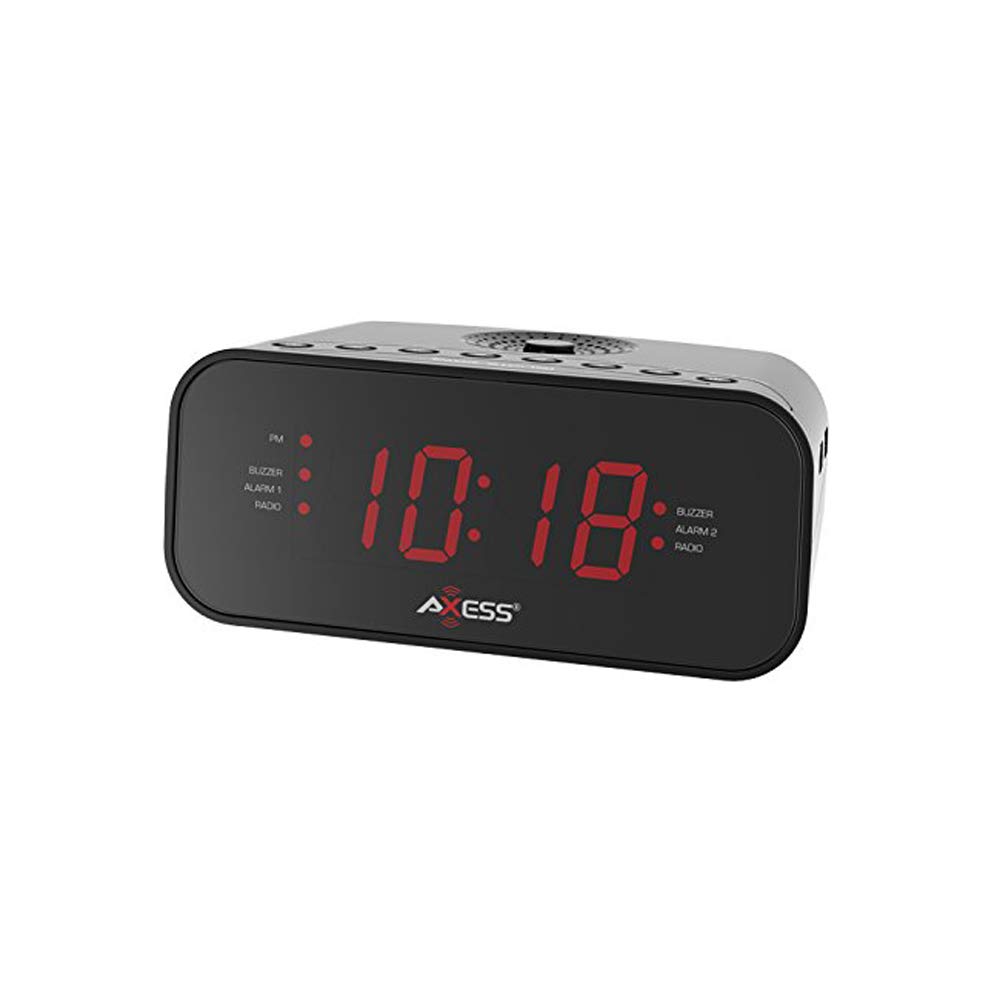
Setšoantšo: Pele view of the Axess CKRD3803 Digital AM/FM Clock Radio. The device is black with a large red LED display showing '10:18'. Indicators for PM, Buzzer, Alarm 1, Radio, and Alarm 2 are visible on either side of the time display.
Likarolo tsa Bohlokoa:
- Large 1.2-inch Red LED Display with two-step dimmer.
- Digital AM/FM Radio.
- Dual Alarm with Buzzer or Radio options.
- Sleep and Snooze Functions.
- Calendar Function.
- Auxiliary Input Jack.
- Battery Backup (2 x AAA batteries, not included) for power outages.
Tlhophiso
Khokelo ea Matla:
- Uncoil the built-in power cord (pigtail antenna).
- Plug the power cord into a standard AC wall outlet (120V, 60Hz).
- The LED display will light up, indicating the unit is receiving power.
Ho kenya Battery Backup:
For uninterrupted timekeeping during power outages, install backup batteries.
- Fumana karolo ea betri e ka tlase ho yuniti.
- Bula sekwahelo sa karolo ya betri.
- Insert two (2) AAA batteries (not included), observing the correct polarity (+ and -) as indicated inside the compartment.
- Koala sekoaelo sa karolo ea betri ka mokhoa o sireletsehileng.
Note: Batteries are for backup only and will not power the display or radio functions during a power outage. They only preserve time and alarm settings.
Litaelo tsa Ts'ebetso
Ho Beha Nako:
- Tobetsa o hatelle NAKO SEBETSO konopo ho fihlela linomoro tsa hora li qala ho benya.
- Tobetsa ea HORA button repeatedly to adjust the hour. Observe the 'PM' indicator for correct AM/PM setting.
- Tobetsa ea MOTSOTSO konopo ka makhetlo a mangata ho lokisa metsotso.
- To switch between 12-hour and 24-hour (military) time format, press the 12/24H button while the time is flashing.
- Tobetsa ea NAKO SEBETSO konopo hape ho netefatsa le ho tswa mokgweng wa ho seta nako.
Setting the Alarm (Alarm 1 and Alarm 2):
The CKRD3803 features two independent alarms.
- Tobetsa o hatelle ALAMO 1 SET (kapa ALAMO 2 SET) button until the alarm hour digits begin to flash.
- Tobetsa ea HORA button to adjust the alarm hour. Observe the 'PM' indicator.
- Tobetsa ea MOTSOTSO konopo ea ho lokisa metsotso ea alamo.
- Tobetsa ea ALAMO 1 SET (kapa ALAMO 2 SET) button again to confirm the time.
- Immediately after confirming the time, press the ALARM 1 MODE (kapa ALARM 2 MODE) button repeatedly to select the alarm source: BUZZER or RELEBOHILE. Leseli le tsamaisanang le lona le tla khantša.
- Ho kenya tshebetsong kapa ho tima alamo, tobetsa ALAMO 1 ON/OFF (kapa ALAMO 2 ON/OFF) button. The alarm indicator will light up when active.
Ts'ebetso ea Radio:
- Tobetsa ea SEAEMOSO TS'OA/TLOA konopo ho bulela seea-le-moea.
- Tobetsa ea AM/FM konopo ho fetola pakeng tsa di-band tsa AM le FM.
- Tobetsa ea TUNE + or PINYA - dikonopo tsa ho lokisa ka letsoho ho fihlela maqhubu ao o a batlang.
- Tobetsa o hatelle TUNE + or PINYA - bakeng sa ho skena seteishene ka boiketsetso.
- Fetola molumo u sebelisa file ea BOLUMO + or MOLUMO - likonopo.
- To improve FM reception, extend the pigtail antenna fully. For AM reception, rotate the unit for best signal.
- Tobetsa ea SEAEMOSO TS'OA/TLOA button again to turn the radio off.
Mosebetsi:
Ha alamo e lla, tobetsa konopo TS'OANANG button to temporarily silence the alarm for approximately 9 minutes. The alarm will sound again after this period.
Mosebetsi oa ho Robala:
Ho robala ha o shebile radio, tobetsa ROBALA button while the radio is playing. Repeatedly press the ROBALA button to cycle through sleep timer options (e.g., 90, 60, 30, 15 minutes, or OFF). The radio will automatically turn off after the selected time.
Hlahisa Dimmer:
Tobetsa ea FIHLELANG button to adjust the brightness of the LED display between two levels (bright and dim).
Kenyelletso ea Thuso:
Connect an external audio device (e.g., MP3 player, smartphone) to the AUX TLALI jack on the unit using a 3.5mm audio cable (not included). The audio from the external device will play through the clock radio's speaker.
Tlhokomelo
To ensure the longevity and optimal performance of your Axess CKRD3803, follow these simple maintenance guidelines:
- Ho hloekisa: Hlakola sesebediswa ka lesela le bonolo, le omileng. O se ke wa sebedisa dihlatswa tse kgohlang, di-waxes, kapa di-solvent kaha di ka senya qetello.
- Mohala oa Matla: Regularly check the power cord for any signs of damage. If damaged, discontinue use and seek professional repair.
- Phetoho ea Betri: Replace backup batteries annually or when the unit is stored for extended periods to prevent leakage.
- Sebaka: Avoid placing the unit in direct sunlight, near heat sources, or in areas with high humidity or dust.
Ho batle phoso
If you encounter issues with your Axess CKRD3803, please refer to the following common problems and solutions:
| Bothata | Lebaka le ka khonehang | Tharollo |
|---|---|---|
| Pontšo ha e na letho. | No AC power; Dimmer set to lowest setting. | Ensure power cord is securely plugged in. Press the FIHLELANG konopo ho eketsa kganya. |
| Cannot set time/alarm. | Buttons not pressed correctly or in sequence. | Refer to the "Setting the Time" and "Setting the Alarm" sections for precise steps. Ensure you press and hold the SET button until digits flash. |
| Alamo ha e lle. | Alarm not activated; Volume too low (for radio alarm). | Ensure the alarm is set and the alarm indicator light is on. For radio alarm, increase radio volume. |
| Kamohelo e mpe ea seea-le-moea. | Antenna not positioned correctly; Weak signal. | Fully extend the pigtail antenna for FM. Rotate the unit for optimal AM reception. Try a different location. |
| Nako/litlhophiso tse lahlehileng ka mor'a ho felloa ke matlatage. | Libetri tsa bekapo ha lia kenngoa kapa ha lia fela. | Install fresh AAA batteries in the battery compartment. |
| Stuck in 24-hour (military) time. | 12/24H setting not adjusted during time setup. | Enter time setting mode (press and hold NAKO SEBETSO). While digits are flashing, press the 12/24H button to toggle between formats. |
Litlhaloso
- Mohlala: CKRD3803
- Hlahisa: 1.2-inch Red LED
- Mohloli oa Matla: Lenaihana 120V ~ 60Hz
- Boloka Battery: 2 x AAA libetri (ha li kenyelelitsoe)
- Lihlopha tsa Radio: AM/FM
- Boholo: 2.95 x 6.89 x 4.21 inches (H x W x D)
- Boima ba 'mele: 1 ponto
- Boitsebiso: Setala sa Acrylonitrile Butadiene
- Likarolo tse Khethehileng: Dual Alarm, Calendar Function, Aux-in, Sleep/Snooze, Dimmer
Warranty le Tšehetso
For warranty information or technical support, please refer to the documentation included with your purchase or visit the official Axess websebaka. Boloka rasiti ea hau ea theko e le bopaki ba hore u rekile litseko life kapa life tsa waranti.