
1. Selelekela
Thank you for choosing the Baseus Encok S16 Neck Hung Bluetooth Wireless In-Ear Earphone. This manual provides detailed instructions for setup, operation, and maintenance to ensure optimal performance and longevity of your device. Please read this manual thoroughly before use.
2. Likahare tsa Sephutheloana
Netefatsa hore lintho tsohle li teng ka har'a sephutheloana:
- 1 x Baseus Encok S16 Wireless Earphone
- 1 x Cable ea ho tjhaja
- 1 x Buka ea Mosebelisi
- 1 x Karete ea Tiisetso

Image: Contents of the Baseus Encok S16 earphone package, showing the earphones, charging cable, user manual, and warranty card.
3. Sehlahisoa Overview
The Baseus Encok S16 earphones feature a neck-hung design for comfortable and secure wear. Key features include:
- Tokiso ea Magnetic: Earbuds can be magnetically joined when not in use, preventing tangling and loss.
- Adjustable Coils: The earphone line length can be adjusted by sliding for a customized fit.
- Molumo oa High Fidelity: Equipped with a dynamic speaker unit, composite diaphragm, and independent tune trope structure for clear audio.
- Efficient Power: Utilizes a British CSR chip and 120mAh battery for low power consumption and extended battery life.
- Tšebelisano ea bokahohle: Smartly matches with smartphones and tablet PCs, compatible with all Bluetooth 4.0 enabled devices.

Image: Close-up of the Baseus Encok S16 earbuds demonstrating their magnetic connection capability.
4. Seta
4.1 Ho tjhaja Li-Earphone
- Connect the provided charging cable to the charging port on the earphone's control unit.
- Hokela ntlha e 'ngoe ea thapo ea ho tjhaja mohloling oa matla oa USB (mohlala, koung ea USB ea komporo, adaptara ea lebota la USB).
- Lebone la sesupo le tla bonesa nakong ea ho tjhaja 'me le tima kapa le fetole' mala ha le tjhaja ka botlalo.
- Tefiso e felletseng hangata e nka lihora tse 1.5 ho isa ho tse 2.
4.2 Ho hokahanya ha Bluetooth
- Netefatsa hore li-earphone li tjhajiloe ka botlalo.
- Press and hold the Power button on the control unit until the indicator light flashes red and blue alternately, indicating pairing mode.
- Ho smartphone ea hau kapa sesebelisoa se nang le Bluetooth, e ea ho litlhophiso tsa Bluetooth.
- Batla available devices and select "Baseus Encok S16" from the list.
- Once connected, the indicator light will flash blue slowly or turn solid blue.
- Haeba u botsoa hore u fumane phasewete, kenya "0000".
5. Litaelo tsa Ts'ebetso
5.1 Litaolo tsa Motheo
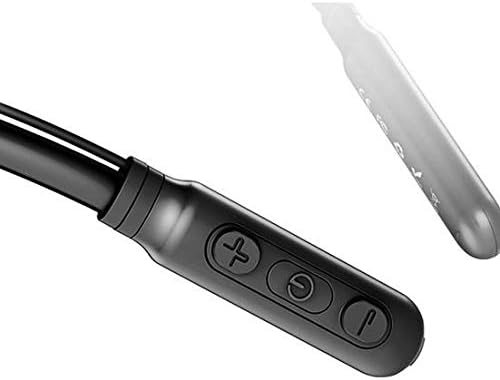
Image: Close-up of the Baseus Encok S16 earphone's inline control unit, showing the power/multi-function button, volume up, and volume down buttons.
| Konopo | Mosebetsi |
|---|---|
| Power Button (Center) |
|
| Phahamiso ea Phahamiso (+) |
|
| Buka e tlase (-) |
|
5.2 Ho Roala Li-Earphone
Place the neckband around your neck, ensuring the control unit is easily accessible. Insert the earbuds comfortably into your ears. Adjust the earphone line length using the sliding coils for a secure and comfortable fit.
6. Tlhokomelo
- Clean the earbuds and control unit regularly with a soft, dry cloth.
- Avoid exposing the earphones to extreme temperatures, humidity, or corrosive liquids.
- Store the earphones in a cool, dry place when not in use. The magnetic earbuds can help prevent tangling during storage.
- Do not attempt to disassemble or repair the earphones yourself, as this will void the warranty.
7. Ho rarolla mathata
| Bothata | Tharollo |
|---|---|
| Ha e khone ho sebetsa | Ensure the earphones are fully charged. Press and hold the Power button for 3 seconds. |
| Ha e khone ho tsamaisana le sesebelisoa |
|
| Ha ho modumo kapa modumo o tlase |
|
| Khokahano ea nakoana |
|
8. Litlhaloso
| Sebopeho | Lintlha |
|---|---|
| Brand | Baseus |
| Nomoro ea Mohlala | FWP-E-S16 |
| Theknoloji ea Khokahano | bluetooth |
| Bluetooth Version | 4.0 (compatible with devices enabling Bluetooth 4.0) |
| Sebopeho sa Foromo | In Ear, Neck Hung |
| Mofuta oa Taolo | Voice Control, Touch (via buttons) |
| Bokhoni ba Battery | 120mAh |
| Boima ba 'mele | 30 lik'hilograma |
| Kenyellelitsoe Likaroloana | Wireless Earphone, Charging Cable, User Manual, Warranty Card |
9. Tiisetso le Tšehetso
This product comes with a Limited Warranty. Please refer to the included Warranty Card for detailed terms and conditions regarding coverage and duration.
For technical support or warranty claims, please contact your retailer or visit the official Baseus websebaka sa marang-rang bakeng sa tlhahisoleseling ea litšebeletso tsa bareki.
Nomoro ea Boitsebiso ea Khoebo ea Lefatše (GTIN): 06953156264489