
Selelekela
Thank you for choosing the Divoom Onbeat 500 Portable Wireless Bluetooth Speaker. This device is designed to deliver powerful sound with convenient wireless connectivity. This manual will guide you through the setup, operation, and maintenance of your speaker to ensure optimal performance and longevity.
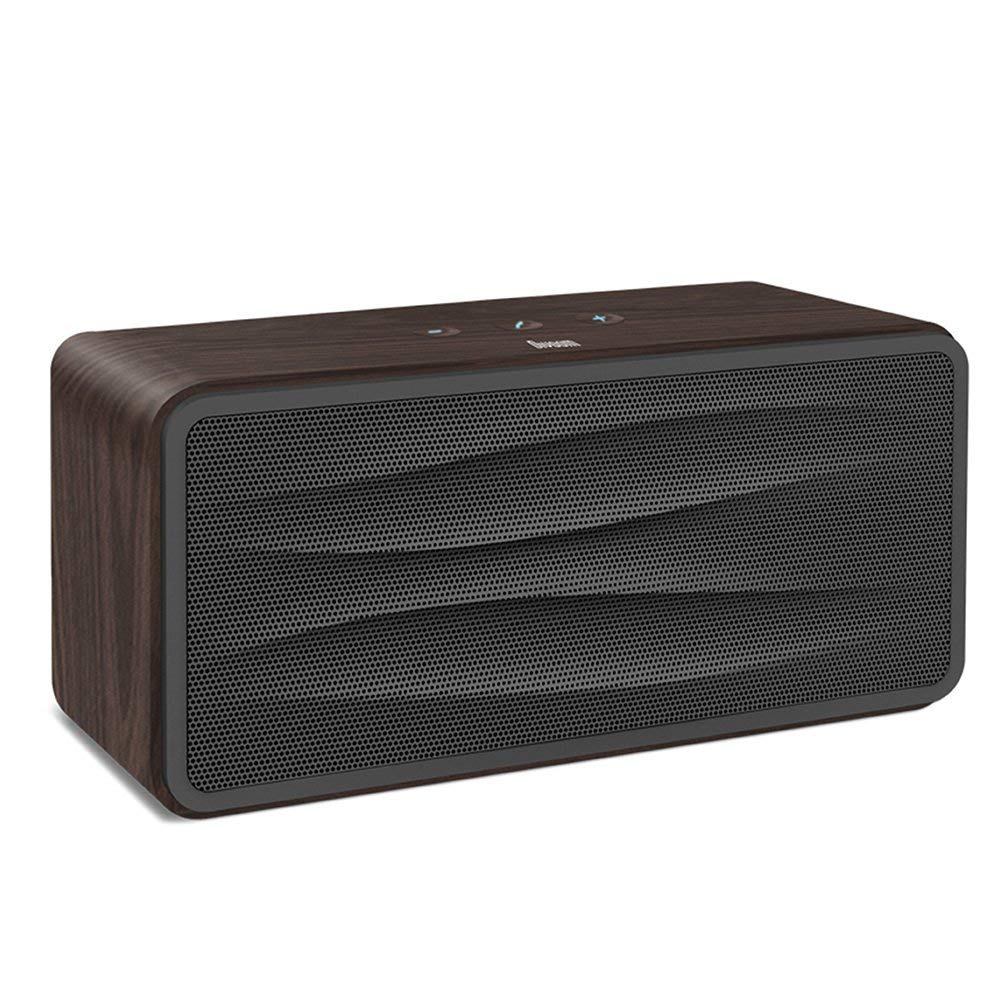
Setšoantšo sa 1: Pele view of the Divoom Onbeat 500 speaker. This image displays the speaker's main grille and overall design.
Litaba tsa Sephutheloana
Ka kopo, sheba sephutheloana sa lintho tse latelang:
- Divoom Onbeat 500 Speaker
- Mohala oa ho tjhaja oa Micro USB
- Cable e thusang
- Bukana ea mosebelisi (tokomane ena)
- Karete ea Tiisetso
Likarolo tsa Sehlahisoa
The Divoom Onbeat 500 speaker offers a range of features for an enhanced audio experience:
- Molumo o Matla: 2.1 channel design with a proprietary passive bass radiator for rich audio.
- Theknoloji ea NFC: Tap-to-pair functionality for quick and easy Bluetooth connection.
- Khokahano ea Bluetooth: Wirelessly play and control music from up to 33 feet (10 meters) away.
- Sepikara se Ahelletsoeng ka hare: Allows you to make and take calls directly from the speaker.
- Betri ea nako e telele: Integrated 5000mAh battery provides extended playback time.
- Kenyelletso ea Thuso: Bakeng sa khokahano ea terata ho lisebelisoa tse seng tsa Bluetooth.
Tlhophiso
1. Ho lefisa Sepikara
Before initial use, fully charge your Divoom Onbeat 500 speaker. Use the provided Micro USB charging cable to connect the speaker to a USB power source (e.g., computer USB port, USB wall adapter). The charging indicator light will illuminate during charging and turn off or change color when fully charged. A full charge typically provides 8-10 hours of playback.
2. Ho tima/Ho tima
- Ho Matlafatsa: Press and hold the Power button for a few seconds until you hear an audible prompt or see the indicator light illuminate.
- Ho tima: Press and hold the Power button again for a few seconds until the speaker powers down.
3. Bluetooth pairing
The Onbeat 500 offers two methods for wireless connection:
NFC (Near Field Communication) Pairing:
If your device supports NFC, you can pair quickly:
- Netefatsa hore NFC e butswe ho smartphone kapa tablet ya hao.
- With the Onbeat 500 powered on, gently tap your NFC-enabled device against the NFC area on the speaker.
- Confirm the pairing request on your device. The speaker will indicate a successful connection.
Standard Bluetooth Pairing:
For devices without NFC or for manual pairing:
- Power on the Divoom Onbeat 500 speaker. It will automatically enter Bluetooth pairing mode if no device is connected, or you may need to press a dedicated Bluetooth button (refer to speaker controls).
- On your audio device (smartphone, tablet, computer), go to the Bluetooth settings and enable Bluetooth.
- Batla available devices. You should see "Divoom Onbeat 500" in the list.
- Select "Divoom Onbeat 500" to connect. The speaker will confirm the connection with an audible prompt.
4. AUX Connection
To connect a device using the auxiliary cable:
- Connect one end of the provided auxiliary cable to the AUX-in port on the Divoom Onbeat 500.
- Connect the other end of the auxiliary cable to the headphone jack or audio output of your device.
- The speaker will automatically switch to AUX mode, or you may need to select it manually (refer to speaker controls).

Setšoantšo sa 2: Lehlakore view of the Divoom Onbeat 500, illustrating the location of the charging port, AUX input, and control buttons.
Ho sebetsa Sebui
1. Ho Bapala 'Mino
Once connected via Bluetooth or AUX, you can control music playback from your connected device. The speaker may also have integrated controls for volume adjustment, play/pause, and track skipping. Refer to the speaker's physical buttons for these functions.
2. Ts'ebetso ea sebuela-pele
When connected to a smartphone via Bluetooth, the Divoom Onbeat 500 can be used as a speakerphone:
- Ho Arabela Pitso: Press the Call button (often indicated by a phone icon) on the speaker.
- Ho Felisa Mohala: Tobetsa konopo ea Call hape.
- Ho hana mohala: Press and hold the Call button.

Setšoantšo sa 3: Ka morao view of the Divoom Onbeat 500, highlighting the passive bass radiator for enhanced low-frequency sound.
Tlhokomelo
1. Ho hloekisa
Ho boloka ponahalo le tšebetso ea sebui sa hau:
- Wipe the exterior with a soft, dry, lint-free cloth.
- Se ke oa sebelisa li-abrasive cleaners, joala, benzene, kapa metsoako e meng ea lik'hemik'hale, kaha li ka senya qetello.
- Qoba ho fumana mongobo ka har'a masoba leha e le afe.
2. Tlhokomelo ea Battery
To prolong the life of the built-in lithium-ion battery:
- Qoba ho ntsha betri ka botlalo kgafetsa.
- Boloka sebui sebakeng se pholileng, se omileng ha se sa sebelisoe nako e telele.
- Charge the speaker at least once every three months if stored for a long time to prevent deep discharge.
Ho batle phoso
If you encounter issues with your Divoom Onbeat 500, please refer to the following common solutions:
| Bothata | Tharollo e ka khonehang |
|---|---|
| Sebui ha se sebetse | Ensure the battery is charged. Connect the speaker to a power source using the Micro USB cable and try again. |
| Ha ho molumo o tsoang ho sebui | Check the volume level on both the speaker and your connected device. Ensure the speaker is correctly paired via Bluetooth or connected via AUX. Try re-pairing the Bluetooth device. |
| Ho hokahanya ha Bluetooth ho hlolehile | Ensure the speaker is in pairing mode. Turn off and on Bluetooth on your device. Move your device closer to the speaker. Clear previous Bluetooth connections on your device and try again. |
| Boleng bo fokolang ba molumo | Ensure the speaker and connected device are within range (for Bluetooth). Check for interference from other wireless devices. Try a different audio source or cable. |
Litlhaloso
Detailed technical specifications for the Divoom Onbeat 500 speaker:
- Lebitso la Mohlala: Divoom Onbeat 500
- Mofuta oa sebui: Sebui sa Khomphutha
- Theknoloji ea Khokahano: bluetooth
- Theknoloji ea puisano e se nang mohala: bluetooth
- Mokhoa oa ho laola: Thetsa
- Mohloli oa Matla: Matla a Battery
- Betri: 1 Lithium Ion battery (5000mAh)
- Audio Wattage: 20 Watts
- Matla a Sebui a Phahameng ka ho Fetisisa: 100 Watts
- Tlhophiso ea Seteishene se Potileng: 2.1
- Lisebelisoa tse Lumellanang: Android, Windows, iPhone (iOS)
- Mofuta oa Sehokelo: USB (bakeng sa ho tjhaja)
- Boholo ba Sehlahisoa: 22.5 x 7.49 x 10.49 cm (LxWxH)
- Boima ba Ntho: 1.55 lik'hilograma
- Mmala: Mashala
- Likarolo tse Khethehileng: NFC, Built-in Speakerphone, Passive Bass Radiator
Warranty le Tšehetso
Your Divoom Onbeat 500 speaker comes with a limited warranty. Please refer to the included Warranty Card for detailed terms and conditions, including warranty period and coverage.
For technical support, service inquiries, or further assistance, please visit the official Divoom website or contact their customer service department using the information provided on your Warranty Card or product packaging. Please have your model number (Onbeat 500) and purchase details ready when contacting support.