
1. Sehlahisoa Overview
The VIVOTEK AM-116 is a 20cm white pendant pipe designed to provide an extended and secure mounting solution for compatible VIVOTEK surveillance cameras. This accessory facilitates optimal camera positioning for various surveillance applications.
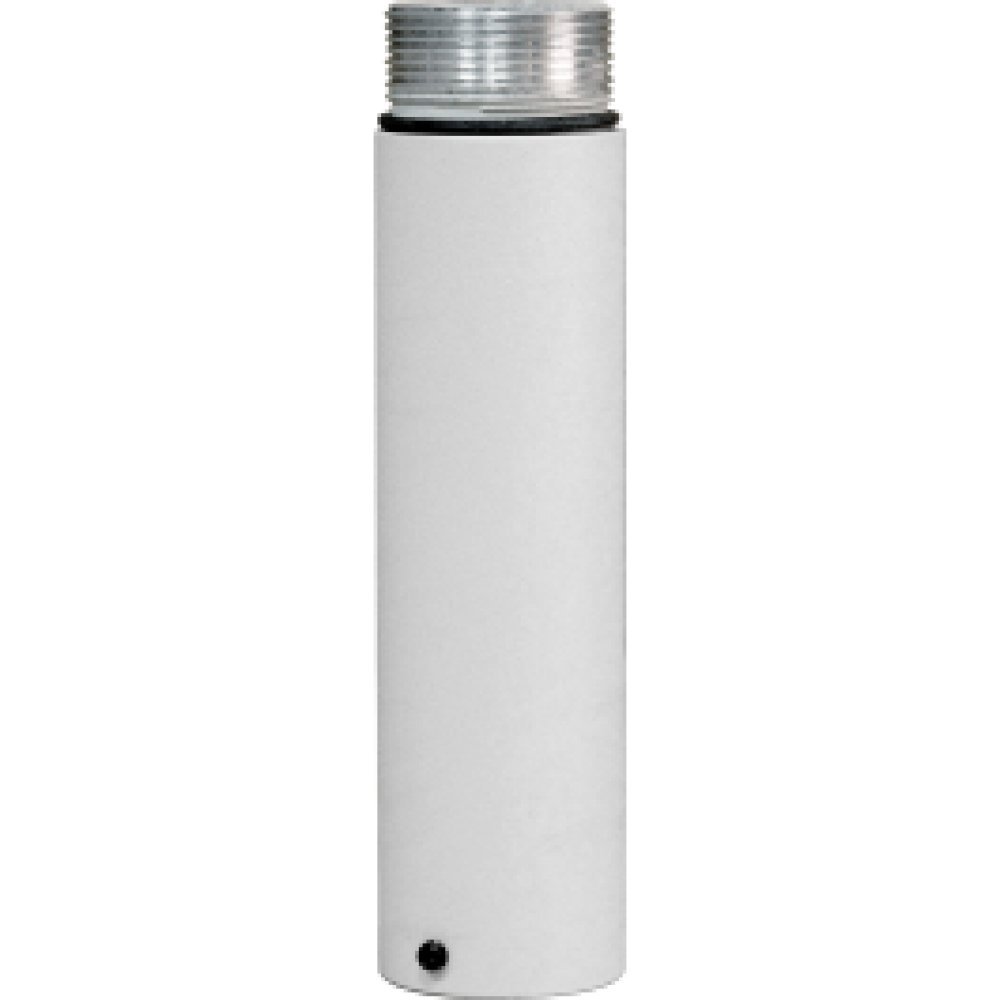
Image 1.1: VIVOTEK AM-116 Pendant Pipe. This image shows the white cylindrical pendant pipe, approximately 20cm in length, designed for camera mounting.
2. Likahare tsa Sephutheloana
Netefatsa hore lintho tsohle li teng ka har'a sephutheloana pele u tsoela pele ka ho kenya.
- VIVOTEK AM-116 Pendant Pipe (1 piece, 20cm, White)
- Lisebelisoa tsa ho kenya (li-screw, li-ankora tsa lebota)
- Tataiso ea ho Kenya (tokomane ena)
3. Boitsebiso ba Tšireletseho
Please read and understand all safety instructions before installation and use. Failure to follow these instructions may result in injury or damage to the product.
- Ho khothaletsoa ho Kenya Setsebi: For optimal safety and performance, installation by a qualified professional is recommended.
- Sireletsehile ho Holima: Ensure the mounting surface is capable of supporting the combined weight of the pendant pipe and the attached camera. Use appropriate mounting hardware for the specific surface material.
- Sebelisa Lisebelisoa tse Nepahetseng: Always use the correct tools for installation to prevent damage to the product or injury.
- Qoba Tšitiso: Do not install the pendant pipe in a location where it might obstruct emergency exits or pathways.
- Tšireletseho ea Motlakase: If connecting to a powered camera, ensure all electrical work is performed by a qualified electrician and complies with local electrical codes.
4. Seta
Follow these steps for proper installation of the VIVOTEK AM-116 Pendant Pipe.
4.1 Mounting the Pendant Pipe
- Tseba Sebaka sa ho Beha: Select a suitable, stable surface (e.g., ceiling, wall) that can securely hold the weight of the pendant pipe and the camera.
- Mark Drill Holes: Use the pendant pipe's mounting base as a template to mark the positions for drilling holes.
- Drill Pilot Holes: Drill pilot holes of the appropriate size for the provided mounting screws and wall anchors (if necessary for the surface material).
- Secure Pendant Pipe: Attach the pendant pipe securely to the mounting surface using the provided screws. Ensure it is firmly fixed and does not wobble.
- Attach Compatible Device: Connect your compatible VIVOTEK camera (e.g., AE-131 + AM-114, AE-132 + AM-114, AE-151 + AM-114 AM-520, SD83xxE) to the bottom of the pendant pipe according to the camera's specific installation instructions. Ensure all connections are tight and secure.
5. Ho sebetsa
The VIVOTEK AM-116 Pendant Pipe is a passive mounting accessory. Once properly installed, its primary function is to provide a stable and extended platform for your compatible VIVOTEK surveillance camera. There are no active operational controls for the pendant pipe itself. The operation of the surveillance system will depend on the attached camera and its associated software.
6. Tlhokomelo
Regular maintenance helps ensure the longevity and reliability of your pendant pipe.
- Tlhahlobo ea Pono: Periodically inspect the pendant pipe and its mounting points for any signs of damage, corrosion, or loosening.
- Ho hloekisa: If necessary, clean the exterior of the pendant pipe with a soft, damp lesela. U se ke ua sebelisa li-abrasive cleaners, solvents, kapa lik'hemik'hale tse bohale, kaha li ka senya qetello.
- Tiisa li-Fasteners: If any mounting screws appear loose, carefully re-tighten them to ensure the pipe remains securely fixed.
7. Ho rarolla mathata
This section addresses common issues related to the VIVOTEK AM-116 Pendant Pipe.
| Hlahisa | Lebaka le ka khonehang | Tharollo |
|---|---|---|
| Pendant pipe feels loose or wobbly after installation. | Mounting screws are not sufficiently tightened, or the mounting surface is inadequate. | Ensure all mounting screws are securely tightened. If the surface is weak, consider reinforcing it or choosing a different mounting location. |
| Camera cannot be attached to the pendant pipe. | Incompatibility with the camera model or incorrect attachment method. | Verify that your camera model is listed as compatible (e.g., AE-131 + AM-114, AE-132 + AM-114, AE-151 + AM-114 AM-520, SD83xxE). Refer to the camera's manual for specific attachment instructions. |
| Visible damage to the pendant pipe. | Physical impact or environmental factors. | If the pipe is damaged, replace it immediately to prevent potential failure and damage to the attached camera. |
8. Litlhaloso
Key technical specifications for the VIVOTEK AM-116 Pendant Pipe.
| Sebopeho | Lintlha |
|---|---|
| Mohlala | AM-116 |
| Moetsi | VIVOTEK |
| Mmala | Bosoeu |
| Bolelele | 20 cm (hoo e ka bang 7.87 inch) |
| Litekanyo tsa sephutheloana | 10.98 x 2.72 x 2.6 lisenthimithara |
| Boima ba Ntho | 1.06 liponto |
| ASIN | B01FRC2D2S |
| Lisebelisoa tse Tšehetsoeng | AE-131 + AM-114, AE-132 + AM-114, AE-151 + AM-114 AM-520, SD83xxE |
9. Boitsebiso ba Tiisetso
The VIVOTEK AM-116 Pendant Pipe is covered by a standard manufacturer's warranty. For detailed information regarding warranty terms, conditions, and duration, please refer to the official VIVOTEK websaete kapa ikopanye le litšebeletso tsa bareki ka kotloloho. Boloka bopaki ba hau ba theko bakeng sa likopo tsa waranti.
10. Tšehetso
For technical assistance, product inquiries, or further support, please contact VIVOTEK customer service through their official channels:
- Semolao Websebaka: Visit the VIVOTEK official websebaka sa marang-rang bakeng sa lisebelisoa tsa tšehetso, Lipotso, le lintlha tsa ho ikopanya.
- Tšebeletso ea bareki: Refer to the VIVOTEK website for regional contact numbers or email support.


