
1. Selelekela
This manual provides detailed instructions for the setup, operation, and maintenance of your Enover TS18 7-Day Programmable Digital Timer. This device is designed to automate the control of electrical appliances by setting specific ON/OFF times throughout the week, offering convenience and energy management.
2. Likarolo tsa lihlahisoa
- Kemiso e Tenyetsehang: Program up to 10 distinct ON/OFF cycles within a 7-day period. Each program repeats weekly.
- Taolo ea Matla: Automatically controls lamps, holiday lights, humidifiers, and other electrical devices. Includes a feature to protect devices from overcharge.
- Security Function: Features a random ON/OFF option to vary lighting times, simulating occupancy when away from home.
- Sehokelo se Sebeletsang Mosebelisi: Equipped with a large LCD display for clear visibility and a manual override switch for immediate control adjustments.
- Boloka Battery: An integrated battery retains programmed settings during power outages, eliminating the need for reprogramming.

Image: Enover TS18 Digital Timer highlighting key features for easy home automation.
3. Likahare tsa Sephutheloana
Pakete e kenyelletsa lintho tse latelang:
- 1 x Enover Digital Timer Switch (Model TS18)
- 1 x Buka ea Mosebelisi

Image: Contents of the Enover TS18 Digital Timer package, including the timer and manual.
4. Sehlahisoa Overview
The Enover TS18 Digital Timer features a clear LCD display and intuitive buttons for easy programming. It plugs directly into a standard electrical outlet.

Setšoantšo: Pele view of the Enover TS18 Digital Timer, displaying the time and control buttons.
Mesebetsi ea likonopo:
- BEKE: Sets the day(s) for programs.
- HORA: E fetola hora bakeng sa nako le di-setting tsa lenaneo.
- MINUTE: E fetola motsotso bakeng sa nako le di-setting tsa lenaneo.
- RES/RCL: Resets or recalls settings.
- TŠEBELETSO: Enters or exits clock setting mode.
- TIMER: Cycles through program settings (P1 ON, P1 OFF, P2 ON, etc.).
- ON/AUTO/OFF: Selects operating mode (Always ON, Automatic, Always OFF).
- TLHOKOMELISO: Activates or deactivates the random ON/OFF function.
- SETA HAPE: Small button (requires a pointed object) to clear all settings and reset the device.
Video: A brief demonstration of the Enover Digital Timer's basic functions and display.
5. Seta
5.1 Tefiso ea Pele
Before first use, plug the timer into an electrical outlet for approximately 5-10 minutes to charge the internal battery. This ensures the display is active and settings can be retained.
5.2 Ho Beha Nako le Letsatsi tsa Hona Jwale
- Tobetsa o hatelle TŠEBELE konopo.
- Ha u ntse u tšoere TŠEBELE, tobetsa ea BEKETSO button repeatedly to set the current day of the week.
- Ha u ntse u tšoere TŠEBELE, tobetsa ea HORA button repeatedly to set the current hour (AM/PM will display).
- Ha u ntse u tšoere TŠEBELE, tobetsa ea MOTSOTSO konopo e pheta-phetoang ho seta motsotso wa hajwale.
- Lokolla TŠEBELE konopo ho boloka litlhophiso.
6. Litaelo tsa Ts'ebetso
6.1 Lenaneo la ho BULELA/HO TIISA Dipotoloho
The timer allows for up to 10 ON/OFF programs. Follow these steps to set a program:
- Tobetsa ea TIMER konopo hang. Pontšo e tla bonts'a "1 ON".
- Tobetsa BEKETSO to select the day(s) for this program (e.g., MO, TU, WE, TH, FR, SA, SU, MO TU WE TH FR, SA SU, MO TU WE TH FR SA SU, etc.).
- Tobetsa HORA ho beha hora ea ON e lakatsehang.
- Tobetsa MOTSOTSO ho beha motsotso o lakatsehang wa ON.
- Tobetsa ea TIMER button again. The display will show "1 OFF".
- Repeat steps 2-4 to set the desired OFF time for Program 1. Ensure the correct day(s) are selected for the OFF time.
- Tsoela pele ho tobetsa TIMER to cycle through and set additional programs (2 ON, 2 OFF, up to 10 ON, 10 OFF).
- Kamora ho seta mananeo ohle a lakatsehang, tobetsa konopo ea TŠEBELE konopo ho khutlela ponts'ong ea nako ea hajoale.
- Netefatsa hore sesupa-nako se kene MOSEBETSI mode for programs to execute. Press ON/AUTO/OFF ho potoloha ho MOSEBETSI.
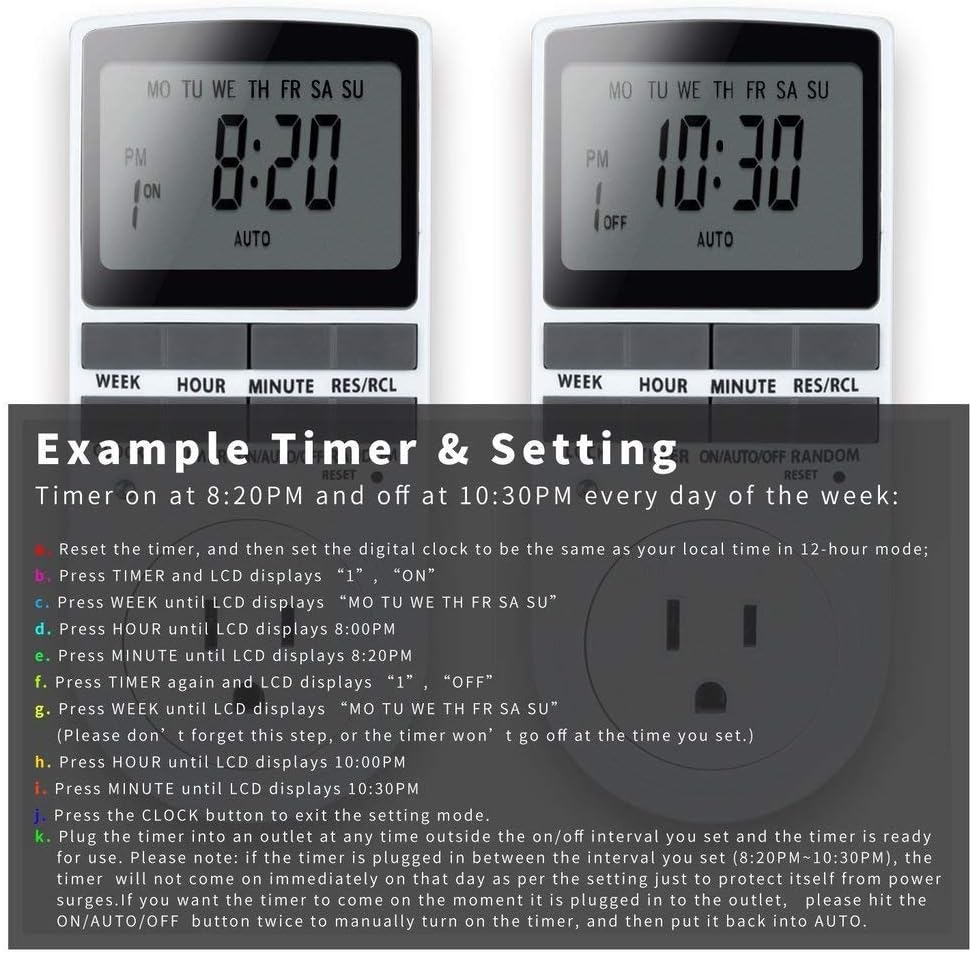
Image: Visual guide for setting an example timer program (ON at 8:20 PM, OFF at 10:30 PM daily).
6.2 Random Function (Anti-theft)
To activate the random ON/OFF feature:
- Tobetsa ea TS'OANELO button. The word "RANDOM" will appear on the display.
- In random mode, the timer will turn ON and OFF at varying times within a set period, typically around the programmed ON/OFF times, to simulate occupancy.
- Ho tima, tobetsa TS'OANELO konopo hape.

Image: The anti-theft random feature of the Enover TS18 Digital Timer, designed to deter intruders.
6.3 Phethahatso ka letsoho
To manually switch the timer's output without affecting programmed settings:
- Tobetsa ea ON/AUTO/OFF konopo ea ho potoloha mekhoa: ON (always on), MOSEBETSI (follows programs), TLOA (always off).
- Select the desired temporary mode. The timer will revert to MOSEBETSI mode at the next programmed ON/OFF event.
Video: A detailed demonstration of setting programs and using the manual override function on the Enover Digital Timer.
7. Lisebelisoa
The Enover TS18 Digital Timer can be used to automate various household devices, enhancing convenience and energy efficiency.
- Coffee Makers: Program your coffee maker to start brewing before you wake up.
- Aquarium Lights/Pumps: Automate the lighting and filtration cycles for your aquarium.
- Indoor Grow Lights: Maintain consistent light schedules for plants.
- Mekhabiso ea Matsatsi a Phomolo: Set festive lights to turn on and off automatically.
- Fans/Humidifiers: Control environmental devices to operate only when needed.
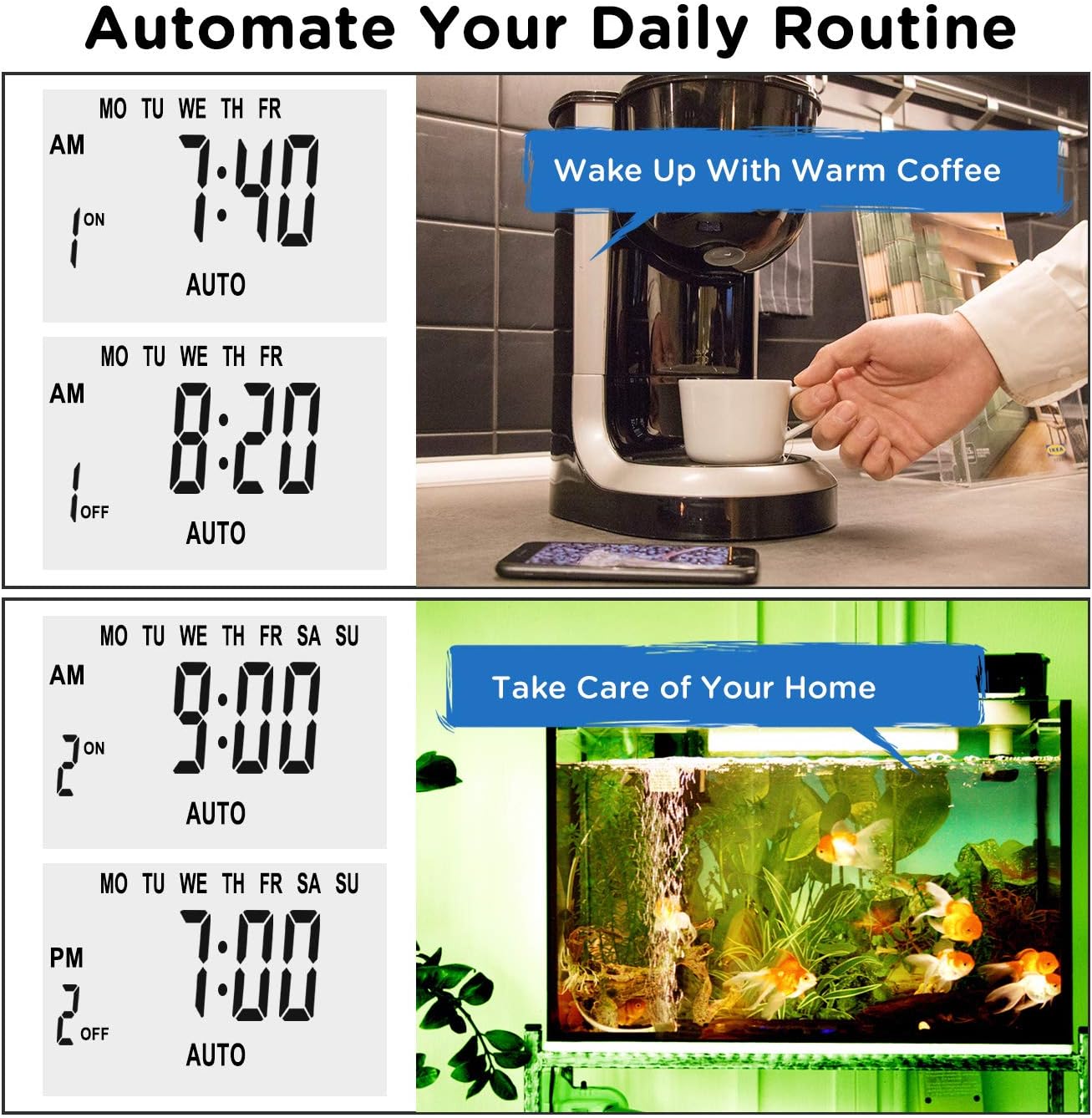
Setšoantšo: Examples of automating daily routines with the Enover TS18 Digital Timer, such as a coffee maker and aquarium.
8. Litlhaloso
| Nomoro ea Mohlala | TS18 |
| Brand | Enover |
| Mmala | Bosoeu |
| Lintho tse bonahalang | Plastiki |
| Nomoro ea Litlhophiso | 10 (ON/OFF programs) |
| Moqtage | Li-volts tse 120 |
| Wattage | 1800 watts |
| Ampagege Bokgoni | 15 Amps |
| Mokhoa oa ho kenya | Plug-in |
| Mofuta oa ho Beha | Hokela Mount |
| Sebopeho sa polaka | B - US style with ground plug |
| Likarolo Tse Khethehileng | 3-wire grounded plug and 3-prong grounded outlet |
| Tšebeliso | Tšebeliso ea ka hare feela |
| Boima ba Ntho | 6.4 lik'hilograma |
| Litekanyo tsa sephutheloana | 5.67 x 3.31 x 2.6 lisenthimithara |
| Mofuta oa lisele tsa betri | KeMH |
| Bophelo ba Battery | 100 days (backup) |
9. Ho rarolla mathata
- Timer not turning ON/OFF as programmed:
- Netefatsa hore sesupa-nako se kene MOSEBETSI mokgoa.
- Netefatsa hore nako le letsatsi la hona joale li behiloe ka nepo.
- Check that the ON and OFF times for the specific program are correctly entered and assigned to the desired days.
- Confirm the appliance connected to the timer is switched ON.
- Pontšo ha e na letho kapa e fifetse:
- Plug the timer into an active electrical outlet for 5-10 minutes to charge the internal battery.
- All settings lost after power outage:
- The internal battery may not be sufficiently charged. Ensure the timer is regularly plugged in to maintain battery charge.
- To clear all settings:
- Sebelisa ntho e nchocho (joalo ka ntlha ea pene) ho tobetsa RETS'ELISITSOE button. This will clear all programs and reset the clock. You will need to re-enter all settings.
10. Tiisetso le Tšehetso
For warranty information or technical support, please refer to the contact details provided on the product packaging or the official Enover websebaka. Boloka rasiti ea hau ea theko bakeng sa likopo tsa tiisetso.