
1. Selelekela
Kea leboha ha u rekileasing the Caliber HPG415BT/B Portable Bluetooth Speaker. This manual provides important information regarding the safe and efficient operation of your device. Please read it thoroughly before use and retain it for future reference.
Litaba tsa Sephutheloana
- Caliber HPG415BT/B Portable Bluetooth Speaker
- USB to Mini USB Charging Cable
- 3.5mm Audio Cable
- Remote Control
- Buka ea Tataiso
2. Boitsebiso ba Tšireletseho
Ho netefatsa ts'ebetso e sireletsehileng le ho thibela tšenyo, ka kopo latela litataiso tse latelang tsa polokeho:
- Se ke oa beha sesebelisoa pula, mongobo, kapa mocheso o feteletseng.
- Avoid placing the speaker near heat sources such as radiators, stoves, or other heat-producing appliances.
- Do not disassemble, repair, or modify the unit yourself. Refer all servicing to qualified personnel.
- Use only the specified charging cable and power adapter (5V USB) to charge the battery.
- Boloka sesebelisoa hole le libaka tse matla tsa makenete.
- Clean the device only with a dry, soft cloth. Do not use liquid cleaners.
3. Likarolo tsa lihlahisoa
The Caliber HPG415BT/B speaker offers a range of features for versatile audio playback:
- Theknoloji ea Bluetooth e se nang mohala: Connect wirelessly to compatible devices within a 10-meter range (Bluetooth version 2.1, supports A2DP and AVRCP profiles).
- Likhetho tse ngata tsa ho Bapala: Play audio from USB drives and SD cards (up to 32GB).
- Radio ea FM: Enjoy your favorite radio stations with automatic search and storage functions.
- Pontšo ea LED: Provides clear information on current mode and status.
- High Power Sound: Equipped with 2x 3W speakers for a total of 6W RMS output.
- Betri e Kopantsoeng e ka Hlabolloang hape: Offers up to 5 hours of continuous playback.
- Litaolo tse Intuitive: Features buttons for previous/next track, play/pause, mode selection, EQ adjustment, and volume control.
- Keletso ea Audio ea 3.5mm: Connect external audio devices via the included audio cable.
- Remote Control: Conveniently operate the speaker from a distance.
4. Taolo le Khokelo
Familiarize yourself with the speaker's controls and connection ports:
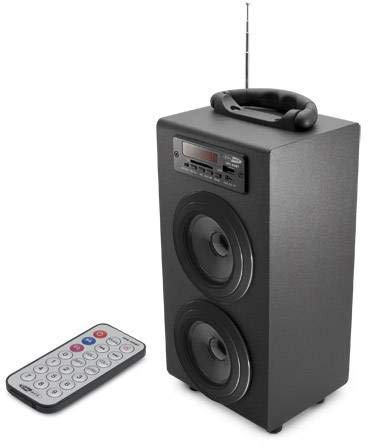
Image 1: Caliber HPG415BT/B Portable Bluetooth Speaker. This image shows the overall design of the speaker, featuring a tubular shape, front-facing speakers, and a control panel on the top or front.
Control Panel (Typical Layout)
- Konopo ea MODE: Switches between Bluetooth, FM Radio, USB, SD, and AUX modes.
- PLAY/PUUSE Konopo: E qala kapa e emisa ho bapala.
- PREVIOUS/NEXT Buttons: Skips tracks in media modes or changes radio stations in FM mode.
- VOLUME +/- Buttons: E fetola boemo ba tlhahiso ea molumo.
- Konopo ea EQ: E potoloha ka har'a li-presets tsa equalizer.
- Matla ON / Off switjha: Located typically on the rear or side.
Connection Ports (Typical Layout)
- Boema-kepe ba USB: Ho hokela li-flash drive tsa USB.
- Sebaka sa Karete ea SD: Bakeng sa ho kenya likarete tsa memori tsa SD.
- Ho Kenngwa ha AUX (3.5mm): For connecting external audio devices via cable.
- Mini USB Charging Port: Bakeng sa ho hokahanya thapo ea ho tjhaja.
5. Seta
5.1 Tefiso ea Pele
- Before first use, fully charge the speaker's internal battery.
- Connect the supplied Mini USB cable to the speaker's charging port.
- Connect the other end of the USB cable to a 5V USB power source (e.g., a computer USB port or a USB wall adapter, not included).
- The LED indicator will show charging status. Once fully charged, the indicator may change color or turn off.
5.2 Ho Matlafatsa/Ho tima
- To power on, slide the Power ON/OFF switch to the 'ON' position. The LED display will light up.
- To power off, slide the Power ON/OFF switch to the 'OFF' position.
6. Litaelo tsa Ts'ebetso
Mokhoa oa 6.1 oa Bluetooth
- Power on the speaker. It will automatically enter Bluetooth pairing mode, indicated by a flashing Bluetooth icon on the LED display.
- Bulela Bluetooth ho smartphone ea hau, tablet, kapa sesebelisoa se seng se nang le Bluetooth.
- Batla available Bluetooth devices and select "HPG415BT" from the list.
- Once paired, the speaker will emit a confirmation sound, and the Bluetooth icon on the display will stop flashing.
- You can now play audio from your connected device through the speaker. Use the PLAY/PAUSE and PREVIOUS/NEXT buttons on the speaker or remote to control playback.
6.2 Mokhoa oa seea-le-moea oa FM
- Tobetsa ea MOKHOA button repeatedly until "FM" appears on the LED display.
- To perform an automatic station scan, press and hold the BAPALA/ KHUTSA button. The speaker will scan and save available FM stations.
- Sebelisa le E FETILENG / E LATELANG buttons to navigate through the saved stations.
6.3 USB/SD Card Playback
- Kenya USB Flash drive boema-kepeng ba USB kapa kareteng ea SD ho slot ea karete ea SD.
- The speaker will automatically switch to USB or SD mode and begin playing audio files. If not, press the MOKHOA button to select the correct source.
- Sebelisa le BAPALA/ KHUTSA le E FETILENG / E LATELANG likonopo ho laola ho bapala.
6.4 Mokhoa oa ho Kena oa AUX
- Connect one end of the supplied 3.5mm audio cable to the speaker's AUX input port.
- Connect the other end of the cable to the headphone jack or audio output of your external audio device.
- Tobetsa ea MOKHOA button repeatedly until "AUX" appears on the LED display.
- Control playback and volume directly from your external audio device.
7. Ho tjhaja Betri
When the battery is low, the speaker may emit an audible warning or the LED indicator will show a low battery status. To charge:
- Connect the Mini USB charging cable to the speaker's charging port.
- Connect the USB end to a 5V USB power source.
- The charging indicator will illuminate. Charging typically takes several hours.
- Once fully charged, the indicator will change or turn off. Disconnect the charging cable.
8. Tlhokomelo
- Ho hloekisa: Use a soft, dry cloth to wipe the exterior of the speaker. Do not use abrasive cleaners, waxes, or solvents.
- Polokelo: Ha e sa sebelisoe ka nako e telele, boloka sebui sebakeng se phodileng, se omileng, hole le khanya ea letsatsi le mocheso o feteletseng.
- Tlhokomelo ea Betri: Ho lelefatsa bophelo ba betri, qoba ho ntsha betri ka botlalo kgafetsa. E tjhaje kgafetsa, leha e sa sebediswe.
9. Ho rarolla mathata
| Bothata | Lebaka le ka khonehang | Tharollo |
|---|---|---|
| Ha ho matla | Battery is discharged; Power switch is OFF. | Charge the battery; Slide the power switch to ON. |
| Ha ho molumo | Volume is too low; Incorrect mode selected; Device not connected properly. | Increase volume; Press MODE to select correct source; Reconnect device. |
| Bluetooth ha e hoketsoe | Speaker not in pairing mode; Device Bluetooth is off; Speaker too far from device. | Ensure speaker is in Bluetooth mode and flashing; Enable Bluetooth on your device; Move devices closer (within 10m). |
| Seea-le-moea sa FM ha se fetohe | Weak signal; Interference. | Relocate the speaker for better reception; Perform an auto-scan again. |
10. Litlhaloso
- Mohlala: HPG415BT/B
- Output Power: 6W RMS (2x 3W)
- Mofuta oa Bluetooth: 2.1
- Bluetooth Operating Range: Ho fihlela ho 10 metres
- Khokahano: Bluetooth, USB, Karete ea SD, 3.5mm AUX Input
- Mecha ea litaba e Tšehetsoeng: USB drives, SD cards (up to 32GB)
- Radio ea FM: Yes, with auto-scan
- Hlahisa: LED
- Mofuta oa Leshala: E ka tjhajwang hape e Kopantsweng
- Bophelo ba Battery: Ho fihlela lihora tse 5
- Ho tjhaja: USB 5V
- Litekanyo (L x W x H): 140 x 120 x 280 limilimithara
- Boima ba 'mele: Hoo e ka bang 1.04 kg (2.29 lbs)
- Mofuta oa Taolo: Buttons, Remote Control
11. Tiisetso le Tšehetso
Caliber products are designed and manufactured to the highest quality standards. For warranty information or technical support, please refer to the warranty card included with your product or visit the official Caliber websaete bakeng sa lintlha tsa puisano.