
1. Selelekela
The Edifier P180 is a stereo earbud headset designed for clear audio and convenient communication. Featuring an inline microphone and control, it offers a comfortable listening experience for various devices.

Figure 1: Edifier P180 Wired Earbud Headset
2. Se ka Lebokoseng
- Edifier P180 Earbud Headset
- Cable
3. Likarolo tsa Bohlokoa
- Classic Comfort: Ergonomic design for comfortable wear without irritating the ear canal.
- Boleng bo Botle ba Modumo: Equipped with 16mm neodymium magnetic monomers for high-fidelity audio playback.
- Integrated Microphone and Control: 3.5mm stereo earphones with a built-in microphone and remote button for mobile phone communication.
- Mosebetsi: Single button control for picking up/hanging up calls and skipping songs (device dependent for iOS/Android).
- Moralo o tšoarellang: Constructed with quality materials for longevity.

Figure 2: Ergonomic design for comfortable fit.
4. Seta
- Hlakola: Carefully remove the Edifier P180 headset from its packaging.
- Hlahloba: Check the earbuds and cable for any visible damage.
- Hokela: Insert the 3.5mm audio jack into the headphone port of your compatible device (smartphone, tablet, computer, etc.). Ensure the jack is fully inserted for proper audio and microphone function.
- Boemo: Place the earbuds comfortably in your ears. The ergonomic design is intended to rest well without causing irritation.
5. Litaelo tsa Ts'ebetso
The Edifier P180 features an inline control button for easy management of calls and music playback.
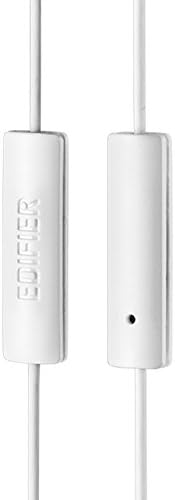
Figure 3: Inline microphone and control button.
- Ho araba / ho emisa di-call: Press the control button once to answer an incoming call. Press it again to end an active call.
- Ho bapala/ho emisa 'Mino: Press the control button once to play or pause audio playback.
- Ho tlola Lipina: Double-press the control button to skip to the next track. Triple-press to go to the previous track (functionality may vary by device and operating system).
- Mothusi oa lentsoe: Long-press the control button to activate your device's voice assistant (e.g., Siri, Google Assistant).
Video 1: Sehlahisoa sa semmuso se felileview of the Edifier P180 Classic Earbud Headsets, demonstrating features and usage.
6. Tlhokomelo
- Ho hloekisa: Gently wipe the earbuds and cable with a soft, dry cloth. Avoid using harsh chemicals or abrasive materials.
- Polokelo: When not in use, store the headset in a clean, dry place, away from extreme temperatures and direct sunlight. Avoid tangling the cable.
- Qoba Mongobo: Do not expose the headset to water or excessive moisture, as this can damage the internal components.
7. Ho rarolla mathata
- Ha ho Molumo:
- Netefatsa hore jack ea 3.5mm e kentsoe ka botlalo koung ea molumo ea sesebelisoa sa hau.
- Hlahloba di-setting tsa bophahamo ba modumo ba sesebediswa sa hao.
- Test the earbuds with another device to rule out a device-specific issue.
- Maekerofounu ha e sebetse:
- Netefatsa hore jeke ea 3.5mm e kentsoe ka botlalo.
- Hlahloba di-setting tsa ho kenya maekerofounu tsa sesebediswa sa hao.
- Lekola maekrofounu ka sesebelisoa kapa sesebelisoa se seng.
- Molumo oa nakoana:
- Check the cable for any kinks or damage.
- Netefatsa hore jack ea molumo e hloekile ebile ha e na lithōle.
8. Litlhaloso
| Sebopeho | Tlhaloso |
|---|---|
| Nomoro ea Mohlala | P180 |
| Karabelo ea Khafetsa | 20 Hz - 20,000 Hz |
| Li-headphone Jack | 3.5 limilimithara Jack |
| Theknoloji ea Khokahano | Tse thapo |
| Boima ba Ntho | 1.76 ounces (50 Grams) |
| Litekanyo tsa Sehlahisoa | 2.01 x 5.59 x 0.91 lisenthimithara |
| Lintho tse bonahalang | Neodymium |
| Mofuta oa Taolo | Inline Control Button |
| Tšitiso | 32 ohm |
| Taolo ea Lerata | Ho Ikhetha ka Molumo |
9. Warranty & Ts'ehetso
The Edifier P180 headset is backed by a Waranti ea lilemo tse 1. For any support inquiries or warranty claims, please refer to the contact information provided with your purchase or visit the official Edifier websebaka.