
Selelekela
This manual provides instructions for the setup, operation, and maintenance of your DIRECTV Universal Remote Control, model RC65. This remote is designed to operate your DIRECTV receiver and can be programmed to control other audio/video devices such as televisions and sound systems.
Please read this manual thoroughly before using your remote control to ensure proper functionality and to maximize your viewka boiphihlelo.
Sehlahisoa se Felletseview
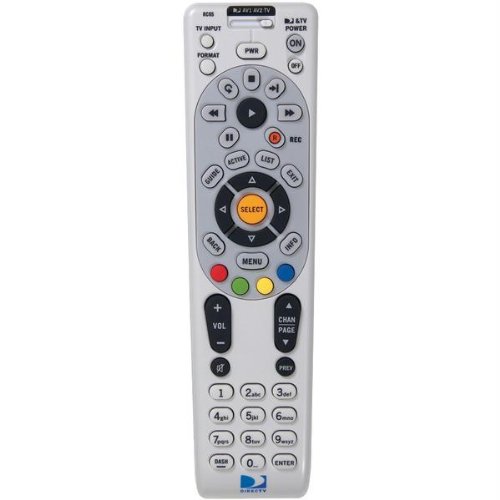
Setšoantšo: Pele view of the DIRECTV Universal Remote Control RC65. This image displays the remote's ergonomic design and the layout of its primary control buttons, including the directional pad, channel and volume controls, and various function keys. The remote is black with white button labels.
The DIRECTV RC65 remote control is a universal remote capable of controlling multiple devices. Its design focuses on ease of use and compatibility with a wide range of audio/video equipment.
Tlhophiso
1. Ho kenya Battery
- Sheba sebaka sa betri ka morao ho remote control.
- Press down on the tab and slide the battery cover off.
- Insert two (2) AA batteries, ensuring the positive (+) and negative (-) terminals align with the markings inside the compartment.
- Tlosa sekwahelo sa betri sebakeng ho fihlela se tobetsa hantle.
Ela Hloko: Libetri ha li kenyelelitsoe taolong ea remote.
2. Programming for DIRECTV Receiver
The remote is typically pre-programmed to operate your DIRECTV receiver. If it does not work, or if you are setting up a new remote, follow these steps:
- Point the remote at your DIRECTV receiver.
- Tobetsa o hatelle THOLA le KHETHA buttons simultaneously until the green light at the top of the remote flashes twice.
- Kenya khoutu 961. The green light will flash twice.
- Tobetsa ea KHALE PHAHAMA button. The green light will flash twice.
- Tobetsa ea KHETHA button. The green light will flash twice.
- Test the remote by changing channels or adjusting volume.
3. Programming for Other Devices (TV, Audio)
To program the remote to control your television or other audio/video devices, you will need the device's brand code. Refer to the code list provided with your DIRECTV system or search online for "DIRECTV remote codes [your device brand]".
- Turn on the device you wish to program (e.g., your TV).
- Tobetsa o hatelle THOLA le KHETHA buttons simultaneously until the green light at the top of the remote flashes twice.
- Press the mode button for the device you are programming (e.g., TV for television, AV1 or AV2 for audio/video devices). The green light will flash once.
- Enter the 5-digit code for your device's brand. The green light will flash twice if the code is accepted.
- Supa remote ho sesebediswa ebe o tobetsa MATLA konopo. Haeba sesebediswa se tima, lenaneo le atlehile.
- If the device does not turn off, repeat steps 1-5 with another code for your device's brand.
Tip: If you cannot find a code, try the "Code Search" method: After step 3, instead of entering a code, press KHALE PHAHAMA repeatedly until the device turns off, then press KHETHA.
Litaelo tsa Ts'ebetso
The DIRECTV RC65 remote control features a standard layout for easy navigation and control of your entertainment system.
- MODE Buttons (DIRECTV, TV, AV1, AV2): Select the device you want to control. Press the corresponding button before issuing commands for that device.
- MATLA: E bulela kapa e tima sesebediswa se kgethilweng.
- PHAHAMA/TLASE: Adjusts the volume of the selected audio device (usually TV or AV receiver).
- CHANNEL UP/DOWN: Changes channels on the DIRECTV receiver.
- LULA: E khutsisa kapa e khutsisa molumo.
- TATAISO: Displays the DIRECTV program guide.
- MENU: Accesses the DIRECTV system menu.
- SELECT/OK: E netefatsa dikgetho kapa e kenya dimenu.
- ARROW Buttons (UP, DOWN, LEFT, RIGHT): Tsamaea ka har'a li-menu le litataiso.
- REKOTO: Records the current program on your DIRECTV DVR.
- PLAY, PAUSE, STOP, REW, FF, SKIP: Control playback of recorded content or live TV (with DVR).
- INFO: E bonts'a tlhahisoleseling mabapi le lenaneo la hajoale.
- ETSOA: E tsoa ho li-menu kapa litataiso.
Note: Specific button functions may vary slightly depending on your DIRECTV receiver model and programmed devices.
Tlhokomelo
Ho Hloekisa Remote
- Sebelisa lesela le bonolo, le omeletseng ho hlakola bokaholimo ba remote control.
- Bakeng sa litšila tse manganga, hanyenyane dampst lesela le nang le metsi kapa sehloekisi se bonolo, se sa cheng. Se ke oa fafatsa sehloekisi ka kotloloho ho remote.
- Avoid using harsh chemicals, solvents, or abrasive cleaning pads, as these can damage the remote's finish or internal components.
Phetoho ea Battery
Replace batteries when the remote's response becomes sluggish or if the green light at the top does not flash when a button is pressed. Refer to the "Battery Installation" section under Setup for detailed instructions.
- Kamehla kenya libeteri ka bobeli ka nako e le 'ngoe.
- Use new AA alkaline batteries for optimal performance.
- Lahla libeteri tsa khale ho latela melao ea lehae.
Ho batle phoso
Remoutu Ha e Arabe
- Sheba Libetri: Ensure batteries are correctly inserted and not depleted. Replace if necessary.
- Tsela ea Pono: Make sure there are no obstructions between the remote and the device you are trying to control. The remote uses infrared (IR) signals, which require a clear line of sight.
- Mokhoa o nepahetseng: Verify that the correct mode button (DIRECTV, TV, AV1, AV2) is pressed for the device you intend to control.
- Seta Remoutu bocha: Remove batteries, press all buttons a few times to discharge any residual power, then reinsert batteries.
Device Not Responding After Programming
- Verify Code: Double-check that you entered the correct 5-digit code for your device's brand. Try other codes listed for your brand.
- Patlo ea Khouto: Attempt the "Code Search" method described in the "Programming for Other Devices" section.
- Se Sebeletsang Sesebediswa: While the remote has an extensive code library, some older or very new devices may not be fully compatible.
Volume/Channel Control Issues
- Senotlolo sa Bolumo: Ensure the volume is not locked to the DIRECTV receiver if you want to control the TV volume. To unlock, press and hold THOLA le KHETHA until the green light flashes twice, then enter 993. Tobetsa KHETHA.
- Taolo ea Channel: Ensure the remote is in DIRECTV mode to change channels on the receiver.
Litlhaloso
| Sebopeho | Lintlha |
|---|---|
| Brand | DIRECTV |
| Lebitso la Model / Nomoro | RC65 |
| Tšobotsi e Khethehileng | Bokahohle |
| Mmala | Ntsho |
| Lisebelisoa tse lumellanang | Television, DIRECTV Receiver, Audio/Video Devices |
| Theknoloji ea Khokahano | Infrared (IR) |
| Mofuta oa Molaoli | Taolo ea Likonopo |
| Mofuta oa Leshala | 2 x AA Batteries (ha e kenyelelitsoe) |
| Boima ba Ntho | Hoo e ka bang Liponto tse 0.52 |
Boitsebiso ba Warranty
This DIRECTV Universal Remote Control (Model RC65) comes with a limited warranty against defects in materials and workmanship under normal use. The warranty period typically covers 90 days from the date of purchase. Please retain your proof of purchase for warranty claims.
This warranty does not cover damage caused by misuse, accident, unauthorized modification, or use with non-DIRECTV approved accessories. For specific warranty terms and conditions, please refer to the documentation included with your DIRECTV system or visit the official DIRECTV support websebaka.
Tšehetso ea Bareki
If you require further assistance with your DIRECTV Universal Remote Control, please contact DIRECTV customer support:
- Ts'ehetso ea Marang-rang: Visit the official DIRECTV support website for FAQs, troubleshooting guides, and programming code lists.
- Tšehetso ea Mohala: Refer to your DIRECTV service agreement or bill for the most current customer service phone number.
When contacting support, please have your DIRECTV account information and the remote control model number (RC65) ready.