
Selelekela
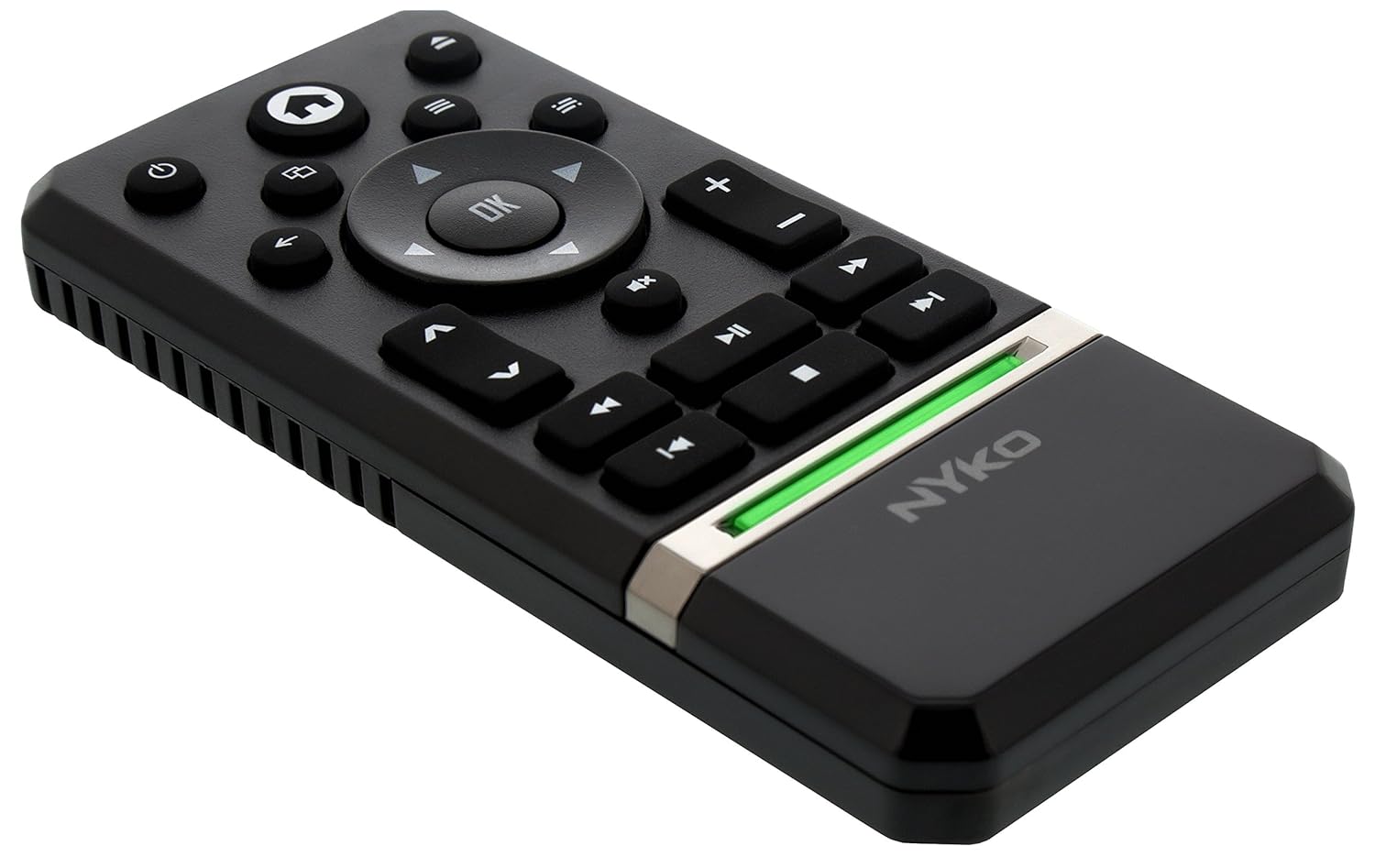
The Nyko Media Remote for Xbox One provides convenient control over your Xbox One console and various media applications. This remote simplifies navigation and playback of streaming content and physical media, offering dedicated buttons for common functions. It also features the ability to power your Xbox One on and off, and control basic functions of your television.

Image: Nyko Media Remote for Xbox One, front view.
Litaba tsa Sephutheloana
- Nyko Media Remote for Xbox One (Model: 86116)
- Tlhokomeliso: Libetri tsa AAA ha li kenyelelitsoe 'me li tlameha ho rekoa ka thoko.

Image: Nyko Media Remote for Xbox One in its retail packaging.
Tlhophiso
1. Ho kenya Battery
- Sheba sebaka sa betri ka morao ho remote.
- Tsamaisa sekwahelo sa betri tlase ho bula.
- Kenya libeteri tse peli (2) tsa AAA, ho netefatsa hore polarity (+/-) e nepahetse joalo ka ha ho bontšitsoe ka hare ho phaposi.
- Replace the battery cover by sliding it upwards until it clicks into place.
Setšoantšo: Ka morao view of the remote with the battery cover removed, illustrating the AAA battery placement.
2. Khokahano ea Pele
The Nyko Media Remote uses infrared (IR) technology. No manual pairing is required for the Xbox One. Simply ensure a clear line of sight between the remote's IR emitter and the Xbox One's IR receiver.
For TV control functions (volume, channels, power), your TV must be configured to respond to the Xbox One's IR signals, typically through the Xbox One's OneGuide settings. The remote sends commands to the Xbox One, which then relays them to your TV via its IR blaster (if configured) or Kinect sensor.
Litaelo tsa Ts'ebetso
The Nyko Media Remote provides comprehensive control for your Xbox One and various media applications. Refer to the diagram below for button identification and their primary functions.

Setšoantšo: Pele view of the Nyko Media Remote, displaying all control buttons.
Mesebetsi ea likonopo:
| Konopo | Mosebetsi |
|---|---|
| Konopo ea Matla (⏻) | Powers the Xbox One console on or off. |
| Konopo ea Lehae (⌂) | Returns to the Xbox One Home screen. |
| View Konopo (🗀) | Accesses additional information or options within an app or game. |
| Konopo ea Menu (☰) | Opens context-sensitive menus or options. |
| Directional Pad (D-Pad) | Navigates through menus and content. |
| OK Konopo | Confirms selections. Can also function as Play/Pause in some apps. |
| Konopo ea ho Khutlela (←) | E khutlela skrineng kapa lethathamong le fetileng. |
| OneGuide Button (📱) | Launches the Xbox OneGuide for live TV and media. |
| Phahamiso ea Phahamiso / Tlase (d / ⏷) | Adjusts the television volume (requires TV setup via Xbox One). |
| Konopo ea semumu (🔇) | Mutes or unmutes television audio. |
| Channel Up/Down (▲ / ▼) | Changes television channels (requires TV setup via Xbox One). |
| Khutlisa kapele (⏪) | Rewinds media playback. |
| Bapala/Emisa (⏯) | E bapala kapa e emisa ho bapala ha mecha ea litaba. |
| Tsoela Pele Pele (⏩) | Fast forwards media playback. |
| Pina e Fetileng (⏮) | E tlolela qalong ea pina ea hona joale kapa pina e fetileng. |
| Ema (⏹) | E emisa ho bapala ha mecha ea litaba. |
| Next Track (⏭) | Skips to the next track or chapter. |
Media and App Control:
The remote is designed for seamless control of various Xbox One applications, including:
- OneGuide
- Netflix
- Hulu Plus
- Amazon Instant Video
- Other streaming services and Blu-ray/DVD playback
Dedicated playback buttons (Play, Pause, Fast Forward, Rewind, Stop, Skip) provide intuitive control for movies, music, and other media.
Tlhokomelo
Phetoho ea Betri:
When the remote's performance diminishes or it stops responding, it is likely time to replace the batteries. Follow the "Battery Installation" steps in the Setup section to replace the two AAA batteries.
Ho hloekisa:
To clean the remote, gently wipe it with a soft, dry cloth. Avoid using harsh chemicals, abrasive cleaners, or excessive moisture, as these can damage the remote's finish or internal components.
Ho batle phoso
- Remoutu ha e arabe:
- Netefatsa hore libeteri tse ncha tsa AAA li kentsoe ka nepo.
- Verify there is a clear line of sight between the remote and the Xbox One console. Obstructions can block the infrared signal.
- Move closer to the Xbox One console. The remote has a maximum effective range of approximately 9 meters (25 feet).
- TV Control (Volume, Channel, Power) Not Working:
- Confirm that your Xbox One's OneGuide settings are properly configured for your television. The remote sends commands to the Xbox One, which then controls the TV.
- Ensure any necessary IR blasters or Kinect sensors are correctly set up and positioned.
- Intermittent Response:
- This can sometimes occur due to weak batteries or environmental interference. Replace batteries and ensure a clear line of sight.
Litlhaloso
| Sebopeho | Lintlha |
|---|---|
| Brand | Nyko |
| Lebitso la Mohlala | Media Remote |
| Nomoro ea Mohlala | 86116 |
| Theknoloji ea Khokahano | Infrared (IR) |
| Lisebelisoa tse lumellanang | Xbox One, Television (via Xbox One IR blaster/Kinect) |
| Mofuta oa Leshala | 2 x AAA libetri (ha li kenyelelitsoe) |
| Boholo Range | Ho fihla ho limithara tse 9 (maoto a 25) |
| Boima ba Ntho | 0.1 Liponto (hoo e ka bang 45 grams) |
| Mmala | Boputsoa bo Lefifi |
| Likarolo tse Eketsehileng | Ergonomic design, dedicated media playback controls. |
Warranty le Tšehetso
Nyko products are designed for quality and reliability. For specific warranty details, please refer to the documentation included with your purchase or visit the official Nyko website. The product includes warranty information in multiple languages.
Tšehetso ea Bareki:
- Lengolo-tsoibila: customer.support@nyko.com
- Mohala: +1-888-400-6956
- Ngoliso ea Marang-rang: www.nokyok.com
- Tlhahisoleseling e 'Ngoe: http://uqr.me/nykotechnologies/qr/83215

Setšoantšo: Ka morao view of the product packaging, detailing features and customer support contact information.