
1. Selelekela
The ATEN VE812 HDMI Over CAT5 Extender is designed to extend an HDMI signal over a single CAT5e/6 cable. This device allows for the transmission of high-definition video and audio signals over long distances, making it ideal for various applications where the HDMI source and display are not in close proximity.
Likarolo tsa Bohlokoa
- Extends HDMI signal over a single CAT5e/6 cable.
- Designed for high availability, scalability, and maximum flexibility.
- Supports high-definition video and audio transmission.
Litaba tsa Sephutheloana
The ATEN VE812 package typically includes:
- VE812T HDMI Over CAT5 Transmitter Unit
- VE812R HDMI Over CAT5 Receiver Unit
- Li-adapter tsa matla
- Bukana ea mosebelisi (tokomane ena)
2. Sehlahisoa Overview
The VE812 system consists of two main components: a transmitter unit (VE812T) and a receiver unit (VE812R). These units work in conjunction to extend the HDMI signal.
Likaroloana

Figure 2.1: Two ATEN VE812 extender units. The top panel of each unit features the ATEN logo and product information.

Setšoantšo sa 2.2: Ka morao view of an ATEN VE812 unit, highlighting the 'REMOTE I/O' RJ45 port for CAT5e/6 cable connection and the DC 5V power input.
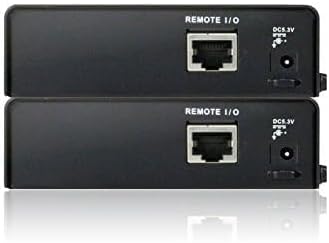
Setšoantšo sa 2.3: Angled view of two ATEN VE812 units, providing a perspective of their compact design and port layout.
3. Ho seta le ho kenya
Litlhoko tsa Tsamaiso
- HDMI source device (e.g., DVD player, computer, game console)
- HDMI display device (e.g., TV, monitor, projector)
- One CAT5e or CAT6 cable of appropriate length (up to 60m for 1080p)
- Two HDMI cables
Connection Diagram (Conceptual)
- Connect an HDMI cable from your HDMI source device to the HDMI input port on the VE812T (Transmitter) unit.
- Connect one end of the CAT5e/6 cable to the RJ45 port on the VE812T (Transmitter) unit.
- Connect the other end of the CAT5e/6 cable to the RJ45 port on the VE812R (Receiver) unit.
- Connect an HDMI cable from the HDMI output port on the VE812R (Receiver) unit to your HDMI display device.
- Connect the provided power adapters to both the VE812T and VE812R units, then plug them into power outlets.
Kenyelletso ea Mohato ka Mohato
- Ensure all devices (HDMI source, display, and extender units) are powered off before making connections.
- Connect the HDMI source to the VE812T.
- Run the CAT5e/6 cable between the VE812T and VE812R units. Ensure the cable is properly terminated and meets specifications for the desired distance.
- Connect the VE812R to the HDMI display.
- Connect power to both extender units.
- Power on the HDMI display, then the HDMI source. The video signal should now be extended to your display.
4. Litaelo tsa Ts'ebetso
Once the ATEN VE812 HDMI Over CAT5 Extender is properly installed and powered on, it operates automatically. No additional software or configuration is typically required for basic functionality.
- Matlafatsa: Ensure both the transmitter and receiver units are connected to power. Status LEDs (if present) should indicate power and link status.
- Khetho ea Mohloli: Select the correct HDMI input on your display device to view the extended signal.
- Botšepehi ba Pontšo: The extender is designed to maintain signal quality over the specified distance. If you experience signal degradation, refer to the troubleshooting section.
5. Tlhokomelo
The ATEN VE812 HDMI Over CAT5 Extender requires minimal maintenance to ensure optimal performance and longevity.
- Ho hloekisa: Use a soft, dry cloth to clean the exterior of the units. Do not use liquid or aerosol cleaners.
- Moea oa moea: Ensure the units are placed in a well-ventilated area to prevent overheating. Do not block any ventilation openings.
- Tsamaiso ea Cable: Keep cables neatly organized and avoid sharp bends or excessive tension on the connectors.
- Maemo a Tikoloho: Operate the device within its specified temperature and humidity ranges.
6. Ho rarolla mathata
If you encounter issues with your ATEN VE812 extender, please refer to the following common troubleshooting steps:
- Ha ho Letšoao la Video/Molumo:
- Verify that both the transmitter and receiver units are powered on.
- Check all HDMI and CAT5e/6 cable connections to ensure they are secure.
- Ensure the CAT5e/6 cable is not damaged and is within the recommended length for your resolution.
- Try connecting the HDMI source directly to the display to confirm the source and display are working correctly.
- Test with a different HDMI cable or CAT5e/6 cable if possible.
- Poor Picture Quality (Flickering, Distortion):
- Ensure you are using a high-quality CAT5e or CAT6 cable.
- Reduce the length of the CAT5e/6 cable if it is near the maximum supported distance.
- Check for strong electromagnetic interference (EMI) sources near the CAT5e/6 cable.
- Letšoao la Nako le Nako:
- Ensure power adapters are firmly connected and providing stable power.
- Sheba hore na ha ho na likhokahano tsa cable tse hlephileng.
7. Litlhaloso
| Tšobotsi | Lintlha |
|---|---|
| Brand | ATEN |
| Letoto | VE812 |
| Ntho Nomoro ea Mohlala | VE812 |
| Boima ba Ntho | 3 liponto |
| Litekanyo tsa Sehlahisoa | 4 x 11 x 7 lisenthimithara |
| Mmala | Ntsho |
| Moetsi | ATEN TECHNOLOGY |
| ASIN | B00FG96GTY |
| Letsatsi le Fumanang Pele | La 30 Loetse 2013 |
8. Ts'ehetso le Warranty
ATEN is committed to providing reliable products and customer satisfaction. For technical assistance or warranty inquiries, please refer to the following information:
- Tšehetso ea tekheniki: ATEN offers free technical support to assist with product setup, troubleshooting, and general inquiries. Please visit the official ATEN websebaka sa marang-rang bakeng sa tlhahisoleseling ea ho ikopanya le mehloli ea tšehetso.
- Boitsebiso ba Tiisetso: This product is covered by ATEN's standard warranty. Details regarding warranty duration and terms can be found on the official ATEN website or by contacting customer service. Extended warranty service packages may also be available.
- Localized Repair Center: ATEN provides localized repair centers for Return Merchandise Authorization (RMA) services.