
Universal Universal Charging Station A
Universal Charging Station A User Manual
Model: Universal Charging Station A
Letšoao: Bokahohle
1. Selelekela
Kea leboha ha u rekileasing the Universal Charging Station A. This charging station is designed to provide efficient and reliable power to a wide range of compatible Gigaset and Swisscom cordless phones. Please read this manual carefully before using the device to ensure proper operation and to maximize its lifespan. This manual provides important information on setup, operation, maintenance, and troubleshooting.
2. Boitsebiso ba Tšireletseho
To prevent damage, electric shock, or injury, please observe the following safety precautions:
- Do not expose the charging station to water or excessive moisture.
- U se ke ua qhaqholla kapa ua leka ho lokisa sesebelisoa ka bouena. Romela litšebeletso tsohle ho basebetsi ba tšoanelehang.
- Use only the power adapter supplied with the charging station. Using an incompatible adapter may cause damage or fire.
- Ensure the charging station is placed on a stable, flat surface away from direct sunlight and heat sources.
- Boloka moo bana ba ka fihlang teng.
- Unplug the power adapter from the wall outlet during lightning storms or when unused for long periods.
- Se ke oa thibela menyetla efe kapa efe ea moea.
3. Likahare tsa Sephutheloana
Ka kopo, sheba litaba tsa sephutheloana ha u bula. Haeba ho na le lintho tse sieo kapa li senyehile, ikopanye le morekisi oa hau.
- 1 x Universal Charging Station A
- 1 x Adapter ea Matla
4. Tataiso ea ho seta
Follow these steps to set up your Universal Charging Station A:
- Hlakola Seteishene sa ho Chaja: Carefully remove the charging station and its power adapter from the packaging.
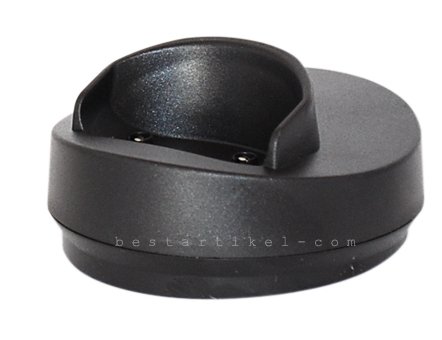
Image: The Universal Charging Station A, a compact black charging dock with a cradle for a cordless phone handset.
- Hokela Adapter ea Matla: Insert the small plug of the power adapter into the DC input port located at the back or side of the charging station.
- Hokela ho Power Outlet: Plug the other end of the power adapter into a standard electrical wall outlet. Ensure the outlet is easily accessible.
- Sebaka: Place the charging station on a stable, flat surface, such as a desk or nightstand, where it will not be easily knocked over.
- E Loketse ho Sebelisa: The charging station is now ready to charge your compatible cordless phone handset.
5. Litaelo tsa Ts'ebetso
This charging station is designed for simple and efficient charging of compatible cordless phone handsets.
- Charging a Handset: Gently place your compatible cordless phone handset into the cradle of the charging station. Ensure the charging contacts on the handset align with the pins on the charging station.
- Lesupa la ho tjhaja: Most handsets will display a charging indicator (e.g., a battery icon or LED light) when properly seated and charging. Refer to your phone's specific user manual for details on its charging indicators.
- Ho tjhaja kapele: This charging station supports fast charging for compatible devices, allowing your handset to recharge quickly.
- Removing Handset: To remove the handset, simply lift it from the cradle.
Mehlala e Lumellanang:
This charging station is compatible with a wide range of Gigaset and Swisscom cordless phone models, including but not limited to:
- Gigaset: A2, A200, A250, A38H, A380, A385, A58H, A580, A585, A580IP, A585IP, AL17H, AL170, AL175, AL27H, AL270, AL275, AL18H, AL180, AL185, AL28H, AL280, AL285, AS18H, AS180, AS185, AS28H, AS280, AS285, C1, C100, C150, CX100, CX150, C2, C200, C250, C450, C455, C450IP, C455IP, CX450, CX455, S1 Professional, S1, S100, S150, SX100, SX150, S79H, S790, S795, SX790, SX795.
- Swisscom: Aton CL308, CLT308, CL307, CLT307.
6. Tlhokomelo le Tlhokomelo
Proper care will ensure the longevity and optimal performance of your charging station.
- Ho hloekisa: Disconnect the power adapter before cleaning. Use a soft, dry, lint-free cloth to wipe the surface of the charging station. Do not use abrasive cleaners, waxes, or solvents.
- Mabitso: Periodically inspect the charging contacts on the station and your handset for dust or debris. Clean them gently with a dry cotton swab if necessary.
- Polokelo: If storing the charging station for an extended period, unplug it from the power outlet and store it in a cool, dry place.
7. Ho rarolla mathata
If you encounter issues with your charging station, refer to the following table for common problems and solutions.
| Bothata | Lebaka le ka khonehang | Tharollo |
|---|---|---|
| Sesebelisoa sa letsoho ha se tjhaje. |
|
|
| Ho tjhaja butle. |
|
|
| Station feels warm. |
|
|
8. Litlhaloso
| Sebopeho | Lintlha |
|---|---|
| Brand | Bokahohle |
| Mohlala | Universal Charging Station A |
| Mmala | Ntsho |
| Theknoloji ea Khokahano | Cable |
| Mofuta oa Sehokelo | 2-phini |
| Likarolo Tse Khethehileng | Ho tjhaja kapele |
| Lisebelisoa tse lumellanang | Gigaset and Swisscom cordless phone handsets (see compatible models list) |
| Kenyellelitsoe Likaroloana | Charging Station, Power Adapter |
| Mofuta oa ho Beha | Thaba ea Desktop |
9. Tiisetso le Tšehetso
For information regarding warranty coverage and technical support, please refer to the documentation provided by your retailer or contact the manufacturer directly. Keep your proof of purchase for warranty claims.
Manufacturer: Universal
Ask a question about this manual
Ask about setup, troubleshooting, compatibility, parts, safety, or missing instructions. Manuals+ will review the question and use this page’s manual context to help answer it.