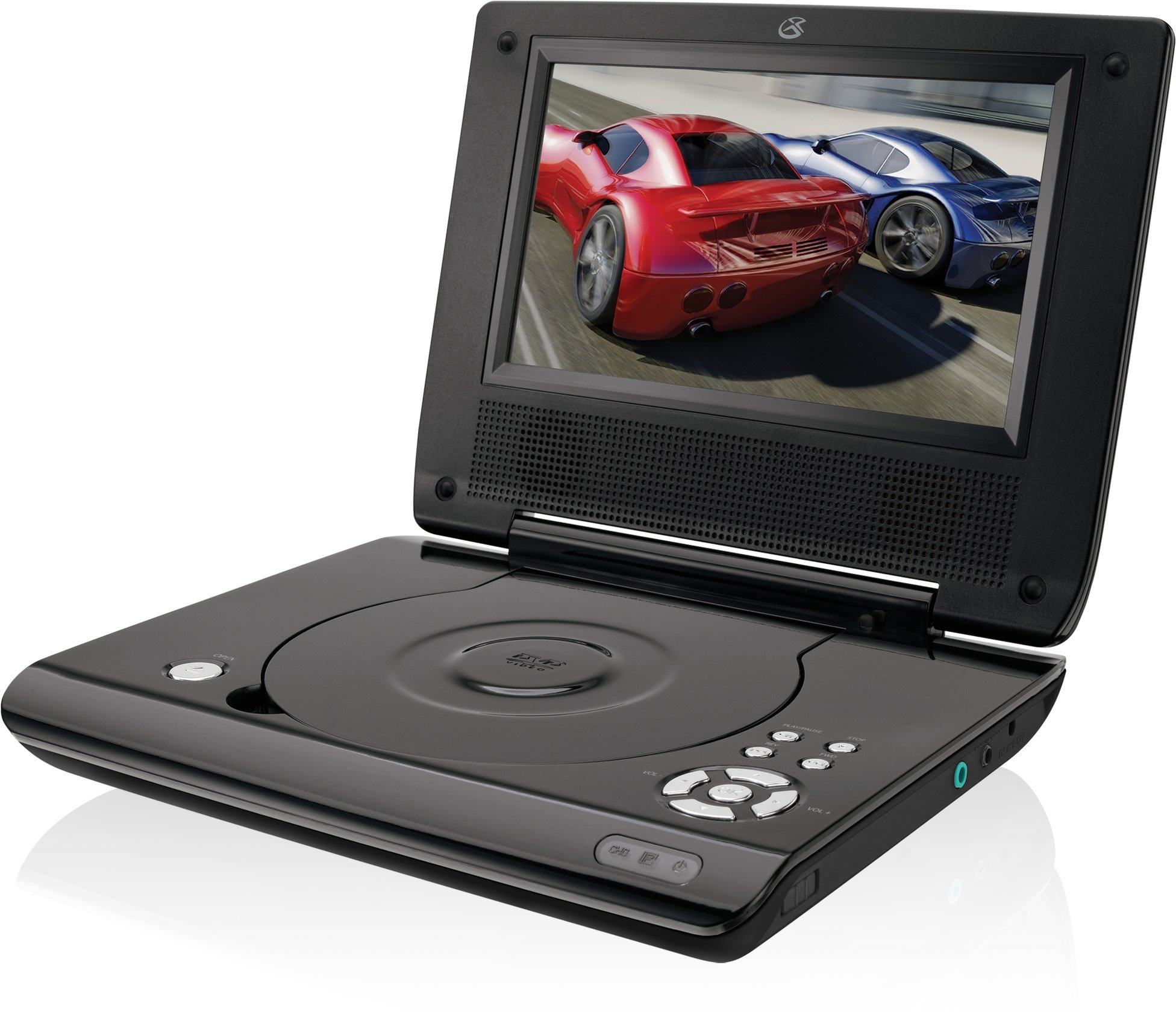
This manual provides essential instructions for the safe and efficient operation of your GPX PD730B 7-inch Portable DVD Player. Please read this manual thoroughly before using the device and retain it for future reference. The GPX PD730B is designed for portable entertainment, allowing you to enjoy DVDs, CDs, and JPEG files on its 7-inch TFT LCD screen.
Litaba tsa Sephutheloana
Netefatsa hore lintho tsohle tse thathamisitsoeng ka tlase li kenyelelitsoe ka har'a sephutheloana sa hau:
GPX PD730B Portable DVD Player
AC / DC Adapter ea Matla
DC Car Adapter (12V)
Li-Earbuds tsa Stereo
Taolo ea Remote (e nang le libeteri tse 2 tsa AAA)
Bukana ea mosebelisi (tokomane ena)
Sehlahisoa se Felletseview
Figure 1: GPX PD730B Portable DVD Player (Closed)
This image shows the GPX PD730B portable DVD player in its closed position, highlighting its compact and sleek design. The top surface is smooth and black, with control buttons visible on the right edge.
Litaolo le Lihokelo
Familiarize yourself with the various controls and connection ports on your portable DVD player.
Konopo ea Matla: E bulela kapa e tima yuniti.
Konopo ea ho Bapala/Emisa: E qala kapa e emisa ho bapala.
Konopo ea ho emisa: E emisa ho bapala.
Likonopo tsa ho Tlola/Ho Batla: Navigates tracks or chapters, or fast-forwards/rewinds.
Taolo ea Bolumo: E fetola boemo ba tlhahiso ea molumo.
Li-headphone Jack: For private listening with stereo earbuds or headphones.
DC In Port: Connects to the AC/DC or car power adapter for charging and power.
Tlhophiso
1. Ho tjhaja Betri
Before initial use, fully charge the built-in rechargeable battery. A full charge provides approximately 2 hours of playback time.
Connect the AC/DC power adapter to the DC In port on the DVD player.
Hokela adaptara ea motlakase ea AC/DC sebakeng se tloaelehileng sa lebota.
The charging indicator light (if present) will illuminate. Charging is complete when the light changes color or turns off (refer to device for specific indicator behavior).
Alternatively, use the 12V DC car adapter to charge the player in a vehicle.
2. Ho tima/Ho tima
Tobetsa o hatelle Matla button on the unit to turn the player on or off. The screen will illuminate when powered on.
Litaelo tsa Ts'ebetso
1. Inserting and Removing Discs
Gently open the disc compartment lid.
Place a DVD or CD onto the spindle with the label side facing up. Press down gently on the center of the disc until it clicks into place.
Close the disc compartment lid firmly.
To remove a disc, open the lid, gently press the spindle button (if present) or lift the disc from the edges, avoiding touching the data surface.
2. Ho Bapala ha Motheo
After inserting a disc, the player will typically begin playback automatically.
Sebelisa le Bapala/Emisa konopo ea ho khefutsa kapa ho qala ho bapala hape.
Tobetsa ea Ema konopo ho emisa ho bapala.
Sebelisa le Tlola buttons (usually labeled with arrows) to navigate between chapters or tracks.
Sebelisa le Search buttons (often combined with Skip) to fast-forward or rewind.
3. Ho Sebelisa Remote Control
The included remote control provides convenient access to all player functions from a distance. Ensure the 2 AAA batteries are correctly installed. Point the remote control directly at the player's remote sensor.
4. Ho hokahanya li-headphones
For private listening, plug the stereo earbuds (or your own headphones) into the Li-headphone Jack on the side of the player. The built-in speakers will automatically mute when headphones are connected.
Figure 2: Portable DVD Player in use (Bedroom)
This image illustrates the portable DVD player being used by a girl in a bedroom setting, demonstrating its suitability for personal entertainment at home.
Figure 3: Portable DVD Player in use (Vehicle)
This image shows a boy watching the portable DVD player in the back seat of a car, highlighting its utility for entertainment during travel.
Figure 4: Portable DVD Player in use (Airplane)
This image depicts a woman using the portable DVD player with headphones on an airplane, showcasing its versatility for quiet, personal entertainment during flights.
Tlhokomelo
Cleaning the Player
Disconnect the player from all power sources before cleaning.
Use a soft, dry cloth to wipe the exterior surfaces. Do not use abrasive cleaners, waxes, or solvents.
For the screen, use a soft, lint-free cloth specifically designed for LCD screens. Avoid excessive pressure.
Boloka karolo ea disk e se na lerōle le lithōle.
Tlhokomelo ea Battery
Ho lelefatsa bophelo ba betri, qoba ho ntsha betri ka botlalo kgafetsa.
If the player will not be used for an extended period, charge the battery to about 50% before storing.
Store the player in a cool, dry place.
Ho batle phoso
If you encounter issues with your GPX PD730B, refer to the following common problems and solutions:
Bothata
Lebaka le ka khonehang
Tharollo
Sebapali ha se bulele.
Battery is discharged; Power adapter not connected properly.
Charge the battery; Ensure power adapter is securely connected to both the player and power source.
Ha ho bapaloe disk.
Disc inserted incorrectly; Disc is dirty or scratched; Incorrect disc format.
Reinsert disc correctly (label side up); Clean disc with a soft cloth; Ensure disc is DVD, CD, or JPEG CD format.
Ha ho molumo o tsoang ho libui/li-headphone.
Volume too low; Headphones not fully plugged in; Mute function active.
Increase volume; Ensure headphones are fully inserted; Check if mute is active on remote or player.
Remote control ha e sebetse.
Libetri li shoele kapa li kentsoe ka phoso; Tšitiso pakeng tsa remote le sebapali.
Replace remote batteries; Ensure correct polarity; Remove any obstructions and point remote directly at sensor.
Litlhaloso
Nomoro ea Mohlala
PD730B
Boholo ba skrine
7 lisenthimithara
Mofuta oa Pontšo
TFT LCD
Qeto ea Naha
480x234
Aspect ratio
16:9
Mecha ea phatlalatso e lumellanang
DVD, DVD+R/RW, CD, CD-R/RW, JPEG CD
Bophelo ba Betri (Kakaretso)
Lihora tse 2
Kenyeletso ya Matla
AC/DC Adapter, 12V DC Car Adapter
Khokahano
Mothusi (Headphone Jack)
Boima ba Ntho
1.72 Liponto
UPC
047323007309
Warranty le Tšehetso
For warranty information, technical support, or service inquiries, please refer to the warranty card included with your product or visit the official GPX websebaka. Boloka rasiti ea hau ea theko e le bopaki ba hore u rekile litseko tsa waranti.
Ask about setup, troubleshooting, compatibility, parts, safety, or missing instructions. Manuals+ will review the question and use this page’s manual context to help answer it.