
1. Selelekela
This manual provides essential information for the safe and efficient operation of your Datalogic PowerScan M8300-AR910RB Handheld Laser Bar Code Reader. Please read this manual thoroughly before using the device to ensure proper setup, operation, and maintenance. Keep this manual for future reference.
2. Boitsebiso ba Tšireletseho
Kamehla ela hloko mehato e latelang ea tšireletso ho thibela kotsi kapa tšenyo ea sesebelisoa:
- Tšireletso ea Laser: This device emits a laser beam. Do not stare directly into the laser beam or point it at others. Avoid direct eye exposure.
- Tšireletseho ea Battery: Use only Datalogic-approved batteries and charging accessories. Do not expose batteries to extreme temperatures, puncture, or disassemble them. Dispose of batteries according to local regulations.
- Maemo a Tikoloho: Do not operate the device in explosive atmospheres or near flammable materials. Keep the device dry and away from extreme temperatures.
- Tlhokomelo: Refer all servicing to qualified service personnel. Do not attempt to open or modify the device.
3. Likahare tsa Sephutheloana
Netefatsa hore lintho tsohle li teng ka har'a sephutheloana:
- Datalogic PowerScan M8300-AR910RB Handheld Laser Bar Code Reader
- Betri e ka tlosoang
- Charging/Communication Cradle (may be sold separately depending on configuration)
- USB or Serial Cable (for cradle connection, may be sold separately)
- Power Supply (for cradle, may be sold separately)
- Tataiso ea ho Qala ka Potlako
4. Sehlahisoa Overview
The Datalogic PowerScan M8300 is a robust, cordless handheld laser bar code reader designed for industrial applications. It features a durable casing and a 910MHz radio for reliable wireless communication.
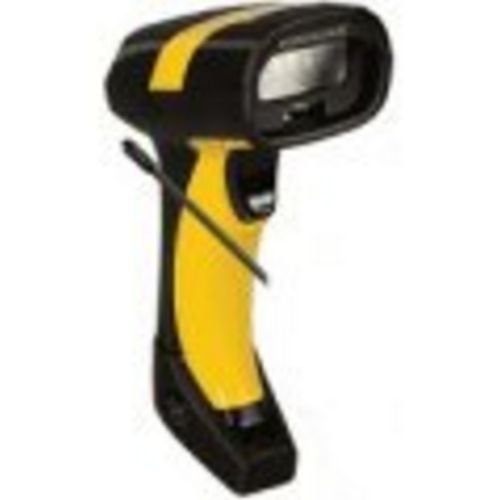
Setšoantšo sa 1: Datalogic PowerScan M8300 Handheld Laser Bar Code Reader. This image displays the front view of the scanner, highlighting its ergonomic design, scan window, and trigger button.
Likarolo tsa Bohlokoa:
- Fesetere ea Scan: Located at the front, where the laser beam exits to read barcodes.
- Qalisa: Activates the laser for scanning.
- Mabone a Indicator: Provide feedback on scan status, battery level, and communication.
- Kamore ea Battery: Located at the base of the handle, housing the removable battery.
- Sehokelo sa Puisano: For wireless data transmission via the 910MHz radio.
5. Seta
5.1. Ho kenya Battery
- Netefatsa hore scanner e tima.
- Locate the battery compartment cover at the bottom of the handle.
- Bula sekoahelo ebe o kenya betri e ka tlosoang, o netefatsa hore polarity e nepahetse.
- Koala sekoaelo sa karolo ea betri ka mokhoa o sireletsehileng.
5.2. Ho tjhaja Betri
- Place the scanner into its charging cradle. Ensure the contacts on the scanner align with those on the cradle.
- Connect the power supply to the charging cradle and plug it into an electrical outlet.
- The scanner's indicator light will show charging status (typically amber for charging, green for fully charged).
- Allow the battery to fully charge before first use (approximately 4 hours).
5.3. Connecting to a Host System
The PowerScan M8300 uses a 910MHz radio for wireless communication. It typically connects to a host system (e.g., PC, laptop) via a base station or cradle connected by a USB or serial cable.
- Connect the communication cable (USB or serial) from the charging/communication cradle to your host system.
- Connect the power supply to the cradle and plug it in.
- Place the scanner in the cradle. The scanner and cradle will automatically establish a wireless link.
- Install any necessary drivers or software on your host system as prompted or as instructed by Datalogic documentation for your specific cradle model.
6. Litaelo tsa Ts'ebetso
6.1. Ho tima/Ho tima
- Ho Matlafatsa: The scanner typically powers on automatically when removed from the cradle or when the trigger is pressed.
- Ho tima: The scanner will enter a low-power sleep mode after a period of inactivity. To fully power off, remove the battery.
6.2. Ho hlahloba Barcode
- Aim the scan window at the barcode you wish to read.
- Tobetsa 'me u tšoare konopo ea ho qala. Mohala oa laser o tla hlaha.
- Position the laser line across the entire barcode.
- Once the barcode is successfully read, the scanner will emit an audible beep and/or an indicator light will illuminate.
- Release the trigger. The scanned data will be transmitted to the connected host system.
6.3. Phetiso ea data
The PowerScan M8300 transmits scanned data wirelessly to its paired base station/cradle. Ensure the scanner is within range of its base station for successful data transfer. Out-of-range scanning capabilities may vary by configuration; refer to advanced programming guides for details.
7. Tlhokomelo
7.1. Ho hloekisa sesebelisoa
- Sebelisa lesela le bonolo, le hloekilengampe kentsoeng ka metsi kapa tharollo e bobebe ea ho hloekisa.
- U se ke ua sebelisa lihlatsoi tse khorofo, li-solvent, kapa lik'hemik'hale tse matla.
- Gently wipe the scan window and the exterior of the scanner.
- Ensure no liquid enters the device openings.
7.2. Tlhokomelo ea Battery
- Ntlafatsa betri khafetsa.
- Qoba ho ntsha betri ka botlalo kgafetsa.
- Store the scanner and spare batteries in a cool, dry place when not in use.
7.3. Polokelo
When storing the scanner for extended periods, ensure the battery is partially charged (around 50%) and remove it from the device if possible. Store in a temperature-controlled environment.
8. Ho rarolla mathata
If you encounter issues with your PowerScan M8300, refer to the following common problems and solutions:
| Bothata | Lebaka le ka khonehang | Tharollo |
|---|---|---|
| Scanner ha e sebetse. | Betri e shoeleng kapa e sa kenngoa ka nepo. | Check battery installation. Charge the battery. Replace battery if necessary. |
| Sekenara ha se bale di-barcode. | Barcode damaged or poorly printed; scan window dirty; incorrect symbology enabled. | Try scanning a different barcode. Clean the scan window. Refer to the programming guide to enable/disable symbologies. |
| No data transmitted to host. | Scanner out of range; base station not connected; communication issue. | Move scanner closer to the base station. Verify base station connection to host. Check base station power. |
| Bophelo ba betri bo bokhutšoanyane. | Battery nearing end of life; frequent use; improper charging. | Replace battery. Ensure full charges. Reduce backlight/power settings if configurable. |
If the problem persists, contact Datalogic technical support.
9. Litlhaloso
The following specifications apply to the Datalogic PowerScan M8300-AR910RB model:
- Nomoro ea Mohlala: PM8300-AR910RB
- Boholo ba Sehlahisoa: 2.72 x 4.49 x 8.15 lisenthimithara
- Boima ba Ntho: 13.9 lik'hilograma
- Moetsi: ADC ea datalogic
- Mohloli oa Matla: Matla a Battery
- Theknoloji ea Khokahano: Wireless (910MHz)
- Lisebelisoa tse Lumellanang: Desktop, Laptop
- UPC: 053926383351
10. Boitsebiso ba Tiisetso
Datalogic products are covered by a limited warranty against defects in materials and workmanship. The specific terms and duration of the warranty may vary by region and product. Please refer to the warranty card included with your product or visit the official Datalogic websebaka sa marang-rang bakeng sa tlhahisoleseding e qaqileng ea tiisetso le mekhoa ea ngoliso.
11. Tšehetso
For technical assistance, product inquiries, or to report issues, please contact Datalogic customer support:
- Websebaka: Visit the official Datalogic website for support resources, FAQs, and driver downloads.
- Ikopanye le: Refer to the 'Contact Us' section on the Datalogic websebaka sa linomoro tsa mohala le liaterese tsa lengolo-tsoibila tse ikhethileng sebakeng sa heno.
When contacting support, please have your product model number (PM8300-AR910RB) and serial number ready.