
Sonic Alert SBJ525SS
Sonic Alert SBJ525SS Digital Alarm Clock Instruction Manual
Model: SBJ525SS
Selelekela
This manual provides comprehensive instructions for the setup, operation, and maintenance of your Sonic Alert SBJ525SS Digital Alarm Clock. Please read this manual thoroughly before using the device to ensure proper function and longevity. This alarm clock is designed to provide reliable timekeeping and alarm functions, including a powerful vibrating bed shaker, loud audible alarm, and visual alert features.
Boitsebiso ba Tšireletseho
- Ensure the power adapter is connected to a standard electrical outlet.
- Do not expose the unit to water or excessive moisture.
- Qoba ho beha yuniti haufi le mehloli ea mocheso kapa mahlaseling a letsatsi.
- Boloka moo bana ba ka fihlang teng.
- Use only the provided power adapter and bed shaker.
Litaba tsa Sephutheloana
Netefatsa hore lintho tsohle li teng ka har'a sephutheloana sa hau:
- Sonic Alert SBJ525SS Digital Alarm Clock Unit
- 12-Volt Vibrating Bed Shaker
- Adapter ea Matla
- Buka ea Tataiso
Sehlahisoa se Felletseview
Familiarize yourself with the various parts and controls of your alarm clock.
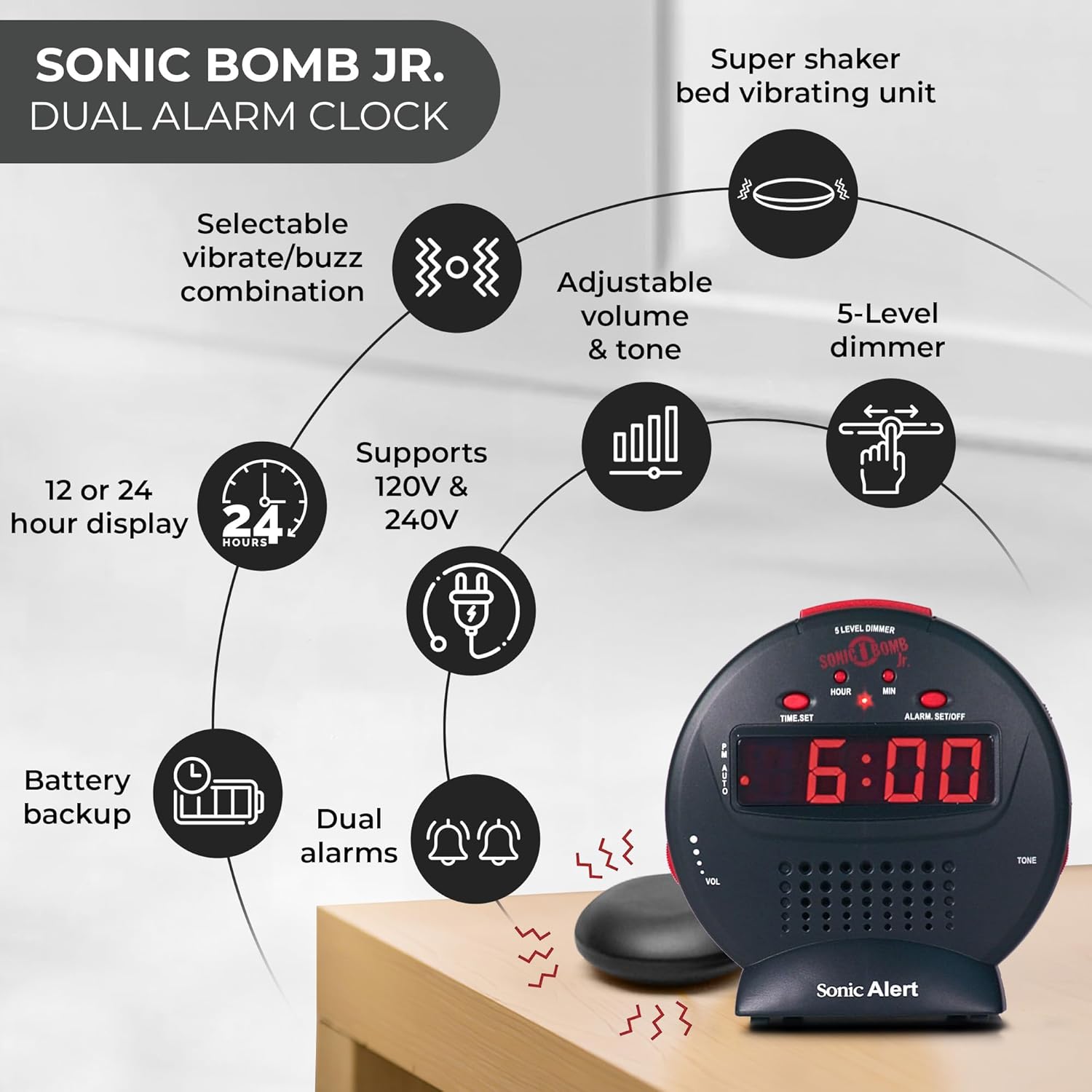
Tlhaloso ea setšoantšo: A diagram illustrating the Sonic Alert SBJ525SS Digital Alarm Clock. Key features highlighted include the 12 or 24-hour display, battery backup, dual alarms, selectable vibrate/buzz combination, adjustable volume and tone, 5-level dimmer, and the super shaker bed vibrating unit. The clock supports 120V & 240V power.
The clock features a large digital display, control buttons for time and alarm settings, and adjustment knobs for volume and tone. A dedicated port is available for the bed shaker connection.
Tlhophiso
1. Khokelo ea Matla
- Connect the power adapter to the DC IN jack on the back of the alarm clock.
- Plug the power adapter into a standard electrical wall outlet. The display will illuminate.
2. Betri bekapo Tlhophiso
The alarm clock requires 2 AA batteries (not included) for battery backup functionality. This ensures your time and alarm settings are retained during a power outage.
- Fumana karolo ea betri e ka tlase ho yuniti.
- Bula sekwahelo sa karolo ya betri.
- Kenya libeteri tse 2 tsa AA, u shebe polarity e nepahetseng (+/-).
- Khutlisetsa sekoahelo sa betri.

Tlhaloso ea setšoantšo: A graphic illustrating the battery backup feature of the alarm clock. It shows the clock on a nightstand with a small circular battery icon (CR2032, 3V) next to it, indicating the type of battery used for backup. The text emphasizes that batteries are not included and are for retaining settings during power outages.
3. Nako e behiloeng
- Tobetsa o hatelle NAKO SEBETSO konopo. Dinomoro tsa dihora di tla qala ho benya.
- Tobetsa ea HORA konopo ka makhetlo a mangata ho fetola hora. Sheba sesupo sa PM bakeng sa tlhophiso e nepahetseng ea AM/PM.
- Tobetsa ea MIN konopo ka makhetlo a mangata ho lokisa metsotso.
- Tobetsa NAKO SEBETSO hape ho tiisa nako.
- Ho fetola pakeng tsa sebopeho sa lihora tse 12 le lihora tse 24, tobetsa konopo 12/24H button (if available, otherwise it might be part of time set cycle).
4. Bed Shaker Connection
The vibrating bed shaker is an integral part of the Sonic Alert system, designed for heavy sleepers or individuals with hearing impairments.
- Locate the jack labeled SHAKERELA ka morao ho oache ea alamo.
- Insert the plug of the bed shaker into this jack.
- Place the bed shaker under your pillow, between your mattress and box spring, or under a fitted sheet for optimal vibration.

Tlhaloso ea setšoantšo: A composite image showing three different methods for placing the super bed shaker: under a pillow, under a fitted sheet, and under a mattress. The image also highlights the 6ft long cable of the shaker.
Litaelo tsa Ts'ebetso
1. Ho Beha Lialamo (Lialamo tse Pedi)
The SBJ525SS features dual alarms, allowing you to set two independent wake-up times.
- Tobetsa o hatelle ALARM SET/OFF button once for Alarm 1. The hour digits for Alarm 1 will flash.
- Sebelisa le HORA le MIN likonopo ho seta nako ea alamo e batloang.
- Tobetsa ALARM SET/OFF again to confirm Alarm 1 and proceed to Alarm 2. The hour digits for Alarm 2 will flash.
- Sebelisa le HORA le MIN buttons to set the desired time for Alarm 2.
- Tobetsa ALARM SET/OFF a third time to confirm Alarm 2 and exit alarm setting mode.
- Ho kenya tshebetsong kapa ho tima alamo, tobetsa ALARM SET/OFF button briefly (not held). Each press cycles through Alarm 1 ON, Alarm 2 ON, Both Alarms ON, Both Alarms OFF. An indicator light on the display will show which alarm(s) are active.

Tlhaloso ea setšoantšo: A bedroom scene with a couple sleeping, and the Sonic Alert alarm clock prominently displayed on a nightstand. The text overlay emphasizes the "Dual Alarm Clock" feature, allowing two different alarms to be set for reliable wake-up times.
2. Alarm Modes (Vibrate, Sound, Both)
The alarm clock offers various alert modes:
- Vibrate Only: The bed shaker will activate without an audible alarm.
- Molumo Feela: The audible alarm will sound without bed shaker activation.
- Ka bobeli: Both the bed shaker and audible alarm will activate simultaneously.
To select the alarm mode, use the MOTSOA ALEME switch located on the side or back of the unit. Cycle through the options until your desired mode is selected.

Tlhaloso ea setšoantšo: A woman sleeping in bed with the Sonic Alert alarm clock and its bed shaker visible on the adjacent nightstand. The image highlights the clock's features: a powerful 6-volt bed shaker, 102dB loud alarm with adjustable tone and volume, alarm and bed shaker test mode, and built-in red flashing lights.
3. Mosebetsi oa ho Khutsisa
Ha alamo e lla, tobetsa e kholo TS'OANANG button on top of the unit to temporarily silence the alarm. The alarm will sound again after the set snooze duration.
- The snooze duration is adjustable from 1 to 30 minutes. Refer to the full instruction manual for specific steps on adjusting the snooze time.
Tlhaloso ea setšoantšo: A man sleeping in bed with the Sonic Alert alarm clock on his bedside table. An overlay graphic shows a slider indicating the adjustable snooze duration from 1 to 30 minutes.
4. Brightness Dimmer
Adjust the display brightness to your preference using the 5-level dimmer function.
- Fumana sebaka FIHLELANG control (often a slider or button) on the unit.
- Adjust the control to cycle through the 5 brightness levels, from brightest (5) to dimmest (1).

Tlhaloso ea setšoantšo: A woman sleeping in a bedroom with the Sonic Alert alarm clock on her nightstand. Below, a series of five clock images illustrate the different brightness levels of the display, from level 5 (brightest) to level 1 (dimmest), demonstrating the five-level dimmer feature.
5. Volume and Tone Adjustment
Customize the audible alarm sound to your preference.
- Sebelisa le TLHOKOMELO (Volume) knob/slider to increase or decrease the alarm's loudness.
- Sebelisa le TS'EBETSO knob/slider to adjust the pitch of the alarm sound.
Tlhaloso ea setšoantšo: E haufi-ufi view of the Sonic Alert alarm clock, specifically highlighting the volume control slider on its side. The accompanying text explains how to adjust the sound with ease using the knobs for volume and tone.

Tlhaloso ea setšoantšo: The Sonic Alert alarm clock on a white surface, with a graphic overlay demonstrating the adjustable tone feature. Sound waves emanate from the clock, and a slider indicates the range of tone adjustments available.
6. USB Charging Port Usage
The alarm clock includes a built-in USB port for charging compatible handheld devices.
- Locate the USB charging port on the side or back of the unit.
- Connect your device's USB charging cable to the port.
- Ensure your device begins charging. Note that charging speed may vary depending on the device and cable.

Tlhaloso ea setšoantšo: A woman reaching for her smartphone, which is connected and charging via the built-in USB port on the Sonic Alert alarm clock, placed on a nightstand next to her bed.
Tlhokomelo
- Ho hloekisa: Hlakola yuniti ka lesela le bonolo, le omeletseng. U se ke ua sebelisa lintho tse hloekisang metsi kapa lisebelisoa tse senyang.
- Phetoho ea Betri: Replace backup batteries annually or when the battery low indicator appears to ensure continuous backup functionality.
- Polokelo: If storing the unit for an extended period, remove the backup batteries to prevent leakage.
Ho batle phoso
| Bothata | Lebaka le ka khonehang | Tharollo |
|---|---|---|
| Pontšo ea oache e timme kapa ea panya. | Power adapter not connected or faulty; power outage. | Ensure power adapter is securely plugged in. Check wall outlet. If power outage, battery backup should maintain time (display will be off). |
| Alarm does not sound/vibrate. | Alarm not activated; incorrect alarm mode selected; volume too low; bed shaker not connected. | Verify alarm is ON (indicator light). Check alarm mode switch. Increase volume. Ensure bed shaker is securely plugged in. |
| Litlhophiso tsa Nako/Alamo lia lahleha ka mor'a hore motlakase o tsoetage. | Libetri tsa bekapo li shoele kapa ha lia kengoa. | Install fresh AA batteries in the battery compartment. |
| USB charging is slow or not working. | Device incompatibility; faulty USB cable; device requires higher power output. | Try a different USB cable. Ensure your device is compatible with standard USB charging. The clock's USB port provides standard charging output. |
Litlhaloso
| Brand | Tlhokomeliso ea Sonic |
| Nomoro ea Mohlala | SBJ525SS |
| Mofuta oa Pontšo | Dijithale |
| Likarolo Tse Khethehileng | Alarm, Auto Dimmable, Snooze, Vibrating Bed Shaker, USB Charging Port, Red Flashing Alert Lights |
| Mohloli oa Matla | Corded Electric with Battery Backup (2 AA batteries required, not included) |
| Litekanyo tsa Sehlahisoa | 5"W x 5"H |
| Lintho tse bonahalang | Plastiki |
| Lerata la Alamo | Up to 102dB (with bed shaker) |
Warranty le Tšehetso
The Sonic Alert SBJ525SS Digital Alarm Clock comes with a Limited Warranty. For specific warranty terms and conditions, please refer to the warranty card included with your product or visit the official Sonic Alert websebaka.
For technical support, troubleshooting assistance, or to inquire about replacement parts, please contact Sonic Alert customer service:
- Websebaka: www.sonicalert.com
- Mokhoa oa puisano: Sheba ofisiri websephuthelo sa sebaka kapa sehlahisoa bakeng sa lintlha tsa hajoale tsa ho ikopanya.
Tlhaloso ea setšoantšo: An open instruction manual for the Sonic Bomb Jr. alarm clock, showing detailed operational instructions and diagrams. This image signifies that a manual is included with the product for user guidance.
Ask a question about this manual
Ask about setup, troubleshooting, compatibility, parts, safety, or missing instructions. Manuals+ will review the question and use this page’s manual context to help answer it.